

Key Takeaways
- Understanding Battery Health: Battery health refers to your Samsung Note 8’s ability to hold a charge, which naturally degrades over time.
- Key Factors Impacting Battery Health: Important influences include charge cycles, temperature exposure, heavy usage patterns, and keeping your software updated.
- Signs of Battery Degradation: Look out for fast battery drain, overheating, and unexpected shutdowns as indicators of poor battery health.
- How to Check Battery Health: Navigate to the Settings app, access Device Care, and evaluate battery usage to identify any draining apps.
- Built-in Samsung Features: Utilize the Samsung Members app and Device Care for monitoring and optimizing battery performance.
- Third-Party Applications: Apps like AccuBattery and GSam Battery Monitor provide in-depth analytics and tools for managing battery health more effectively.
Have you ever noticed your Samsung Note 8 running out of juice faster than it used to? It’s frustrating when your phone can’t keep up with your daily needs. Understanding your battery health can help you pinpoint issues and extend its lifespan.
Understanding Battery Health
Understanding battery health is crucial for maintaining your Samsung Note 8. Battery health refers to the condition of your battery and its ability to hold a charge. Over time, batteries naturally degrade, affecting performance and battery life.
Key Factors Influencing Battery Health
- Charge Cycles: Every time you charge your phone from 0% to 100%, it counts as a cycle. Lithium-ion batteries, like those in your Note 8, generally last between 300 to 500 charge cycles before showing significant signs of wear.
- Temperature Exposure: Batteries function best in moderate temperatures. Exposure to extreme heat or cold can damage the battery and lead to faster deterioration. Keep your device away from direct sunlight and hot surfaces.
- Usage Patterns: Activities that demand high power, such as gaming or streaming video, can stress the battery. Frequent use of these features might accelerate wear. Limiting intense usage can help extend battery life.
- Updates and Software: Regular updates can optimize battery performance. Always ensure your phone runs the latest software to benefit from bug fixes and enhancements.
Signs of Poor Battery Health
Recognizing when your battery’s health has declined can help you take timely action:
- Fast Drain: If your battery percentage drops rapidly within a short time, it could signal degradation.
- Overheating: Frequent overheating during usage or charging may indicate battery issues.
- Unexpected Shutdowns: If your phone shuts down unexpectedly, even with some charge remaining, consider checking battery health.
How to Check Battery Health on Samsung Note 8
- Access Settings: Open the Settings app on your device.
- Select Battery: Scroll down and tap on “Device care,” then select “Battery.”
- Open More Options: Tap on the three-dot icon in the upper right corner, and select “Battery usage.”
- Inspect App Usage: Review the battery usage by apps to identify any draining applications.
Monitoring these factors can help you maintain better battery health and enhance your Samsung Note 8’s longevity.
Built-in Samsung Features
Samsung offers several built-in features to help you assess and monitor the battery health of your Galaxy Note 8. You can use these tools to make informed decisions about your device’s power management.
Recommended Products

❤【HIGH QUALITY GRADE A PREMIUM BATTERY】:This Upgraded Galaxy Note 8 Battery uses Grade A+ rated battery cells with CE and ROHS UL UKCA certification,ensure last over 1200 charge cycles. Multiple-protection for safer operation for both user and devices,build-in microchip to prevent over-charging,over-discharging and over-heating.

{COMPATIBLE MODELS}:This Replacement battery Compatible with Samsung Galaxy Note 8 (Model: SM-N950 N950T N950A N950P N950V N950R4 N950F).
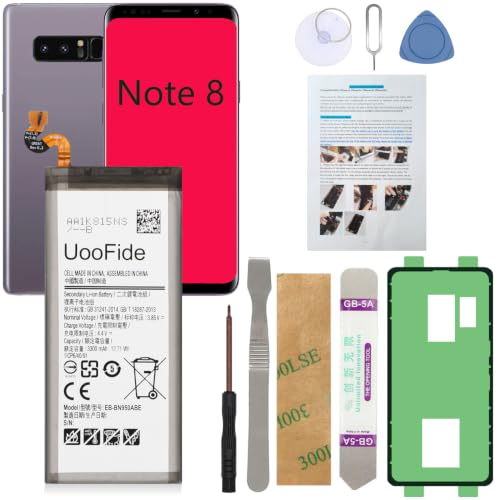
【Latest IC Chip Smart Power Housekeeper 】- Use the latest cost-effective smart IC chip on the market now which same as the original Galaxy Note 8 battery, combined with the latest science and technology at the same time, so that the battery has an exclusive smart power housekeeper which can intelligently control and distribute the power, maximize power conversion rate. Longer power life without bothering about running out of power and shut down some apps all the time.
Samsung Members App
The Samsung Members app provides valuable insights into your device’s performance, including battery health. To access this feature:
- Open the Samsung Members App from your apps list.
- Tap on Get help.
- Select Battery to view information on battery usage and health.
The app analyzes battery performance and gives recommendations on optimizing settings to improve battery life.
Device Care
Device Care helps you maintain your Galaxy Note 8’s overall performance, including battery health. To use Device Care:
- Go to Settings on your device.
- Scroll down to Battery and device care.
- Tap on Battery and check the battery status.
In this section, you’ll find options to optimize battery usage based on your patterns and adjust settings for improving battery longevity. You’ll also see detailed reports on apps consuming power and any additional settings that could extend battery life.
Third-Party Applications
Third-party applications can provide valuable insights into your Samsung Note 8’s battery health. These apps often offer advanced features and detailed analytics that build on the information from built-in tools.
Recommended Products

HD Screen for Clear Readings: Features a wide-angle LED display that stays clear from any viewpoint. The red/yellow/green indicator lights make results instantly understandable, offering an at-a-glance health assessment. Ideal for seniors, low-light bedrooms, and quick at-a-glance health checks.

Clinically Validated for Accuracy: The accuracy of iHealth Neo has been thoroughly tested and conforms to relevant certification standards, No Calibration required. Easy Operation by one button.

Upgraded Dual User Memory: Upgraded from iHealth Push KD-723, this wrist blood pressure monitor supports 2 users and stores up to 199 readings per user. Review history directly on the BP machine, even without the app.
Recommended Apps
- AccuBattery
AccuBattery measures actual battery usage and health. It tracks charge cycles and helps you monitor the battery’s capacity over time.
- GSam Battery Monitor
GSam provides detailed statistics on battery usage, allowing you to identify which apps consume the most power. This data can help optimize your usage.
- BatteryGuru
BatteryGuru offers tips for extending battery life, alongside monitoring capabilities. It alerts you of battery issues and suggests adjustments to settings.
App Features
- Battery Health Check
Most apps provide a straightforward battery health percentage, based on capacity relative to when the battery was new.
- Usage Statistics
These apps display detailed usage statistics, showing which applications drain the battery most. Understanding usage can help you reduce unnecessary consumption.
- Charge Cycle Counter
Many apps feature a charge cycle counter, tracking how many times your battery has gone from 0% to 100%. This information is crucial for determining overall battery wear.
- Temperature Monitoring
Temperature readings can inform you if overheating occurs during charging or usage, aiding in preventative measures to enhance battery longevity.
Using third-party apps adds another layer of monitoring and control, allowing you to maintain optimal battery health on your Samsung Note 8.
Manual Check Methods
You can check the battery health of your Samsung Note 8 using manual methods. Two effective ways include using dialer codes and the settings menu.
Dialer Codes
Enter specific codes into the dialer app to access hidden features. Use the following steps:
- Open the Dialer app.
- Type #*#4636# and press the call button.
- Select Battery Information to view details about battery health.
- Check metrics like battery status, capacity, and voltage.
These codes provide quick access to essential battery data without needing third-party apps.
Settings Menu
The settings menu offers a straightforward way to monitor battery health. Follow these steps:
- Open Settings on your device.
- Tap on Device Care.
- Select Battery.
- Tap on Battery Usage to see which apps consume the most battery.
- Check Diagnostics for any alerts regarding battery performance.
By examining battery usage and diagnostics, you can identify apps that may contribute to battery drain. Adjust settings accordingly to enhance overall battery health.
Conclusion
Taking charge of your Samsung Note 8’s battery health is key to keeping your device running smoothly. By regularly checking its condition and being mindful of your usage patterns you can extend its lifespan and enhance performance.
Utilizing built-in features like the Samsung Members app and Device Care can provide valuable insights and recommendations. Don’t forget about third-party apps that can help you dive deeper into your battery’s performance.
With a little effort and attention you can ensure your Note 8 stays powered up and ready for anything. So keep monitoring and enjoy your device to the fullest!
Frequently Asked Questions
What causes battery drain on the Samsung Note 8?
Battery drain on the Samsung Note 8 can be caused by several factors, including age, charge cycles, temperature exposure, and heavy app usage. Software updates and background applications can also contribute to faster battery depletion.
How can I check the battery health of my Samsung Note 8?
You can check the battery health by using the Samsung Members app or the Device Care feature in your settings. Additionally, you can enter specific dialer codes to access hidden battery information.
What signs indicate poor battery health on a Samsung Note 8?
Signs of poor battery health include rapid battery drain, overheating, unexpected shutdowns, and slow charging. If you notice these symptoms, it’s time to evaluate your battery health.
Are there any built-in features to monitor battery health on my device?
Yes, the Samsung Members app and the Device Care feature are built-in tools that help monitor battery health. They provide insights and recommendations for optimizing battery usage and enhancing device performance.
What third-party apps can I use to monitor battery health?
You can use apps like AccuBattery, GSam Battery Monitor, and BatteryGuru. These applications offer advanced features to track charge cycles, monitor temperature, and identify power-hungry apps.
How can I extend the battery life of my Samsung Note 8?
To extend battery life, keep your software updated, reduce screen brightness, limit background app activity, and utilize power-saving modes. Regularly checking your battery health can also help in maximizing longevity.
Can I manually check battery health using dialer codes?
Yes, you can enter specific dialer codes into the Samsung Note 8’s dialer app to access hidden battery data, including status, capacity, and voltage, which helps evaluate battery health.
Why is it important to understand battery health?
Understanding battery health is crucial for identifying issues that cause fast drain and ensuring your device’s longevity. Regular monitoring can help you maintain optimal performance and avoid costly replacements.
