

Key Takeaways
- Understand Battery Health: Battery health indicates how well your Samsung S24 Ultra battery retains charge over time; it typically declines as the device ages.
- Signs of Declining Health: Look out for rapid battery drain, overheating, and charging difficulties as indicators of poor battery health.
- How to Check Battery Health: Utilize the built-in Settings app by navigating to ‘Battery and Device Care’ to monitor battery usage and identify power-hungry apps.
- Use Third-Party Apps: For detailed insights, consider apps like AccuBattery and GSam Battery Monitor that offer extensive battery metrics and diagnostic tools.
- Implement Maintenance Tips: Optimize battery health by managing charging habits, adjusting screen brightness, limiting background activity, and regularly updating software.
- Monitor Regularly: Consistently check your battery’s condition and performance to prevent unexpected degradation and ensure longevity of your device.
Have you ever wondered why your Samsung S24 Ultra isn’t holding a charge like it used to? You’re not alone—many users face this frustrating issue as their devices age. Knowing your battery health can help you decide if it’s time for a replacement or if there are simple fixes to improve performance.
Understanding Battery Health
Battery health refers to the overall condition and efficiency of your device’s battery. As batteries age, their ability to hold a charge declines. This can lead to a noticeable decrease in performance, impacting how long your Samsung S24 Ultra lasts between charges.
Signs of Poor Battery Health
Be aware of these indicators that your battery’s health may be suffering:
- Rapid Drain: If your battery depletes quickly despite light usage.
- Overheating: Excessive heat during charging or use can signal battery issues.
- Charging Problems: Difficulty charging or maintaining charge levels may indicate health problems.
Checking Battery Health on Samsung S24 Ultra
To check the health of your Samsung S24 Ultra battery, follow these steps:
- Open Settings: Go to your device’s Settings app.
- Select Battery and Device Care: Tap on the option to access battery details.
- Tap on Battery: Here, you can view battery usage and settings.
- Check Usage Details: Look for applications that consume a lot of power. Identifying these can help optimize performance.
Tools for Monitoring Battery Health
Utilize these tools and apps for more detailed insights:
- Samsung Members App: This built-in app provides a diagnostic tool for checking battery health regularly.
- AccuBattery App: Available in the Play Store, it offers in-depth metrics and estimations of battery health over time.
Improve Battery Health
Take these steps to enhance your battery’s performance:
- Limit Background Activity: Reduce background app activity to save battery life.
- Manage Brightness: Lower screen brightness or use adaptive settings.
- Regular Updates: Keep your device and apps updated to benefit from performance improvements.
Monitoring battery health prevents unexpected degradation. Staying proactive means you get the most out of your Samsung S24 Ultra.
Steps to Check Battery Health on Samsung S24 Ultra
Checking your battery health can help you maintain your Samsung S24 Ultra’s performance. Follow these steps to ensure your battery is in good condition.
Recommended Products

Compatible Phone Model: This battery kit is specifically designed for Galaxy S24 Ultra (with model SM-S928 series), NOT work for S24 or S24 Plus, please double confirm your phone model before purchasing
![Samsung Galaxy Watch Ultra (2024) 47mm LTE AI Smartwatch w/Energy Score, Wellness Tips, Heart Rate Tracking, Sleep Monitor, Fitness Tracker, GPS,Titanium Silver [US Version, 1Yr Manufacturer Warranty]](https://m.media-amazon.com/images/I/51aXySo2zkL._SL500_.jpg)
RUGGED. RELIABLE. READY FOR ANYTHING: Climb the highest peak; Bike the long way home; The durable titanium design is our toughest yet, able to stand up to the rigors of your workout, including rainy or dusty conditions — even ocean swimming¹
Using Built-in Device Care Feature
- Open Settings: Start by tapping on the Settings app from your home screen or app drawer.
- Select Battery and Device Care: Scroll down and tap on the ‘Battery and Device Care’ option.
- Choose Battery: Select ‘Battery’ to access various battery settings and usage details.
- See Battery Usage: Review the battery usage data for specific apps and processes. This information helps identify which apps drain your battery faster.
Accessing Battery Settings
- Navigate to Battery Status: In the Battery settings, look for the ‘Battery Health’ or ‘Status’ option (availability may vary).
- View Battery Health: If available, tap on this option to see an overview of your battery’s health, including charge cycles and current capacity relative to its original specs.
- Utilize Additional Tools: For deeper analysis, consider using the Samsung Members App or AccuBattery app, which provide extensive battery metrics and advice on improving battery life.
By following these steps, you can easily monitor your Samsung S24 Ultra’s battery health and take necessary actions to keep your device running smoothly.
Third-Party Applications for Battery Health
Using third-party applications offers another way to monitor battery health effectively. These apps can provide insights that the built-in options might not cover.
Recommended Apps
- AccuBattery: This app gives you detailed information on battery capacity, charge cycles, and health metrics.
- GSam Battery Monitor: GSam provides a comprehensive overview of battery usage by app, detailed wake locks, and other performance metrics.
- BatteryGuru: BatteryGuru tracks your charging habits and gives recommendations to optimize battery life.
How to Use These Apps
- Download and Install: Visit the Google Play Store, search for your chosen battery health app, and install it.
- Set Up the App: Open the app and provide any necessary permissions. This may include access to battery usage data.
- Review Battery Health: Navigate to the battery health section of the app. Look for capacity percentage, charge cycles, and estimated lifespan.
- Analyze App Usage: Check app-specific battery drain metrics. Identify which apps consume the most power and consider limiting their use or replacing them.
- Implement Suggestions: Follow any optimization tips provided by the app. This may include adjusting settings like screen brightness or disabling unused features.
Utilizing these applications enhances your ability to maintain your Samsung S24 Ultra’s battery health.
Tips for Maintaining Battery Health
Maintaining battery health on your Samsung S24 Ultra ensures optimal performance and longevity. Implement the following strategies:
Recommended Products

【Designed Only for Samsung Galaxy S24 Ultra】Precision cutouts ensure unobstructed access to buttons, speakers, camera and USB-C port. Fully compatible with Samsung Pay, Android Auto and Bluetooth wireless earbuds without removing the S24 Ultra battery case.

[Safe charging and protection design] Passed CE, FC, RoHS certification to ensure your charging safety. Use high-quality battery cells to ensure power, safety and reliability, and long-term use will not reduce the health of the battery life.
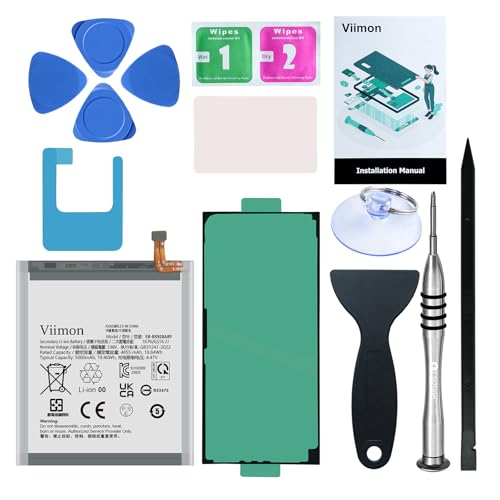
【Compatible Model】It is compatible with Samsung Galaxy S24 Ultra Only, Model: S24 Ultra 5G SM-S928. Not for S24 and S24+ Plus. Please double identify and check your phone model matches before purchasing the battery.
Optimize Charging Habits
- Avoid Overcharging: Disconnect your device once it reaches 100%. Continuous charging can strain the battery.
- Charge Between 20% and 80%: This range minimizes stress on the battery. Aim to keep your charge above 20% and below 80% whenever possible.
Manage Screen Brightness
- Use Adaptive Brightness: Enable adaptive brightness settings. This feature adjusts the screen brightness based on surrounding light conditions.
- Lower Brightness Manually: Reduce brightness when in low-light environments. It conserves power and reduces energy consumption.
Limit Background Activity
- Restrict Background Apps: Close apps running in the background. Navigate to Settings > Battery and Device Care > Battery Usage to see which apps consume the most power.
- Use Battery Saver Mode: Activate Battery Saver Mode during heavy use. This mode reduces performance to extend battery life.
Update Software Regularly
- Install Updates: Keep your device updated with the latest software. Updates often include optimizations for battery performance.
- Check for App Updates: Regularly update apps to ensure they run efficiently and consume less energy.
Control Connectivity Settings
- Disable Unused Features: Turn off Bluetooth, Wi-Fi, and GPS when not in use. This action prevents the battery from draining unnecessarily.
- Switch to Airplane Mode: Use Airplane Mode in areas with weak signals. The device won’t constantly search for a signal, saving battery life.
Monitor Battery Health
- Use Built-in Tools: Regularly check battery health using the Device Care feature. Review app usage and eliminate those that drain battery excessively.
- Consider Third-Party Apps: Use apps like AccuBattery or GSam Battery Monitor for in-depth insights. These apps provide detailed data on battery capacity and usage.
Clean Device Internally
- Remove Dust and Debris: Clean the charging port and device exterior regularly. Dust can hinder charging efficiency and cause overheating.
By adopting these practices, you can effectively maintain and enhance the battery health of your Samsung S24 Ultra.
Conclusion
Taking care of your Samsung S24 Ultra’s battery health is essential for keeping your device running smoothly. By regularly checking its health and implementing the tips shared, you can maximize its performance and lifespan.
Whether you choose to use built-in tools or third-party apps, staying informed about your battery’s condition helps you make better decisions. Remember that small changes in your charging habits and app usage can make a big difference.
With a little effort, you can enjoy your device without worrying about unexpected battery issues. Keep your phone happy and fully charged for all your daily adventures!
Frequently Asked Questions
What causes battery performance decline in the Samsung S24 Ultra?
The battery in the Samsung S24 Ultra declines in performance over time due to regular use and aging. Common issues include decreased charge retention, rapid drain, and overheating. These factors highlight the importance of monitoring battery health to determine if a replacement or adjustment in usage habits is necessary.
How can I check the battery health on my Samsung S24 Ultra?
To check battery health, go to the Settings app, select Battery and Device Care, and view battery usage details. This section shows battery status and identifies which apps consume the most power, helping you manage battery performance effectively.
What are some signs of poor battery health?
Signs of poor battery health include rapid battery drain, overheating while charging or in use, and difficulty charging the device. If you notice any of these issues, it may be time to assess your battery’s condition and consider taking action.
What third-party apps can help monitor battery health?
Recommended third-party apps for monitoring battery health include AccuBattery, GSam Battery Monitor, and BatteryGuru. These apps provide detailed insights into battery capacity, usage, and optimization suggestions, helping users maintain battery performance more effectively.
How can I improve the battery life of my Samsung S24 Ultra?
To enhance battery life, optimize charging habits by avoiding overcharging and keeping the charge between 20% and 80%. Manage screen brightness, limit background apps, use Battery Saver Mode, and ensure regular software updates to maintain optimal battery performance.
Is it necessary to replace my Samsung S24 Ultra’s battery if it has issues?
Not necessarily. First, assess the battery health using built-in tools or third-party apps. Many performance issues can be resolved with software adjustments or changes in usage habits. However, if the battery remains problematic after these steps, a replacement may be necessary.
