

Key Takeaways
- Understanding Battery Health: Battery health refers to the capacity and performance of your Samsung S20 FE’s battery, impacting how long it lasts and indicating if a replacement is needed.
- Key Indicators: Monitor essential metrics like battery capacity percentage, charge cycles, battery temperature, and performance issues (e.g., slowdowns, unexpected shutdowns) to assess battery health.
- Ways to Check Health: Use built-in settings via the device care feature or the Samsung Members app to check battery health. Alternatively, utilize third-party apps like AccuBattery or GSam Battery Monitor for more detailed insights.
- Actions to Take: If battery health is declining (especially below 80% capacity), consider optimizing settings, limiting background apps, or replacing the battery to restore performance.
- Maintenance Tips: Prolong battery lifespan by adjusting screen brightness, monitoring app usage, updating software, enabling battery saver mode, and charging regularly.
- Temperature Awareness: Avoid exposing your Samsung S20 FE to extreme temperatures and refrain from full discharges to maintain battery efficiency over time.
Is your Samsung S20 FE not lasting as long as it used to? You’re not alone. Many users experience battery drain over time, and it can be frustrating when you rely on your phone throughout the day. Knowing how to check your battery health can help you determine if it’s time for a replacement or if there are simple fixes to extend its life.
Understanding Battery Health
Battery health refers to the overall efficiency and performance of your Samsung S20 FE’s battery. It indicates how much capacity the battery retains compared to when it was new. Checking battery health helps you determine if your battery requires replacement or if you can take steps to improve its longevity.
Key Indicators of Battery Health
- Battery Capacity: This percentage reflects how much charge your battery can hold. A lower percentage signals reduced capacity.
- Charge Cycles: Each full charge and discharge counts as one cycle. More cycles typically lead to diminished battery health.
- Battery Temperature: An overheated battery can develop issues. Normal operating temperatures range between 32°F and 95°F (0°C – 35°C).
- Performance Issues: Frequent slowdowns, unexpected shutdowns, or rapid battery drain suggest declining health.
How to Check Battery Health
You can check your battery health using built-in settings or third-party apps. Here’s how:
- Via Settings:
- Open the Settings app.
- Tap on Battery and device care.
- Select Battery.
- Look for options such as Battery usage or Battery diagnostics to get insights into health status.
- Using Third-Party Apps:
- Download reliable battery monitoring apps from the Google Play Store, such as AccuBattery or GSam Battery Monitor.
- Open the app and follow its prompts to assess battery health details.
Taking Action Based on Battery Health
If you notice signs of declining battery health, consider these actions:
- Optimize Settings: Use battery saver modes and adjust screen brightness.
- Limit Background Apps: Disable unnecessary background processes to conserve battery life.
- Replace the Battery: If capacity falls below 80%, a replacement may be necessary to restore performance.
Maintaining battery health involves regular monitoring and implementing best practices for usage. Prioritize checking your battery health to ensure your Samsung S20 FE performs at its best.
Methods To Check Battery Health
You can assess the battery health of your Samsung S20 FE using a couple of effective methods. These approaches provide insights into your battery’s performance and help you decide if any actions are necessary.
Recommended Products

{COMPATIBLE MODELS}:This Replacement battery Compatible with Samsung Galaxy S20 FE (Model: SM-G781B G781U G781W SM-A526 A526B/DS A5260 A526W).

[PLS CONFIRM DEVICE MODEL] --- The repair kit contains the instruction to guide you step by step installation, and we have professional engineers to answer all your questions about the repair process. Please verify your old battery part number and model before purchasing this replacement battery. Compatible with Samsung Galaxy S20 FE SM-G781, G781V, G781A, G781T, G781P, G781R4, G781U, G781U1, EB-BG781ABY. ★NOT FOR Samsung Galaxy S20, S20+, S20 Ultra, Note 20, Note 20 Ultra★
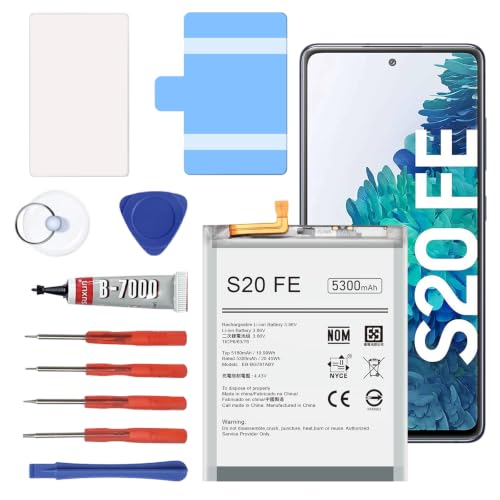
【5300mAh High Capacity & 0 Cycle】 Experience extended usage with our 5300mAh high-capacity replacement battery, providing significantly more power than standard batteries. Featuring a brand-new 0 cycle count.
Using Samsung Members App
- Open the Samsung Members app on your device. If you don’t have it, download it from the Galaxy Store or Google Play Store.
- Tap on “Get help” at the bottom of the screen to access support options.
- Select “Battery” from the list. You’ll find a battery diagnostics section.
- Review the battery status and capacity. This section provides details on charge cycles and remaining capacity, helping you gauge overall health.
Using Device Care Feature
- Go to Settings on your device.
- Tap “Battery and device care.” This brings you to a comprehensive overview of your device’s health.
- Select “Battery.” Here, you’ll find options to check battery usage and more.
- Tap “Battery usage.” This area reveals which apps consume the most power, allowing you to optimize usage.
- Access “More battery settings.” Here, you can enable features like battery saver and background app management to enhance performance.
By using these methods, you can quickly understand your battery’s health and take appropriate actions to maintain its performance.
Third-Party Apps For Battery Health
Third-party apps provide additional ways to monitor and manage battery health on your Samsung S20 FE. Here are some popular options:
AccuBattery
- AccuBattery measures battery capacity over time. It offers insights into charge cycles and usage statistics. This app provides detailed information on how well your battery retains charge.
GSam Battery Monitor
- GSam Battery Monitor delivers comprehensive usage statistics. It tracks which apps consume the most battery and how you can improve battery performance. It also features alerts for abnormal battery drain.
Battery Guru
- Battery Guru optimizes battery performance and provides health information. It highlights settings to improve battery life and gives you the option to adjust charging habits based on your usage patterns.
DU Battery Saver
- DU Battery Saver combines battery health monitoring with optimization tools. It helps extend battery life through a cleaner interface and management features.
Battery Life Pro
- Battery Life Pro tracks battery health, showing real-time information about capacity and efficiency. This app detects charge cycles, which helps anticipate when you may need a replacement.
To use these apps, download them from the Google Play Store, install them, and follow the in-app instructions to access the battery health features. These apps empower you to check battery health and optimize performance effectively.
Tips To Maintain Battery Health
Maintaining battery health ensures your Samsung S20 FE performs optimally. Here are some effective strategies:
Adjust Screen Brightness
Limit screen brightness to extend battery life. Use auto-brightness or reduce brightness manually in settings.
Manage App Usage
Monitor app usage regularly. Uninstall or disable apps that drain battery life unnecessarily. Check the battery usage section in settings for insights.
Update Software
Install software updates promptly. These updates often include battery optimization features and bug fixes that can enhance performance.
Optimize Location Services
Restrict location services to necessary apps only. Choose “Battery Saving” mode in location settings to conserve energy.
Enable Battery Saver Mode
Use battery saver mode to stretch battery life during critical times. Activate this feature in settings when you’re low on charge.
Limit Background Activity
Disable background activity for non-essential apps. This can help avoid unnecessary drain.
Use Original Chargers
Always use the original charger or certified replacements. These chargers provide the correct voltage and current, which helps maintain battery integrity.
Refrain from Extreme Temperatures
Keep your device in moderate temperature conditions. Avoid exposing it to extreme heat or cold, as these can harm battery efficiency.
Avoid Full Discharges
Try not to let the battery drop to 0%. Frequently draining the battery fully can shorten its lifespan. Aim to charge it when it reaches around 20%.
Charge Regularly
Charge your phone regularly. Frequent partial charges rather than full ones can keep the battery healthy.
Clean Charging Port
Keep the charging port free from debris. A clean port helps ensure an efficient connection and proper charging.
Implement these tips to keep your battery healthy and improve your overall device experience. Regular maintenance can significantly prolong the life of your Samsung S20 FE’s battery.
Conclusion
Keeping an eye on your Samsung S20 FE’s battery health is essential for a smooth experience. By regularly checking your battery status and making a few adjustments to your usage habits, you can extend its lifespan and maintain optimal performance.
Don’t forget to explore the built-in tools like the Samsung Members app and Device Care for easy monitoring. If you find that your battery’s capacity is dipping or you’re facing issues, consider the tips shared to improve its health.
With a little effort, you can enjoy your device for longer without the frustration of unexpected battery drain. Happy charging!
Frequently Asked Questions
What causes battery drain in the Samsung S20 FE?
Battery drain in the Samsung S20 FE can be caused by various factors including older battery age, heavy app usage, high screen brightness, and background processes running continuously. Regular software updates and settings optimization can also impact battery performance.
How can I check the battery health of my Samsung S20 FE?
You can check the battery health using the Samsung Members app or the Device Care feature. Both tools provide insights into battery capacity, charge cycles, and performance, helping you assess whether a replacement is needed.
What should I do if my battery health is declining?
If your battery health is declining, consider optimizing your settings, limiting background apps, and reducing screen brightness. If your battery capacity is below 80%, a replacement may be advisable to maintain optimal performance.
Are there apps to monitor battery health?
Yes, there are several third-party apps available, such as AccuBattery, GSam Battery Monitor, and Battery Guru, which can help you monitor and manage your Samsung S20 FE’s battery health effectively.
What are some tips to maintain battery health?
To maintain battery health, regularly adjust screen brightness, manage app usage, update software, enable battery saver mode, and avoid extreme temperatures. Keeping the charging port clean and charging regularly also helps prolong battery life.
