

Key Takeaways
- Understand Battery Characteristics: Samsung Galaxy Watches use rechargeable lithium-ion batteries with varying capacities; optimizing usage settings can extend battery life.
- Identify Battery Issues: Signs that may indicate a battery problem include rapid drainage, inability to charge, and overheating; early detection can prevent further complications.
- Gather Necessary Tools: Before changing the battery, acquire essential tools like a Phillips screwdriver, plastic prying tool, tweezers, and a compatible replacement battery.
- Follow Safety Precautions: Always power off your device, work in a static-free environment, wear safety glasses, and handle all components gently to avoid damage.
- Step-By-Step Replacement Process: Carefully remove the back casing, detach the old battery, install the new one, and reassemble the watch to ensure a successful battery change.
- Troubleshoot Common Problems: Be prepared for issues like the watch not powering on, battery not charging, or rapid drainage; proper inspection and alignment during installation are key to resolving these.
Have you ever found yourself frustrated by a dead battery on your Samsung Galaxy Watch? You’re not alone. Many users face this issue, and it can be a hassle when you’re trying to stay connected or track your fitness goals.
Overview Of Samsung Galaxy Watch Batteries
Samsung Galaxy Watches utilize rechargeable lithium-ion batteries, known for their efficiency and longevity. These batteries come in various capacities depending on the model, typically ranging from 247 mAh to 472 mAh.
Galaxy Watches generally provide a battery life of one to two days, depending on usage and settings. Features like GPS, heart rate monitoring, and notifications can drain the battery faster. Therefore, optimizing settings can help extend battery life.
Battery Replacement
When your Galaxy Watch battery no longer holds a charge or drains quickly, consider a replacement. Replacement batteries can be purchased from authorized Samsung dealers or online retailers.
Signs of Battery Issues
- Rapid Drainage: If the battery depletes significantly faster than usual, this indicates an issue.
- Inability to Charge: If the watch won’t charge, despite being connected, check connections and cords first.
- Overheating: Excessive heat during charging can signify battery problems.
By recognizing these signs early, you can address battery issues before they worsen.
Recommended Products
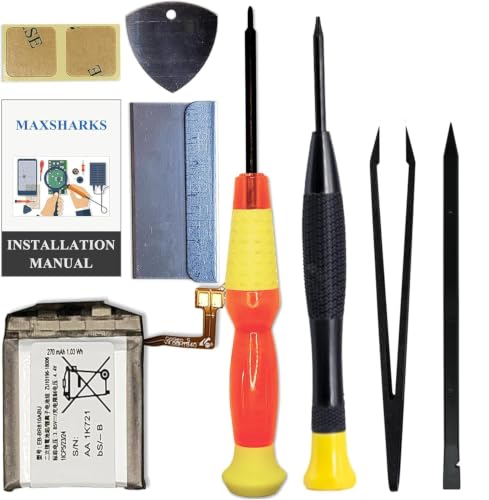
Compatible Smartwatch Model: This battery kit is specifically designed for Samsung Galaxy Watch 1st (42mm) / Gear S4 (with model SM-R810 SM-R815 series), please double confirm your smartwatch model before purchasing

【Exact Fit Compatibility】 Designed specifically for Samsung Galaxy Watch 4 (40mm SM-R860/SM-R865) and Watch 4 Classic (42mm SM-R880/SM-R885). Matches OEM part number EB-BR880ABY for a seamless drop-in replacement.
Tools Required For Battery Change
Changing the battery on your Samsung Galaxy Watch requires specific tools for safety and efficiency. Gather the following items before starting the replacement.
Recommended Tools
- Phillips screwdriver: A small Phillips screwdriver helps open the back cover of the watch. Choose one that fits snugly in the screws.
- Plastic prying tool: This tool prevents damage to the watch casing while prying it open. A guitar pick or plastic spudger works well.
- Tweezers: Use tweezers to handle small components and avoid losing screws or delicate parts.
- New battery: Ensure that you purchase a battery compatible with your specific Galaxy Watch model. Check the specifications beforehand.
- Soft cloth: A soft, lint-free cloth protects the watch screen from scratches during the replacement process.
Safety Precautions
- Power off the watch: Always turn off your Galaxy Watch before attempting a battery change to avoid any electrical shorts.
- Static-free environment: Work in a static-free area to prevent damage to sensitive electronic components.
- Wear safety glasses: Protect your eyes from any debris that may come loose when you open the watch.
- Avoid sharp tools: Using sharp tools increases the chance of damaging the watch. Stick to plastic tools for prying.
- Handle with care: Treat your watch components gently. Avoid applying excessive force while opening or replacing parts.
Step-By-Step Guide On How To Change Battery On Samsung Galaxy Watch
Changing the battery on your Samsung Galaxy Watch can extend its life and functionality. Follow these steps for a smooth replacement process.
Removing The Watch Back
- Power off your Galaxy Watch. Hold the power button until the watch shuts down.
- Use a Phillips screwdriver to remove the screws from the back panel. Ensure you keep the screws in a safe place.
- Insert a plastic prying tool into the gap between the watch case and back cover. Gently pry the back off. Take care not to damage the surrounding components.
Detaching The Old Battery
- Locate the old battery; it’s typically secured with adhesive.
- Use tweezers or your fingers to gently lift the battery. Wiggle it slightly to loosen the adhesive.
- Carefully disconnect the battery connector from the circuit board. Make sure not to pull on the wires.
Installing The New Battery
- Take your new battery and align it with the connector on the circuit board.
- Press the connector into place gently but firmly. Ensure it’s secure.
- Center the new battery in the designated compartment. If necessary, use a small amount of adhesive to hold it in.
Reassembling The Watch
- Carefully place the watch back onto the watch casing. Ensure all edges are aligned.
- Use your Phillips screwdriver to reinsert the screws, tightening them gently but securely.
- Power on your Galaxy Watch by holding the power button until it vibrates.
Following these steps helps you replace your watch battery efficiently. Ensure to dispose of the old battery following local regulations.
Common Issues When Changing The Battery
When changing the battery on your Samsung Galaxy Watch, several common issues may arise. Addressing these problems promptly can simplify the process and ensure the watch functions correctly.
Troubleshooting Tips
- Watch Won’t Power On: If your watch doesn’t turn on after replacing the battery, confirm that the new battery is securely connected. Double-check the placement of the connectors and ensure no dust or debris obstructs them.
- Battery Not Charging: If the battery fails to charge, inspect the charging contacts on both the watch and charger for dirt or damage. Clean any residue gently with a soft cloth. Try a different charger or cable, as the issue may lie with the charging method rather than the battery.
- Overheating: If the watch overheats after a battery change, it indicates a potential connection issue. Power off the watch, check connections, and reassemble everything. Overheating may also result from using an incompatible battery; ensure the replacement matches the manufacturer’s specifications.
- Rapid Battery Drain: If the new battery drains quickly, it may not be functioning properly. Monitor usage patterns, particularly with power-intensive features like GPS and notifications. Consider resetting the watch to factory settings if problems persist.
- Physical Damage: Inspect the watch for any physical damage after the battery change. Look for cracks or loose components that might hinder performance. Use a soft cloth or non-abrasive tool to avoid scratches on the watch’s surface.
By keeping these troubleshooting tips in mind, you can navigate common issues effectively and enjoy your Samsung Galaxy Watch without interruptions.
Conclusion
Changing the battery on your Samsung Galaxy Watch doesn’t have to be a daunting task. With the right tools and a little patience you can easily give your watch a new lease on life. Remember to follow the steps carefully and keep safety precautions in mind to avoid any mishaps.
By staying aware of your watch’s battery health and recognizing the signs of issues early you can ensure it remains a reliable companion for all your fitness and connectivity needs. Enjoy your refreshed watch and the freedom it brings to your daily activities. Happy watching!
Frequently Asked Questions
What causes battery drain on a Samsung Galaxy Watch?
Battery drain can result from various factors, including heavy usage of features like GPS and heart rate monitoring, screen brightness settings, and running multiple apps. Optimizing these settings can help extend battery life.
How long does a Samsung Galaxy Watch battery last?
Samsung Galaxy Watch batteries generally last between one to two days, depending on the model, usage, and settings. Features that require more power can significantly reduce battery life.
What tools do I need to change the battery in my Galaxy Watch?
To change the battery, you will need a Phillips screwdriver, a plastic prying tool, tweezers, a new compatible battery, and a soft cloth to protect the screen.
How can I tell if my Galaxy Watch battery needs to be replaced?
Signs that your battery may need replacement include rapid drainage, inability to charge, and overheating. If you notice these issues, it’s best to address them promptly.
How do I change the battery of my Samsung Galaxy Watch?
To change the battery, power off the watch, use a Phillips screwdriver to remove screws, carefully pry off the back cover, disconnect the old battery, connect the new battery, and reassemble the watch.
What safety precautions should I take when replacing the battery?
Always power off the watch before replacement, work in a static-free environment, wear safety glasses, avoid sharp tools, and handle components carefully to prevent damage.
What should I do if my Galaxy Watch won’t power on after a battery change?
If your watch won’t power on, check the battery connections to ensure they are secure. If the issue persists, try charging the watch or consult a professional for assistance.
How do I dispose of the old battery from my Galaxy Watch?
Dispose of the old battery according to local regulations. Many communities have recycling programs or designated disposal sites for electronic waste, including batteries.
