

Ever found yourself locked out of your Cadillac XT5 because the key fob battery died at the most inconvenient time? Frustrating, right? Don’t worry, we’ve got your back! In this article, we’ll walk you through the simple steps to replace the battery in your Cadillac XT5 key fob.
Imagine having the freedom to access your car effortlessly without any hiccups. By learning how to change the battery in your Cadillac XT5 key fob, you’ll never have to deal with the stress of a dead battery again. It’s a quick and easy process that can save you time and hassle in the long run.
Gather Necessary Tools
To start changing the battery in your Cadillac XT5 key fob, make sure you have the following tools ready:
- New battery – CR2032 type
- Small flathead screwdriver or a coin
- A soft cloth or gloves to protect your hands
- A clean, flat surface to work on
- Optional: tweezers for handling the small battery
Having these tools on hand will make replacing the battery a simple and quick process.
Recommended Products

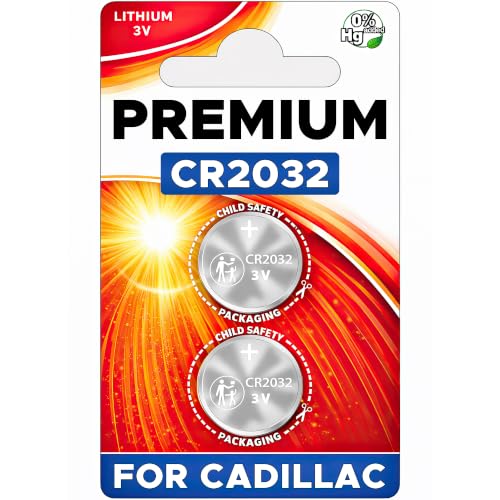
**To confirm compatibility please use the picture guide located in the product images**

Comprehensive Replacement Kit – Two CR2032 coin batteries for a quick, seamless Cadillac key fob swap.

**Please confirm fitment with our listing images and make sure the CR2032 battery will fit your key's battery**- Batteries included are the same as provided by the manufacturer ensuring perfect fit and great reliability.
Locate the Battery Compartment
When changing the battery in your Cadillac XT5 key fob, the first step is to locate the battery compartment. Here’s how you can find it with ease:
- Look for a Small Notch: Start by examining your key fob. You’ll notice a small notch along the edge of the fob.
- Use a Tool: To open the key fob, insert a flathead screwdriver or a coin into the notch. Gently twist to separate the key fob’s halves.
- Handle with Care: Once opened, pay attention to the internal components. The battery compartment is typically situated on one side of the fob.
By following these simple steps, you can easily locate the battery compartment in your Cadillac XT5 key fob.
Remove the Old Battery
To replace the old battery in your Cadillac XT5 key fob, follow these simple steps:
- Take out the old battery: Use a small tool to carefully pry out the old battery from its compartment.
- Handle with care: Avoid damaging the surrounding components as you remove the old battery.
- Dispose of properly: Make sure to dispose of the old battery in accordance with local regulations.
| Important Note |
|---|
| A common battery type for Cadillac XT5 key fobs is the CR2032 coin cell battery. |
Next, let’s proceed with inserting the new battery into your key fob.
Insert the New Battery
To insert the new battery into your Cadillac XT5 key fob, follow these steps:
- Step 1: Take the new CR2032 coin cell battery.
- Step 2: Insert the battery into the compartment with the positive side facing down.
- Step 3: Ensure the battery is securely in place.
- Step 4: Snap the key fob back together.
Remember to handle the new battery carefully and dispose of the old one properly.
Recommended Products
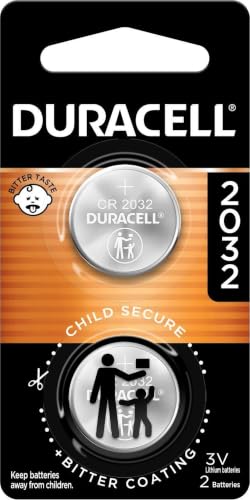
COMPATIBLE WITH AIRTAG & KEY FOBS: Works with Apple AirTag, all major car key fobs (Toyota, Honda, BMW, Ford, Chevrolet, Lexus), fitness trackers, glucose monitors, tire pressure sensors, and any CR2032 / 3V lithium coin battery device.
NOTE: Your Key Fob must take CR2032 Battery for compatibility.

PACKAGE INCLUDED : Two (2) CR2032 Remote Fob Battery and Opening/Pry Tools , Five item bundle (total 5pcs) , PLEASE NOTE: Keyless entry remote fob not included.
Reassemble the Key Fob
Now it’s time to put everything back together, ensuring your Cadillac XT5 key fob is fully functional.
- Place the back cover over the battery compartment.
- Align it carefully, making sure it fits snugly.
- Press firmly until you hear a distinct click.
After reassembly, test your key fob to ensure it’s working correctly.
Conclusion
That’s it! You’ve successfully replaced the battery in your Cadillac XT5 key fob. Remember to handle the new battery with care and dispose of the old one properly. By following these simple steps, you can ensure your key fob continues to work efficiently. Just reassemble the key fob, test it out, and you’re good to go. Enjoy the convenience of your fully functional key fob!
Frequently Asked Questions
How do I insert the CR2032 coin cell battery into my Cadillac XT5 key fob?
To insert the CR2032 battery, place it with the positive side facing down inside the key fob. Ensure it is securely positioned before snapping the key fob back together.
Why is it important to handle the new battery carefully?
Handling the new battery carefully ensures proper installation and prevents damage to the key fob. It also guarantees optimal performance.
How should I dispose of the old battery?
Dispose of the old battery in accordance with local regulations and guidelines for proper battery disposal to protect the environment.
How do I reassemble the key fob after replacing the battery?
To reassemble the key fob, place the back cover over the battery compartment, align it carefully, ensuring a snug fit. Press firmly until you hear a distinct click to secure it.
What should I do after reassembling the key fob?
After reassembling, test the key fob to ensure proper functionality. This step confirms that the battery replacement process was successful.
