

Ever found yourself locked out of your car because your Honda key fob battery died at the worst possible moment? Frustrating, right? Don’t worry, we’ve all been there. But what if I told you that changing the battery in your Honda key fob is easier than you think?
Imagine never having to deal with the inconvenience of a dead key fob battery again. Picture effortlessly replacing the battery in a few simple steps, saving you time and money on a trip to the dealership. In this article, you’ll discover the quick and easy process of changing the battery in your Honda key fob, empowering you to take control of your car’s access without any hassle.
Check the Key Fob Model
When changing the battery in your Honda key fob, the first step is to identify the key fob model you have. This is crucial because different models may have varying methods for battery replacement.
- Look for the model number on your key fob to determine the specific type.
- Refer to your Honda owner’s manual for guidance if you are unsure about the model.
Ensuring you have the correct information about your key fob model will help you proceed with the battery replacement process smoothly and efficiently.
Gather the Necessary Tools
When it’s time to change the battery in your Honda key fob, having the right tools at hand will make the process a breeze. Here’s what you’ll need:
- Small flat-head screwdriver: For prying open the key fob.
- Replacement battery: Ensure it matches the one you’re removing.
- Tweezers or needle-nose pliers: Handy for handling small components.
- Clean cloth: To wipe down the key fob before reassembly.
Remember, having these tools ready can save you time and prevent any unnecessary hassle when replacing the battery in your Honda key fob.
Recommended Products
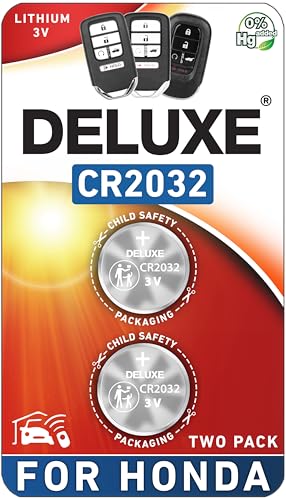
CONFIRM FIT - **Please confirm compatibility using the fitment guide located in the product images**

*Please check the second product image to confirm compatibility (Installation Videos + Tools Included)*

PACKAGE INCLUDED : Two (2) CR2032 Remote key Fob Battery and Opening/Pry Tools , Five item bundle (total 5pcs) , Please confirm compatibility using the fitment guide located in the product images.
Open the Key Fob
When it comes to replacing the battery in your Honda key fob, the first step is to open the key fob safely and correctly. Here are the steps to guide you through this process:
- Locate the Seam: Examine your key fob to find the seam where the two halves of the fob meet. This is the point where you’ll start opening it.
- Use the Flat-head Screwdriver: Take your small flat-head screwdriver and gently insert it into the seam. Apply a bit of pressure to pry open the key fob. Be careful not to use excessive force to avoid damaging the fob.
- Work Your Way Around: Slowly move the screwdriver along the seam to release the clips holding the key fob together. Take your time to ensure you don’t break or crack the fob.
- Separate the Halves: Once you’ve loosened all the clips, carefully separate the two halves of the key fob. Be cautious as the internal components may shift once the fob is opened.
- Set Aside the Back Cover: Place the back cover of the key fob in a safe spot while you access the battery compartment. This will prevent it from getting lost or damaged during the battery replacement process.
By following these steps, you’ll be ready to proceed with replacing the battery in your Honda key fob seamlessly.
Recommended Products

5 CR1616 button cell batteries.

PACKAGE INCLUDED : Two (2) CR1616 Remote key Fob Batteries and Opening/Pry Tools , Five item bundle (total 5pcs) , Please confirm compatibility using the fitment guide located in the product images.

NOTE: Your Key Fob must take CR2032 Battery for compatibility.
Remove the Old Battery
To replace the battery in your Honda key fob, you now need to remove the old one. Here’s how to do it:
- Locate the battery: Check where the battery is placed in your key fob.
- Use a small tool: A small screwdriver or a coin can be handy in taking out the old battery.
- Replace the old battery: Once you locate it, carefully remove the old battery.
- Dispose of the old battery properly: Remember to dispose of the old battery in accordance with local regulations.
| Key Points | |
| Handle the battery with care | Avoid touching the new battery’s terminals with your fingers. |
| Mind the battery orientation | Ensure you insert the new battery with the correct orientation. |
| Dispose of old batteries safely | Recycle old batteries at designated locations. |
Maintaining proper care when handling the battery is crucial to ensure a successful replacement process.
Ready to move on to the next step?
Recommended Products

LONG-LASTING BATTERIES DESIGNED FOR DEPENDABILITY: Duracell Lithium Coin CR2032 3 Volt batteries deliver long-lasting power and performance you can count on for devices throughout the home or on-the-go, such as key fobs, remote controls, Apple AirTag️, flameless candles, wireless cameras, thermometers, toys, and more.

LONG-LASTING BATTERIES DESIGNED FOR DEPENDABILITY: Duracell Lithium Coin CR2032 3 Volt batteries deliver long-lasting power and performance you can count on for devices throughout the home or on-the-go, such as key fobs, remote controls, Apple AirTag️, flameless candles, wireless cameras, thermometers, glucose monitors, toys, and more.

Lithium Coin Battery: Duracell's 1620 3V coin batteries provide reliable, long lasting power for your medical devices, watches, toys, fitness devices, security devices, electronics and more.
Insert the New Battery
When inserting the new battery into your Honda key fob, it’s crucial to handle it with care and ensure it’s placed correctly. Here are the steps to successfully insert the new battery:
- Step 1: Take the new battery out of its packaging.
- Step 2: Make sure the battery orientation is correct before placing it in the key fob.
- Step 3: Gently push the new battery into the designated slot until it’s snug.
- Step 4: Double-check that the battery is securely in place.
Always remember to use the correct battery type recommended for your Honda key fob to ensure optimal performance.
Test the Key Fob
Now that you’ve inserted the new battery into your Honda key fob, it’s time to test if it’s working properly. Here’s how you can do it:
- Press the Buttons: Try pressing the buttons on the key fob to see if there is a response from your vehicle.
- Check the Range: Test the key fob’s range by trying to unlock or lock your car from different distances.
- Verify Functionality: Make sure all the buttons are responsive and that the key fob is communicating effectively with your vehicle.
Battery Performance Tips
- Frequency of Use: Regularly using your key fob helps maintain the battery’s performance.
- Keep it Clean: Dirt and debris can affect the key fob’s functionality. Clean it with a soft, dry cloth.
- Battery Replacement: If the key fob still isn’t working properly after battery replacement, consider consulting a professional.
Key Fob Troubleshooting
- Recheck Placement: Ensure the battery is correctly inserted with the right orientation.
- Reset the Key Fob: Some key fobs may require reprogramming after battery replacement. Refer to your vehicle’s manual for instructions.
| Average Battery Life |
|---|
| 1-2 years |
Conclusion
That’s it! You’ve successfully learned how to change the batteries in your Honda key fob. Remember to test its functionality, maintain battery performance, and troubleshoot any issues that may arise. By following these simple steps, you can ensure that your key fob remains in top condition for smooth operation. Don’t forget that the average battery life is around 1-2 years, so keep an eye out for any signs that it might need replacing. Enjoy the convenience and peace of mind that comes with a properly functioning key fob!
Frequently Asked Questions
How do I test the functionality of my Honda key fob after changing the battery?
To test the functionality of your Honda key fob after replacing the battery, try pressing all the buttons to ensure they respond, check the range by using it from various distances, and verify overall performance like unlocking and locking your vehicle.
Any tips for maintaining the performance of my Honda key fob battery?
To maintain your Honda key fob battery’s performance, remember to use it regularly to keep it active, and keep the key fob clean from dirt and debris. These practices can prolong the battery life and ensure reliable functionality.
What should I do if my Honda key fob is still not working after changing the battery?
If your Honda key fob is still not working after changing the battery, double-check the battery’s placement to ensure proper contact, reset the key fob as needed according to its manual, and refer to the vehicle manual for reprogramming instructions if necessary.
How long does the average Honda key fob battery last?
The average lifespan of a Honda key fob battery typically ranges between 1 to 2 years, but this can vary based on usage frequency and environmental conditions. Consider replacing the battery if you notice decreased responsiveness or range in your key fob’s performance.
