

Ever found yourself locked out of your Audi because of a dead key fob battery? Frustrating, right? You’re not alone. It’s a common issue that many Audi owners face. But don’t worry, we’ve got your back! In this article, we’ll walk you through the simple steps to change your Audi key fob battery hassle-free.
Imagine never having to deal with the stress of a non-responsive key fob again. With just a few minutes of your time, you can learn how to replace the battery in your Audi key fob like a pro. Say goodbye to those inconvenient moments of being stuck outside your car, and say hello to a quick and easy solution that will save you time and money.
Step 1: Gather Materials
When it’s time to change your Audi key fob battery, you’ll want to make sure you have everything you need at hand. Here’s what you’ll need to gather before you get started:
- New battery suitable for your Audi key fob model.
- Small flathead screwdriver or a coin.
- A soft cloth to protect your key fob from scratches during the process.
Now that you have all the necessary materials assembled, you’re ready to move on to the next step in replacing your Audi key fob battery.
Recommended Products

COMPATIBLE WITH AIRTAG & KEY FOBS: Works with Apple AirTag, all major car key fobs (Toyota, Honda, BMW, Ford, Chevrolet, Lexus), fitness trackers, glucose monitors, tire pressure sensors, and any CR2032 / 3V lithium coin battery device.

**Please confirm compatibility using the fitment guide located in the product images**
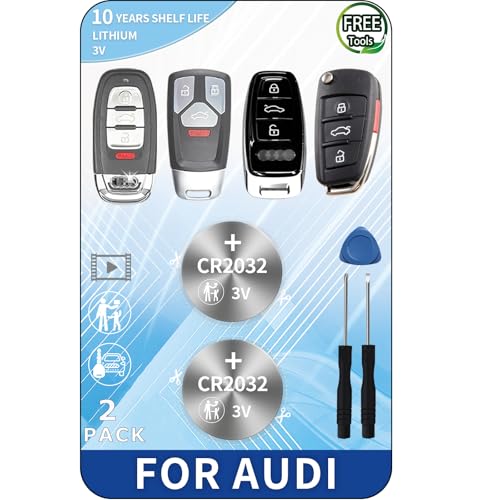
PACKAGE INCLUDED : Two (2) CR2032 Remote key Fob Batteries and Opening/Pry Tools , Five item bundle (total 5pcs) , *Please confirm compatibility using the fitment guide located in the product images*
Step 2: Locate the Key Fob Battery Compartment
To replace your Audi key fob battery, you’ll first need to find the battery compartment on your key fob. Here’s how to do it:
- Hold your key fob with the Audi logo facing up.
- Look at the back of the key fob for a small notch or slot.
- This is where you’ll insert a flathead screwdriver or a coin to open the key fob.
Step 3: Remove the Old Battery
Now it’s time to remove the old battery from your Audi key fob. Begin by gently pushing the old battery out using a small tool like a flathead screwdriver or a coin. Be careful not to damage the key fob components while doing this. Once the old battery is out, dispose of it properly following any local guidelines for battery recycling.
Here are some key points to keep in mind during this step:
- Handle the key fob with care to avoid any accidental damage to its internal parts.
- Use a soft touch when pushing out the old battery to maintain the key fob’s functionality.
- Check for any dirt or debris inside the battery compartment before inserting the new battery.
Remember, this step is crucial in the battery replacement process to ensure a smooth transition to the new battery.
Step 4: Insert the New Battery
Now it’s time to insert the new battery into your Audi key fob. Here’s what you need to do:
- Check the battery type: Make sure you have the correct battery type specified for your key fob model. Refer to the owner’s manual if you’re unsure.
- Position the battery: Place the new battery into the battery compartment with the positive side facing up.
- Close the fob: Carefully put the key fob back together. Make sure it snaps shut securely.
- Test the key fob: Check if the new battery works by pressing the buttons to lock and unlock your Audi. If everything functions correctly, you’re all set!
Remember, changing the battery in your Audi key fob is a simple but essential task to ensure your key fob continues to operate smoothly.
Recommended Products

KEY FOB BATTERY INSTALLATION – Includes 2 CR2032 coin batteries for quick and effortless replacement of your key fob battery for Audi models.

Elite Batteries Replacement are compatible with all Audi key fobs from 2006 to 2025. If your Audi is before 2006, check the image compatibility guide to make sure this battery will fit your key fob.

3V LITHIUM COIN 2032 BATTERY PACK: One 2 pack of Energizer lithium 2032 Batteries. Packaging may vary
Step 5: Test the Key Fob
Now that you’ve gone through the process of replacing the battery in your Audi key fob, the final step is to test if everything is working as it should.
- Stand close to your Audi and press the buttons on the key fob.
- Check if the doors lock and unlock as they should.
- Test the trunk release button if your key fob has one.
- Listen for the audible signals from your car when you press the buttons.
If everything is working properly, congratulations! You’ve successfully replaced the battery in your Audi key fob.
Recommended Products

Pack Including: Two (2) Pieces CR2032 Remote Key Fob Batteries and Opening/Pry Tools - Five item bundle (total 5pcs), Please check Amazon details Confirmed Fit to ensure that this is the correct battery for your remote.

[Please check the second product image to confirm compatibility]- Installation Videos + Tools Included.

Conclusion
You’ve now successfully replaced the battery in your Audi key fob following the simple steps outlined in this guide. By ensuring the correct battery type, proper insertion, and thorough testing, you’ve taken a proactive step in maintaining the functionality of your key fob. Remember, this small maintenance task can go a long way in ensuring your key fob operates smoothly, allowing you easy access to your vehicle. Keep up with regular battery checks to avoid any unexpected issues in the future. With these tips in mind, you can confidently handle the battery replacement process whenever needed.
Frequently Asked Questions
Q: Why is it important to replace the battery in my Audi key fob?
A: Replacing the battery ensures smooth operation of the key fob, allowing you to lock and unlock the doors and access your trunk.
Q: What tools do I need to replace the battery in my Audi key fob?
A: You will need a small tool to safely remove the old battery and insert the new one.
Q: How do I know which type of battery to use for my Audi key fob?
A: Check your key fob’s manual or the old battery for the correct battery type needed.
Q: What should I do with the old battery once I remove it from the key fob?
A: Dispose of the old battery properly following local regulations for electronic waste recycling.
Q: How can I test if the new battery is working correctly in the key fob?
A: Test the key fob by ensuring the doors lock and unlock, the trunk release button functions, and listening for audible signals from the car.
