

Key Takeaways
- Battery Replacement Costs Vary: Prices for Samsung battery replacements typically range from $60 to $100, depending on the model and service location.
- Factors Influencing Costs: Key factors include the specific device model, labor charges at repair centers, warranty status, and whether you opt for genuine or aftermarket batteries.
- Authorized vs. Third-Party Services: Official Samsung service centers provide genuine parts with warranties but may charge higher fees, while third-party options are often cheaper but require careful selection to ensure quality.
- DIY Replacement Potential: If you have technical skills, DIY battery replacements can save costs, with kits priced between $30 to $60, but this may void existing warranties.
- Warranty Considerations: Check your warranty status, as battery replacements might be free if under warranty, but using unauthorized services could void coverage.
- Extending Battery Life: Simple maintenance tips, like managing screen brightness and updating software, can help prolong your battery’s lifespan and delay replacement.
Is your Samsung phone struggling to hold a charge? You’re not alone. Many users face battery issues as their devices age, leading to the inevitable question: how much does a Samsung battery replacement cost?
Understanding the costs involved can help you make informed decisions about whether to repair or replace your device. This article breaks down the expenses associated with battery replacement, including factors that influence pricing and options available to you. By the end, you’ll have a clearer picture of what to expect and how to get your phone back to peak performance without breaking the bank.
Overview of Samsung Battery Replacement Costs
Samsung battery replacement costs can vary based on several factors. Understanding these costs helps you make informed decisions about your device’s maintenance.
Factors Affecting Replacement Costs
- Device Model: Different Samsung models have varying battery types and sizes. For example, replacement for a Galaxy S21 typically costs around $70, while a Galaxy Note 20 may be closer to $80.
- Labor Charges: Authorized service centers often charge a service fee for installation. Expect to pay an additional $30 to $50 for labor.
- Warranty Status: If your device is under warranty, you might qualify for free replacement. Samsung’s warranty typically covers defects but may not include wear-and-tear issues like battery degradation.
- Battery Quality: Aftermarket or third-party batteries usually cost less, but their quality can vary. Prices for these batteries range from $20 to $50, depending on the brand and specifications.
Comparison of Official vs. Third-Party Services
- Official Services: Samsung’s authorized service centers provide genuine batteries and professional installation. While costs are generally higher, you receive a warranty on the parts and labor.
- Third-Party Services: Third-party repair shops often offer competitive prices. While savings can be significant—often 20% to 50% lower than official rates—be cautious. Ensure they use quality parts to avoid future issues.
- DIY Replacement: If you have technical skills, you can replace the battery yourself with the right tools and a quality battery. DIY kits can cost between $30 to $50, but this option carries risks, including voiding any remaining warranty.
These insights help you navigate Samsung battery replacement costs, allowing you to choose the best option for your needs.
Breaking Down Replacement Pricing
Understanding the costs associated with Samsung battery replacement helps you make informed decisions. Pricing varies based on several factors, including your device model and warranty status.
Different Samsung Models and Their Costs
Samsung offers a range of models, each with distinct battery replacement costs. Below are estimated prices for different models based on authorized service center charges:
| Samsung Model | Price Range ($) |
|---|---|
| Galaxy S21 | 70 – 90 |
| Galaxy S20 | 70 – 85 |
| Galaxy Note 20 | 80 – 100 |
| Galaxy A51 | 60 – 80 |
| Galaxy S10 | 75 – 95 |
Costs may vary slightly based on location and service center. Always check with your local repair options for the most accurate pricing.
Warranty Considerations
Warranty status significantly affects replacement costs. If your phone is under warranty, battery replacement might be free or available at a reduced rate. Typically, Samsung offers a limited warranty covering battery failure due to manufacturing defects.
If the warranty is expired or the damage isn’t covered, expect to pay the full price. Keep in mind that using unauthorized repair services may void your warranty. Always review warranty terms before proceeding with repairs.
How to Extend Battery Life Before Replacement
Extending your Samsung phone’s battery life can delay the need for replacement. Implement these strategies to maximize your battery performance.
Tips for Regular Maintenance
- Update Software: Keep your phone’s software up to date. Latest updates often include battery optimization improvements.
- Adjust Screen Brightness: Set your screen brightness to automatic or lower it manually. Reducing brightness saves battery life significantly.
- Manage Background Apps: Close unused apps running in the background. Limiting active apps conserves power.
- Enable Power Saving Mode: Activate power saving mode during low battery levels. This feature limits background activity and app usage.
- Limit Location Services: Turn off GPS or location access for apps not in use. This can prevent unnecessary battery drain.
Common Battery Drain Issues
- High Screen Usage: Prolonged screen time drains battery quickly. Consider reducing usage periods or utilizing dark mode.
- Resource-Intensive Apps: Apps like games or video streaming consume more battery. Monitor your app usage and uninstall unnecessary ones.
- Poor Network Signal: Weak signals prompt your phone to work harder, draining battery. Use Wi-Fi when available or switch to airplane mode in areas with no reception.
- Bluetooth and Wi-Fi: Leaving Bluetooth and Wi-Fi on while unused can sap battery life. Turn them off when not in use.
- Notifications: Frequent notifications from apps can wake your phone and drain battery. Manage app notifications to reduce interruptions.
Implement these practices to enhance your Samsung phone’s battery life, keeping it efficient until replacement becomes necessary.
Where to Get Your Battery Replaced
You have several options for getting your Samsung battery replaced, depending on convenience, cost, and your comfort level with DIY tasks.
Recommended Products

Compatible Phone Model: This battery kit is specifically designed for Galaxy A03 Core SM-A032F series, please double confirm your phone model before purchasing
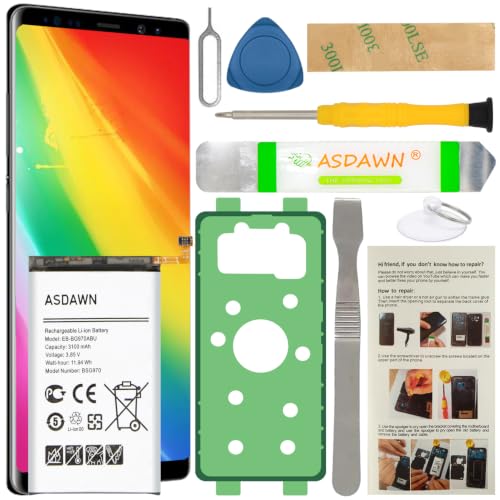
[FOR COMPATIBLE MODEL] -- Contains the instruction to guide you step by step installation, and we have professional engineers to answer all your questions about the repair process. Please verify your old battery part number and model before purchasing this replacement battery. Compatible with Samsung Galaxy S10e SM-G970, EB-BG970ABU, SM-G970F/DS, SM-G970U, SM-G970W ★NOT FOR Samsung Galaxy S10/ S10 Plus/ Note 10/ Note 10 Plus★
Authorized Service Centers
Authorized service centers are the most reliable choice for battery replacement. These centers use genuine Samsung parts, ensuring quality and compatibility. Visit a Samsung store or an authorized repair shop in your area. For example, replacing a battery at these locations tends to cost between $70 and $100, including labor. If your device is under warranty, you might even receive a free replacement. It’s wise to call ahead to confirm availability and pricing.
DIY Battery Replacement Options
If you’re comfortable with technology, consider DIY battery replacement. Websites, such as iFixit, provide detailed guides and necessary tools for various Samsung models. Costs here are usually lower, ranging from $30 to $60 for a replacement battery, depending on the model. Ensure you check compatibility before buying. Remember, opting for DIY might void your warranty, so weigh the risks before proceeding. Follow the instructions closely, and take your time during the process to avoid damaging your device.
Conclusion
Understanding the costs of Samsung battery replacement helps you make informed decisions for your device. Whether you choose an authorized service center for peace of mind or consider a DIY approach for savings there’s a solution that fits your needs.
Remember to factor in your warranty status and the potential for free or reduced-cost replacements. By being proactive about battery care you can extend your phone’s life and performance. With the right approach you’ll keep your Samsung running smoothly for years to come.
Frequently Asked Questions
What factors influence Samsung battery replacement costs?
The costs of replacing a Samsung battery can vary based on the device model, labor charges, warranty status, and battery quality. For instance, a Galaxy S21 battery replacement may cost around $70, while a Galaxy Note 20 can be about $80. Authorized service centers might add additional labor fees ranging from $30 to $50.
How much does it typically cost to replace a Samsung phone battery?
Typically, the cost for Samsung battery replacements ranges from $60 to $100, depending on the model and service provider. For example, a Galaxy A51 battery may cost between $60 and $80, while a Galaxy S20 replacement might be around $70 to $85.
Can I get my Samsung phone battery replaced for free?
Yes, if your Samsung phone is still under warranty, you may be eligible for a free battery replacement. Be sure to check your warranty status and terms with the service center to confirm your eligibility.
What are the risks of using third-party battery replacement services?
Third-party services may offer lower prices for battery replacement, but they can come with risks, such as using non-genuine parts that may affect performance or void your warranty. It’s important to weigh the potential cost savings against the quality and reliability of the service.
Is it possible to replace my Samsung battery myself?
Yes, DIY battery replacement is an option if you’re comfortable with technology. Costs may range from $30 to $60 for a replacement battery, but be mindful that this could void any existing warranty. Following detailed guides and checking compatibility is essential for success.
How can I extend my Samsung phone’s battery life?
To enhance your Samsung phone’s battery life, keep your software updated, adjust screen brightness, manage background apps, enable power-saving mode, and limit location services. These practices can help maintain efficiency until a battery replacement is necessary.
Where can I get my Samsung phone battery replaced?
You can get your Samsung battery replaced at authorized service centers for a reliable experience. Alternatively, consider third-party repair shops or DIY replacement if you’re comfortable with the equipment and process. Pricing varies, so compare options for cost-effectiveness.
