

Ever wondered how long it takes to charge your Sony a7III battery fully? Picture this: you’re gearing up for a day of capturing stunning photos and suddenly realize your camera battery is running low. The struggle is real, right? But fret not, as we’ve got your back! In this article, we’ll dive into the nitty-gritty of charging your Sony a7III battery, so you can stay powered up and ready to seize the moment.
Understanding Sony a7III Battery
When it comes to charging your Sony a7III battery, having a solid grasp of its specifications can be immensely helpful.
- Battery Type: The Sony a7III comes with a NP-FZ100 rechargeable lithium-ion battery.
- Capacity: The battery has a capacity of 2280mAh.
- Charging Time: Typically, the charging time for the Sony a7III battery can vary based on the charger used and its current charge level.
Remember to use the appropriate charger designed for the NP-FZ100 battery to ensure proper and safe charging.
Charging Time for Sony a7III Battery
Charging your Sony a7III battery may vary depending on several factors, such as the charger you use and the current charge level. Here are some pointers to keep in mind:
- Standard Charging Time: On average, charging an NP-FZ100 battery for your Sony a7III from 0% to 100% might take around 150 to 180 minutes with the appropriate charger.
- Quick Charging Options: Some chargers offer quick charging capabilities, reducing the charging time significantly. For instance, a compatible quick charger can charge your NP-FZ100 battery to around 50% in just 40-60 minutes.
- Avoid Overcharging: It’s crucial not to overcharge your battery, as it can reduce its lifespan. Once your Sony a7III battery reaches full charge, unplug it promptly to maintain its longevity.
- Charging Level Impact: Keep in mind that the current charge level of your battery can influence the overall charging time. For instance, charging from 20% to full capacity might be quicker than charging from completely empty to full.
- Utilize the Right Charger: To ensure optimal charging times and battery health, always use a charger specifically designed for the NP-FZ100 battery. Using the correct charger safeguards against potential damage and supports efficient charging.
By keeping these factors in mind and utilizing the appropriate charging practices, you can effectively manage the charging time for your Sony a7III battery, ensuring it stays powered up and ready for your photography needs.
Recommended Products

Notice:1.Recommended to use a power adapter with 22.5W or higher output; 2.Not compatible with 5V / 1A power adapterss; 3.When using a 5V / 2.4A adapter, the charger operates in slow-charge mode, prioritizing the charging of the battery in Channel 1 first. It automatically switches to Channel 2 once Channel 1 is fully charged

Battery Specs: Capacity: 2500mAh (per battery), Battery Type: Lithium-ion, Voltage: 7.2V. Package includes: 3x NP-FZ100 replacement batteries, 1x triple USB charger with LCD display, and 1x microfiber cleaning cloth.
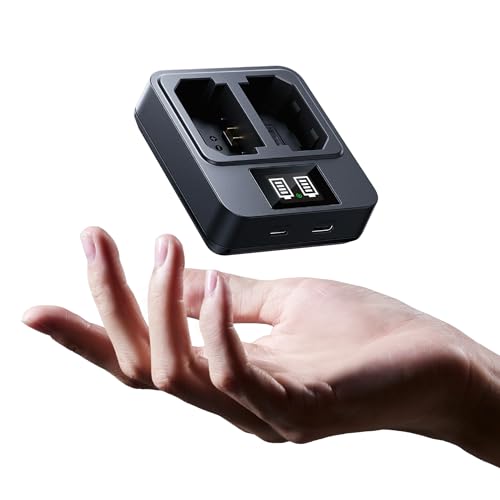
[PD 20W Ultra-Fast Charging]Experience blazing fast 20W charging with 9V⎓2A input—recharge two a7iii batteries in just 2.5 hours, 50% faster than standard 10W a7iii battery chargers. Built for everyday creators and casual shooters who value speed and convenience.
Tips to Optimize Charging Efficiency
When it comes to charging your Sony a7III battery, optimizing efficiency is key to maintaining its longevity and performance. Here are some handy tips to help you get the most out of your charging routine:
- Use a Compatible Charger: Always use the correct charger for the NP-FZ100 battery to ensure safe and efficient charging.
- Avoid Overcharging: Overcharging can negatively impact the battery’s lifespan. Be mindful of unplugging the charger once the battery reaches 100%.
- Partial Charges: Opt for partial charges when possible. Charging from 50% to 80% can be quicker and less taxing on the battery.
- Invest in Quick Chargers: Quick chargers can significantly reduce charging times, getting you back to shooting faster.
- Monitor Charge Level: Keep an eye on the battery’s current charge level. Charging from lower percentages may take longer than when starting from a higher charge.
- Charge in a Cool Environment: Charging your battery in a cool environment can help maintain an optimal temperature for the battery.
By incorporating these simple yet effective tips into your charging routine, you can prolong the lifespan of your Sony a7III battery and ensure it’s always ready to capture your next photographic masterpiece.
Recommended Products

Fully Compatible with NP-FZ100 Batteries: Works with OEM and third-party batteries for consistent performance across A7iii A7iv A7Rv A6700 A6600 A9 A1 FX3 FX30 ZV-E1, and more—charge freely without compromise.

UNIVERSAL DESIGN Compatible with Sony, Tilta and Most 3rd Party NP-FZ100 Batteries

Ultra-Fast PD 20W Charging: Optimized for professionals, this industry-leading 20W system of Sony battery charger intelligently allocates power across 2 slots—fully recharging two NP-FZ100 batteries in just 1.5 hours, which is 50% faster than standard chargers. Compatible with wall outlets, car adapters, or power banks, it's the ultimate charging hub for high-volume studio shoots and back-to-back productions.
Managing Battery Life
When it comes to prolonging your Sony a7III battery’s lifespan, proper management is key. Here are some essential tips to help you optimize charging efficiency and maximize performance:
- Be Mindful of Charging Cycles: Aim for partial charges instead of full discharges for better longevity.
- Avoid Overcharging: Unplug the charger once the battery reaches 100% to prevent damage.
- Monitor Charge Levels: Check your battery’s status regularly to keep track of power levels.
- Charge in a Cool Environment: High temperatures can reduce battery life, so opt for cool locations when charging.
By following these strategies, you can ensure that your Sony a7III battery remains in top condition for all your photography needs.
Recommended Products

{COMPATIBILITY}: LP NP-FZ100 Camera Battery Charger compatible with Sony NP-FZ100 Li-on Battery. Compatible with Sony A7IV, A7III, A7C, A7R III, A7R IV, A7Siii, A7C, A7Cii, A6700, A6600, Alpha 9, A9II, A9R, A9S, A1, ZV-E1, ZV-E10II, FX3, FX30, etc.

Fully Compatible with NP-FZ100 Batteries: Works with OEM and third-party batteries for consistent performance across A7iii A7iv A7Rv A6700 A6600 A9 A1 FX3 FX30 ZV-E1, and more—charge freely without compromise.

【Charge Four Batteries Simultaneously】 Keep your shoot uninterrupted with the K&F CONCEPT charging hub, designed to power up to four NP-FZ100 or LP-E6/N/E6NH/E6P series batteries at once. Ideal for extended vlogging, outdoor filming, and long photography sessions, ensuring you always have spare power for your camera.
Conclusion
By following the tips outlined in this article, you can ensure your Sony a7III battery remains in excellent condition for your photography needs. Remember to opt for partial charges, unplug at 100%, monitor charge levels regularly, and charge in cool environments. These simple practices will help you maximize your battery’s performance and longevity. Happy shooting!
Frequently Asked Questions
What are the key points to consider for managing Sony a7III battery life?
To optimize the Sony a7III battery performance, focus on partial charges, unplug at 100%, avoid overcharging, monitor charge levels, and charge in cool environments.
How can partial charges benefit the Sony a7III battery?
Partial charges help prevent stressing the battery, extending its lifespan compared to full discharges.
Why is it crucial to unplug the Sony a7III battery at 100%?
Overcharging can damage the battery and reduce its overall lifespan, so it’s important to unplug once fully charged.
How often should users monitor the Sony a7III battery charge levels?
Regularly checking the battery charge levels can help users anticipate when to charge, preventing unnecessary strain on the battery.
Why is charging the Sony a7III battery in a cool environment recommended?
Charging the battery in cool environments can prevent overheating, which can cause damage and reduce the battery’s longevity.
