

Key Takeaways
- Battery Life Variation: Samsung watches generally last between 24 to 40 hours on a full charge, influenced by usage intensity and model differences.
- Usage Patterns Matter: Light users may achieve extended battery life, while heavy usage, especially involving GPS and heart rate monitoring, can significantly reduce battery duration.
- Settings Impact Performance: Adjusting display brightness, turning off the always-on feature, and disabling unnecessary connectivity options can help conserve battery life.
- Maximized Battery with Tips: Effective practices such as activating power saving modes, limiting notifications, and closing unused apps can enhance battery longevity.
- Model-Specific Insights: Newer models like the Galaxy Watch 5 boast superior battery life compared to older versions, and fitness-oriented devices like the Galaxy Fit series offer impressive longevity for active users.
- Real-World Expectations: Battery life experiences can vary; for example, users might see around 40 hours during light usage while intensive activities may drop this to about 24 hours.
Ever found yourself checking your Samsung watch only to realize the battery’s almost dead? You’re not alone. Many users wonder how long their device should last on a single charge. It can be frustrating when you rely on your watch for notifications, fitness tracking, or even just the time, and it fails you unexpectedly.
Overview of Samsung Watch Battery Life
Samsung watches typically offer a versatile battery life, ranging from one to several days, depending on usage patterns and watch models. For instance, the Galaxy Watch series often provides between 24 to 40 hours of battery life on a full charge.
Battery Life Factors
- Model Differences: Different Samsung watch models come with varying battery capacities. For example, the Galaxy Watch 5 may last longer than earlier models due to improved battery technology.
- Usage Intensity: Heavy usage with multiple apps and features, like GPS and heart rate monitoring, drains the battery faster.
- Display Settings: Brightness levels and always-on display features can significantly impact battery life. Lower brightness and disabling the always-on feature extend usage.
- Connectivity Options: Using Bluetooth and Wi-Fi continuously will consume more power than turning them off when not in use.
Real-World Battery Life Scenarios
- Light Usage: If you primarily use your watch for notifications and timekeeping, you may get closer to the maximum battery life.
- Intensive Workouts: Running GPS and heart rate tracking during workouts can reduce battery life substantially, sometimes dropping it to around 24 hours.
- Sleep Tracking: Some users report around 40 hours of battery life when using sleep tracking features without frequent app interaction.
Tips to Extend Battery Life
- Adjust Display Settings: Decrease brightness and turn off the always-on display.
- Limit Notifications: Customize notifications to receive only what’s necessary, reducing battery consumption.
- Close Unused Apps: Ensure background apps close when not in use.
- Disable Vibration: Turn off vibrations for notifications and alerts to conserve energy.
Understanding these factors helps you manage your Samsung watch’s battery effectively, ensuring it functions optimally when you need it most.
Factors Affecting Battery Life
Battery life for your Samsung watch primarily depends on several factors. Understanding these can help you maximize performance and longevity.
Usage Patterns
Usage patterns significantly impact battery lifespan. Light usage, like checking time occasionally, can extend battery life beyond the typical range. Conversely, heavy usage, such as continuous tracking during workouts or streaming music, drains the battery quickly. For example, if you use your watch primarily for notifications and fitness tracking, you might achieve around two days of battery life. On the other hand, if you frequently engage in GPS activities, expect reduced endurance.
Settings and Features
Settings and features also play a crucial role in battery performance. Brightness level, watch face selection, and enabled features all affect how long your watch lasts. Using a dimmer display and a static watch face conserves energy. Additionally, turning off features like heart rate monitoring or Always On Display when not needed can prolong battery life. Switching off Bluetooth or Wi-Fi when not in use helps as well. Experiment with these settings to find a balance that maintains functionality without excessive power drain.
Estimated Battery Life of Different Models
Samsung watch battery life varies across models and usage, impacting your daily experience. Below, you’ll find details on battery performance for popular series.
Recommended Products
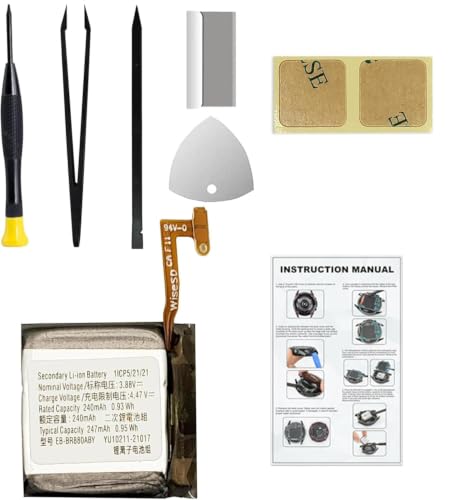
Compatible Smartwatch Model: This battery kit is specifically designed for Samsung Galaxy Watch 4 40mm (with model SM-R860 series) / Watch 4 Classic 42mm (with model SM-R880 series), please double confirm your smartwatch model before purchasing

COMPATIBILITY: The battery model is EB-BR880ABY, it is only compatible with Samsung Galaxy Watch 4 (40 mm), SM-R860 SM-R865 series and Galaxy Watch 4 Classic (42mm) SM-R880 SM-R885, please carefully confirm the model of your smartwatch before purchase.
Galaxy Watch Series
The Galaxy Watch series, including the Galaxy Watch 5 and Watch 4, typically offers a battery life ranging from 24 to 40 hours. Depending on your activities, you might see different outcomes:
- Galaxy Watch 5: Stands out with up to 40 hours on a full charge under light usage conditions like checking notifications and tracking steps.
- Galaxy Watch 4: Offers between 24 to 36 hours, depending on features in use, such as GPS or heart rate monitoring. Heavy users may need to charge it daily.
To maximize battery life, try lowering the screen brightness and switching off Always On Display when not in use.
Galaxy Fit Series
The Galaxy Fit series is designed primarily for fitness enthusiasts. Consequently, the battery life here can exceed expectations:
- Galaxy Fit 2: Provides up to 15 days of usage, even with regular fitness tracking and notifications. This extensive battery life makes it an excellent choice for those focused on fitness.
- Galaxy Fit 3: Similar to its predecessor, it offers around 10 to 14 days of battery life, depending on activity levels and display settings.
For optimal performance, limit app notifications and disable features like continuous heart rate monitoring when not needed.
Tips to Extend Battery Life
You can maximize your Samsung watch’s battery life with some simple adjustments and practices. Two effective areas to focus on include power saving modes and managing notifications.
Power Saving Modes
You can activate power saving modes on your watch to limit energy consumption. This feature reduces background activity and dims the display. Access these settings by:
- Swiping down from the top of the screen.
- Tapping the battery icon.
- Selecting “Power saving mode.”
Using this mode can extend your battery life significantly, especially during travel or long outings. In some models, enabling this mode can stretch battery life by up to 20 hours.
Managing Notifications
Controlling notifications is essential for conserving battery. Each notification draws power, so limit them to only the most important alerts. Follow these steps:
- Open the “Wearable” app on your phone.
- Navigate to “Notifications.”
- Select which apps you want to receive notifications from.
Disabling alerts from less critical apps can help preserve your battery. Additionally, consider using “Do Not Disturb” mode during times when you’re not expecting important updates. By refining your notification settings, you keep your battery running longer while still staying informed on crucial updates.
Conclusion
Your Samsung watch can be a reliable companion when it comes to staying connected and tracking your fitness. By understanding how battery life varies based on your usage and making simple adjustments to settings, you can keep your watch running longer.
Whether you’re using it for quick notifications or intense workouts, knowing how to manage its features can make all the difference. With a few tweaks, you’ll find it easier to enjoy your watch without the constant worry of running out of battery. Embrace these tips and enjoy the full potential of your Samsung watch.
Frequently Asked Questions
How long does the battery last on Samsung watches?
The battery life of Samsung watches typically ranges from 24 to 40 hours on a full charge, depending on the model and usage. For instance, the Galaxy Watch 5 can last up to 40 hours with light usage, while the Galaxy Watch 4 generally offers between 24 to 36 hours.
What factors affect Samsung watch battery life?
Several factors influence battery life, including the specific watch model, the intensity of usage (like GPS tracking or app usage), display settings (brightness and Always On Display), and connectivity options. Light usage can help extend battery life significantly.
How can I extend my Samsung watch’s battery life?
To extend battery life, reduce screen brightness, turn off Always On Display, limit unnecessary notifications, close unused apps, and disable vibrations. Activating power saving modes can also help by limiting background activity and dimming the display.
What is the battery life of the Galaxy Fit series?
The Galaxy Fit series is renowned for its long battery life. The Galaxy Fit 2 can typically last up to 15 days, while the Galaxy Fit 3 offers around 10 to 14 days, depending on user activity levels.
Is it worth using power saving mode on my Samsung watch?
Yes, using power saving mode can significantly extend your watch’s battery life by reducing energy consumption. It minimizes background activity and may allow you to get an extra 20 hours of usage, making it ideal during low battery scenarios.
