

Key Takeaways
- Battery Capacity and Performance: The Samsung Galaxy S7 features a 3,000 mAh battery, providing up to 22 hours of talk time and approximately 15 hours of internet usage on Wi-Fi under optimal conditions.
- Key Factors Affecting Battery Life: Usage patterns, screen brightness, and network conditions significantly impact the battery’s longevity. Heavy app usage and poor reception drain the battery faster.
- Optimizing Battery Life: Utilize power-saving modes, manage apps, and ensure regular software updates to enhance battery efficiency and prolong usage.
- Real-World Usage Insights: Light users can expect a full day of battery life, while intensive activities like gaming and video streaming can reduce battery duration to 4-10 hours.
- Comparison with Competitors: The Galaxy S7 generally performs favorably against similar devices, with competitive usage times and efficient management practices contributing to its battery performance.
- Practical Tips for Extended Life: Adjust screen settings, limit background processes, turn off unused features, and monitor app usage to maximize the Samsung Galaxy S7’s battery performance.
Ever found yourself scrambling for a charger when your phone’s about to die? You’re not alone. Many Samsung Galaxy S7 users wonder just how long their battery can keep up with everyday demands.
Overview of Samsung Galaxy S7 Battery
The Samsung Galaxy S7 features a 3,000 mAh battery designed to provide solid performance. Typical usage can yield up to 22 hours of talk time and approximately 15 hours of internet usage on Wi-Fi. When streaming videos, the battery lasts around 13 hours under optimal conditions.
Battery life varies based on several factors:
- Usage Patterns: Heavy app usage, including gaming and streaming, drains the battery quickly. Conversely, light browsing and messaging extend duration.
- Settings: Brightness levels and background processes can impact battery sustainability. Lowering the screen brightness and limiting background app activity can enhance battery life.
- Network Conditions: Using your phone in areas with poor reception can lead to faster battery depletion due to increased power usage to maintain a signal.
To monitor and manage battery life effectively, consider these tips:
- Optimize Battery Settings: Utilize power-saving modes available in the settings menu. This feature limits background data and reduces performance to conserve battery.
- Manage Apps: Regularly check battery usage statistics for apps. Uninstalling or disabling high-drain apps can prolong battery life.
- Update Software: Ensure your device runs the latest software version. Updates often contain optimizations that can improve battery efficiency.
Knowing these aspects can help you maintain better control over your Samsung Galaxy S7’s battery life.
Factors Affecting Battery Life
Battery life on the Samsung Galaxy S7 depends on several factors. Understanding these elements helps maximize usage and performance.
Recommended Products
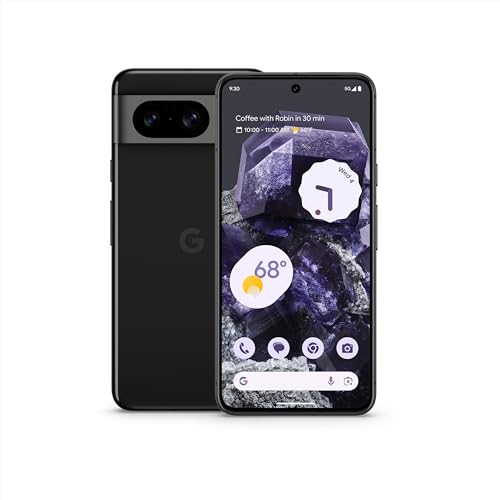
Pixel 8 is the helpful phone engineered by Google; the new Google Tensor G3 chip is custom-designed with Google AI for cutting-edge photo and video features and smarter ways to help[1]

Pixel 9 Pro XL with Gemini is the most powerful Pixel yet, and now comes in two sizes; it has a pro-level camera and it’s engineered by Google, so it gets the best of Google AI first
Screen Usage
Screen brightness impacts battery longevity. High brightness drains battery faster. Consider using adaptive brightness settings to adjust brightness automatically based on surroundings. Screen timeout settings can also make a difference; a shorter timeout reduces the time the display stays on when you’re not using it.
App Usage
Apps consume varying amounts of battery power. Background apps, especially those using location services or constantly refreshing, can significantly reduce battery life. Closing unused apps helps conserve energy. Checking battery usage statistics in settings reveals which apps consume the most power, enabling you to manage them effectively.
Battery Performance in Real-World Scenarios
Understanding how the Samsung Galaxy S7’s battery performs in daily situations helps you maximize its usage. Battery life can significantly change based on how you use your device.
Typical Usage Patterns
In everyday use, the Galaxy S7 provides impressive performance. For light users, engaging with social media, sending texts, and making calls can stretch battery life to a full day or more. If you use features like GPS or stream videos, expect around 8 to 10 hours before needing a recharge.
Multiple variables impact your experience. Background app activity, push notifications, and screen brightness all contribute to battery drain. You might avoid heavy gaming or prolonged video playback when you know you won’t have access to a charger.
- Social Media: Browsing can consume around 6-8% of battery per hour.
- Messaging: Sending texts typically uses about 2-3% per hour.
- Video Streaming: Streaming can quickly drain between 10-20% per hour.
Gaming Performance
Gaming puts a noticeable strain on the Galaxy S7’s battery. Titles with high-quality graphics or extensive gaming sessions can decrease your battery life rapidly. On average, you may experience around 4 to 6 hours of gaming before needing a charge.
To optimize gaming sessions, keep a few tips in mind:
- Lower Graphics Settings: Switching to lower settings can conserve battery.
- Close Background Apps: This minimizes additional battery usage.
- Enable Power Saving Mode: Activating this feature can extend playtime.
Overall, knowing how your Galaxy S7 performs in various scenarios helps you strategize your usage for extended battery life.
Comparison with Competitors
Comparing the Samsung Galaxy S7 battery performance with competitors provides a clearer understanding of its standing in the market. Similar devices often showcase varied battery capacities and life, affecting user experience.
Similar Devices
The Samsung Galaxy S7 competes with several smartphones that feature comparable battery capacities. Devices like the iPhone 7, which has a 1,960 mAh battery, offer lesser capacity yet demonstrate efficient power management, achieving about 14 hours of internet usage. In contrast, the Google Pixel, equipped with a 2,770 mAh battery, delivers around 12 hours on Wi-Fi. Devices such as the OnePlus 3, boasting a larger 3,000 mAh battery, can provide longer usage times due to its optimized software, reaching up to 20 hours of talk time.
Battery Life Rankings
When ranking battery life, the Galaxy S7 typically positions favorably. For instance, based on various reviews, the S7 ranks alongside top performers. Here’s a comparison of battery life in hours across popular devices during typical usage:
| Device | Battery Capacity (mAh) | Talk Time (Hours) | Internet Usage (Hours) |
|---|---|---|---|
| Samsung Galaxy S7 | 3,000 | 22 | 15 |
| iPhone 7 | 1,960 | 14 | 13 |
| Google Pixel | 2,770 | 17 | 12 |
| OnePlus 3 | 3,000 | 20 | 16 |
You can see that while the Galaxy S7’s capacity is comparable to others, its performance in real-world usage often gives it an edge, especially for heavy tasks like video streaming or gaming. Battery management techniques specific to the S7 can further enhance its performance, putting it ahead in everyday use cases. Understanding these comparisons helps you choose a device that aligns with your specific battery life needs.
Tips to Extend Samsung Galaxy S7 Battery Life
- Adjust Screen Brightness: Lower the screen brightness manually or enable adaptive brightness. Automatic adjustments save battery by adapting to surroundings.
- Limit Background Processes: Close apps running in the background. Use the settings menu to check which apps consume the most power.
- Turn Off Unused Features: Disable Wi-Fi, Bluetooth, and mobile data when not in use. These features keep searching for connections, draining battery life unnecessarily.
- Manage Location Services: Opt for “Battery Saving” mode in location settings. This reduces location tracking and prolongs battery duration.
- Utilize Power-Saving Mode: Activate power-saving mode in settings. This reduces device performance to extend battery life, particularly during critical times.
- Reduce Screen Timeout: Set a shorter screen timeout in display settings. This limits how long your screen stays illuminated when idle.
- Update Software Regularly: Keep your device’s software up to date. Updates often include optimization improvements for battery performance.
- Monitor App Usage: Regularly check battery usage statistics under settings. Identify and uninstall or disable apps that drain power significantly.
- Avoid Live Wallpapers: Use static wallpapers instead of live wallpapers. Animations consume more battery, especially with brighter displays.
- Limit Video Streaming: Download videos for offline viewing when possible. Streaming consumes significant battery and data, especially with high-definition content.
Following these tips can help maximize your Samsung Galaxy S7’s battery performance throughout the day.
Conclusion
You’ve got the tools to make the most of your Samsung Galaxy S7’s battery life. By understanding how different activities affect performance and implementing a few simple adjustments, you can keep your phone running smoothly throughout the day. Whether you’re a light user or someone who loves gaming or streaming, managing your settings can make a big difference.
Remember to monitor your app usage and adjust your screen settings for optimal battery longevity. With a little care, you can enjoy your Galaxy S7 without the constant worry of running out of power. Happy texting and streaming!
Frequently Asked Questions
What is the battery capacity of the Samsung Galaxy S7?
The Samsung Galaxy S7 features a 3,000 mAh battery. This battery is designed to provide solid performance, offering up to 22 hours of talk time and approximately 15 hours of internet use on Wi-Fi.
How does screen brightness affect battery life on the Galaxy S7?
Screen brightness significantly impacts battery longevity. Higher brightness drains the battery faster, so it’s recommended to use adaptive brightness settings and adjust timeout settings to conserve energy.
How long does the Galaxy S7 battery last during gaming?
Gaming on the Galaxy S7 can lead to a quick decrease in battery performance, averaging around 4 to 6 hours of playtime. Lowering graphics settings and closing background apps can help optimize battery life during gaming.
What activities consume the most battery on the Galaxy S7?
Activities like GPS usage and video streaming are the most battery-intensive, with navigation draining the battery to about 8 to 10 hours. Streaming video can consume 10-20% of the battery per hour.
How can I extend the battery life of my Galaxy S7?
To extend battery life, adjust screen brightness, limit background processes, turn off unused features like Wi-Fi and Bluetooth, manage location services, and regularly update software. Enabling power-saving mode also helps.
Is the Galaxy S7’s battery life competitive with other smartphones?
Yes, the Galaxy S7’s battery life is competitive with other devices. While its 3,000 mAh battery is comparable to some competitors, it performs favorably, especially during heavy tasks like video streaming or gaming.
