

Key Takeaways
- Battery Capacity: The Samsung Galaxy S10 is equipped with a 3,400 mAh battery, providing around 13 to 15 hours of battery life with moderate use.
- Usage Scenarios: Expect approximately 12 hours of video playback, 14 hours of web browsing, and an impressive 50 hours of music streaming on a single charge.
- Charging Options: The device features fast charging, allowing a full charge in about 70 minutes, along with options for wireless and reverse wireless charging.
- Factors Affecting Battery Life: Key factors like display brightness, app usage, and network connectivity significantly influence overall battery performance.
- Real-World Performance: Users report an average screen-on time of 5 to 8 hours, with varying results based on their specific usage habits and activities.
- Battery-Saving Tips: Adjusting settings such as screen brightness, limiting background apps, and enabling battery saver mode can help extend your device’s battery life effectively.
Ever found yourself frantically searching for a charger while your phone’s battery drops to single digits? You’re not alone. With so many devices competing for our attention, knowing how long your Samsung Galaxy S10 can last on a single charge is crucial.
Overview of Samsung Galaxy S10 Battery
The Samsung Galaxy S10 features a 3,400 mAh battery. This capacity supports a range of activities, from browsing social media to streaming videos. Users typically experience around 13 to 15 hours of battery life with moderate use. That includes web browsing, watching videos, and using apps.
Battery Life Scenarios
- Video Playback: The Galaxy S10 offers approximately 12 hours of video playback. This is ideal for watching movies or shows during travel.
- Web Browsing: Expect about 14 hours of continuous web browsing on Wi-Fi. This makes it suitable for reading articles and researching online.
- Music Streaming: For music, you’ll get around 50 hours of playback. Listening to music on-the-go becomes hassle-free with this endurance.
Charging Options
The Galaxy S10 supports fast charging, allowing you to reach 100% in about 70 minutes. Wireless charging is also available, providing flexibility when you don’t want to deal with cables. The device has reverse wireless charging, letting you charge other Qi-compatible devices like earbuds.
Battery-Saving Tips
To extend battery life, consider these tips:
- Adjust Screen Brightness: Lowering brightness can significantly reduce power consumption.
- Limit Background Apps: Close apps running in the background to conserve energy.
- Enable Battery Saver Mode: Activate this mode for reduced performance but extended battery life in emergencies.
With an understanding of your Galaxy S10 battery’s capabilities and features, you can make better usage decisions throughout your day.
Factors Affecting Battery Life
Several factors influence the battery life of your Samsung Galaxy S10. Understanding these can help you maximize usage throughout the day.
Recommended Products

[FOR COMPATIBLE MODEL] -- Contains the instruction to guide you step by step installation, and we have professional engineers to answer all your questions about the repair process. Please verify your old battery part number and model before purchasing this replacement battery. Compatible with Samsung Galaxy S10+ SM-G975, EB-BG975ABU, EB-BG975ABE, G975A, G975T, G975V, G975P, G975R4 ★NOT FOR Samsung Galaxy S10e/ S10/ Note 10/ Note 10 Plus★

COMPATIBILITY: This battery only fits for Samsung Galaxy S10, SM-G973F, SM-G973U, SM-G973W, SM-G973U1, SM-G9730, SM-G973N, SM-G973X, SCV41, SM-G973C. Please carefully confirm your phone model before purchase.

【Compatible Model】:This Battery Model is EB-BG973ABU,Compatible with Samsung Galaxy S10, SM-G973F, SM-G973U, SM-G973W, SM-G973U1, SM-G9730, SM-G973N, SM-G973X, SCV41, SM-G973C series. NOT work for Galaxy S10 Plus.Please confirm your phone model and your old battery part number before placing an order.
Display Brightness and Settings
Display brightness significantly impacts battery life. Higher brightness levels drain the battery faster. You can reduce brightness manually or enable adaptive brightness, which automatically adjusts based on your environment. Setting the screen timeout to a shorter duration also conserves energy.
App Usage and Background Processes
App usage plays a crucial role in battery consumption. Apps running in the background, especially those that refresh frequently, can deplete battery life. Close unused apps and limit notifications. For instance, social media and streaming apps often run background processes that consume power. Regularly check the battery usage in settings to identify power-hungry apps.
Network Connectivity
Network connectivity affects battery performance, too. Poor signal strength leads to higher battery drain as your phone works harder to maintain a connection. If you’re in an area with weak signals, consider switching to airplane mode when you don’t need connectivity. Using Wi-Fi instead of cellular data can also extend battery life, as Wi-Fi generally consumes less power.
Battery Performance in Real-World Usage
Understanding how the Samsung Galaxy S10 battery performs in real-world scenarios helps you manage your device usage effectively. The battery life can vary based on several factors, including your habits and settings.
Average Screen-On Time
Average screen-on time for the Samsung Galaxy S10 ranges from 5 to 8 hours. This variability depends largely on how you use your phone. For instance, using battery-intensive apps like games or high-resolution videos can decrease this time significantly. To maximize your screen-on time, consider these tips:
- Lower Brightness: Adjust brightness to a comfortable level.
- Limit Background Processes: Close unused apps regularly.
- Use Dark Mode: Enable dark mode to save battery on Super AMOLED displays.
Usage Scenarios
Different usage scenarios can affect your battery life differently. Here are some examples:
- Social Media Browsing: Regularly checking apps like Facebook and Instagram may provide around 8 hours of battery life, depending on notifications and auto-play settings.
- Video Streaming: Streaming services like Netflix typically consume more power. Expect around 12 hours of video playback under optimal conditions.
- Voice Calls: Using your phone primarily for calls can extend battery life. You might achieve up to 24 hours on a full charge when limiting screen time.
- Gaming: Engaging in graphically intensive games can drain the battery in about 4 to 6 hours, depending on game intensity and settings.
By adjusting your usage habits according to these scenarios, you can extend your smartphone’s battery life efficiently.
Comparison with Other Smartphones
Understanding how the Samsung Galaxy S10’s battery life stacks up against other popular smartphones helps you make informed decisions about your device choice.
Recommended Products

[PLS CONFIRM DEVICE MODEL] --- Contains the instruction to guide you step by step installation, and we have professional engineers to answer all your questions about the repair process. Please verify your old battery part number and model before purchasing this replacement battery. Compatible with Galaxy S10 SM-G973, EB-BG973ABU, EB-BG973ABE, G973A, G973T, G973V, G973P, G973R4 ★NOT FOR Galaxy S10e/ S10 Plus/ Note 10/ Note 10 Plus★

Compatible Phone Model: This battery kit is specifically designed for Samsung Galaxy S10 (with model SM-G973 series), NOT work for Galaxy S10 Plus/S10 5G, please double confirm your phone model before purchasing

【Compatible Model】It is compatible with Samsung Galaxy S10 SM-G973, EB-BG973ABU, EB-BG973ABE, G973A, G973T, G973V, G973P, G973R4. Not for S10 Plus. Please double identify check your phone model matches before purchasing the battery.
Battery Specs of Competitors
Many flagship smartphones offer similar battery specs, yet differences exist that can impact your usage.
| Smartphone | Battery Capacity | Web Browsing Time | Video Playback Time | Music Streaming Time |
|---|---|---|---|---|
| Samsung Galaxy S10 | 3,400 mAh | 14 hours | 12 hours | 50 hours |
| iPhone 11 | 3,110 mAh | 11 hours | 10 hours | 48 hours |
| Google Pixel 4 | 2,800 mAh | 11 hours | 9 hours | 40 hours |
| OnePlus 7T | 3,800 mAh | 15 hours | 13 hours | 60 hours |
| Xiaomi Mi 10 | 4,780 mAh | 16 hours | 15 hours | 70 hours |
The Galaxy S10 offers competitive performance, particularly in music streaming. However, the OnePlus 7T and Xiaomi Mi 10 excel with larger batteries that extend usage times across various applications.
User Experiences
User experiences reveal how battery life performs in real-world conditions.
- Users report the Galaxy S10 maintains robust battery longevity during regular tasks.
- Many experience around 8 hours of social media browsing without prompts for charging.
- Video streaming often yields approximately 10 to 12 hours based on brightness settings and network conditions.
- Users engaging in gaming notice varying results, with sessions lasting between 4 to 6 hours.
Feedback highlights the effectiveness of features like battery saver mode, which enhances battery longevity during extensive use. Balancing app usage and connectivity preferences also plays a vital role in optimizing the Galaxy S10’s battery life. Adjusting settings per individual usage patterns becomes crucial for the best experience.
Tips for Extending Battery Life
Extending the battery life of your Samsung Galaxy S10 starts with a few smart adjustments.
Recommended Products

HIGH CAPACITY --- This replacement battery for Samsung Galaxy S10 is 4500mAh high capacity, with more power than original battery.You can use your phone for a longer time!
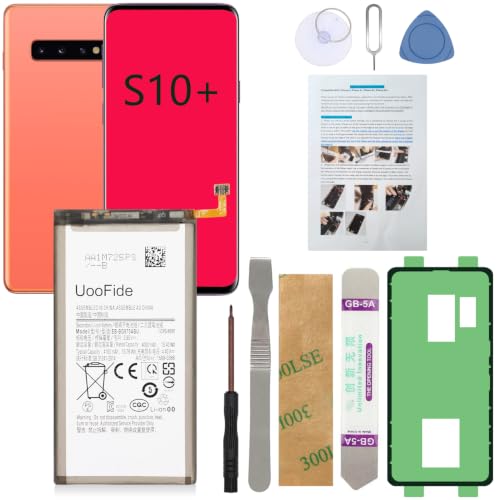
【Latest IC Chip Smart Power Housekeeper 】- Use the latest cost-effective smart IC chip on the market now which same as the original Galaxy S10+ battery, combined with the latest science and technology at the same time, so that the battery has an exclusive smart power housekeeper which can intelligently control and distribute the power, maximize power conversion rate. Longer power life without bothering about running out of power and shut down some apps all the time.

{COMPATIBLE MODELS}:This Replacement battery Compatible with Samsung Galaxy S10 PLUS (Model: SM-G975F G975U G975W G975U1 G9750 G975N ).
Settings Adjustments
Adjust settings to conserve battery. Lower the screen brightness manually. You can also enable adaptive brightness, which adjusts according to your environment. Set a shorter screen timeout, around 30 seconds, to prevent the display from staying on too long. Disable features like Always On Display if you don’t find them necessary. Location services can consume battery. Use them only when needed by going to Settings > Location and changing the mode to Battery saving. Lastly, turn off unnecessary vibrations in Settings > Sound & vibration.
Optimizing App Usage
Optimize your app usage for better battery performance. Close unused apps running in the background. This can be done through the recent apps menu. Limit notifications for social media apps, as constant alerts can drain power. For apps that refresh in the background, navigate to Settings > Apps and select “Data usage” to restrict background data. Consider using Lite versions of apps, such as Facebook Lite or Messenger Lite, which consume less battery. Regularly check for app updates, as developers often release improvements that enhance battery efficiency.
Conclusion
The Samsung Galaxy S10 offers a solid battery experience that can keep up with your daily demands. By understanding how to manage your usage and adjusting settings, you can make the most of its impressive battery life. Whether you’re streaming music or browsing social media, a few simple tweaks can help you extend that time even further.
With the right habits and features, you’ll find that your Galaxy S10 can easily keep you connected throughout the day. So go ahead and enjoy your device without constantly worrying about finding a charger. You’ve got this!
Frequently Asked Questions
What is the battery capacity of the Samsung Galaxy S10?
The Samsung Galaxy S10 has a battery capacity of 3,400 mAh, providing enough power for approximately 13 to 15 hours of moderate use.
How long does it take to charge the Samsung Galaxy S10 fully?
The Galaxy S10 uses fast charging technology, allowing it to reach 100% charge in about 70 minutes.
How long can I use the Galaxy S10 for video playback?
You can enjoy around 12 hours of video playback on the Samsung Galaxy S10 before needing to recharge.
What are some tips to extend the battery life of the Galaxy S10?
To extend battery life, lower screen brightness, enable battery saver mode, close unused apps, and restrict background processes.
How does the Galaxy S10’s battery life compare to other smartphones?
The Galaxy S10 offers competitive battery life, especially for music streaming, and outperforms devices like the iPhone 11 and Google Pixel 4 in certain usage scenarios.
Why is display brightness important for battery life?
Higher display brightness levels drain battery faster. Reducing brightness or enabling adaptive brightness can help conserve energy.
How does poor network connectivity affect battery life?
Poor signal strength leads to increased battery drain. Users can switch to airplane mode or prefer Wi-Fi to extend battery life in weak signal areas.
What is the average screen-on time for the Galaxy S10?
The average screen-on time for the Samsung Galaxy S10 falls between 5 to 8 hours, depending on individual usage habits and activities.
