

Key Takeaways
- Battery Capacity: The Samsung Galaxy S20 FE features a 4,500 mAh battery, providing robust performance suitable for a full day of varied usage.
- Screen Time: Users can expect up to 12 hours of screen time under optimal conditions, with performance lowering in scenarios like video streaming (around 8 hours) and gaming (approximately 6 hours).
- Standby and Usage: In standby mode, the device can last several days, making it reliable for less active periods, while web browsing typically maintains battery life for around 10 hours.
- Charging Options: Fast and wireless charging capabilities allow users to recharge their devices quickly, with 50% charge possible in about 30 minutes with a compatible charger.
- Battery Management Tips: Adjusting screen brightness, limiting background apps, and using battery saver modes can significantly improve overall battery longevity.
- Comparative Performance: Compared to other smartphones, the Galaxy S20 FE offers competitive battery life, making it a balanced option for users seeking efficient performance.
Ever found yourself running low on battery just when you need your phone the most? You’re not alone. Many Samsung Galaxy S20 FE users wonder how long their device can keep going before needing a recharge.
Overview of Samsung Galaxy S20 FE Battery
The Samsung Galaxy S20 FE features a robust 4,500 mAh battery, which supports various usage patterns. Depending on your activities, the battery can last a single day or more.
Battery Life Under Different Conditions
- Screen Time: The device can offer up to 12 hours of screen time on a full charge. This duration varies based on brightness settings and app usage.
- Standby Time: In standby mode, the battery retains power for several days. It’s ideal for users who check their phones occasionally.
- Usage Scenarios:
- Streaming Videos: Expect around 8 hours of video streaming. Factors like video quality influence battery consumption.
- Gaming: Engaging in intense mobile games may reduce battery life to about 6 hours. Settings and graphics quality play significant roles.
- Web Browsing: The battery lasts approximately 10 hours during regular web browsing sessions.
Charging Options
The Galaxy S20 FE supports fast charging and also wireless charging. The device can charge up to 50% in roughly 30 minutes using a fast charger. For best results, consider using Samsung-approved charging accessories.
Battery Management Tips
- Adjust Screen Brightness: Keeping brightness on auto can help extend battery life.
- Limit Background Apps: Close apps running in the background.
- Use Battery Saver Mode: Activate this mode when you anticipate low battery situations.
Understanding these features and tips helps you manage your Samsung Galaxy S20 FE battery effectively, ensuring it’s ready when you need it most.
Battery Capacity and Specifications
The Samsung Galaxy S20 FE’s battery performance stands out in the smartphone market. With a capacity of 4,500 mAh, it supports various user needs throughout the day.
Recommended Products

[PLS CONFIRM DEVICE MODEL] --- The repair kit contains the instruction to guide you step by step installation, and we have professional engineers to answer all your questions about the repair process. Please verify your old battery part number and model before purchasing this replacement battery. Compatible with Samsung Galaxy S20 FE SM-G781, G781V, G781A, G781T, G781P, G781R4, G781U, G781U1, EB-BG781ABY. ★NOT FOR Samsung Galaxy S20, S20+, S20 Ultra, Note 20, Note 20 Ultra★
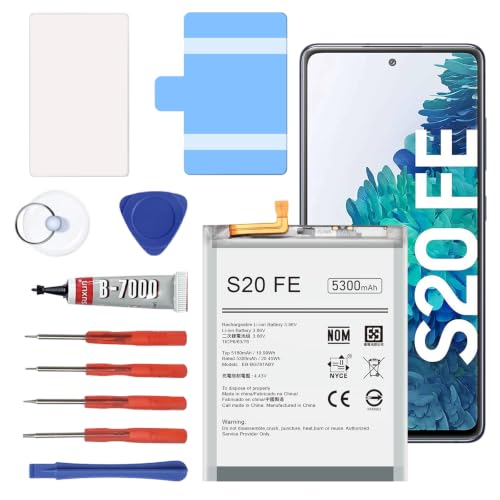
【5300mAh High Capacity & 0 Cycle】 Experience extended usage with our 5300mAh high-capacity replacement battery, providing significantly more power than standard batteries. Featuring a brand-new 0 cycle count.

{COMPATIBLE MODELS}:This Replacement battery Compatible with Samsung Galaxy S20 FE (Model: SM-G781B G781U G781W SM-A526 A526B/DS A5260 A526W).
Overview of Battery Specs
The Galaxy S20 FE includes features that enhance battery life. It delivers up to 12 hours of screen-on time, which is valuable for multitasking or streaming videos. Standby mode can extend a few days without needing a charge, while video streaming lasts around 8 hours. Intense gaming sessions may reach about 6 hours, and web browsing typically takes 10 hours before requiring a recharge. These specs allow for flexibility in daily use.
Comparison with Other Models
When comparing the Galaxy S20 FE to other smartphones, it shows competitive battery life. For instance, the Galaxy S20 Ultra, with its 5,000 mAh battery, offers slightly more longevity, especially under heavy use. However, the S20 FE’s optimized features ensure it remains efficient for most users. In contrast, models like the iPhone 12 have smaller batteries, leading to shorter screen time. Understanding these comparisons helps you choose the right device for your lifestyle.
Real-World Battery Life
The Samsung Galaxy S20 FE offers impressive battery performance in everyday situations. Understanding how it performs can help you maximize its potential.
Screen-On Time
The Galaxy S20 FE delivers up to 12 hours of screen-on time under optimal conditions. This duration varies based on your activities. Streaming videos can reduce the screen time to around 8 hours, while web browsing may extend it to about 10 hours. For tasks like gaming, expect about 6 hours before needing a charge. Adjusting settings such as screen brightness or resolution can further enhance your screen-on time.
Usage Scenarios
Your usage significantly influences how long the battery lasts. Typical scenarios include:
- Video Streaming: Streaming HD content on platforms like Netflix can drain the battery faster, achieving around 8 hours of playback.
- Web Browsing: Casual browsing can maximize battery life, lasting up to 10 hours on a single charge.
- Gaming: Playing graphically intense games typically yields around 6 hours, noting that demanding graphics require more power.
- Standby Mode: When inactive, the S20 FE can last several days without needing a recharge, making it reliable for those less active days.
By adjusting your usage habits and settings, you can optimize the battery life to fit your lifestyle.
Factors Affecting Battery Life
Battery life on your Samsung Galaxy S20 FE can fluctuate due to various factors. Understanding these elements helps you manage battery performance effectively.
Network Connectivity
Network connectivity significantly influences battery drain. Poor signal strength can cause your phone to work harder to maintain a connection. For instance, if you’re in an area with weak Wi-Fi or cellular signal, your device continually searches for a better signal, draining the battery faster. To conserve battery life, consider switching to Airplane mode in low-signal areas or disabling 5G when it’s not necessary.
App Usage
App usage habits play a crucial role in determining how long your battery lasts. Resource-intensive apps, such as video streaming services or mobile games, consume more power than simpler apps, like note-taking tools or basic messaging platforms. For example, streaming a movie on Netflix might reduce battery life to around 8 hours, while social media browsing could extend usage to about 10 hours. Regularly check your battery usage settings to identify which apps drain the most power. You can optimize your battery by limiting background activity and notifications for less critical apps.
Tips for Maximizing Battery Life
Maximizing the battery life of your Samsung Galaxy S20 FE helps ensure it’s ready for use whenever you need it. Here are effective strategies to achieve this.
Recommended Products

HIGH CAPACITY --- This replacement battery for Samsung Galaxy S20 FE is 5150mAh high capacity, with more power than original battery.You can use your phone for a longer time!
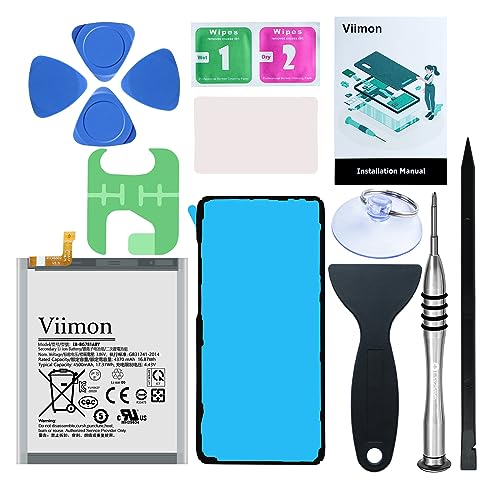
【Compatible Model】It is compatible with Samsung Galaxy S20 FE, A52 and A52S 5G, Model: S20 FE 5G SM-G781B G781U G781W SM-A526 A526B/DS A5260 A526W. Not for S20 and S20+ Plus. Please double identify and check your phone model matches before purchasing the battery.

COMPATIBILITY: This battery only fits for Samsung Galaxy S20 FE, SM-G781B, SM-G781B/DS, SM-G781U, SM-G781U1, SM-G781W, SM-G7810, SM-G781N, SM-G781V. Please carefully confirm your phone model before purchase.
Battery Saving Modes
Use the built-in battery saving modes to extend usage. The Galaxy S20 FE offers two modes:
- Medium Power Saving: Reduces screen brightness, limits background app activity, and restricts the performance of resource-intensive apps.
- Maximum Power Saving: Drastically reduces performance, disables most apps, and switches to a basic interface. This mode can significantly stretch battery life, especially when you’re running low.
Activate these modes via Settings > Battery and Device Care > Battery.
Optimizing Settings
Adjust settings to reduce battery drain without sacrificing functionality. Consider these adjustments:
- Lower Screen Brightness: Dim the screen or enable adaptive brightness to automatically adjust levels based on surroundings.
- Limit Background Data: Restrict background data for apps. Go to Settings > Apps, select an app, tap Mobile Data, and disable Background Data.
- Turn Off Always-On Display: If you don’t use this feature, disable it under Settings > Lock screen.
- Manage Connectivity: Turn off Wi-Fi, Bluetooth, and location services when not in use. Enable Airplane mode in low-signal areas to prevent extra battery drain.
- Update Apps: Ensure all apps are regularly updated. Developers often optimize apps for better battery usage.
By implementing these methods, your Samsung Galaxy S20 FE can last longer throughout the day, adapting to your needs more efficiently.
Conclusion
The Samsung Galaxy S20 FE offers impressive battery life that can keep up with your daily activities. With a little attention to your usage habits and some smart adjustments, you can maximize its potential. Whether you’re streaming videos or browsing the web, you’ll find it reliable and efficient.
By utilizing the built-in battery saving modes and managing your settings, you can easily extend its longevity. So go ahead and enjoy your device without the constant worry of running out of power. With the right strategies, your S20 FE can be a dependable companion throughout the day.
Frequently Asked Questions
How long does the Samsung Galaxy S20 FE battery last?
The Samsung Galaxy S20 FE features a 4,500 mAh battery that can typically last a full day with regular use. Depending on activities, users can expect up to 12 hours of screen time, around 8 hours of video streaming, approximately 6 hours of gaming, and about 10 hours of web browsing.
What are the charging options for the Galaxy S20 FE?
The Samsung Galaxy S20 FE offers several charging options, including fast charging and wireless charging. Fast charging allows for quicker recharges, while wireless charging provides added convenience for users who prefer a cable-free experience.
What tips can help extend the battery life of my Galaxy S20 FE?
To extend the battery life of your Galaxy S20 FE, you can lower screen brightness, limit background applications, and enable battery saver modes. Switching to Airplane mode in low-signal areas and regularly checking battery usage settings also help manage power consumption effectively.
How does the Galaxy S20 FE’s battery compare to other smartphones?
In comparison to other devices, the Galaxy S20 FE has a competitive battery performance. For example, while the Galaxy S20 Ultra has a slightly larger battery, it may be less optimized for efficiency, and the iPhone 12’s smaller battery results in shorter screen time.
What factors affect battery life on the Galaxy S20 FE?
Battery life on the Galaxy S20 FE can be impacted by factors such as network connectivity and app usage. Poor signal strength can drain the battery more quickly, while resource-intensive apps, like video streaming and gaming, consume more power than simpler applications. Regularly managing apps can help mitigate this.
