

Key Takeaways
- Battery Capacity: The Samsung A12 is equipped with a robust 5,000 mAh battery, generally providing up to 18 hours of typical usage on a single charge.
- Screen-On Time: Users can expect around 10 hours of continuous screen time, although power-intensive activities like gaming and video streaming can reduce this to 6-8 hours.
- Charging Efficiency: It takes approximately 2 hours to fully charge the device, with fast charging allowing up to 50% charge in about 30 minutes.
- Impact of Settings: Factors such as display brightness, network connectivity, and background apps significantly influence battery performance; optimizing these can enhance longevity.
- Battery Saver Tips: Enabling power-saving features, reducing screen brightness, and managing app usage effectively can help extend the battery life of your Samsung A12.
- Competitive Performance: When compared to similar devices, the A12 maintains solid battery performance, making it a reliable choice for budget smartphone users.
Ever found yourself scrambling for a charger halfway through your day? If you own a Samsung A12, you might be wondering just how long its battery really lasts. With so many smartphones out there boasting impressive battery life, it’s easy to feel uncertain about your device’s performance.
Overview of Samsung A12 Battery Life
The Samsung A12 features a 5,000 mAh battery, designed for extended usage. Generally, you can expect the battery to last up to 18 hours on a single charge with typical use. This duration covers routine activities such as browsing, social media, and streaming video.
Screen-On Time
For those who prioritize screen time, the A12 supports approximately 10 hours of continuous use. This usage includes watching videos, playing games, or browsing websites. When using power-intensive apps, battery life decreases significantly.
Charging Times
Charging the A12 takes around 2 hours with the included charger. If you use a fast charger, you may achieve up to 50% charge in about 30 minutes.
Factors Affecting Battery Life
Several factors can influence battery performance, including:
- Display Brightness: High brightness settings drain battery faster.
- Background Apps: Apps running in the background consume power.
- Network Connectivity: Poor signal strength can lead to increased battery usage as the phone works harder to maintain connections.
Battery Optimization Tips
To enhance battery life, consider these simple tips:
- Reduce Screen Brightness: Adjust it to a comfortable level.
- Limit Background Data: Restrict apps from using data when not in active use.
- Enable Battery Saver Mode: Activate this feature in settings during heavy usage days.
By understanding the Samsung A12 battery’s capabilities and following these recommendations, you can enjoy prolonged use without constant recharging.
Factors Influencing Battery Life
Battery life on the Samsung A12 varies due to several key factors. Understanding these elements helps you manage your device more effectively.
Screen On Time
Screen on time significantly impacts battery performance. Keeping your screen active drains the battery faster. For instance, using the device for gaming or video streaming consumes more power than checking texts or browsing simple websites. Adjusting the display’s brightness to a lower level or setting it to auto-brightness reduces battery consumption.
App Usage
App usage plays a critical role in battery longevity. Some apps are more power-hungry than others. Intensive apps like games or video editors can quickly deplete your battery. Regularly check which apps use the most battery life through the device’s settings. You can limit background activity by closing apps you don’t use often or disabling auto-updates. This approach helps extend your overall usage time.
Network Connectivity
Network connectivity also affects battery drain. Poor signal strength causes your phone to work harder, leading to faster battery depletion. If you find yourself in an area with weak reception, consider switching to airplane mode until you return to a better signal. Additionally, turning off Wi-Fi and Bluetooth when not in use conserves power. Using 4G or 5G networks often consumes more battery compared to slower connections, so switch to a Wi-Fi connection whenever possible.
Real-World Battery Performance
The Samsung A12 battery delivers solid performance across various usage scenarios. Understanding how it fares in everyday conditions helps users set realistic expectations.
Recommended Products

🎋【Compatible Model】EB-BA217ABY Replacement Battery for Samsung Galaxy A12 SM-A125F SM-A125U SM-A125M[Note: Not for Galaxy A11,Galaxy A13 or other Phone Models]

【Quality Assurance】 All items were thoroughly tested and packed before shipping. Brand new and high quality. Perfect for EB-BA217ABY battery.

✅【6200mAh MEGA CAPACITY】 Supercharge your Samsung Galaxy A12 with this massive 6200mAh upgraded battery – far exceeding the original capacity. Enjoy of regular usage or marathon streaming and gaming sessions without hunting for a charger. Ideal for heavy users, travelers, and anyone tired of daily recharging.
Average Usage Scenarios
The Samsung A12’s 5,000 mAh battery maintains impressive longevity with typical use. For activities like browsing, social media, and video watching, you can expect around 18 hours of life. Under moderate screen time, you may enjoy approximately 10 hours of continuous use. Engaging in power-intensive tasks, such as gaming or streaming HD videos, can reduce this significantly, often down to 6-8 hours.
Additionally, using features like GPS and high screen brightness drains the battery faster. To maximize battery life during these activities, consider lowering the brightness or turning off unnecessary location services when they’re not needed.
Comparison with Similar Devices
When comparing the Samsung A12 to similar devices, the battery performance stands out. Competing smartphones with comparable specifications, like the Motorola G Power and the Xiaomi Redmi Note 10, offer similar battery capacities. However, practical usage reports show that the A12’s battery management keeps it competitive.
Many users report that the A12 maintains better battery life during standard tasks than competitors. While the Motorola G Power can provide outstanding battery longevity, it often depends on specific usage habits. Ultimately, the A12 balances performance against a reasonable price, making it a reliable choice in the budget smartphone market.
Tips to Extend Battery Life
You can enhance your Samsung A12’s battery longevity with simple adjustments and settings. Implementing these tips ensures you get the most out of your device.
Recommended Products

[Compatibility] Only for samsung galaxy A12 screen replacement , model ( A125 A127) ,6.5 inch ,with Frame . Please confirm the model before purchasing. Note: No Repair Tools Included

Pack of 3 tempered glass screen protectors for Samsung Galaxy A12, Galaxy A02s. Very long service life: 9 times more resistant to scratches. Harder than a knife! High responsiveness, high transparency
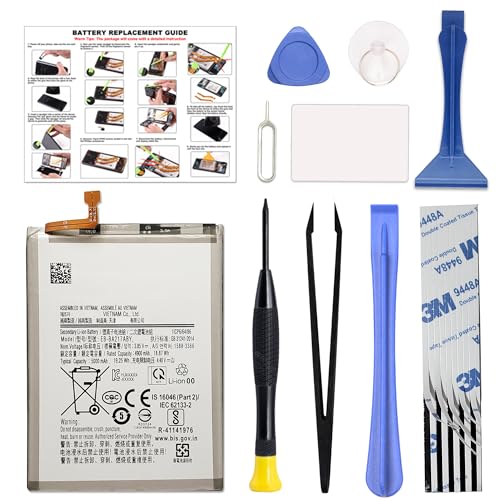
COMPATIBILITY: This battery only fits for Samsung Galaxy A12 & A21s. Please carefully confirm your phone model before purchase.
Power Saving Modes
Utilize the built-in power-saving modes to extend your battery life effectively. The Samsung A12 includes a battery saver option that reduces performance and limits background activity. Activate this mode by going to Settings > Battery and Device Care > Battery > Power Saving Mode. You can choose between mild or moderate restrictions based on your needs.
Optimizing Settings
Adjust several settings to maximize efficiency. Start by lowering your screen brightness through Settings > Display > Brightness. Alternatively, enable Adaptive brightness for automatic adjustments based on your environment. Turn off features like Always-On Display and vibrations to save additional power.
Disable unnecessary connectivity features as well. Go to Settings > Connections and switch off Wi-Fi, Bluetooth, and mobile data when they’re not in use. Also, limit background data by navigating to Settings > Connections > Data usage > Mobile data usage and restricting apps that contribute to battery drain.
Managing your app usage effectively contributes significantly to conserving battery life. Identify power-hungry applications by visiting Settings > Battery > Battery Usage. If certain apps consistently use excessive power, consider uninstalling them or looking for alternatives.
Conclusion
Your Samsung A12’s battery life can truly keep up with your daily activities. With a solid 5,000 mAh battery you can enjoy hours of browsing and streaming without constantly worrying about recharging.
By being mindful of your usage habits and making a few adjustments like lowering screen brightness or turning off background apps you can extend that battery life even further.
So whether you’re gaming on the go or catching up on your favorite shows you can feel confident knowing your A12 is designed to last. Enjoy your device and all the freedom that comes with it!
Frequently Asked Questions
What is the battery capacity of the Samsung A12?
The Samsung A12 comes with a robust 5,000 mAh battery, designed to provide extended usage throughout the day.
How long does the Samsung A12 battery last on a single charge?
Under typical usage, the Samsung A12 battery can last up to 18 hours, while continuous use can provide around 10 hours of screen time.
How long does it take to fully charge the Samsung A12?
It takes approximately 2 hours to fully charge the Samsung A12, and the device also supports fast charging options.
What factors affect the battery life of the Samsung A12?
Battery life can be influenced by display brightness, background app activity, and network connectivity, which can drain the battery faster if not managed properly.
How can I maximize my Samsung A12 battery life?
To enhance battery longevity, reduce screen brightness, limit background data usage, enable battery saver mode, and monitor app usage to identify those that consume more power.
How does the Samsung A12 compare to other budget smartphones in battery performance?
The Samsung A12 generally outperforms similar budget devices, like the Motorola G Power and Xiaomi Redmi Note 10, especially in standard usage scenarios.
Is the Samsung A12 suitable for gaming use?
While the Samsung A12 can handle gaming, it’s important to note that power-intensive games will drain the battery faster, so users should adjust settings as needed to manage longevity.
