

Key Takeaways
- Samsung S6 Battery Overview: The Galaxy S6 features a non-removable lithium-ion battery with a capacity of 2,550 mAh, necessitating specific removal procedures for troubleshooting or replacement.
- Signs of Battery Issues: Common indicators that the battery may need replacement include rapid draining, inability to hold a charge, or physical swelling.
- Required Tools: Essential tools for battery removal are a heat gun or hair dryer, plastic prying tool, Phillips screwdriver, and SIM card removal tool to ensure a smooth process.
- Step-by-Step Removal Process: The battery removal involves powering off the device, applying heat to soften the adhesive, carefully prying off the back cover, unscrewing the battery assembly, and disconnecting the battery.
- Choosing a Replacement Battery: Select a high-quality replacement battery, specifically designed for the Galaxy S6, and verify its specifications to avoid potential damage.
- Proper Disposal of Old Batteries: Dispose of old lithium-ion batteries responsibly by recycling them at designated facilities or during community hazardous waste events to protect the environment.
Have you ever found yourself in a situation where your Samsung S6 just won’t turn on, and you suspect it might be the battery? You’re not alone. Many users face this frustrating issue, and knowing how to remove the battery can be a game-changer for troubleshooting or replacing it.
Overview Of Samsung S6 Battery
The Samsung Galaxy S6 features a non-removable battery, which means you can’t simply pop it out like older models. Instead, it’s integrated into the device for a sleeker design.
Key Specifications
- Type: Lithium-ion
- Capacity: 2,550 mAh
- Talk Time: Up to 17 hours on 3G
- Standby Time: Up to 250 hours
Battery Replacement Signs
You may need to replace the battery if you notice:
- Rapid draining despite charging
- Inability to hold a charge
- Physical swelling or heat during use
Tools Needed for Battery Removal
To safely remove the battery, gather these tools:
- Heat gun or hair dryer
- Plastic prying tool
- Phillips screwdriver
- SIM card removal tool
Steps for Battery Removal
- Power Off: Ensure your Samsung S6 is completely powered off.
- Heat Application: Use a heat gun or hair dryer to warm the edges to soften the adhesive.
- Prying Open: With a plastic prying tool, gently lift the back cover off. Take care to avoid damaging the internal components.
- Unscrewing: Remove screws that secure the battery assembly. Use the Phillips screwdriver for this task.
- Disconnecting: Detach the battery connector from the motherboard using the plastic prying tool.
- Removing: After disconnection, extract the battery from the device.
Important Notes
- Handle components delicately to avoid damage.
- Dispose of the old battery per local regulations.
- Restart your device after installing a new battery to ensure proper functionality.
Knowing how to handle your Samsung S6 battery lets you troubleshoot effectively and potentially extend the device’s lifespan.
Tools Required For Battery Removal
Gathering the right tools makes removing the battery from your Samsung S6 easier and safer. Here’s a detailed list to help you prepare.
Recommended Products

🌈【Wide Application & Universal】: This 22 in 1 opening pry tools set is designed for assemble or disassemble all your electric devices. Suitable for iPhone 14 13 12 11 Pro Max / XS / XR / X / 8 Plus / 7 Plus / 7 / 8 / 6S / 6S Plus, iPad, iPod, android phone, laptop, tablet, smartwatch, Macbook, computer, LCD screen, battery, camera, game consoles, speaker and more. Whether you're a professional or a amateur, this set can repair anything you need.
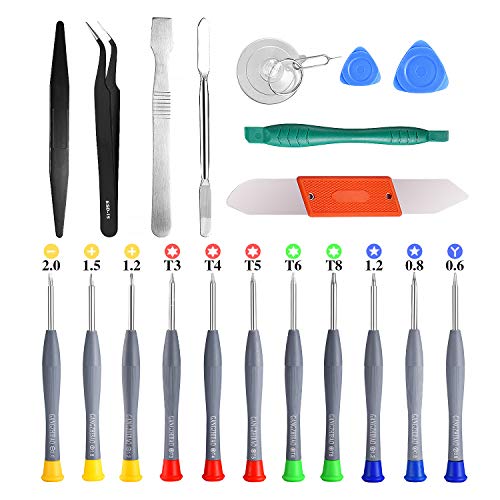
PentalobeScrewdriver Set: p5 Pentalobe screwdriver,PH000 Phillips Screwdriver, Pentalobe T5 Pentalobe T6 Screwdrivers Repair Tool Kit for Apple MacBook Mac Retina Pro Air,T5 for Macbook air & pro repair, it can remove fan screws, including SSD or hard disk replacement. The improved T5 has curved corner tip, which are different from the previous straight corner tip, It will not damage the screws and is more durable

{COMPATIBLE MODELS}:This Replacement battery Compatible with Samsung Galaxy S6 (Model: SM-G920 G920V G920T G920A G920P G920I G920F S906L).
Essential Tools
- Heat Gun or Hair Dryer: Use this for softening the adhesive around the back cover. Apply heat for about 30 seconds, keeping it at a safe distance to avoid damaging the phone.
- Plastic Prying Tool: This helps you gently separate the back cover from the device without scratching it. Avoid using metal tools that might cause damage.
- Phillips Screwdriver: Required for unscrewing the battery assembly. Ensure you have the right size for a snug fit to prevent stripping the screws.
- SIM Card Removal Tool: This tool assists in removing the SIM card tray, giving you more access if needed.
Optional Tools
- Tweezers: Handy for maneuvering small components within the device. They provide precision when handling connectors and screws.
- Anti-Static Wrist Strap: Wearing this can prevent static electricity from damaging sensitive components. Attach it to a grounded surface while working.
- Small Zip Lock Bags: Use these for organizing screws and small parts. Label them to keep track of which screws belong where.
- Suction Cup Tool: Helpful for pulling off the back cover, especially when adhesive is stubborn. It creates enough grip without causing harm.
Having these tools on hand ensures a smooth battery removal process. Make sure to work carefully and stay organized throughout the steps to avoid any mishaps.
Step-By-Step Guide To Remove Battery
Follow this guide to remove the battery safely from your Samsung S6.
Recommended Products
![SHENMZ Galaxy S6 Battery,[Upgraded] 5800mAh High Capacity Li-Polymer EB-BG920ABE Replacement Battery for Samsung Galaxy S6 SM-G920 G920V G920T G920A G920P G920I G920F S906L with Repair Tools](https://m.media-amazon.com/images/I/41pc-APX7ML._SL500_.jpg)
✾【HIGH QUALITY, TRUSTWORTHY PREMIUM BATTERY】:This Upgraded S6 battery uses Grade A+ rated battery cells with CE and ROHS certification,ensure last over 1200 charge cycles. Multiple-protection for safer operation for both user and devices,build-in microchip to prevent over-charging,over-discharging and over-heating.

Compatible with: Fit for Samsung Galaxy Tab S6 10.5” SM-T860 T865, Samsung Galaxy Tab S5e 10.5” SM-T720 T725, please check the model of your tablet before purchase. Compatible Part Numbers: EB-BT725ABU. Installation Notice: Replacing battery for Samsung Galaxy Tab S6 / S5E requires careful disassembly. Please watch professional teardown video before installation. Improper installation may result in charging recognition error.

✔ Compatible With: Samsung Galaxy S7 S8 S8 Plus S9 S9 Plus S10,S10 Plus,S20,S20+,S20 Ultra ,S21,S21 Plus,S21 Ultra,Galaxy S22,S22 Plus,S22 Ultra,S23,S23 Ultra,Note8, Note 9,Note 10,Note 10 Plus,Note 20,Note 20 Ultra,Galaxy Z Flip 2 3 4 5,Galaxy Z Fold 2 3 4 5and other Samsung Galaxy Models
Power Off Your Device
Start by powering off your device. Tap and hold the power button until the shutdown menu appears. Select “Power Off” and confirm. Ensure the phone is completely off before proceeding.
Remove The Back Cover
Next, prepare to remove the back cover. Use a heat gun or a hair dryer to warm up the edges for about 30 seconds. This softens the adhesive. Use a plastic prying tool to carefully slide between the back cover and the device. Gently lift the cover, starting from one corner, and work your way around until it pops off.
Take Out The Battery
Once the back cover is removed, locate the battery. Use a Phillips screwdriver to unscrew the battery assembly. Disconnect the battery connector by gently pulling it away. Carefully lift the battery out of its compartment. Handle it delicately to avoid damage.
Remember to recycle the old battery according to local regulations.
Tips For Battery Replacement
Replacing the battery in your Samsung S6 involves careful selection and proper disposal practices to ensure optimal performance and environmental safety.
Recommended Products

【COMPATIBLE MODELS】Compatible with Samsung Galaxy S6. Battery Model: EB-BG920ABE. Fits for SM-G920, G920F, G920A, G920P series. NOT compatible with Galaxy S6 Enge,Galaxy S6 Enge+ or other Galaxy models. Please double check your phone model before purchasing the battery.
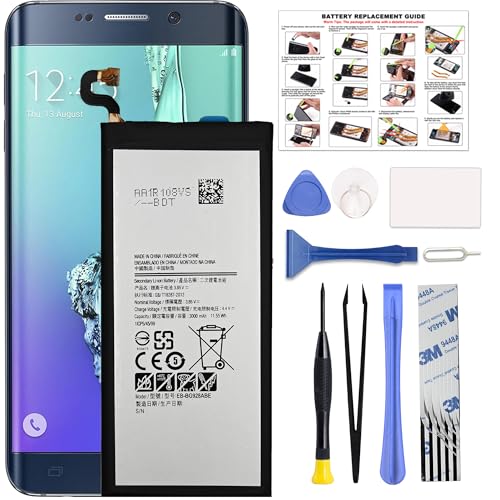
COMPATIBILITY: This battery only fits for Samsung Galaxy S6 Edge+ Plus, SM-G928A, SM-G928F, SM-G928A, SM-G928T, G928I, SM-G928G, SM-G928C, SM-G928I, SCV31, SM-G9280, SM-G928L, SM-G928S, SM-G928K, SM-G928W8. Please carefully confirm your phone model before purchase.

[Compatible Models]: Galaxy S5 (EB-BG900BBC) Battery has the same performance as a brand new original battery. Please verify your old battery part number and model number before purchasing this replacement battery. For Galaxy S5,AT&T SM-G900P,SM-G900T G900A,G900F,G900H,G900R4,I9600,SM-G900V Model
Choosing The Right Replacement Battery
Choose a high-quality replacement battery to ensure reliability and longevity. Opt for batteries specifically designed for the Galaxy S6. Look for brands with positive reviews and a solid warranty. Verify the battery’s specifications, such as the 2,550 mAh capacity. Confirm it’s a lithium-ion battery to match your device’s requirements. Avoid generic batteries that lack specifications, as they may cause damage or reduce performance.
Proper Disposal Of Old Battery
Dispose of your old battery responsibly to protect the environment. Locate a local recycling facility that accepts lithium-ion batteries. Many electronics stores offer recycling drop-off services. Some municipalities host hazardous waste collection events for battery disposal. Never throw batteries in regular trash, as they can leak harmful chemicals. Always check local regulations to ensure proper disposal methods are followed.
Conclusion
Knowing how to remove the battery from your Samsung S6 can save you time and frustration. Whether you’re troubleshooting issues or planning to replace an old battery, following the right steps makes all the difference.
Remember to handle everything with care and choose a quality replacement battery to keep your device running smoothly. Don’t forget to recycle your old battery responsibly to help protect the environment. With a little patience and the right tools, you’ll have your phone back in action in no time. Enjoy the peace of mind that comes with understanding your device better!
Frequently Asked Questions
What should I do if my Samsung S6 won’t turn on?
If your Samsung S6 won’t turn on, try charging the device for at least 30 minutes. If there’s no response, it could be a battery issue. Consider removing the battery or performing a soft reset by pressing the Power and Volume Down buttons together for about 10 seconds.
How can I tell if my Samsung S6 battery needs to be replaced?
Signs that your Samsung S6 battery may need replacement include rapid battery drain, the device not holding a charge, and physical swelling or heat during usage. If you notice any of these symptoms, consider replacing the battery.
Is it possible to remove the Samsung S6 battery?
While the Samsung S6 has a non-removable battery, it can be removed with the right tools and careful handling. Following specific steps can help safely extract the battery for troubleshooting or replacement.
What tools do I need to remove the Samsung S6 battery?
Essential tools include a heat gun or hair dryer, a plastic prying tool, a Phillips screwdriver, and a SIM card removal tool. Optional tools like tweezers and a suction cup can also assist in the process.
How do I safely remove the battery from a Samsung S6?
To safely remove the battery from a Samsung S6, power off the device, apply heat around the back cover to soften the adhesive, gently pry it open, unscrew and disconnect the battery connector, and carefully lift out the battery.
What should I do with the old battery after removal?
After removing the old battery, dispose of it responsibly by recycling. Locate local recycling facilities or participate in hazardous waste collection events to ensure proper disposal and protect the environment.
How do I choose a replacement battery for my Samsung S6?
Select a high-quality replacement battery specifically designed for the Samsung S6. Verify compatibility and specifications to avoid generic options, which may damage your device or lead to suboptimal performance.
Can I enhance the battery removal process?
Yes! Using optional tools like tweezers, an anti-static wrist strap, and small zip lock bags for organizing screws can make the battery removal process smoother and more organized.
