

Key Takeaways
- Vivid Mode Enhances Visuals: This feature boosts color saturation and contrast, providing a more immersive experience, particularly for media consumption.
- Increased Battery Consumption: Activating Vivid Mode may lead to a battery drain of 10% to 20% due to higher brightness and color saturation, especially with dynamic content like videos.
- Influencing Factors: Battery life is affected by screen brightness, content type, display technology (like OLED), background apps, and device settings.
- User Experiences Vary: Many users appreciate the vibrant colors of Vivid Mode but report a noticeable drop in battery life during extended use, particularly when streaming content.
- Tips for Management: To mitigate battery drain, consider lowering screen brightness, setting shorter screen timeouts, switching to standard mode when possible, and enabling adaptive brightness.
- Optimize Device Settings: Closing background apps, disabling unnecessary features, using battery saver mode, and keeping your device updated can further enhance battery performance.
Ever wondered if that eye-catching vivid mode on your device is draining your battery faster? You’re not alone. Many people enjoy the vibrant colors and sharp details but worry about the impact on battery life.
Understanding Vivid Mode
Vivid Mode enhances the visual experience on your device. This mode boosts color saturation and contrast, making images and videos appear more vibrant and engaging.
What Is Vivid Mode?
Vivid Mode is a display setting available on many smartphones and tablets. It alters the color profile, resulting in richer colors and deeper blacks. For instance, images in Vivid Mode may show more vivid reds and blues compared to standard settings. This mode often provides a more immersive viewing experience, especially for media consumption.
Benefits of Using Vivid Mode
Using Vivid Mode offers several advantages:
- Enhanced Visual Experience: Colors appear more intense, drawing your attention to details.
- Improved Media Consumption: Movies and games may become more captivating, providing an enjoyable experience.
- Better Readability in Bright Light: On sunny days, this mode can enhance text visibility by increasing contrast and color depth.
Employing Vivid Mode can significantly transform how you interact with your content, keeping your viewing experience exciting.
Exploring Battery Consumption
Understanding how vivid mode affects battery life requires a look into consumption measurement and the various factors that contribute to battery performance.
How Battery Consumption Is Measured
Battery consumption is typically measured in milliampere-hours (mAh). This metric indicates a battery’s capacity to provide energy over time. For example, a battery rated at 3000 mAh can supply 3000 milliamps of current for one hour. To assess how vivid mode impacts battery life, testing often involves comparing usage in standard mode and vivid mode under similar conditions. Observing how long a device lasts during activities, such as video playback or web browsing, reveals differences in power intake.
Factors Influencing Battery Life
Several factors influence battery life when using vivid mode:
- Screen Brightness: Higher brightness exacerbates battery drain. Vivid mode generally requires more power due to enhanced color saturation.
- Content Type: Watching videos or playing games that leverage vivid mode can deplete the battery faster compared to static images or text.
- Display Technology: OLED displays use less power displaying black, while vivid mode may increase overall color brightness, impacting consumption.
- Background Apps: Active applications consume battery, regardless of the display mode. Background processes can amplify the impact of vivid mode.
- Device Settings: Features like adaptive brightness or battery-saving modes may help manage consumption while using vivid mode.
Understanding these factors allows you to make informed decisions on using vivid mode effectively without overly stressing your device’s battery.
Does Vivid Mode Use More Battery?
Concerns about battery drain when using Vivid Mode on devices are common. Understanding how this feature affects battery life helps manage usage effectively.
Recommended Products

Clamp onto the battery terminals and read the vehicle's dark current after the systems have gone to sleep. Remove fuses one by one — the circuit that drops the reading is your drain source. No more blind guessing.
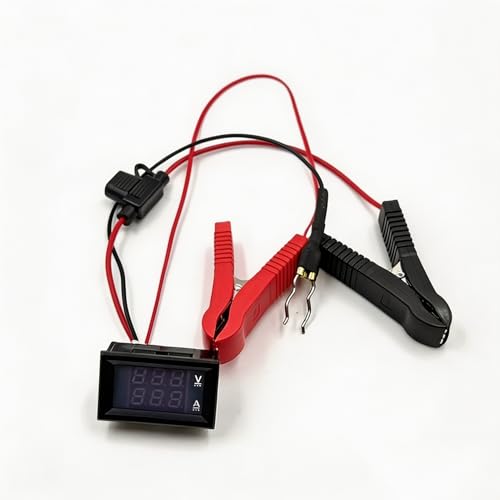
NO-DISCONNECT SAFE TESTING: Innovative design allows you to track down parasitic battery drain without disconnecting the vehicle's electrical system. This completely prevents vehicle computer (ECU) resets, loss of radio codes, and anti-theft system lockouts, ensuring a hassle-free diagnostic process.

Catch Battery Problems Early: Featured in two videos by Project Farm, a popular YouTube channel with millions of subscribers, the ANCEL BA101 helps you quickly spot battery issues before they leave you stranded. It provides easy-to-understand readings for State of Health (SOH), State of Charge (SOC), voltage, current, CCA, plus cranking and charging system tests, so you can better understand your battery and help avoid unexpected breakdowns
Research Findings
Studies indicate that Vivid Mode can impact battery consumption, mainly due to increased screen brightness and enhanced color saturation. A comparison of standard and Vivid Modes reveals that devices tend to use 10% to 20% more battery when Vivid Mode is activated. Furthermore, tests show that displaying dynamic content, like videos or games, in Vivid Mode leads to even higher battery usage.
User Experiences and Reports
User reports often highlight mixed experiences with Vivid Mode and battery life. Many users enjoy the vibrant colors but notice a slight drop in battery life, especially during prolonged use. Real-world examples demonstrate that streaming movies in Vivid Mode can cause noticeable drain, sometimes reducing battery life by 30% compared to standard mode.
For optimal usage, consider enabling features like adaptive brightness, which adjusts screen brightness based on ambient light. This feature can help mitigate battery drainage while allowing you to enjoy the visual enhancements of Vivid Mode.
Tips for Managing Battery Life
Managing battery life effectively can enhance your experience with vivid mode while preventing excessive drain.
Recommended Products

Three Color Temperatures & Slide Dimmer: The rechargeable table lamp offers three adjustable color temperatures—3000K (warm), 4000K (neutral), and 6000K (cool)—to match any mood. Simply touch the slider dimmer to adjust the brightness from 10% to 100%, with instant response within 0.1 seconds. Whether you need a soft, relaxing glow or a bright, focused light for reading or working, this lamp provides seamless control, allowing you to create the perfect lighting environment for every occasion.

Remote Temperature Control: Manage your RV’s thermostat from anywhere using a smartphone app or wireless remote, making it easy to adjust temps without leaving your seat.

Adjusting Display Settings
Adjust display settings to optimize battery performance.
- Lower Brightness: Reducing brightness decreases power consumption. Lower it to a comfortable level, especially in dark environments.
- Set Screen Timeout: Choose a shorter screen timeout to help conserve energy. A five or ten-second timeout is often sufficient.
- Switch to Standard Mode: When vivid mode isn’t necessary, switch to standard mode. This option typically uses less battery while still providing adequate visibility.
- Enable Adaptive Brightness: This feature automatically adjusts screen brightness based on your surroundings. It reduces battery usage in dim conditions and enhances it in bright light.
Other Tips for Optimizing Battery Performance
Implement additional strategies to boost your device’s battery efficiency.
- Close Background Apps: Close unused apps running in the background. These can drain battery by consuming memory and processor resources.
- Disable Unnecessary Features: Turn off features like Bluetooth and GPS when not in use. These services consume power continuously if left active.
- Use Battery Saver Mode: Activate this mode when battery life is low. It limits background activity and adjusts settings to maximize power.
- Update Your Device: Ensure your operating system and apps are current. Updates often include optimizations that improve battery performance.
Utilizing these tips can significantly enhance battery life without sacrificing the benefits of vivid mode.
Conclusion
Using Vivid Mode can certainly enhance your viewing experience with its vibrant colors and improved contrast. However it’s important to be mindful of its impact on battery life. While you might enjoy those rich visuals you could notice a slight increase in battery consumption, especially during intense activities like streaming or gaming.
By implementing a few simple strategies like adjusting brightness and using adaptive features you can still enjoy Vivid Mode without draining your battery too quickly. Ultimately it’s all about finding the right balance that works for you and your device.
Frequently Asked Questions
Can Vivid Mode drain my device’s battery faster?
Yes, using Vivid Mode can drain your device’s battery faster. Research shows that battery consumption can increase by 10% to 20% when Vivid Mode is activated due to factors like increased screen brightness and enhanced color saturation.
What factors affect battery life in Vivid Mode?
Battery life in Vivid Mode is influenced by screen brightness, content type, display technology, background apps, and device settings. Higher brightness and dynamic content, such as videos or games, can lead to increased battery drain.
How can I reduce battery consumption while using Vivid Mode?
To reduce battery consumption, try lowering the screen brightness, enabling adaptive brightness, and closing unnecessary background apps. Switching to standard mode when vivid settings aren’t essential can also help preserve battery life.
Is Vivid Mode worth it for media consumption?
Yes, Vivid Mode enhances your visual experience, especially for media consumption, by boosting color saturation and contrast. While it may use more battery, many users find the improved visuals worth the trade-off.
How much battery life can I expect to lose using Vivid Mode?
When using Vivid Mode, you may experience a battery life reduction of up to 30% during intensive tasks like streaming videos. For typical usage, expect a loss of 10% to 20% compared to standard mode.
