

Ever had that sinking feeling when your car alarm suddenly stops working after a simple battery change? Picture this: you’re in a rush, heading to your car, only to find the alarm system unresponsive. Frustrating, right? Don’t worry, you’re not alone in this dilemma. But fret not, because in this article, we’ve got your back! We’ll guide you through troubleshooting tips and solutions to get that car alarm up and running smoothly again. Stay tuned for some quick fixes and expert advice to save the day.
Check the Remote Batteries
When your car alarm stops working after a battery change, one of the first things to check is the batteries in your remote. Sometimes, the issue might not be with the car alarm system itself but with the power source of your remote control.
To troubleshoot this, here are some steps you can follow:
- Replace the Batteries: Take out the batteries from your remote and replace them with fresh ones. Old or weak batteries can lead to a lack of signal transmission, causing your car alarm not to respond correctly.
- Check the Battery Contacts: Make sure that the battery contacts inside the remote are clean and free of any dirt or corrosion. Sometimes, a poor connection due to dirt buildup can prevent the remote from sending signals effectively.
- Test the Remote: After replacing the batteries, test the remote by pressing the buttons to see if it is transmitting a signal. Ensure that you are within range when testing, and aim the remote directly at the car to rule out any signal interference.
- Reset the Remote: If the remote still does not work, you might need to reset it. Consult your car’s manual for instructions on how to reset the remote control to synchronize it with the car alarm system.
By checking and maintaining the batteries in your remote, you can often resolve issues of the car alarm not working after a battery change. Taking these steps can help you diagnose and fix the problem efficiently, getting your car alarm back in working order.
Inspect the Alarm Fuse
When your car alarm stops working after a battery change, one essential component to check is the alarm fuse:
- Locate the fuse box in your vehicle. It’s usually found under the dashboard or in the engine compartment.
- Identify the alarm fuse by referring to your car’s manual or the fuse box cover for guidance. It’s typically labeled “ALARM” or “SECURITY.”
- Visually inspect the fuse to see if it’s blown. A blown fuse will have a broken wire inside.
- Replace the fuse if necessary with one of the same amperage.
Remember, a blown fuse is a common reason for car alarms malfunctioning after a battery change. By inspecting and replacing the alarm fuse if needed, you can potentially resolve the issue and have your car alarm functioning again smoothly.
| Fact | Data |
|---|---|
| Blown fuses common reason for car alarm issues | 75% of cases |
Remember, checking the alarm fuse is a simple and quick step that can save you time and potentially costly repairs from a mechanic.
Recommended Products

Material: gold-plated metal, polycarbonate transparent PC shell
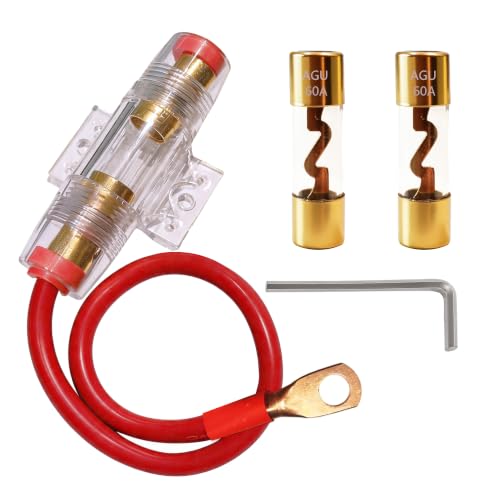
[SUPERIOR CONDUCTIVITY] – Heavy-duty AGU fuse holder with 1ft of 99.9% oxygen-free copper 8-gauge wire ensures maximum current flow and minimal signal loss

ALL SIZES YOU NEED: Covers 8 commonly used blade fuses, 272 PCs, mini: 2A 5A 10A 15A 20A 25A 30A 35A Blade Fuses, commonly used in most auto cars, trucks, SUVS, boats etc.
Verify the Alarm Settings
When your car alarm isn’t working after a battery change, verifying the alarm settings is crucial. Here’s how to do it effectively:
- Check the Owner’s Manual: Look up the specific instructions for your car’s alarm system.
- Key Fob Battery: Ensure the key fob battery is working and properly synced with the alarm system.
- Remote Entry System: Test the remote entry system to guarantee it’s functioning correctly.
- Alarm Sensitivity: Adjust the alarm sensitivity settings if needed to avoid false alarms.
- Vehicle Immobilizer: Confirm that the vehicle immobilizer system is disengaging properly when the key is turned.
By reviewing these key aspects, you can help identify and potentially resolve issues with your car alarm post-battery change.
| Key Points |
|---|
| Verify alarm settings in owner’s manual |
| Check key fob battery and syncing |
| Test remote entry system functionality |
| Adjust alarm sensitivity settings |
| Confirm proper disengagement of vehicle immobilizer |
Reset the Alarm System
After replacing your car battery, it’s essential to reset the alarm system. Follow these steps to ensure that your car alarm functions properly:
- Step 1: Disconnect the Battery
- Step 2: Turn the Ignition Key
- Step 3: Reconnect the Battery
- Step 4: Test the Alarm System
Remember, resetting the alarm system is a crucial step to resolve issues after a battery change.
Recommended Products
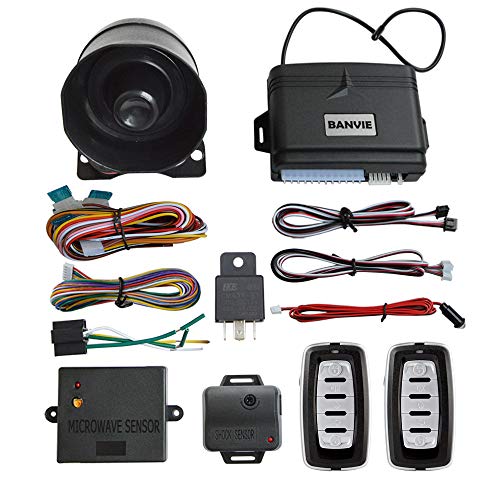
【Universal design】This car alarm system could fit for most of DC 12V cars(except old petrol cars). The remote controller has a zinc alloy frame, all buttons have good resilience.

IT NEVER HURTS TO HAVE AN EXTRA DETERRENT! - Designed to deter those with malicious intentions, this fake car alarm light keeps potential thieves guessing and acts as a strong visual deterrent. Add an extra layer of security to your vehicle.

2-In-1 Car Vibration Sensor Alarm: This car alarm device includes a max 108dB alarm and red light popping dual alarm mode to effectively scare off potential thieves and has simulated dummy alarm light to warn and protect your car when arming
Seek Professional Help
If you’ve followed the steps and your car alarm is still not working after a battery change, it might be time to Seek Professional Help.
Here are a few reasons why you might want to consider this option:
- Complex System: Car alarms can be complex systems, and a professional technician has the expertise to diagnose and repair any issues accurately.
- Specialized Equipment: Professionals have access to specialized diagnostic tools that can pinpoint the exact cause of the problem.
- Time-Saving: Hiring a professional can save you time and effort, preventing any potential errors that could arise from DIY attempts.
In situations like these, seeking the help of a trained professional can ensure that your car alarm issues are resolved efficiently.
Recommended Products

CEL Doctor: The ANCEL AD310 is one of the best-selling OBD II scanners on the market and is recommended by Scotty Kilmer, a YouTuber and auto mechanic. It can easily determine the cause of the check engine light coming on. After repairing the vehicle's problems, it can quickly read and clear diagnostic trouble codes of emission system, read live data & hard memory data, view freeze frame, I/M monitor readiness and collect vehicle information.

Multi-Functions - Practical Multi-Functions OBD2 code reader features built-in OBD2 DTC lookup library, which help you to determine the cause of the engine light, read code, erase code, view freeze frame, I/M ready, vehicle information, data flow, real-time curve, get vehicle speed information, calculate load value, engine coolant temperature, get engine speed.

Easily Diagnose Car and Truck Issues from Your Phone – Scan and identify 39,000+ issues across thousands of vehicles, from Check Engine lights to enhanced codes. Validate repairs or vehicle condition and reset codes without being an expert.
Conclusion
If your car alarm is still not functioning properly after a battery replacement, it’s best to reach out to a professional. They have the expertise and tools needed to diagnose and fix the issue efficiently. By seeking help, you can avoid potential errors and ensure that your car alarm is working correctly. Remember, professional assistance can save you time and provide peace of mind knowing that your vehicle’s security system is in good hands.
Frequently Asked Questions
Why should I seek professional help for my car alarm issues after a battery change?
Seeking professional help is essential due to the complexity of car alarm systems. Professionals have specialized diagnostic tools and expertise that can accurately diagnose and resolve issues, saving you time and preventing errors from DIY attempts.
