

Key Takeaways
- Battery Lifespan Awareness: Lenovo batteries typically last between 3 to 5 years; signs of wear may indicate it’s time for a replacement.
- Signs of Battery Deterioration: Look for reduced battery life, overheating, or physical damage such as swelling; these are key indicators that a replacement is necessary.
- DIY Replacement Steps: Replacing a Lenovo battery can generally be done at home by following specific steps including powering off the device, removing the back cover, and securely installing the new battery.
- Purchase from Authorized Sources: For optimal performance and compatibility, always buy replacement batteries from authorized retailers or Lenovo’s official site.
- Warranty Considerations: Check your warranty status before replacing the battery; unauthorized replacements may void your warranty, so consult Lenovo support if needed.
- Safety First: Follow safety precautions to prevent electric shock and avoid damage to your laptop during the battery replacement process.
Have you ever found yourself frustrated with a sluggish Lenovo laptop that just won’t hold a charge? You’re not alone. Many users face this issue as their devices age, leading to the common question: can you replace the battery?
Overview of Lenovo Batteries
Lenovo batteries come in various types across different models. These include lithium-ion and lithium-polymer batteries. Lithium-ion batteries are common in many laptops due to their efficiency and longevity. Lithium-polymer batteries often offer more flexibility in form, which can lead to thinner laptop designs.
Recommended Products

【Specifications】Model: L18D3PF2 L18M3PFA Voltage: 15.52V Capacity: 60.3Wh/5235mAh Also comes with installation tools

We use high quality battery,manufactured by Japanese battery giant to produce the CMOS battery.

Specifications: Battery Model: 01AV423 SB10K97580, Voltage: 11.4V Capacity: 24Wh ; Cells: 2-cell; Color: Black ,Condition :New,Packages includes: 1x 01AV423 Battery,2 x Screwdrivers,1x Instruction for Lenovo t480 Battery
Battery Lifespan
Battery lifespan impacts performance. Most Lenovo batteries maintain optimal functionality for about 3 to 5 years. After this period, you might notice a decrease in capacity, which leads to shorter usage times between charges.
Signs of Battery Wear
Identifying battery wear helps you decide on replacement. Look for these signs:
- Reduced battery life during regular use
- Overheating while charging or using the laptop
- Swelling or physical damage to the battery
If you observe these issues, assessing your battery’s condition is essential.
Replacement Process
Replacing a Lenovo battery can often be an accessible task. Follow these steps for replacement:
- Power off your laptop and disconnect it from the charger.
- Locate the battery compartment. Depending on your model, the battery may be removable or require opening the laptop case.
- Remove the old battery if applicable.
- Insert the new battery, ensuring it fits correctly.
- Reconnect the laptop and power it on.
Where to Buy
When looking to buy a replacement battery, opt for authorized retailers or Lenovo’s official website. Using original parts ensures compatibility and reliability, promoting optimal performance.
Warranty Considerations
Check your warranty status before replacing the battery. Unauthorized replacements can void warranties in some cases. If the laptop is still under warranty, consider contacting Lenovo support for battery replacements.
With this information, you can assess your Lenovo battery and decide if it’s time for a replacement.
Signs You Need a Battery Replacement
Monitoring your Lenovo laptop’s battery is essential. Several signs indicate it’s time for a replacement.
Recommended Products

Specifications:Model:L15L3PB0; Voltage:11.4V;Capacity:52.5Wh;Cell:3Cells;100% brand new from manufacture. Grade A cells ensure fast charges and low power consumption.

【Tech Specs & 100% New Products】Model: L18M4PH0 Voltage: 7.68V Capacity:60Wh/7820mAh Battery type: Li-ion. (We only use grade A battery cells that provide up to 500 recharge cycles over the life of the battery.Come with screwdrivers.)

Specifications :Model:L18C4PF3 ; Voltage:15.36V;Capacity:45Wh ;100% brand new from manufacture. Grade A product ensure fast charges and low power consumption.
Decreased Battery Life
Notice a significant drop in how long your laptop runs on a charge? A healthy Lenovo battery typically lasts between 3 to 5 hours. If your battery lasts less than half that time, consider a replacement. Check your battery settings to see its health and capacity. If it’s at or below 80% health, it’s a clear sign your battery needs replacement.
Physical Damage
Inspect your laptop for any visible signs of battery damage. Look for swelling, leaks, or cracks. A damaged battery can pose safety risks. If you notice any of these issues, replacing the battery is necessary to avoid hazards. Always handle batteries with care, and avoid using a laptop with a physically damaged battery.
Steps to Replace Your Lenovo Battery
Replacing your Lenovo battery can enhance your device’s performance. Follow these steps closely to ensure a successful battery replacement.
Recommended Products
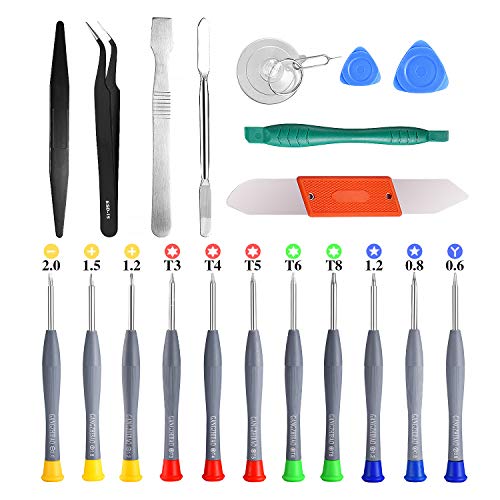
PentalobeScrewdriver Set: p5 Pentalobe screwdriver,PH000 Phillips Screwdriver, Pentalobe T5 Pentalobe T6 Screwdrivers Repair Tool Kit for Apple MacBook Mac Retina Pro Air,T5 for Macbook air & pro repair, it can remove fan screws, including SSD or hard disk replacement. The improved T5 has curved corner tip, which are different from the previous straight corner tip, It will not damage the screws and is more durable
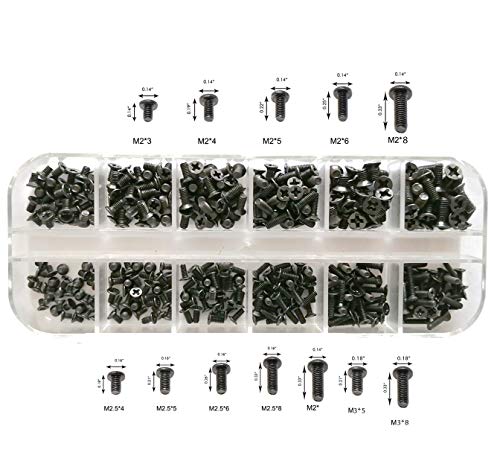
Perfect for SSD M.2, PC case, power supply, motherboard, hard drives, fan and floppy/CD-ROM/DVD-ROM drives fixed installation, they are placed in a box, easy to find and use!

Gather Required Tools
You need several tools for the replacement process. Gather the following items:
- Screwdriver: A Phillips screwdriver suitable for small screws.
- Spudger or Plastic Pry Tool: Helps in safely prying off the cover.
- New Lenovo Battery: Ensure it’s compatible with your model by checking specifications.
Power Down Your Device
Turn off your laptop completely before starting. Disconnect the power adapter and remove any connected peripherals. Confirm the device is not in sleep or hibernate mode.
Remove the Back Cover
Using the screwdriver, unscrew the back cover. Keep track of the screws in a small container to avoid losing them. Carefully use the spudger to pry open the cover, taking care not to damage any clips.
Disconnect the Old Battery
Locate the old battery and find the connector cable. Gently lift the connector from the motherboard using the spudger, minimizing the risk of damage. In most batteries, pull the tabs at the sides to free the battery from its housing.
Install the New Battery
Position the new battery in place, aligning the connector with the motherboard. Firmly press down until the connection is secure. Make sure the battery rests snugly in the housing.
Reassemble Your Device
Replace the back cover, ensuring all clips snap into place. Reinsert the screws and tighten them down without over-torquing. Once finished, power on your laptop to check if it recognizes the new battery. Check battery settings to confirm the installed battery appears correctly.
Safety Precautions
Taking safety precautions during battery replacement helps avoid accidents and damage. Follow these guidelines to ensure a safe and successful process.
Consider Warranty Implications
Before replacing your Lenovo battery, check your warranty status. Unauthorized replacements might void it. To maintain coverage, consider contacting Lenovo support for guidance or replacement options. Authorized service providers can ensure you stay within warranty terms while getting the necessary help.
Avoiding Electric Shock
Prevent electric shock by ensuring your laptop is completely powered down and unplugged before starting. Wait a few minutes after powering off to allow any residual charge to dissipate. When handling the battery, avoid touching metal components while grounding yourself by using anti-static wrist straps. This prevents static electricity from damaging sensitive laptop parts.
Conclusion
Replacing your Lenovo battery can breathe new life into your laptop and improve its performance. By staying vigilant about your battery’s health and recognizing the signs of wear, you can make informed decisions about when to replace it.
Remember to source your new battery from authorized retailers to ensure compatibility and safety. Following the proper steps during the replacement process will help you avoid any mishaps.
With a little care and attention, you can keep your Lenovo running smoothly for years to come. Happy computing!
Frequently Asked Questions
Can I replace the battery in my Lenovo laptop?
Yes, you can replace the battery in your Lenovo laptop. It’s important to identify the type of battery your device uses and follow the proper replacement steps for safety and compatibility.
How long do Lenovo laptop batteries typically last?
Lenovo laptop batteries usually last between 3 to 5 years. After this period, you may notice a decline in performance and battery life, indicating the need for a replacement.
What are the signs of battery wear in a Lenovo laptop?
Signs of battery wear include reduced battery life, overheating, and visible damage like swelling or cracks. If your laptop runs for less than half its typical time, consider replacing the battery.
Where can I buy a replacement battery for my Lenovo laptop?
You should purchase replacement batteries from authorized retailers or directly from Lenovo’s official website to ensure compatibility and quality.
How do I check my Lenovo laptop’s battery health?
You can check your battery health by going to your laptop’s settings and looking for the battery health and capacity reading. A reading at or below 80% usually indicates that a replacement is necessary.
What tools do I need to replace my Lenovo laptop battery?
To replace your Lenovo laptop battery, you will need a Phillips screwdriver, a spudger or plastic pry tool, and a compatible new battery.
What safety precautions should I take when replacing my Lenovo battery?
Ensure your laptop is powered down and unplugged. Let it sit for a while to dissipate any residual charge, and use anti-static wrist straps to protect sensitive components from static electricity.
Does replacing my Lenovo laptop battery void the warranty?
Replacing the battery yourself may void your warranty if done incorrectly or if you use unauthorized parts. Always check your warranty status before proceeding with a replacement.
