

Key Takeaways
- Battery Replacement Options: You have two primary choices for replacing the Samsung S20 battery: using official Samsung services or undertaking a DIY approach, each with its own advantages and costs.
- Signs of Battery Failure: Look out for indications such as rapid battery drain, overheating, random shutdowns, and poor performance, which suggest the need for a battery replacement.
- DIY Considerations: If opting for a DIY battery replacement, ensure you have the necessary tools and basic electronics skills to avoid damage to your device and potential warranty voiding.
- Essential Tools Needed: Gather specific tools for a successful replacement, including a precision screwdriver set, plastic pry tools, tweezers, a suction cup, opening picks, and a new battery.
- Professional Help Benefits: Utilizing official Samsung services guarantees genuine parts and professional installation, providing warranty coverage and minimizing risks associated with DIY attempts.
- Understanding Battery Life Influences: Factors such as app usage and screen brightness can impact your device’s battery life, so managing these can prolong battery performance before considering a replacement.
Is your Samsung S20 struggling to hold a charge? You’re not alone. Many users face battery issues as their phones age, leaving them frustrated and searching for solutions. You might be wondering if you can replace the battery yourself or if it’s time to seek professional help.
This article will guide you through the options available for replacing your S20’s battery. You’ll learn about the tools you need, the steps involved, and the pros and cons of tackling the job yourself versus going to a technician. By the end, you’ll have a clearer idea of how to bring your phone back to life and keep it running smoothly.
Overview of Samsung S20
The Samsung S20 is a flagship smartphone that launched in March 2020. It features a sleek design, high-resolution display, and powerful performance. With a 6.2-inch Dynamic AMOLED 2X screen, the S20 offers vibrant colors and deep blacks, enhancing your viewing experience.
Equipped with a Snapdragon 865 processor, the S20 provides fast performance. It runs on Android 10 and supports 5G connectivity, making it future-proof for mobile networks. You’ll find a triple-camera setup on the rear, including a 12 MP ultra-wide lens, 12 MP wide lens, and 64 MP telephoto lens. This captures stunning photos and videos, even in low-light conditions.
The device houses a 4000 mAh battery, which offers all-day use under normal circumstances. However, as your device ages, you may experience battery performance issues. Many users notice a decline in battery life, prompting the need for potential replacement. Understanding whether you can replace the battery in the Samsung S20 yourself or need to consult a professional is crucial.
Being aware of the features and construction of the S20 aids in making an informed decision about battery replacement. Familiarity with components will help you assess potential risks when attempting a DIY option or when considering a service technician.
Understanding Battery Life
Battery life significantly impacts your Samsung S20 user experience. Over time, factors like app usage, screen brightness, and network conditions affect battery performance. Recognizing these influences helps you manage and potentially improve your phone’s lifespan.
Common Issues with S20 Battery
Various issues commonly affect the Samsung S20 battery. These include:
- Fast Drain: If your battery drains rapidly, despite light usage, it may indicate battery wear.
- Overheating: Excessive heat during charging or regular use signals potential battery failure.
- Random Shutdowns: If your phone shuts off unexpectedly, even with charge remaining, the battery may no longer hold power effectively.
Signs You Need a Battery Replacement
Identifying signs that signal a battery replacement is essential. Look out for these indicators:
- Poor Performance: Slow app loading times and lagging can stem from an aging battery.
- Charging Issues: Difficulty charging or a fluctuating battery percentage may highlight battery health problems.
- Physical Damage: Bulging or swelling of the battery indicates a need for immediate replacement to prevent further damage.
Recognizing these signs will help you determine the right time to replace your Samsung S20 battery, ensuring optimal performance and usability.
Can You Replace Battery in Samsung S20?
Yes, you can replace the battery in a Samsung S20, but options exist based on your preferences and comfort level. You have two primary choices: use official Samsung services or attempt a DIY approach.
Recommended Products
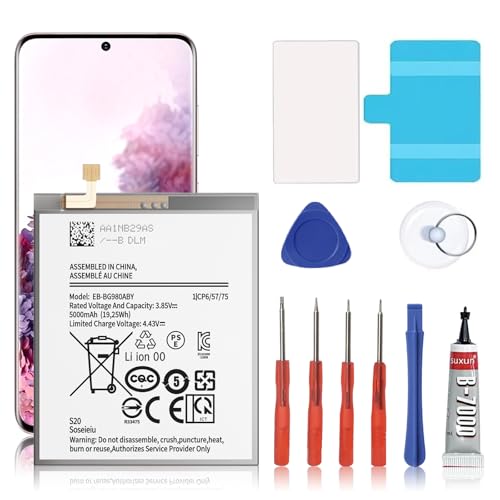
🎋【Compatible Model】EB-BG980ABY Replacement Battery for Samsung Galaxy S20 SM-G980 SM-G980F[Note: Not for Galaxy S20 FE or S20 Ultra other Phone Models]

✅【4500mAh Upgrade Battery Replacemen】(Long Lasting/0 cycle) Brand New High quality updated battery for Samsung Galaxy S20 Plus Model (SM-G985 SM-G985F S20+ 5G) is made of world-class Lithium polymer battery cell, the advanced technology makes our battery capacity up to 4500mAh with the same size.

{COMPATIBLE MODELS}:This Replacement battery Compatible with Samsung Galaxy S20 Plus (Model: SM-G985 SM-G985F S20+ 5G).
Official Samsung Battery Replacement Services
Samsung provides authorized battery replacement services. This option guarantees the use of genuine parts and professional handling. To utilize this service, follow these steps:
- Visit the Samsung Support Website: Find your device’s specific service options.
- Locate an Authorized Service Center: Enter your location to find nearby centers.
- Schedule an Appointment: Set a time for service to minimize wait times.
Opting for Samsung service usually costs between $100 to $150, depending on the region. Benefits include warranty coverage and expert installation, ensuring your device’s integrity.
DIY Battery Replacement Considerations
If you’re comfortable with electronics, consider a DIY battery replacement. This approach can save money but involves several factors:
- Tools Needed: Obtain a heat gun, a suction cup, plastic opening tools, and a new battery compatible with the S20.
- Skill Level: Ensure you have basic skills in handling small electronics. If you’re inexperienced, you might want to reconsider this method.
- Risks: Recognize the risks of voiding warranties or damaging the device. Improper handling may lead to screen or internal component damage.
Follow these steps for a DIY replacement:
- Power Off the Device: Always turn off your phone before starting.
- Heat the Edges: Use a heat gun to soften adhesive around the screen edges.
- Pry Open the Back: Carefully insert a plastic tool, gently separating the screen from the body.
- Disconnect the Battery: Locate the battery connector and unplug it.
- Install the New Battery: Place the new battery in, reconnect it, and reassemble the device carefully.
Research confirming the compatibility of parts and step-by-step tutorials can ensure a smoother process.
By evaluating these options, you can determine the best course of action for replacing your Samsung S20 battery.
Tools Needed for Battery Replacement
To replace the battery in your Samsung S20, gather the following tools. These items ensure a smooth and safe process.
- Screwdriver Set: Use a precision screwdriver set that includes a Phillips #00 and a Torx T3 screwdriver. These sizes fit the screws securing the phone’s back cover and the battery.
- Plastic Pry Tool: A plastic pry tool helps separate the back cover from the phone without damaging the casing. Avoid metal tools, as they might scratch or scuff the surface.
- Tweezers: Fine-tip tweezers are useful for handling small components and removing screws. They allow for precision in tight spaces.
- Suction Cup: A suction cup aids in lifting the back cover away from the phone. It provides a strong grip, making it easier to pull apart the adhesive.
- Opening Picks: Use these picks to help gently pry open any stubborn areas during disassembly. They prevent damage to internal components.
- Replacement Battery: Purchase a genuine Samsung S20 battery or a high-quality third-party alternative. Verify the compatibility and reputation of the supplier.
- Adhesive Strips: These strips secure the new battery in place. They come in handy when reassembling your phone after replacing the battery.
- Soft Cloth: A clean, soft cloth protects the phone’s surface while you work. It prevents scratches and keeps everything organized.
Gather these tools before starting the replacement process. Ensure you work in a clean, well-lit area to easily manage the components during the repair.
Recommended Products
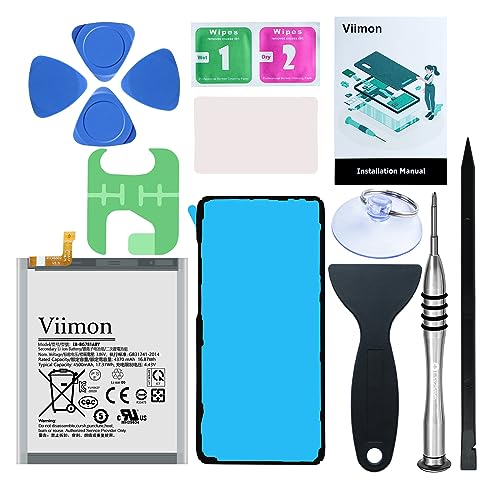
【Compatible Model】It is compatible with Samsung Galaxy S20 FE, A52 and A52S 5G, Model: S20 FE 5G SM-G781B G781U G781W SM-A526 A526B/DS A5260 A526W. Not for S20 and S20+ Plus. Please double identify and check your phone model matches before purchasing the battery.

[PLS CONFIRM DEVICE MODEL]-- The repair kit contains the instruction to guide you step by step installation, and we have professional engineers to answer all your questions about the repair process. Please verify your old battery part number and model before purchasing this replacement battery. Compatible with Samsung Galaxy S20 Ultra SM-G988, G988V, G988A, G988T, G988P, G988R4, G988U, G988U1, EB-BG988ABY. ★NOT FOR Samsung Galaxy S20, S20+, Note 20 Ultra, S20 FE, Note 20★
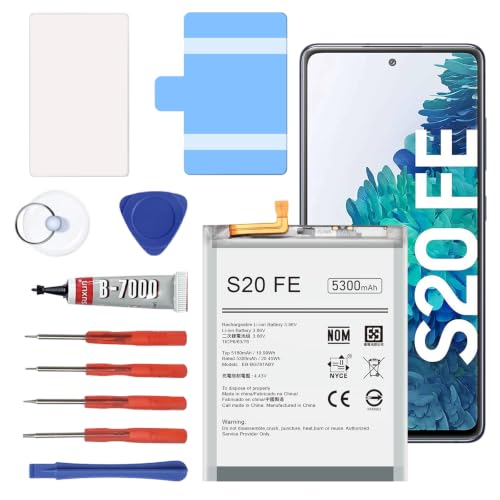
【5300mAh High Capacity & 0 Cycle】 Experience extended usage with our 5300mAh high-capacity replacement battery, providing significantly more power than standard batteries. Featuring a brand-new 0 cycle count.
Conclusion
Deciding whether to replace the battery in your Samsung S20 is an important choice that can greatly affect your device’s performance. Whether you opt for a DIY approach or go with professional help, being informed about your options makes all the difference.
If you notice signs of battery decline like fast draining or charging issues, taking action sooner rather than later can save you frustration down the line. Remember to gather the right tools if you choose to tackle the replacement yourself.
Ultimately, keeping your phone in top shape ensures you can enjoy all its features without any hiccups. Whichever route you take, you’ll be on your way to revitalizing your Samsung S20 and enhancing your overall experience.
Frequently Asked Questions
What are common battery problems with the Samsung S20?
Many Samsung S20 users face issues like fast battery drain, overheating, and unexpected shutdowns as their devices age. These problems may indicate that a battery replacement is needed.
How can I tell if my Samsung S20 battery needs replacement?
Signs that signal a battery replacement include significantly reduced performance, difficulty charging, and physical symptoms like a bulging battery. If you notice these issues, it may be time for a replacement.
Should I replace my Samsung S20 battery myself or use a professional service?
You can opt for either a DIY battery replacement or professional service. DIY can save money, but requires comfort with electronics, while professional service guarantees genuine parts and expertise.
What tools do I need for a DIY Samsung S20 battery replacement?
Essential tools include a precision screwdriver set, plastic pry tool, fine-tip tweezers, suction cup, opening picks, a replacement battery, adhesive strips, and a soft cloth for a safe replacement.
How much does it cost to replace a Samsung S20 battery through Samsung?
Replacing the battery through Samsung typically costs between $100 to $150. This price ensures you receive genuine parts and professional handling for your device.
