

Key Takeaways
- Battery Degradation Signs: Watch for decreased battery life, rapid discharge, overheating, unexpected shutdowns, and physical damage indicators to determine if a battery replacement is needed.
- Replacement Options: Choose between professional services, such as authorized centers, or DIY kits for models with removable batteries.
- Importance of Quality: Always opt for genuine or high-quality batteries to ensure performance and safety during replacement.
- Maintenance Tips: Enhance battery longevity by avoiding overcharging, regulating temperature, and regularly updating software.
- Cost-Effective Solution: Battery replacement is often more budget-friendly compared to purchasing a new device and supports environmental sustainability by reducing e-waste.
- Warranty Considerations: Check your warranty terms as DIY replacements may void coverage; authorized service centers can help maintain warranty protection.
Ever found yourself frustrated with a Samsung phone that just won’t hold a charge? You’re not alone. Many people face this issue as their devices age, leaving them wondering if a battery replacement is even possible.
Overview Of Samsung Phone Batteries
Samsung phone batteries are typically lithium-ion (Li-ion) batteries. These batteries offer several advantages, including longer life spans and minimal memory effect. You might notice decreased performance in older devices due to battery degradation, a common issue as batteries age.
Battery Types
- Standard Battery: Most Samsung phones come with a non-removable standard battery. These batteries fit securely in the phone’s design, which can enhance water and dust resistance.
- Removable Battery: A few older Samsung models feature removable batteries. This design allows for simpler replacement when your battery loses capacity.
Signs of Battery Degradation
You may recognize battery issues by noticing:
- Decreased Screen Time: You see a significant drop in the time your phone lasts between charges.
- Rapid Discharge: The battery percentage drops quickly, often within a few hours of use.
- Overheating: Your phone heats up during charging or regular use.
Battery Replacement Options
If your Samsung phone’s battery shows signs of degradation, consider these replacement options:
- Authorized Service Centers: Samsung recommends visiting an authorized service center for professional battery replacement. This ensures you receive a genuine battery and proper installation.
- DIY Replacement Kits: For older models with removable batteries, you can purchase DIY replacement kits online. These kits typically include a new battery and tools for installation. Always follow included instructions carefully to avoid damage.
- Third-Party Services: Some third-party repair shops specialize in battery replacement. Research their reputation and confirm they use quality components.
Battery Maintenance Tips
To prolong your battery’s life, consider these practices:
- Avoid Overcharging: Disconnect your phone from the charger once it reaches 100%.
- Keep Temperature in Check: Extreme heat or cold can negatively affect battery performance.
- Update Software Regularly: Software updates often include optimizations for battery performance.
With this knowledge, you can make informed decisions about managing your Samsung phone battery effectively.
Importance Of Battery Replacement
Understanding the importance of battery replacement can enhance your Samsung phone’s performance and longevity. A well-functioning battery not only boosts device responsiveness but also makes using your phone more enjoyable.
Signs You Need A Battery Replacement
- Decreased Battery Life: Noticeable reduction in time between charges indicates potential degradation.
- Rapid Discharge: If your battery drops from 100% to 20% within a few hours, it’s time for a check.
- Overheating: Frequent overheating during charging or phone use suggests battery issues.
- Unexpected Shutdowns: If your phone turns off even with charge remaining, consider replacing the battery.
- Swelling or Physical Damage: Any visible bulging or distortion in the battery area is a safety concern that requires immediate replacement.
Benefits Of Replacing Your Battery
- Improved Performance: New batteries can restore speed and responsiveness, making your device run like new.
- Extended Usage Time: A fresh battery provides more hours of usage, enhancing daily convenience.
- Enhanced Safety: Replacing a damaged or degraded battery minimizes risks like overheating and potential fire hazards.
- Cost-Effective Solution: Compared to buying a new phone, replacing the battery is usually a more budget-friendly option.
- Environmental Responsibility: Replacing rather than discarding an entire device supports sustainability by reducing electronic waste.
Can You Replace Battery In Samsung Phone?
Yes, you can replace the battery in a Samsung phone, but the process varies by model. Understanding your phone’s battery type and choosing the right replacement method can help restore performance.
Recommended Products

【Spare Battery Specs】EB-BA426ABY Replacement battery has a capacity of 5100mAh, the Voltage is 3.86V.

COMPATIBILITY: The battery model is EB-BR880ABY, it is only compatible with Samsung Galaxy Watch 4 (40 mm), SM-R860 SM-R865 series and Galaxy Watch 4 Classic (42mm) SM-R880 SM-R885, please carefully confirm the model of your smartwatch before purchase.

🔋 High-Capacity 6200mAh Battery for Galaxy S23 Plus Upgraded 6200mAh power delivers longer battery life than original (4700mAh). Enjoy all-day video streaming, gaming, or working without frequent recharging. Perfect for heavy users and travelers.
DIY Battery Replacement
If you own an older Samsung model with a removable battery, replacing it yourself is straightforward. Here’s a quick overview of how to do it:
- Power Off Your Phone: Ensure your device is completely turned off.
- Remove the Back Cover: Use a plastic tool to gently pry off the cover.
- Take Out the Old Battery: Carefully remove the old battery by lifting it from the compartment.
- Insert the New Battery: Align the new battery with the connectors and press it into place.
- Reattach the Back Cover: Snap the cover back onto your phone until it’s securely in place.
- Power On Your Phone: Hold the power button until the Samsung logo appears.
For non-removable batteries, you may need a DIY battery replacement kit, which includes necessary tools and a new battery. Follow specific instructions from the kit or online resources tailored to your phone model.
Professional Battery Replacement Services
For Samsung phones with non-removable batteries, seeking professional assistance is advisable. Here are your options:
- Authorized Service Centers: Contact Samsung’s official service centers for the best quality parts and skilled technicians. They provide warranty coverage for the replacement.
- Local Repair Shops: Choose reputable shops with positive reviews. Ensure they use high-quality batteries to minimize potential issues.
- Mobile Repair Services: Some services offer to replace your battery at your location. Check their credentials and guarantees before scheduling the service.
When considering professional services, ask about parts warranties and turnaround times. This helps ensure you get a reliable replacement and service.
Considerations Before Replacing Your Battery
Before you decide to replace your Samsung phone battery, consider several important factors. Evaluating these aspects helps ensure a smooth battery replacement experience and enhances your device’s performance.
Recommended Products

Compatible Model: It is compatible with Samsung Galaxy Note 10+ Plus Only, Model: SM-N975, EB-BN972ABU. Not for Note 10. Please double identify and check your phone model matches before purchasing the battery.
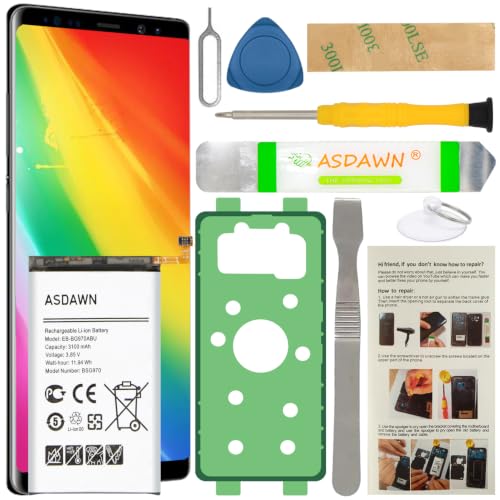
[FOR COMPATIBLE MODEL] -- Contains the instruction to guide you step by step installation, and we have professional engineers to answer all your questions about the repair process. Please verify your old battery part number and model before purchasing this replacement battery. Compatible with Samsung Galaxy S10e SM-G970, EB-BG970ABU, SM-G970F/DS, SM-G970U, SM-G970W ★NOT FOR Samsung Galaxy S10/ S10 Plus/ Note 10/ Note 10 Plus★
Warranty Implications
Replacing the battery can impact your warranty status. If your Samsung phone is still under warranty, opening the device or replacing the battery yourself might void that warranty. Always check the terms and conditions of your warranty to avoid unintended consequences. If warranty coverage is still available, consider using authorized service centers for battery replacements to maintain coverage.
Risks Involved In DIY Replacement
Performing a DIY battery replacement carries several risks. You could inadvertently damage internal components, risking expensive repairs. Additionally, using poor-quality third-party batteries might lead to performance issues or safety hazards like overheating. Ensure you have the necessary tools and knowledge before attempting a DIY replacement. If you’re unsure, seeking professional assistance may save time and prevent potential damage.
Conclusion
Taking care of your Samsung phone’s battery can make a world of difference in your device’s performance. If you notice signs like rapid discharge or overheating it might be time to think about a replacement. Whether you choose to go the DIY route for older models or seek professional help for newer ones there’s a solution that fits your needs.
Remember to prioritize quality components and consider the implications on your warranty. With a little effort you can extend your phone’s life and enjoy a better user experience. So don’t hesitate to take action—your device will thank you for it.
Frequently Asked Questions
What causes reduced battery life in Samsung phones?
Battery life decreases in Samsung phones mainly due to the natural aging of lithium-ion batteries. As they age, users may experience rapid discharge, decreased screen time, and overheating due to chemical changes within the battery.
When should I consider replacing my Samsung phone battery?
Consider replacing your Samsung phone battery if you notice signs like significantly decreased battery life, rapid discharge, unexpected shutdowns, overheating, or physical damage. These issues indicate that your battery’s performance has declined.
How can I replace my Samsung phone battery?
For older models with removable batteries, you can replace the battery yourself by removing the back cover. For non-removable batteries, seek professional assistance from authorized service centers or local repair shops to ensure quality and safety.
Are there maintenance tips to prolong battery life?
Yes! To prolong battery life, avoid overcharging your phone, keep it at moderate temperatures, and regularly update your software. These practices help maintain battery health and efficiency over time.
Is battery replacement cost-effective compared to buying a new phone?
Yes, replacing the battery is often more cost-effective than buying a new phone. A new battery can significantly enhance your device’s performance and longevity, saving you money while reducing electronic waste.
