

Key Takeaways
- Battery Replacement Options: Samsung phones may have non-removable batteries, but users can choose DIY or professional replacement approaches to maintain performance.
- DIY Battery Replacement Steps: Identifying the specific model, gathering necessary tools, purchasing a quality battery, and following detailed guides are essential for a successful DIY replacement.
- Professional Services: Consulting authorized repair centers or reputable local shops ensures safety, quality, and protection of warranty, especially for those uncomfortable with DIY methods.
- Warranty Implications: Replacing a battery might void the warranty; it’s important to review warranty terms and consult Samsung support before proceeding with a DIY replacement.
- Post-Replacement Issues: Be on the lookout for common problems such as overheating, swelling, inconsistent battery life, and charging issues following a replacement to ensure optimal device performance.
Have you ever found yourself frustrated with your Samsung phone dying too quickly? You’re not alone. Many users face the same issue as their devices age, leading to a common question: can you replace the batteries in Samsung phones?
This article will guide you through the ins and outs of battery replacement for your Samsung device. Whether you’re considering a DIY approach or looking for professional help, you’ll find useful tips and insights to make the process smoother. By the end, you’ll know whether you can revive your phone’s battery life without breaking the bank.
Overview Of Samsung Phone Battery Replacement
Samsung phone battery replacement can maintain or improve your device’s performance. Many Samsung models come with non-removable batteries, complicating the replacement process. Understanding your options helps you decide the best approach for your situation.
DIY Battery Replacement
- Research Your Model: Identify your specific Samsung model. This helps find compatible batteries and guides for DIY replacement.
- Gather Necessary Tools: You’ll need a heat gun or hairdryer, plastic prying tool, and a screwdriver set. Having these on hand simplifies the process.
- Purchase a Quality Battery: Choose a reliable provider for replacement batteries. Look for OEM (original equipment manufacturer) parts or reputable third-party options.
- Follow Detailed Guides: You can find step-by-step guides or video tutorials online. Follow them closely to avoid damaging your phone.
Professional Battery Replacement
- Visit Authorized Repair Centers: If you’re uncomfortable with DIY tasks, consider visiting an authorized Samsung repair center. They provide expert service and use genuine parts.
- Check Warranty Options: If your device is still under warranty, battery-related issues might qualify for a free replacement. Contact Samsung support to inquire.
- Evaluate Local Repair Shops: Research local repair shops with good reviews. Ensure they use quality parts and offer warranties on their service.
Common Questions About Battery Replacement
- Is it worth replacing the battery? Yes, replacing a battery can extend your phone’s life and improve functionality.
- Can replacing the battery void my warranty? DIY replacements may void warranties. Always check the terms before proceeding.
- How long does the replacement take? DIY replacements typically take 30 minutes to an hour, while professional services can vary based on demand.
Battery replacement can rejuvenate your Samsung phone and enhance your overall user experience. Whether opting for DIY or professional services, make informed choices to ensure a successful battery replacement.
Factors To Consider Before Replacing Batteries
Replacing a battery in a Samsung phone involves several important considerations. These factors can influence the decision and process involved in a successful battery replacement.
Warranty Implications
Warranty terms can be affected by battery replacement. If your phone is still under warranty, choose authorized service centers for battery replacement. Unauthorized repairs may void the warranty. Always review your warranty documentation to understand the implications of battery replacement. Contact Samsung support for guidance if unsure.
Type Of Battery Used
The type of battery you use significantly impacts performance and safety. Always opt for a genuine Samsung battery or a reputable third-party battery that meets safety standards. Low-quality batteries can cause issues such as overheating or swelling, leading to further damage. Research your phone model to ensure compatibility. Make sure the battery specifications match your original battery for optimal performance.
How To Replace Batteries In Samsung Phones
Replacing batteries in Samsung phones can boost performance and extend device life. Follow these steps for a successful battery replacement.
Recommended Products

【Spare Battery Specs】EB-BA426ABY Replacement battery has a capacity of 5100mAh, the Voltage is 3.86V.

COMPATIBILITY: The battery model is EB-BR880ABY, it is only compatible with Samsung Galaxy Watch 4 (40 mm), SM-R860 SM-R865 series and Galaxy Watch 4 Classic (42mm) SM-R880 SM-R885, please carefully confirm the model of your smartwatch before purchase.

🔋 High-Capacity 6200mAh Battery for Galaxy S23 Plus Upgraded 6200mAh power delivers longer battery life than original (4700mAh). Enjoy all-day video streaming, gaming, or working without frequent recharging. Perfect for heavy users and travelers.
Step-By-Step Guide
- Power Off Your Phone: Before starting, turn off the device completely.
- Remove the Back Cover: Use a plastic pry tool to gently lift the back cover. Apply steady pressure to avoid damage.
- Disconnect the Battery: Locate the battery connector and carefully disconnect it using a spudger or your fingernail.
- Remove the Old Battery: If the battery is glued, use the pry tool to carefully lift it out. Be cautious and avoid bending the battery.
- Insert the New Battery: Place the new battery in position. Make sure it aligns with the connectors.
- Reconnect the Battery: Press down on the connector until it clicks into place.
- Replace the Back Cover: Align the back cover and press firmly until it snaps back into place.
- Power On Your Phone: Turn on the device and check that the new battery is functioning properly.
Tools Required
- Plastic Pry Tool: Helps to safely remove the back cover without scratching the phone.
- Spudger: Useful for disconnecting the battery and prying out components.
- New Battery: Ensure it’s compatible with your specific Samsung model; consider OEM or high-quality third-party options.
- Screwdriver Set: If your phone model uses screws securing the back cover, you’ll need a small Phillips screwdriver.
- Tweezers: Helpful for handling small components and connectors.
Ensure that you follow each step carefully, and use the recommended tools for the best results. Using proper tools helps prevent damage to your device.
Professional Vs. DIY Replacement
Choosing between professional and DIY battery replacement for your Samsung phone requires careful consideration. Each option has its benefits and drawbacks.
Recommended Products

Compatible Model: It is compatible with Samsung Galaxy Note 10+ Plus Only, Model: SM-N975, EB-BN972ABU. Not for Note 10. Please double identify and check your phone model matches before purchasing the battery.
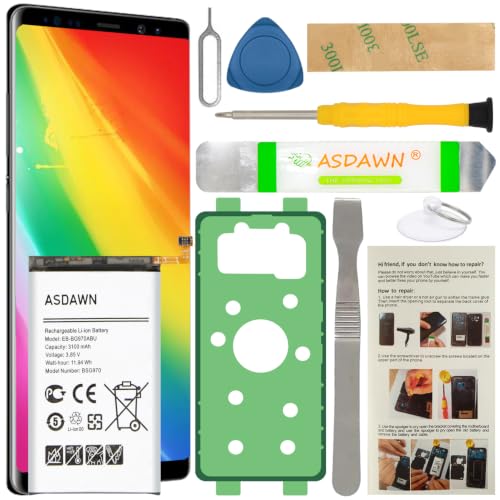
[FOR COMPATIBLE MODEL] -- Contains the instruction to guide you step by step installation, and we have professional engineers to answer all your questions about the repair process. Please verify your old battery part number and model before purchasing this replacement battery. Compatible with Samsung Galaxy S10e SM-G970, EB-BG970ABU, SM-G970F/DS, SM-G970U, SM-G970W ★NOT FOR Samsung Galaxy S10/ S10 Plus/ Note 10/ Note 10 Plus★
DIY Replacement
DIY replacement offers flexibility and cost savings. This option works well if you’re comfortable with technology and have basic repair skills. Follow these steps for a successful DIY battery replacement:
- Research your model: Find specific guides tailored to your Samsung model. Websites like iFixit provide step-by-step instructions.
- Gather tools: Obtain necessary tools, such as a plastic pry tool, spudger, screwdriver set, and tweezers.
- Purchase a quality battery: Select a genuine Samsung battery or a reputable third-party battery that meets safety standards.
- Follow the guide carefully: Power off your device, remove the back cover, disconnect the old battery, and install the new one according to the steps provided.
Professional Replacement
Professional replacement ensures safety and quality. This option suits those uncomfortable with DIY methods or whose phones are still under warranty. Consider these points when opting for professional services:
- Authorized service centers: Use authorized Samsung service centers for repair. They guarantee original parts and protect your warranty.
- Local repair shops: Research local repair shops with good reviews. Check for customer feedback regarding their service quality.
- Cost: Professional services may cost more than DIY but often provide additional warranties on the work done.
Key Considerations
Assess the following before making a decision:
- Skill level: If you’re inexperienced with phone repairs, professional help reduces the risk of damage.
- Warranty status: If your phone’s under warranty, seek authorized repair options to avoid voiding it.
- Time investment: DIY can take more time, depending on your experience, while professionals often provide faster service.
Understanding these factors enables you to choose the best approach for replacing your Samsung phone’s battery.
Common Issues After Battery Replacement
After you replace the battery in your Samsung phone, several common issues may arise. Here’s what to watch for:
Overheating
Overheating can occur if the new battery isn’t compatible or if it’s of low quality. If your phone gets excessively hot during charging or use, consider replacing the battery again.
Swelling
Swelling indicates a potential malfunction in the battery. Monitor your device closely; if you notice the back cover bulging, it could signal a dangerous situation. Seek immediate replacement of the battery.
Inconsistent Battery Life
Inconsistent battery life, where your phone discharges quickly or erratically, often stems from compatibility issues or poor-quality batteries. Track battery performance over several days. If problems persist, consult with a professional.
Charging Issues
Charging problems can happen if the battery isn’t seated correctly or if your charging port is damaged. Ensure the battery is securely connected and test with a different charger or cable.
Software Problems
Software glitches may arise after a battery replacement, particularly if the new battery isn’t recognized by the device. Perform a soft reset to see if the issue resolves itself. If it doesn’t, consider factory resetting, but back up your data first.
Warranty Concerns
If you’ve replaced the battery yourself, it may void any remaining warranty. Check your warranty terms to understand the implications.
Consider adhering to these practical tips when replacing a battery:
- Use Quality Parts: Always opt for genuine or high-quality replacement batteries.
- Follow Guides: Use manufacturer-approved guides to ensure proper reassembly.
- Keep Software Updated: Make sure your phone’s software is up-to-date to prevent compatibility issues.
By staying aware of these potential issues, you can better navigate the battery replacement process and maintain your Samsung phone’s performance.
Conclusion
Replacing the battery in your Samsung phone can breathe new life into your device. Whether you choose to tackle it yourself or seek professional help it’s essential to weigh your options carefully. Remember to use quality parts and follow the right procedures to avoid any issues down the line.
By taking the time to understand the process and your phone’s specific needs you can make an informed decision that suits your comfort level and budget. A fresh battery could enhance your overall experience and keep your phone running smoothly for longer. So go ahead and take that step towards a better battery life!
Frequently Asked Questions
How can I tell if my Samsung phone battery needs to be replaced?
If your Samsung phone is draining battery quickly, overheating, or experiencing sudden shutdowns, it may be time for a battery replacement. Additionally, physical signs like swelling or damage to the battery are clear indicators.
Can I replace my Samsung phone battery myself?
Yes, you can replace your Samsung phone battery yourself if you’re comfortable with technology. Make sure to research your specific model, purchase a quality battery, and follow detailed guides for your device.
What tools do I need for a DIY battery replacement?
Essential tools for a DIY battery replacement include a plastic pry tool, spudger, screwdriver set, tweezers, and a compatible new battery. These tools will help you safely open your device and replace the battery.
Will replacing my battery void my warranty?
Replacing your battery may void your warranty if unauthorized repairs are performed. It’s best to consult your warranty terms and consider using authorized service centers if your phone is still under warranty.
How long does it take to replace a Samsung phone battery?
The battery replacement process can take anywhere from 30 minutes to an hour, depending on your skill level and the complexity of the device. If you choose a professional service, the time may vary but is often quicker.
What should I do if my phone has issues after a battery replacement?
If you experience problems like overheating, inconsistent battery life, or charging issues after replacing your battery, double-check the installation steps and ensure you used a quality battery. Keeping your software updated can also help resolve compatibility issues.
Are third-party batteries safe for Samsung phones?
While third-party batteries can be safe, it’s crucial to choose reputable brands that meet safety standards. Low-quality batteries may pose risks like overheating and swelling, leading to further damage to your device.
Why is it important to use genuine Samsung batteries?
Using genuine Samsung batteries is important for maintaining safety, performance, and reliability. These batteries are designed specifically for your device and reduce the risk of issues like overheating or device malfunction.
