

Key Takeaways
- Battery Replacement is Possible: You can replace the battery in a Samsung Galaxy S6, but it requires careful handling due to its non-removable battery design.
- Signs of Battery Issues: Look for shorter battery life, overheating, swollen battery, and frequent crashes as indicators that a replacement may be necessary.
- DIY vs. Professional Replacement: Weigh the pros and cons of doing it yourself (cost-effectiveness, flexibility) versus seeking professional help (safety, expertise) based on your experience and urgency.
- Required Tools: Essential tools for replacing the battery include a plastic opening tool, Phillips screwdriver, tweezers, and the new battery itself.
- Follow the Proper Steps: Ensure you power off the device, safely remove the back cover, disconnect the old battery, and correctly install the new one.
- Monitor Post-Replacement Performance: After installation, turn on your Galaxy S6 to check if the new battery is functioning properly and ensures enhanced performance.
Have you ever found yourself frustrated with a phone that just won’t hold a charge? If you’ve got a Samsung Galaxy S6, you’re not alone. Many users face battery issues as their devices age, leaving them wondering if they can tackle the problem themselves.
Overview of Samsung Galaxy S6
The Samsung Galaxy S6, launched in April 2015, features a sleek design and powerful performance. It comes equipped with a 5.1-inch Super AMOLED display, providing vibrant colors and sharp images. The device relies on the Exynos 7420 processor, which ensures smooth multitasking and fast app launches.
You’ll find impressive camera capabilities in this smartphone. The Galaxy S6 boasts a 16-megapixel rear camera with optical image stabilization and a 5-megapixel front camera, perfect for selfies. The built-in storage options vary from 32GB to 128GB, although it lacks expandable storage via microSD.
Battery life typically lasts about 12 to 14 hours of mixed usage, but individual experiences may differ based on usage patterns. The device supports fast charging, allowing for quick power-ups when needed.
Despite its many advantages, users often face battery-related issues as the device ages. These problems can lead to questions about battery replacement and self-repair options, especially since the Galaxy S6 features a non-removable battery design. Understanding these aspects helps in navigating the challenges of maintaining your phone’s performance.
Battery Life in Samsung Galaxy S6
Battery life is vital for a smooth user experience in the Samsung Galaxy S6. While the device typically lasts about 12 to 14 hours with mixed usage, this can decline over time, particularly as the battery ages.
Recommended Products
![SHENMZ Galaxy S6 Battery,[Upgraded] 5800mAh High Capacity Li-Polymer EB-BG920ABE Replacement Battery for Samsung Galaxy S6 SM-G920 G920V G920T G920A G920P G920I G920F S906L with Repair Tools](https://m.media-amazon.com/images/I/41pc-APX7ML._SL500_.jpg)
✾【HIGH QUALITY, TRUSTWORTHY PREMIUM BATTERY】:This Upgraded S6 battery uses Grade A+ rated battery cells with CE and ROHS certification,ensure last over 1200 charge cycles. Multiple-protection for safer operation for both user and devices,build-in microchip to prevent over-charging,over-discharging and over-heating.

【Compatible Model】:S6 Replacement Battery compatible with models :for Samsung Galaxy S6 SM-G920 G920V G920T G920A G920P G920I G920F S906L.

The battery is manufactured and tested under strict quality control standards before sent out
Common Battery Issues
Common battery issues include rapid discharge, overheating, and unexpected shutdowns. You might notice your phone draining power much faster than before, even with minimal usage. Overheating occurs during charging or heavy usage, indicating potential strain on the battery. Unexpected shutdowns can happen when the battery’s charge level shows a percentage, yet the device powers down suddenly. These symptoms often signal a diminishing battery capacity that’s common as the Samsung Galaxy S6 ages.
Signs You Need a Battery Replacement
Several signs indicate a battery replacement might be necessary:
- Shorter battery life: If your phone requires more frequent charging, it’s a clear sign of a weak battery.
- Device overheating: Overheating during regular use points to issues with the battery.
- Swollen battery: A bulging battery can physically affect your device, requiring immediate replacement.
- Frequent crashes: If your device shuts down, particularly at higher battery levels, a battery replacement might be in order.
Monitoring these signs helps maintain your phone’s performance and functionality, ensuring you get the most out of your Samsung Galaxy S6.
Can You Replace a Battery in a Samsung Galaxy S6?
Yes, you can replace the battery in a Samsung Galaxy S6, but be prepared for a detailed process due to its non-removable battery design. Below are some guidelines on how to perform the replacement safely and effectively.
Steps for Battery Replacement
- Power Off Your Device: Always start by powering off your Galaxy S6 to avoid any electrical issues.
- Remove the Back Cover: Use a plastic opening tool to carefully pry off the back cover. Start at a corner and work your way around.
- Unscrew the Battery Connector: Locate and unscrew the battery connector bracket. This usually requires a small Phillips screwdriver.
- Disconnect the Battery: Gently lift the connector from the motherboard using a plastic tool, ensuring you don’t damage any surrounding components.
- Remove the Old Battery: Using the plastic opening tool, carefully pry the battery out of the phone case.
- Insert the New Battery: Place the new battery in the same position as the old one. Make sure it aligns properly.
- Reconnect the Battery: Secure the battery connector back to the motherboard and replace the connector bracket.
- Replace the Back Cover: Snap the back cover back onto the device firmly.
- Power On Your Device: Turn your Galaxy S6 back on and check if the new battery functions well.
Tools Required for Replacement
| Tool | Purpose |
|---|---|
| Plastic Opening Tool | To safely remove the back cover and battery |
| Phillips Screwdriver | To unscrew battery connector brackets |
| Tweezers | To handle small components and connectors |
| New Battery | The replacement battery for your device |
Following these steps and using the right tools will help you replace the battery in your Samsung Galaxy S6 efficiently.
Professional Vs. DIY Battery Replacement
Deciding between professional and DIY battery replacement for your Samsung Galaxy S6 can impact device performance and longevity. Here’s a closer look at both options.
Recommended Products
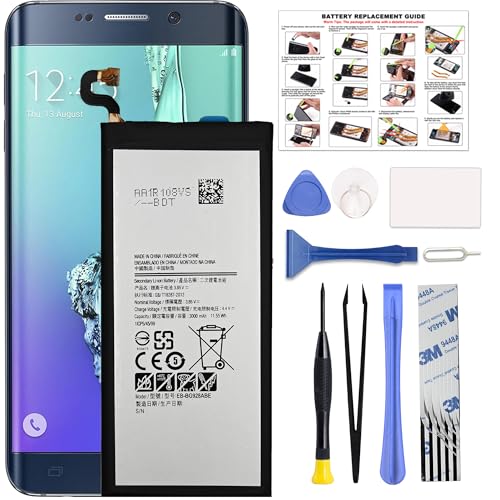
COMPATIBILITY: This battery only fits for Samsung Galaxy S6 Edge+ Plus, SM-G928A, SM-G928F, SM-G928A, SM-G928T, G928I, SM-G928G, SM-G928C, SM-G928I, SCV31, SM-G9280, SM-G928L, SM-G928S, SM-G928K, SM-G928W8. Please carefully confirm your phone model before purchase.

Compatible with: Fit for Samsung Galaxy Tab S6 10.5” SM-T860 T865, Samsung Galaxy Tab S5e 10.5” SM-T720 T725, please check the model of your tablet before purchase. Compatible Part Numbers: EB-BT725ABU. Installation Notice: Replacing battery for Samsung Galaxy Tab S6 / S5E requires careful disassembly. Please watch professional teardown video before installation. Improper installation may result in charging recognition error.
Pros and Cons of DIY Replacement
Pros:
- Cost-Effective: Performing the replacement yourself saves on labor costs. You buy only the battery and necessary tools.
- Flexibility: You choose when to do it. No need to make an appointment or wait in a repair shop.
- Learning Experience: Gaining hands-on experience with your phone can build your repair skills for future issues.
Cons:
- Risk of Damage: Inexperienced users can accidentally damage internal components during replacement.
- Warranty Void: If your device is still under warranty, DIY efforts might void it, limiting future repair options.
- Time-Consuming: The process can take longer than expected, especially if you encounter complications or require multiple attempts.
When to Seek Professional Help
- Swollen Battery: If you notice a swollen battery, professional evaluation is essential. A swollen battery poses safety risks.
- Limited Experience: If you’re unfamiliar with phone repairs, seeking professional assistance reduces the risk of damaging your device.
- Tool Availability: You may lack the specialized tools required for the replacement. Professionals have access to the necessary equipment.
- Urgent Repairs: If your device requires immediate attention, professionals can often replace the battery faster than you might at home.
Weigh your options carefully. Evaluate your comfort level with repairs, the current condition of your device, and whether the savings of a DIY replacement justify potential risks.
Conclusion
Taking care of your Samsung Galaxy S6’s battery can significantly enhance your device’s performance. If you notice signs like rapid discharge or overheating it’s worth considering a battery replacement. Whether you choose to tackle the replacement yourself or seek professional help depends on your comfort level and the specific issues you’re facing.
Remember to weigh the pros and cons of each option before making a decision. With the right approach you can breathe new life into your Galaxy S6 and enjoy all its features without the frustration of battery problems. Happy fixing!
Frequently Asked Questions
What issues do Samsung Galaxy S6 users face with battery performance?
Samsung Galaxy S6 users commonly experience problems like rapid battery discharge, overheating, and unexpected shutdowns as their devices age. These symptoms indicate a decline in battery capacity, prompting questions about whether a battery replacement is necessary.
How can I tell if my Samsung Galaxy S6 needs a battery replacement?
Signs that your Samsung Galaxy S6 might need a battery replacement include shorter battery life, the device frequently overheating, experiencing crashes, or noticing a swollen battery. Regularly monitoring these issues can help maintain optimal device performance.
Is it possible to replace the Galaxy S6 battery on my own?
Yes, replacing the Galaxy S6 battery on your own is possible, but it can be challenging due to its non-removable battery design. You’ll need specific tools and a step-by-step approach. The article provides detailed guidelines to assist you through the process.
What tools do I need to replace the battery in a Galaxy S6?
To replace the battery in a Galaxy S6, you will need a plastic opening tool, a Phillips screwdriver, tweezers, and a compatible new battery. Having the right tools ensures a smoother replacement process.
Should I opt for DIY battery replacement or seek professional help?
Choosing between DIY and professional battery replacement depends on your comfort level with repairs. DIY can save money and offer hands-on experience, while professional help is safer for tasks like replacing a swollen battery or if you lack the necessary tools. Evaluate your situation carefully.
