

Key Takeaways
- Battery Lifespan Awareness: Samsung S10 batteries typically have a capacity of 3,400 mAh but degrade over time, leading to faster drains and longer charging times.
- Common Battery Issues: Indicators of battery problems include rapid discharge, overheating, unexpected shutdowns, and reduced charge cycles.
- Replacement Options: Users can opt for professional service for reliable battery replacement or choose a DIY approach if they possess the necessary skills and tools.
- Essential Tools for DIY: Required tools for a successful battery replacement include a Phillips screwdriver, plastic pry tools, tweezers, and a compatible replacement battery.
- Risks of Battery Replacement: DIY battery replacement carries risks such as damaging the device, compromising water resistance, and potentially voiding warranties.
- Cost Considerations: Professional battery replacement typically costs between $70 to $150, while DIY methods can range from $30 to $80, allowing users to weigh their options based on skills and budget.
Is your Samsung S10 struggling to hold a charge? You’re not alone. Many users face battery issues as their phones age, leading to frustrating moments when you need your device most.
Overview of Samsung S10 Battery
Samsung S10 batteries are lithium-ion types, known for their efficiency and longevity. The typical capacity is 3,400 mAh, which provides ample power for daily use. However, as devices age, you might notice deteriorating battery performance, including faster drain and longer charging times.
Several factors contribute to battery wear. Frequent charging, high usage rates, and extreme temperatures can reduce battery life significantly. For instance, using demanding apps or games can increase power consumption, causing faster depletion.
If you experience severe battery issues, consider monitoring your device’s battery health through settings. Samsung provides built-in tools for assessing battery usage.
Common Signs of Battery Issues
- Rapid Discharge: If your battery drains significantly faster than usual, it’s a clear sign of wear.
- Overheating: Excessive heat during charging or usage can indicate battery problems.
- Unexpected Shutdowns: If your phone shuts down randomly, despite having charge, check the battery’s condition.
- Diminished Charge Cycles: A significantly reduced battery capacity after charging can indicate it’s time for a replacement.
Replacement Options
You can choose to replace the battery through authorized service centers or opt for DIY methods.
- Professional Service: Allows for guarantees and ensures safe handling of your device.
- DIY Options: If you’re tech-savvy, consider battery replacement kits available online. These kits generally include tools and instructions.
Tools for Replacement
If choosing the DIY route, gather these essential tools:
- Screwdriver Set: Specific types to open the device.
- Plastic Pry Tools: Prevents damage while opening the device.
- Tweezers: Helps with precise maneuvering inside the phone.
- Replacement Battery: Ensure compatibility with Samsung S10.
Using the correct tools and following detailed instructions can lead to a successful battery replacement process. Always handle components carefully to avoid physical damage.
Reasons for Changing the Battery
Your Samsung S10 battery may require replacement due to various issues. Identifying these reasons ensures your device continues functioning well.
Recommended Products

[PLS CONFIRM DEVICE MODEL] --- Contains the instruction to guide you step by step installation, and we have professional engineers to answer all your questions about the repair process. Please verify your old battery part number and model before purchasing this replacement battery. Compatible with Galaxy S10 SM-G973, EB-BG973ABU, EB-BG973ABE, G973A, G973T, G973V, G973P, G973R4 ★NOT FOR Galaxy S10e/ S10 Plus/ Note 10/ Note 10 Plus★

【Compatible Model】:This Battery Model is EB-BG973ABU,Compatible with Samsung Galaxy S10, SM-G973F, SM-G973U, SM-G973W, SM-G973U1, SM-G9730, SM-G973N, SM-G973X, SCV41, SM-G973C series. NOT work for Galaxy S10 Plus.Please confirm your phone model and your old battery part number before placing an order.

【Compatible Model】It is compatible with Samsung Galaxy S10 SM-G973, EB-BG973ABU, EB-BG973ABE, G973A, G973T, G973V, G973P, G973R4. Not for S10 Plus. Please double identify check your phone model matches before purchasing the battery.
Performance Issues
Performance problems often arise as the battery ages. You might notice faster battery drain, where the charge seems to disappear within a few hours, even with minimal usage. Longer charging times can also signal a failing battery. If your device overheats during use or while charging, this points to potential battery issues. It’s essential to address these problems promptly to maintain optimal performance.
Physical Damage
Physical damage can also necessitate a battery change. If your phone shows signs such as a swollen battery or cracks in the back cover, it’s time for a replacement. A swollen battery can cause pressure on internal components, risking further damage to your device. Addressing this issue quickly can safeguard your phone’s longevity and functionality.
DIY Battery Replacement
Replacing your Samsung S10 battery can be a rewarding task. It can save you money and extend your device’s lifespan. Follow these steps for a successful DIY battery replacement.
Recommended Products
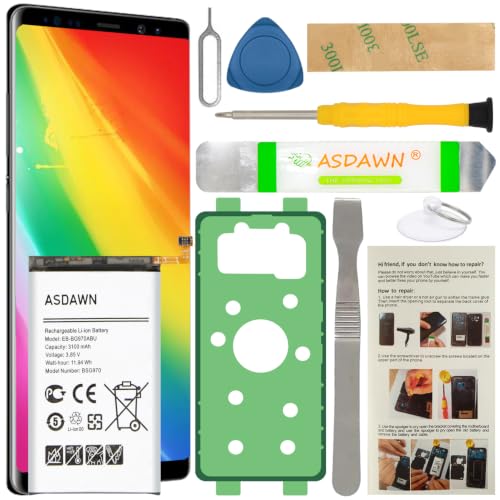
[FOR COMPATIBLE MODEL] -- Contains the instruction to guide you step by step installation, and we have professional engineers to answer all your questions about the repair process. Please verify your old battery part number and model before purchasing this replacement battery. Compatible with Samsung Galaxy S10e SM-G970, EB-BG970ABU, SM-G970F/DS, SM-G970U, SM-G970W ★NOT FOR Samsung Galaxy S10/ S10 Plus/ Note 10/ Note 10 Plus★

COMPATIBILITY: This battery only fits for Samsung Galaxy S10, SM-G973F, SM-G973U, SM-G973W, SM-G973U1, SM-G9730, SM-G973N, SM-G973X, SCV41, SM-G973C. Please carefully confirm your phone model before purchase.

Compatible Model: Replacement Battery Galaxy S10 plus. Compatible with Samsung Galaxy S10 Plus Carriers, include Galaxy S10 Plus EB-BG975ABU G975V( Verizon ),G975A( AT&T ),G975T( T-Mobile ),G975P( Sprint ), G975R4(US Cellular) NOT for Other Samsung Model. Please Confirm Your Phone Model From Phone Back Cover to Avoid Wrong Order
Tools Needed
- Phillips screwdriver: For removing screws on the phone casing.
- Plastic prying tool: To safely open the device without causing damage.
- Tweezers: For handling small components.
- Suction cup: To create leverage for lifting the screen.
- Replacement battery: Ensure it’s compatible with the Samsung S10 model.
Step-by-Step Process
- Power off your phone: Turn off your Samsung S10 completely before starting any work.
- Remove the back cover: Use a suction cup to gently lift the back cover while inserting a plastic prying tool to separate the adhesive. Be careful not to apply too much pressure.
- Unscrew the battery connector: Locate the screws securing the battery connector and remove them with a Phillips screwdriver.
- Disconnect the old battery: Carefully lift the battery connector from the motherboard with tweezers, avoiding any other components.
- Take out the old battery: Wiggle the battery gently to detach it from the adhesive. If it’s stuck, use the prying tool, but proceed slowly.
- Insert the new battery: Place the new battery into the compartment and reconnect the battery connector to the motherboard.
- Reassemble your phone: Replace the screws, then attach the back cover, ensuring it fits snugly.
- Power on your device: After reassembly, turn on your Samsung S10 to check if the new battery works correctly.
Use caution throughout the process. If unsure at any step, consider seeking professional help to avoid damaging your device.
Professional Battery Replacement Services
Professional battery replacement services offer a reliable solution for Samsung S10 users facing battery issues. Experts efficiently handle battery replacements, ensuring your device functions optimally.
When to Consider Professional Help
Consider professional help if you notice severe symptoms like excessive overheating, unexpected shutdowns, or physical damage, such as a swollen battery. If DIY attempts lead to confusion or anxiety, professionals can safely execute the battery replacement. For those lacking the necessary tools or experience, seeking help from trained technicians protects your investment and ensures proper installation.
Cost Comparison
Here’s a cost breakdown for professional battery replacement versus DIY methods:
| Replacement Option | Estimated Cost |
|---|---|
| Professional Service | $70 – $150 |
| DIY Tools & Battery | $30 – $80 |
While professional services offer peace of mind and expertise, DIY options may save money if you’re confident in your skills. Weigh the costs against potential risks and benefits before deciding your approach.
Risks Involved in Battery Replacement
Replacing the battery in your Samsung S10 involves several risks that you should consider before proceeding. Understanding these risks helps you make informed decisions.
Potential Damage to the Device
- Screen Damage: Using tools improperly can crack or damage the screen during the replacement.
- Internal Component Damage: Mishandling components can lead to damage to delicate parts like connectors and chips.
- Water Resistance: Opening the device can compromise its water-resistant features if not resealed correctly.
Safety Hazards
- Battery Puncture: Incorrect handling of the battery might puncture it, resulting in hazardous leaks or fires.
- Overheating: Batteries can overheat if they are not installed properly, posing a risk of burns or further device damage.
- Electrostatic Discharge: Failing to use anti-static precautions may lead to electrostatic discharge, damaging internal components.
Warranty Considerations
- Void Warranty: Performing a DIY battery replacement can void your warranty. If you encounter issues later, you might not receive support from Samsung.
- Professional Help: Consulting a professional ensures that your warranty remains intact and may provide peace of mind.
Cost Implications
- Additional Repair Costs: Mistakes during replacement can lead to further damage, incurring additional repair costs.
- Value of Time: If a DIY attempt fails, seeking professional help might take more time than if you immediately opted for a service.
Weighing these risks can guide you in deciding whether to pursue a DIY battery replacement or seek professional assistance.
Conclusion
Changing the battery in your Samsung S10 can definitely breathe new life into your device. Whether you choose to tackle it yourself or seek professional help, making the right decision will depend on your comfort level and the severity of the issues you’re facing.
If you’re feeling adventurous and have the right tools, a DIY replacement can be rewarding and cost-effective. Just remember to take your time and handle everything with care. On the other hand, if you’re unsure or dealing with significant problems, don’t hesitate to reach out to a professional.
Taking action on battery issues sooner rather than later will help ensure your S10 continues to serve you well for years to come.
Frequently Asked Questions
What are common signs of battery problems in a Samsung S10?
Common signs of battery problems include rapid battery discharge, overheating, unexpected shutdowns, and diminished charge cycles. If you observe these issues, it may be time to assess your battery’s health.
How long does the Samsung S10 battery typically last?
The Samsung S10 battery has a typical capacity of 3,400 mAh. While it is efficient for daily use, performance may degrade as the device ages, leading to faster battery drain and longer charging times.
Can I replace the Samsung S10 battery myself?
Yes, you can replace the Samsung S10 battery yourself using the right tools like a Phillips screwdriver, plastic prying tool, and suction cup. However, careful handling is essential to avoid damage; consider professional help if unsure.
When should I consider professional battery replacement services?
Consider professional battery replacement for severe issues, such as excessive overheating, unexpected shutdowns, or physical damage to the device. Professional services ensure safe handling and correct installation, reducing the risk of further problems.
What tools do I need for a DIY battery replacement?
For a DIY battery replacement, you’ll need a Phillips screwdriver, plastic prying tool, tweezers, suction cup, and a compatible replacement battery. Having the right tools is crucial for a successful and safe replacement process.
What risks are involved in DIY battery replacement?
Risks include potential damage to the device, safety hazards like battery puncture, and voiding your warranty. Improper tool use can cause internal damage, so weigh these risks before attempting a DIY replacement.
How much does it cost to replace a Samsung S10 battery?
Professional battery replacement services typically range from $70 to $150, while DIY methods, including tools and a replacement battery, can cost between $30 and $80. Consider the costs and potential risks when deciding on your approach.
Why is battery health important as the Samsung S10 ages?
Battery health is crucial as it directly impacts performance. As the Samsung S10 ages, declining battery capacity can lead to rapid discharge and longer charging times. Monitoring battery health helps you address issues early.
