

Key Takeaways
- Battery Replacement Options: OnePlus users have two primary options for battery replacement: a DIY approach or professional services. Choose based on your comfort level and skills.
- Signs of Battery Issues: Indicators such as rapid drain, overheating, unexpected shutdowns, and physical damage signal that it may be time for a battery replacement.
- DIY Considerations: If opting for DIY, gather necessary tools, follow safe procedures to avoid damage, and be aware that this may void your warranty.
- Professional Services: For hassle-free replacement, find an authorized service center, check reviews, and discuss costs and warranties to ensure quality service.
- Battery Life Optimization: Implement practical tips like lowering screen brightness, limiting background apps, and managing connectivity to extend your OnePlus battery life.
- Regular Monitoring: Regularly check battery health through device settings to proactively manage issues and ensure optimal device performance.
Have you ever found yourself frustrated with a phone that just won’t hold a charge? If you own a OnePlus device, you might be wondering if the battery can be replaced. It’s a common concern as batteries naturally degrade over time, impacting performance and usability.
In this article, you’ll discover whether you can replace your OnePlus battery and what options are available to you. Whether you’re considering a DIY fix or seeking professional help, understanding the process can save you time and money. Let’s explore how to get your OnePlus back to its best, so you can enjoy your device without the constant worry of running out of power.
Overview Of OnePlus Battery Replacement
Replacing a OnePlus battery can restore your device’s performance significantly. Several options exist for battery replacement, offering flexibility based on your skills and comfort level.
DIY Battery Replacement
- Gather tools: You’ll need a heat gun, small Phillips screwdriver, and plastic pry tools.
- Power off the device: Always ensure your OnePlus device is powered down before beginning.
- Remove the back cover: Use the heat gun to soften the adhesive and gently pry the back cover off.
- Disconnect the battery: Locate the battery connector and carefully disconnect it from the motherboard.
- Install the new battery: Position the new battery, connect it to the motherboard, and reattach the back cover.
Professional Battery Replacement
- Locate an authorized service center: Search for the nearest OnePlus service center using the OnePlus website.
- Schedule an appointment: Contact the service center to book an appointment for battery replacement.
- Let the experts handle it: Technicians will safely replace the battery using verified components.
Considerations for Battery Replacement
- Warranty Impact: DIY replacements might void your warranty. Check your warranty status before proceeding.
- Cost Assessment: Budget for a new battery, which typically ranges from $30 to $80. Professional services may cost more due to labor.
- Battery Type: Ensure the replacement battery is compatible with your OnePlus model. Always source batteries from reputable suppliers.
Common Symptoms of Battery Issues
- Rapid Drain: If your phone loses charge quickly, it indicates possible battery degradation.
- Overheating: Excessive heat during charging points to battery problems.
- Device Shutdown: Unexpected shutdowns, even with a battery charge, signal replacement needs.
Understanding your options helps you make informed decisions about replacing your OnePlus battery, ensuring optimal performance for your device.
Reasons For Battery Replacement
You might need to replace your OnePlus battery for several reasons. Understanding these can help you determine the appropriate time for a change.
Recommended Products

【More Capacity】 Model battery:BLP699,3880mAh large capacity .Larger capacity and longer life.This battery prolongs the phone service time, you can use the high capacity battery directly without bothering about running out of power and shut down some apps all the time.
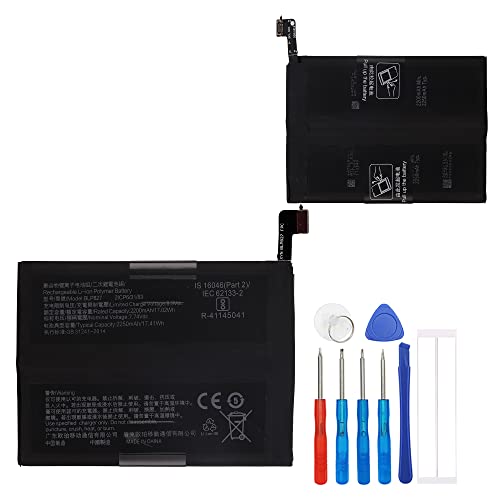
This battery is compatible with OnePlus 9 Pro 5G LE2125, please carefully check your phone model before purchase.
Decreased Performance
Decreased performance indicates your device struggles to hold a charge. If you notice your OnePlus battery drops from 100% to 20% in just a few hours despite light usage, that suggests battery degradation. Frequent app crashes or slow system responses also signal that the battery can’t keep up with your device’s demands.
Physical Damage
Physical damage is another clear sign that a battery replacement is necessary. If your phone shows any swelling, cracks, or leaks near the battery compartment, get the battery replaced immediately. A damaged battery poses safety hazards and can lead to further device damage if not addressed quickly. Always handle your device with care, and seek professional assistance for noticeable physical issues.
How To Determine If You Need A Battery Replacement
Recognizing when a battery replacement is necessary can significantly enhance your OnePlus device’s performance and longevity. Look for the following indicators to decide if it’s time for a new battery.
Recommended Products

【Precise Compatibility, Perfect Fit】Please confirm your device model before placing an order. This product is a replacement battery for the [BLP821] model, specifically designed for the [One-Plus 9 1+9 LE2113 LE2117] model, ensuring a perfect fit with the original device and restoring your phone's vitality.

This battery is compatible with OnePlus 10 Pro 1+10 Pro, please carefully check your phone model before purchase.

Compatible Model No.:OnePlus 9 Pro 5G 1+9 Pro 5G LE2127 LE2123 LE2121 LE2125 LE2120,Capacity:2250mAh,Voltage:7.74V. Make sure your device is suitable for this replacement battery before ordering.
Signs That Indicate Replacement
- Rapid Drain: If your battery depletes within a few hours of normal usage, it likely needs replacement.
- Overheating: Excessive heat during charging or use signals battery issues.
- Unexpected Shutdowns: A device that turns off without warning, even with a sufficient charge, points to battery failure.
- Physical Damage: Swelling, cracks, or leaks from the battery are clear signs of risk and warrant immediate replacement.
- Charge Cycles: If your battery has gone through 300-500 charge cycles, it’s likely worn out, affecting efficiency.
Checking Battery Health
- Access Settings: Open the ‘Settings’ app on your OnePlus device.
- Select Battery: Tap on ‘Battery’ to find information about your battery’s performance.
- Battery Usage: Review which apps consume the most power. If there’s a consistent drain from a particular app, it may be causing issues rather than the battery.
- Battery Health Apps: Download third-party battery health apps, such as AccuBattery or GSam Battery Monitor. These tools provide metrics on battery wear and efficiency.
- Software Updates: Ensure your device is running the latest software. Sometimes, updates can resolve battery performance issues.
Regularly monitoring these indicators helps you maintain optimal performance and make timely decisions regarding battery replacement for your OnePlus device.
OnePlus Battery Replacement Options
When facing battery issues with your OnePlus device, several replacement options are available to restore functionality. You can choose between a DIY approach or seeking professional services, depending on your comfort level and needs.
DIY Replacement
For those willing to tackle the battery replacement themselves, follow these steps:
- Gather Tools: You’ll need a small screwdriver, prying tool, and possibly adhesive strips. Ensure you have a compatible replacement battery.
- Remove the Back Cover: Carefully use a prying tool to detach the back cover. Be cautious to avoid damaging the casing.
- Disconnect the Battery: Once the back cover is off, locate the battery connector and gently disconnect it.
- Replace the Battery: Remove the old battery and insert the new one. Make sure it’s properly connected.
- Reassemble the Device: Secure the back cover by pressing it back into place. Ensure everything is aligned and attached correctly.
- Power On: Restart your device to check if the new battery is functioning properly.
Keep in mind, this method could void your warranty. Use caution and consult online guides specific to your OnePlus model for detailed visual instructions.
Professional Replacement Services
If you prefer a hassle-free option, consider using professional services. Here are steps to follow:
- Locate Authorized Service Centers: Search for official OnePlus service centers or trusted third-party repair shops in your area.
- Check Reviews: Read customer reviews to ensure the service provider has a good reputation for quality and reliability.
- Schedule an Appointment: Contact the center to set up a convenient time for your battery replacement.
- Discuss Details: When you arrive, describe the battery issues you’ve experienced. This helps technicians assess your device accurately.
- Inquire About Costs: Ask for a cost estimate upfront, including labor and parts. Make sure to confirm warranty terms on the service.
Using professional services ensures proper installation and often comes with a warranty, providing peace of mind regarding the quality of the work done.
Tips For Extending Your OnePlus Battery Life
To maximize the battery life of your OnePlus device, consider implementing these practical tips:
Lower Screen Brightness
Reduce screen brightness or enable adaptive brightness. This adjustment decreases battery drain, especially in low-light environments.
Limit Background Apps
Close unused apps running in the background. This action conserves battery by preventing unnecessary power usage.
Use Battery Saver Mode
Activate battery saver mode when your charge is low. This feature limits background processes and services, prolonging your battery life.
Manage Location Services
Turn off location services for apps that don’t need it. Regular GPS use significantly drains the battery.
Disable Unnecessary Notifications
Limit notifications from apps that aren’t critical. Each notification wakes your device, consuming battery power.
Update Software Regularly
Keep your OnePlus device updated. Software updates often include battery optimization improvements and bug fixes.
Turn Off Unused Connectivity
Switch off Bluetooth, Wi-Fi, or mobile data when not in use. These features continuously search for connections, using battery life.
Optimize App Settings
Access individual app settings to minimize battery consumption. Disable features like auto-sync or background data for apps that don’t require them.
Utilize Dark Mode
Enable dark mode if your device has an AMOLED display. Darker pixels consume less power than lighter ones, extending battery life.
Monitor Battery Health
Regularly check battery health through device settings. This practice allows you to identify any issues early and adjust usage accordingly.
Implementing these tips can significantly enhance the longevity of your OnePlus battery, helping you stay powered up throughout the day.
Conclusion
Taking care of your OnePlus battery is key to keeping your device running smoothly. Whether you choose to replace the battery yourself or seek professional help you have options to restore its performance. Remember to weigh the potential risks of DIY replacements against the benefits of expert assistance.
Stay alert for signs of battery issues and don’t hesitate to act if you notice rapid draining or physical damage. With the right approach and a little bit of care you can keep your OnePlus device in great shape for years to come. Plus by following some simple tips you can extend your battery life and enjoy uninterrupted usage throughout the day.
Frequently Asked Questions
How do I know if my OnePlus battery needs replacing?
If your OnePlus device shows symptoms like rapid battery drain, overheating, unexpected shutdowns, or physical damage (like swelling), it may need a battery replacement. You can also check your battery health in the device settings or use third-party apps to monitor its performance.
Can I replace the OnePlus battery myself?
Yes, you can replace the OnePlus battery yourself. You’ll need specific tools like a small screwdriver, prying tool, and adhesive strips. Follow detailed online guides for safe removal and installation. However, keep in mind that DIY methods might void your warranty.
What are the risks of DIY battery replacement?
DIY battery replacement can void your warranty and potentially damage your device if not done correctly. If you’re not experienced with device repair, consider seeking professional help to avoid any complications.
How do I find a professional for battery replacement?
To find a professional for OnePlus battery replacement, look for authorized service centers. Check online reviews for service quality and schedule an appointment. Discuss your battery issues and costs upfront with the technician.
What factors should I consider before replacing my OnePlus battery?
Consider factors like the cost of the replacement, compatibility with your OnePlus model, and the potential impact on your warranty. Assess the symptoms your device is experiencing to determine if replacement is necessary.
What can I do to extend my OnePlus battery life?
To extend your OnePlus battery life, lower screen brightness, limit background app usage, use battery saver mode, manage location services, and update your software regularly. Implementing these strategies can greatly enhance battery longevity.
