

Key Takeaways
- Understanding Battery Types: Samsung primarily uses Lithium-ion (Li-ion) batteries, known for their high energy density, low self-discharge rates, and long lifespan, which are pivotal for device performance.
- Signs of Battery Issues: Key indicators that your Samsung phone battery needs replacement include rapid drainage, swelling, overheating, unexpected shutdowns, and charging difficulties.
- DIY vs. Professional Replacement: You can change your Samsung phone battery yourself if it’s removable; however, non-removable batteries require more tools and expertise. Professional services provide safety and proper installation, often with warranties.
- Cost Estimates: DIY battery replacement typically costs between $30 to $60 for the battery, whereas professional services range from $50 to $150, depending on the provider and model.
- Safety Precautions: Always power off your device, use proper tools, and work in a non-static environment to avoid damage during the battery replacement process.
- Warranty Considerations: Replacing the battery yourself could void your warranty, so check your warranty status before proceeding and consider professional services if you’re covered.
Ever found yourself frustrated with a phone that just won’t hold a charge? You’re not alone. Many Samsung users face this issue as their devices age, and it can feel overwhelming to think about getting it fixed.
Understanding Samsung Phone Batteries
Samsung phone batteries play a crucial role in the performance of your device. Knowing more about these batteries can help you make informed decisions regarding replacements.
Types of Samsung Phone Batteries
Samsung primarily uses Lithium-ion (Li-ion) batteries. These batteries provide several advantages, including:
- High Energy Density: Li-ion batteries store more energy in less space, allowing for slimmer phone designs.
- Low Self-Discharge Rate: They maintain charge longer when not in use, which is convenient for occasional users.
- Long Lifespan: Li-ion batteries can last for hundreds of charge cycles without significant degradation.
Some premium models may feature Samsung’s proprietary technologies, such as fast charging and wireless charging capabilities, enhancing the user experience.
Lifespan of Samsung Phone Batteries
The lifespan of Samsung phone batteries typically ranges from 2 to 3 years, depending on usage patterns. Factors influencing longevity include:
- Charge Cycles: Regular full charges and discharges affect battery health. Aim for partial charges (20%-80%) to extend lifespan.
- Temperature Exposure: Extreme heat or cold can shorten battery life. Keep your phone within the recommended temperature range.
- Screen Brightness and Apps: High screen brightness and background apps can drain the battery quickly. Optimize settings to improve longevity.
Monitoring these aspects can help you maximize the lifespan of your battery. If your device shows signs of rapid drainage or reduced performance, consider a replacement.
Assessing Battery Issues
Identifying when your Samsung phone battery needs attention is crucial for optimal performance. Several signs indicate a potential need for battery replacement.
Signs You Need a Battery Replacement
- Rapid Drainage: If your phone discharges quickly, even with normal usage, it may signal a failing battery.
- Swelling: Physical changes like a swollen battery case can lead to device damage and safety hazards.
- Overheating: Excessive heat during charging or use suggests underlying battery problems.
- Frequent Shutdowns: If your phone turns off unexpectedly, even with battery life remaining, it needs assessment.
- Charging Issues: Difficulty when connecting your charger or slow charging rates may indicate battery failure.
Troubleshooting Common Battery Problems
- Check for Software Updates: Ensure your device runs the latest software, as updates can resolve battery-draining bugs.
- Manage Background Apps: Disable unnecessary background applications that contribute to power consumption.
- Adjust Display Settings: Reducing screen brightness and timeout duration helps conserve battery life.
- Reset Settings: Resetting your phone’s settings can correct misconfigurations that affect battery performance.
- Factory Reset: As a last resort, restoring your device to factory settings can resolve software-related battery issues, though this erases all data.
Monitoring these signs and steps helps determine if a battery replacement or troubleshooting is necessary.
Can I Change the Battery in My Samsung Phone?
Yes, you can change the battery in your Samsung phone, but it varies based on the model. Some Samsung phones have removable batteries, while others feature sealed designs, requiring different approaches for replacement.
Recommended Products

【Spare Battery Specs】EB-BA426ABY Replacement battery has a capacity of 5100mAh, the Voltage is 3.86V.

COMPATIBILITY: The battery model is EB-BR880ABY, it is only compatible with Samsung Galaxy Watch 4 (40 mm), SM-R860 SM-R865 series and Galaxy Watch 4 Classic (42mm) SM-R880 SM-R885, please carefully confirm the model of your smartwatch before purchase.

🔋 High-Capacity 6200mAh Battery for Galaxy S23 Plus Upgraded 6200mAh power delivers longer battery life than original (4700mAh). Enjoy all-day video streaming, gaming, or working without frequent recharging. Perfect for heavy users and travelers.
DIY Battery Replacement
For models with removable batteries, the process is straightforward. Here’s how to do it:
- Power Off the Phone: Ensure your phone is completely turned off.
- Open the Back Cover: Use a finger or a plastic tool to gently pry open the back cover.
- Remove the Battery: Carefully pull the battery out. Take care not to damage any connectors.
- Insert the New Battery: Align the new battery with the connector and push it in until it clicks.
- Replace the Back Cover: Press the back cover back into place until secure.
- Power On Your Phone: Turn your phone back on to ensure everything works properly.
For models without a removable battery, DIY replacement becomes complex. You’d need tools like a heat gun, suction cup, and various screwdrivers. Follow these steps if you’re up for a challenge:
- Power Off and Remove SIM Card: Ensure your phone is off, and take out the SIM card tray.
- Heat the Edges: Gently heat the edges of the phone to soften the adhesive.
- Pry Open the Screen: Use a suction cup to lift the screen slightly, then use a plastic opening tool to separate the screen from the body.
- Disconnect Battery: Identify and disconnect the battery connector from the motherboard.
- Remove Adhesive: If needed, remove any adhesive holding the battery in place.
- Install New Battery: Insert the new battery and reconnect it.
- Reassemble the Phone: Carefully fit the screen back into place, ensuring it seals properly.
Seek caution when attempting DIY replacements, especially if your phone is still under warranty.
Professional Battery Replacement Services
Choosing professional services often guarantees better safety and efficiency. Here are your options:
- Samsung Service Center: Authorized service centers offer reliable battery replacement with genuine parts. Expect a warranty on the new battery and professional installation.
- Local Repair Shops: Many local repair shops specialize in phone repairs, including battery replacements. Verify their reputation and ensure they use quality parts.
- Mail-In Services: Some companies provide mail-in battery replacement services. You ship your phone to them, and they return it with a new battery. Check reviews before trusting this option.
Choosing a professional service typically saves time and reduces the risk of damaging your device.
Tools Required for Battery Replacement
Replacing your Samsung phone battery requires a few essential tools. Gathering the right tools ensures a smoother process and minimizes the risk of damage.
Recommended Products

Compatible Model: It is compatible with Samsung Galaxy Note 10+ Plus Only, Model: SM-N975, EB-BN972ABU. Not for Note 10. Please double identify and check your phone model matches before purchasing the battery.
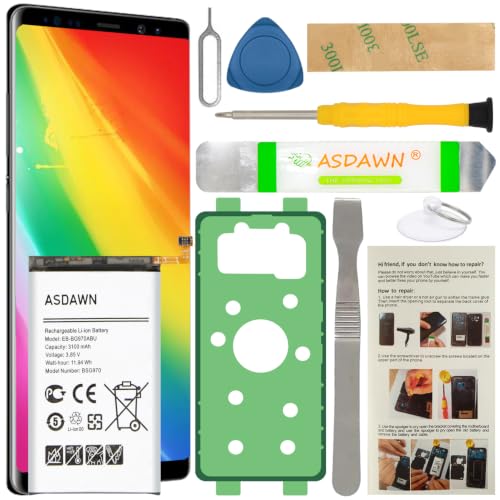
[FOR COMPATIBLE MODEL] -- Contains the instruction to guide you step by step installation, and we have professional engineers to answer all your questions about the repair process. Please verify your old battery part number and model before purchasing this replacement battery. Compatible with Samsung Galaxy S10e SM-G970, EB-BG970ABU, SM-G970F/DS, SM-G970U, SM-G970W ★NOT FOR Samsung Galaxy S10/ S10 Plus/ Note 10/ Note 10 Plus★
Essential Tools for DIY
- Screwdriver Set: You’ll need a small Phillips and flathead screwdriver to access your phone’s battery compartment.
- Plastic Pry Tools: These help safely open the device without scratching or damaging the case.
- Tweezers: Useful for handling small components and connectors.
- Spudger: This tool aids in safely disconnecting battery connectors and other components.
- Heat Gun or Hair Dryer: Applying gentle heat softens adhesive, making it easier to open the device.
- Replacement Battery: Ensure you have a compatible battery for your specific Samsung model.
Safety Precautions to Consider
- Power Off Your Device: Always turn off your phone before starting the battery replacement process to prevent electrical shock.
- Work on a Non-static Surface: Avoid static electricity by using an anti-static mat or working on a wooden surface. This protects sensitive internal components.
- Avoid Excessive Force: Use tools gently. Applying too much pressure can crack the screen or damage internal parts.
- Check for Damage: Inspect the new battery for any dents or swelling before installation. A damaged battery can pose safety risks.
- Dispose of Batteries Properly: Dispose of your old battery according to local regulations to prevent environmental hazards.
With the right tools and safety measures, you can confidently tackle the battery replacement process.
Cost of Battery Replacement
Understanding the costs associated with battery replacement can help you make informed decisions about maintaining your Samsung phone.
DIY Costs vs. Professional Costs
When considering a DIY battery replacement, the costs typically range from $30 to $60 for a compatible replacement battery. Tools, if not already owned, may add another $10 to $30. This option saves money if you’re comfortable with the process and have the necessary skills.
In contrast, professional battery replacement services often charge between $50 and $150, depending on your phone model and service provider. Authorized Samsung service centers usually offer warranty coverage, ensuring quality repairs, but may be on the higher end of the pricing spectrum. Local repair shops might provide competitive rates and quicker service.
Warranty Considerations
Warranty coverage can significantly impact your choice. If your Samsung phone is still under warranty, opting for a professional service may keep the warranty intact. Making a DIY change could void the warranty, leading to potential issues down the line. Always check your warranty terms before proceeding; this information often guides your decision on battery replacement options. If you’re unsure, contacting Samsung support can clarify what suits your device best.
Conclusion
Changing the battery in your Samsung phone can seem daunting but with the right knowledge and tools, you can make it a manageable task. Whether you choose to tackle a DIY replacement or seek professional help, being informed about your options is key. Remember to keep an eye on your battery’s performance and address any issues early on to extend its lifespan.
Ultimately, taking care of your phone’s battery not only enhances its performance but also improves your overall experience. So go ahead and give your Samsung the care it deserves. You’ve got this!
Frequently Asked Questions
How long do Samsung phone batteries last?
Samsung phone batteries typically last between 2 to 3 years. Their lifespan depends on factors such as charge cycles, exposure to temperature extremes, and screen brightness. Monitoring these factors can help maximize battery longevity.
What are the signs of a failing Samsung battery?
Key signs of a failing Samsung battery include rapid drainage, swelling, overheating, frequent shutdowns, and charging issues. If you notice these problems, it may be time to assess whether a battery replacement is necessary.
Can I replace my Samsung phone battery myself?
Yes, you can replace your Samsung phone battery yourself, especially for models with removable batteries. However, models with sealed designs require specific tools and careful handling. Always consider your skills and comfort level before attempting a DIY replacement.
What tools do I need for a DIY battery replacement?
For a DIY battery replacement, you’ll need a screwdriver set, plastic pry tools, tweezers, a spudger, a heat gun or hair dryer, and a compatible replacement battery. Ensuring you have the right tools is crucial for a successful replacement.
Is it safer to have my Samsung battery replaced professionally?
Yes, seeking professional battery replacement is often safer. Authorized service centers and local repair shops have the expertise to replace batteries without damaging your device and can also maintain warranty coverage.
How much does it cost to replace a Samsung battery?
DIY battery replacement typically costs between $30 to $60, excluding tools. Professional services range from $50 to $150, depending on the model and provider. Consider warranty implications when choosing your replacement method.
