

Key Takeaways
- Battery Lifespan: Samsung Galaxy Watch batteries typically last between 1 to 2 days, influenced by usage patterns and settings.
- Replacement Options: Users can choose between DIY battery replacement or seeking professional services, with each option having its own advantages and considerations.
- Signs of Battery Issues: Common indicators that your watch battery may need replacement include rapid discharge, inability to charge, overheating, and physical swelling.
- DIY Steps: The DIY battery replacement process involves powering off the watch, removing the back cover, and carefully disconnecting and replacing the old battery with a new one.
- Cost Factors: DIY replacement is cost-effective (ranging from $10 to $30 for parts), while professional services usually cost between $50 to $100 but offer warranties and expert installation.
- Maintenance Tips: To prolong battery life, consider reducing brightness, limiting notifications, and utilizing power-saving mode when necessary.
Ever found yourself frustrated with a smartwatch that just won’t hold a charge? You’re not alone. Many Samsung Galaxy Watch users face battery issues as their devices age. It’s a common problem that can leave you wondering if you need to buy a new watch or if there’s a simpler fix.
In this article, you’ll discover whether you can replace the battery in your Samsung Galaxy Watch. You’ll learn about the options available to you, from DIY solutions to professional repairs. By the end, you’ll have the knowledge to make an informed decision and hopefully extend the life of your beloved device.
Overview of Samsung Galaxy Watch Battery
The Samsung Galaxy Watch battery plays a crucial role in enhancing your device’s performance. Typically, the battery lifespan for these watches ranges from 1 to 2 days, depending on usage and settings. Various factors can impact battery life, including screen brightness, app usage, and notifications.
Types of Batteries
Samsung Galaxy Watches usually feature lithium-ion batteries. These batteries offer several advantages:
- Lightweight: They contribute to the overall sleek design of the watch.
- Fast Charging: They attain a full charge relatively quickly.
- Durable: They withstand numerous charge cycles without significant degradation.
Battery Replacement Options
If you notice significant battery drain or failure, consider your replacement options:
- Do-It-Yourself:
- Gather necessary tools like a screwdriver, spudger, and replacement battery.
- Follow online tutorials designed specifically for your Galaxy Watch model.
- Use caution to avoid damaging the watch during the process.
- Professional Repair Services:
- Seek authorized Samsung service centers for battery replacement.
- Ensure technicians use genuine Samsung parts for optimal performance.
- Verify warranty implications when opting for professional services.
Signs of Battery Issues
Be aware of these common symptoms indicating battery problems:
- Rapid Drain: Watch loses charge within a few hours.
- Inability to Charge: Battery doesn’t respond when connected to a charger.
- Overheating: Noticeable warmth during use or charging.
Maintenance Tips
To prolong your Samsung Galaxy Watch battery life, consider these practical tips:
- Reduce Brightness: Dim the display to conserve power.
- Limit Notifications: Disable non-essential app notifications.
- Enable Power Saving Mode: Use this feature when low on battery.
Maintaining your Samsung Galaxy Watch battery ensures optimal performance and longevity, allowing you to enjoy your device for an extended period.
Understanding Battery Replacement
When your Samsung Galaxy Watch starts showing signs of battery wear, understanding the replacement options becomes essential. This section covers why replacement might be necessary and how to identify when your battery needs attention.
Recommended Products
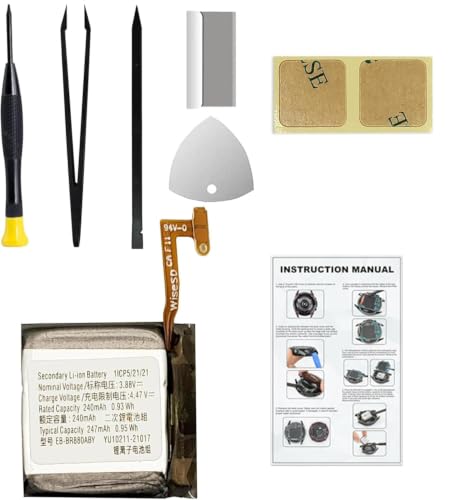
Compatible Smartwatch Model: This battery kit is specifically designed for Samsung Galaxy Watch 4 40mm (with model SM-R860 series) / Watch 4 Classic 42mm (with model SM-R880 series), please double confirm your smartwatch model before purchasing

COMPATIBILITY: The battery model is EB-BR880ABY, it is only compatible with Samsung Galaxy Watch 4 (40 mm), SM-R860 SM-R865 series and Galaxy Watch 4 Classic (42mm) SM-R880 SM-R885, please carefully confirm the model of your smartwatch before purchase.
Why Battery Replacement Might Be Necessary
Battery replacement becomes necessary due to several reasons. Over time, rechargeable lithium-ion batteries lose their ability to hold a charge. This reduction in capacity can lead to shorter usage times. Moreover, physical damage from drops or exposure to moisture can also impair the battery’s performance. When charging issues arise or the watch overheats, consider replacement to restore function and safety.
Signs Your Battery Needs Replacement
You can spot a failing battery through specific indicators:
- Rapid Discharge: If your watch runs out of power within a few hours of usage, it indicates reduced battery capacity.
- Inability to Charge: If you struggle to charge your device, despite using the original charger, this signals a potential battery issue.
- Overheating: If your watch becomes excessively warm during charging or regular use, it might be time for a battery replacement.
- Physical Swelling: A bulging watch case may indicate battery swelling, necessitating immediate replacement for safety.
Recognizing these signs early can help you address battery issues before they lead to more significant problems.
Steps to Replace Samsung Galaxy Watch Battery
Replacing your Samsung Galaxy Watch battery involves a few essential tools and a clear process. Follow these steps to ensure a smooth battery replacement.
Tools Required for Replacement
- Small Phillips screwdriver: Necessary for removing screws in the watch casing.
- Plastic opening tool: Helps to pry open the watch without damaging it.
- Tweezers: Useful for handling small components and connectors.
- Replacement battery: Ensure it’s compatible with your specific Galaxy Watch model.
- Soft cloth: Protects the watch’s surface during the process.
Detailed Replacement Process
- Power off your watch: Before starting, turn off your Galaxy Watch to prevent any electrical shorts.
- Remove the back of the watch: Use the plastic opening tool to gently pry off the back cover. Work around the edges until it pops off.
- Unscrew the battery: Locate and remove the screws securing the battery using the Phillips screwdriver. Keep screws in a safe place.
- Disconnect the battery: Carefully detach the battery connector from the motherboard using tweezers or your fingers.
- Insert the new battery: Place the new battery in the same position as the old one. Connect the battery to the motherboard, ensuring a secure fit.
- Reassemble the watch: Replace the screws and reattach the back cover. Press down firmly to ensure it snaps into place.
- Power on your watch: Turn the device back on to check if the new battery works properly.
By following these steps, you can replace the battery in your Samsung Galaxy Watch efficiently.
Options for Battery Replacement
You have several options for replacing your Samsung Galaxy Watch battery, whether you prefer to tackle it yourself or seek professional help.
DIY Replacement vs. Professional Service
Choosing between a DIY replacement and a professional service depends on your comfort level and the tools available.
- DIY Replacement: You can replace the battery yourself if you possess the necessary tools and skills. A small Phillips screwdriver, a plastic opening tool, tweezers, and a new battery are essential. It’s cost-effective and can save time. Follow the detailed steps for a successful replacement, but proceed with caution to avoid damaging your watch.
- Professional Service: Opting for a professional service provides peace of mind, especially if you’re unsure about performing the replacement. Professionals use genuine parts and have experience, ensuring a proper installation. This option usually comes with a warranty for the repair.
Cost Considerations
Cost plays a significant role in deciding between DIY and professional replacement.
- DIY Costs: If you go the DIY route, your costs will include the price of the replacement battery, which can range from $10 to $30, along with any tools you may need to purchase.
- Professional Service Costs: Professional repairs vary in price, typically ranging from $50 to $100, depending on your location and the service provider. This price often includes labor and genuine parts, justifying the expense.
By assessing your comfort level and budget, you can choose the best option for your Samsung Galaxy Watch battery replacement.
Conclusion
You now have a clearer understanding of whether the battery in your Samsung Galaxy Watch can be replaced. Whether you choose to tackle the replacement yourself or opt for professional help it’s essential to recognize the signs of battery issues early on.
By taking the right steps you can extend the life of your watch and enjoy its features without the frustration of a dying battery. Remember to consider your comfort level with DIY repairs and the benefits of genuine parts when making your decision. With the right approach you can keep your smartwatch running smoothly for years to come.
Frequently Asked Questions
How long does the battery last on a Samsung Galaxy Watch?
The battery life of a Samsung Galaxy Watch typically ranges from 1 to 2 days, depending on factors like screen brightness, app usage, and overall settings.
What are signs that my Samsung Galaxy Watch battery needs replacement?
Common signs include rapid battery drain, the watch not charging, and overheating during use. If you notice these issues, it may be time for a replacement.
Can I replace the battery myself?
Yes, you can replace the battery yourself if you have the right tools, like a small Phillips screwdriver and a plastic opening tool, along with a compatible replacement battery.
What tools do I need to replace my Samsung Galaxy Watch battery?
You’ll need a small Phillips screwdriver, a plastic opening tool, tweezers, a new compatible battery, and a soft cloth for handling the watch.
Should I choose DIY or professional battery replacement?
DIY replacement is cost-effective and faster if you’re skilled and have tools. Professional services ensure genuine parts and warranty coverage, offering peace of mind but at a higher cost.
How much does it cost to replace a Samsung Galaxy Watch battery?
DIY replacement costs range from $10 to $30 for parts and tools. Professional repairs typically cost between $50 and $100, including labor and parts.
