

Key Takeaways
- Essential Tools: Gather a Philips screwdriver, plastic pry tool, tweezers, suction cup tool, heat source, and a compatible replacement battery for a seamless replacement process.
- Power Down Safely: Always power down your Samsung A10e before starting the battery replacement to avoid electrical hazards and protect your device.
- Follow Steps Carefully: Adhere to the step-by-step guide for removing the back cover, disconnecting the old battery, installing the new one, and reassembling your device to ensure a successful replacement.
- Test the New Battery: After installation, power on your device and monitor the new battery’s performance for any issues, ensuring it’s functioning as expected.
- Environmentally Responsible: Dispose of the old battery properly by using designated recycling centers or electronic stores to prevent environmental damage.
- ESD Protection: Utilize electrostatic discharge (ESD) precautions, such as wearing a wrist strap or grounding yourself, to protect the phone’s internal components during the replacement process.
Is your Samsung A10e running out of juice faster than it used to? You’re not alone. Many users face battery issues as their phones age, leading to frustrating moments when you need your device the most.
Tools Needed For Battery Replacement
To replace the battery in your Samsung A10e, gather the following tools:
Recommended Products

{COMPATIBLE MODELS}:This Replacement battery Compatible with Samsung Galaxy A10e/A20e (Model: A102U SM-A102U/A20e SM-A202F/DS/A20e Dual SIM SM-A202F).

[Compatible Models] Developed especially for Samsung Galaxy A10e.Compatible with SM-A102U/A20e SM-A202F/DS/A20e Dual SIM SM-A202F EB-BA202ABU
![[4200mAh] Galaxy A10e / A20e Battery, EB-BA202ABU Battery with Repair Kit](https://m.media-amazon.com/images/I/51Wm6ZY6x1L._SL500_.jpg)
⚡ Premium Quality: Experience a new level of performance with our upgraded 4200mAh battery replacement. This high-quality 0-cycle battery will restore your phone’s battery life to like-new condition, reducing daily charging frequency with over 1000 charge cycles.
1. Philips Screwdriver
Use a small Philips screwdriver to remove screws securing the back cover.
2. Plastic Pry Tool
Employ a plastic pry tool for separating the back cover from the phone without causing damage.
3. Tweezers
Utilize tweezers to handle small components, like the battery connector and adhesive strips.
4. Suction Cup Tool
A suction cup tool helps lift the back cover more easily, especially if it’s tightly sealed.
5. Replacement Battery
Ensure you have a compatible Samsung A10e battery, matching specifications for proper functionality.
6. Heat Gun or Hair Dryer
Consider a heat gun or hair dryer to warm the sides of the phone, loosening the adhesive for easier removal.
7. Work Surface
Set up a clean, static-free work surface to prevent damage during the replacement process.
Gathering these tools before starting will streamline the battery replacement process and minimize complications.
Safety Precautions
Taking safety precautions ensures a smooth battery replacement for your Samsung A10e. Follow these guidelines to protect yourself and your device.
Recommended Products

【ESD Safe Tool】The STREBITO anti static wristband has a built-in 1 MΩ resistor, which protects your electronic components from accidental electrostatic discharge (ESD) damage during repairs. Anti static bracelet eliminates static electricity from human body in 0.1s to equalize the charge between your hand and the electronic devices
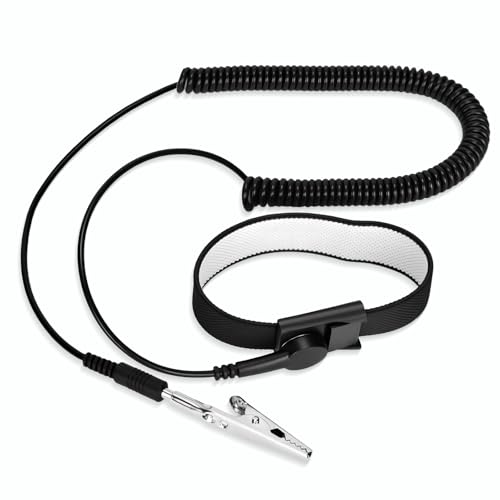
[ESD-Safe Design] The FRXIE anti static bracelet features a built-in ~1 MΩ resistor to safely discharge body static, helping protect electronics from ESD damage while supporting personal safety. This durable ESD strap is an essential anti static wrist strap for PC building, electronics repair, treadmill static protection, professional lab ESD tasks, and other static-sensitive tasks.

Resistance: < 10K Ohm (Wrist Strap) , 1M Ohm 10% (Cord).
Powering Down The Device
Power down your Samsung A10e before starting the battery replacement process. This prevents accidental damage and electrical hazards. Press and hold the power button until the shutdown option appears, then tap it to turn off the device completely. Wait for the screen to go dark before proceeding with the replacement.
ESD Protection
Use electrostatic discharge (ESD) protection to safeguard your device’s internal components. Wear an ESD wrist strap while working to prevent static electricity from damaging delicate parts. If you don’t have a wrist strap, touch a grounded metal object to discharge any static. Avoid wearing synthetic fabrics, as they can generate static electricity.
Step-by-Step Battery Replacement
Replacing the battery in your Samsung A10e involves several straightforward steps. Follow these instructions carefully to ensure a successful replacement.
Removing The Back Cover
- Use a heat gun or hair dryer to soften the adhesive around the back cover.
- Once warm, use a suction cup tool to lift the back cover slightly.
- Insert a plastic pry tool into the gap and gently slide it around the edges to loosen the adhesive.
- Carefully lift and remove the back cover. Set it aside.
Disconnecting The Old Battery
- Locate the battery connector on the motherboard.
- Use a plastic pry tool to gently lift the connector away from the board.
- Remove any adhesive holding the battery in place by gently prying it away.
- Carefully lift the old battery from its compartment. Dispose of it properly.
Installing The New Battery
- Place the new battery into the compartment.
- Ensure it aligns correctly with the connections.
- Reconnect the battery connector to the motherboard by pressing it firmly into place.
- If applicable, secure the battery with adhesive strips or tape.
Reassembling The Device
- Align the back cover with the device.
- Press down firmly to ensure a snug fit, especially around the edges where adhesive is located.
- If needed, apply gentle heat to re-activate any residual adhesive.
- Power on your Samsung A10e to verify that the new battery works properly.
Following these steps helps secure a successful battery replacement.
Post-Replacement Tips
After replacing the battery in your Samsung A10e, follow these tips to ensure everything functions smoothly.
Testing The New Battery
Testing the new battery is crucial. First, turn on your device to check if it powers up correctly. If it does, use it for a while and monitor its performance. Check for any unusual behavior, such as rapid battery drain or overheating. If you notice issues, ensure that the battery is properly connected to the motherboard. If problems persist, you might need to consider another replacement.
Proper Disposal Of Old Battery
Proper disposal of the old battery is important for safety and environmental reasons. Place the old battery in a protective case to prevent short-circuiting. Many local recycling centers or electronic stores accept old batteries for safe disposal. Check with your area for designated drop-off locations or recycling programs. Avoid throwing the battery in the trash, as it can harm the environment.
Conclusion
Replacing the battery in your Samsung A10e can seem daunting but with the right tools and steps it’s a manageable task. By following the guide and taking necessary precautions you’re not just extending your phone’s life but also saving money on repairs.
Remember to test your new battery after installation to ensure everything’s working smoothly. And don’t forget to dispose of the old battery responsibly to protect the environment. With a little patience and care you’ll have your device running like new again. Enjoy your revitalized Samsung A10e and stay connected without worry!
Frequently Asked Questions
What causes battery depletion in the Samsung A10e?
Battery depletion in the Samsung A10e mainly occurs as the device ages due to normal wear and tear. Frequent use of apps, background processes, and charging habits can also contribute to faster battery drain.
What tools do I need to replace the battery in a Samsung A10e?
To replace the battery in a Samsung A10e, gather a Philips screwdriver, plastic pry tool, tweezers, suction cup tool, heat gun or hair dryer, and a compatible replacement battery. Having these tools ready will streamline the process.
How do I ensure safety when replacing the battery?
Before starting, power down your device to avoid electric shocks. Use electrostatic discharge (ESD) protection, such as an ESD wrist strap, or ground yourself by touching a metal object. Avoid synthetic clothing to minimize static electricity.
Can I replace the Samsung A10e battery myself?
Yes, you can replace the Samsung A10e battery yourself by carefully following step-by-step instructions. With the right tools and precautions, a DIY battery replacement is feasible for most users.
What should I do after replacing the battery?
After replacing the battery, test it to ensure it powers on and charges correctly. Monitor the device for any issues like rapid drain or overheating, and dispose of the old battery safely at a recycling center or electronic store.
