

Key Takeaways
- Samsung S20 Battery Overview: The Samsung S20 features a non-removable 4000 mAh lithium-ion battery that supports full-day usage and fast charging options.
- Reasons for Removal: Battery removal may be necessary for troubleshooting, replacement, or cleaning to maintain device performance.
- Essential Tools: Acquire tools such as a plastic pry tool, Phillips screwdriver, tweezers, and a suction cup to safely open the device and remove the battery.
- Step-by-Step Process: Power off your device, heat the edges, carefully pry open the back, disconnect the battery connector, and lift out the battery.
- Replacing the Battery: Choose manufacturer-approved batteries, verify specifications, read reviews, and handle with care to ensure a successful replacement.
Have you ever found yourself needing to remove the battery from your Samsung S20 but weren’t sure how to do it? You’re not alone. Many people face this challenge, whether it’s for troubleshooting, replacing a faulty battery, or simply cleaning the device.
Overview of Samsung S20 Battery
TheSamsung S20 features a non-removable 4000 mAh lithium-ion battery. This battery type offers efficient power management and maintains performance over time. Understanding the battery’s characteristics helps you make informed decisions about usage and care.
Battery Features
- Capacity: The 4000 mAh capacity supports a full day of usage for most users.
- Charging Options: The Samsung S20 supports fast charging, both wired (25W) and wireless (15W).
- Battery Health: Regular software updates optimize battery health. Ensure updates are installed to improve performance.
Reasons for Battery Removal
Certain situations might prompt you to remove the battery:
- Troubleshooting: If the device is unresponsive, removing the battery can help reset it.
- Replacing: A degraded battery may require replacement after extensive use.
- Cleaning: Dust and debris can accumulate around charging ports, necessitating battery removal for proper cleaning.
This overview equips you with essential information about your Samsung S20 battery to ensure efficient usage and maintenance.
Required Tools for Battery Removal
Removing the battery from your Samsung S20 requires specific tools for a safe and effective process. Below are the essential and optional tools you may need.
Recommended Products
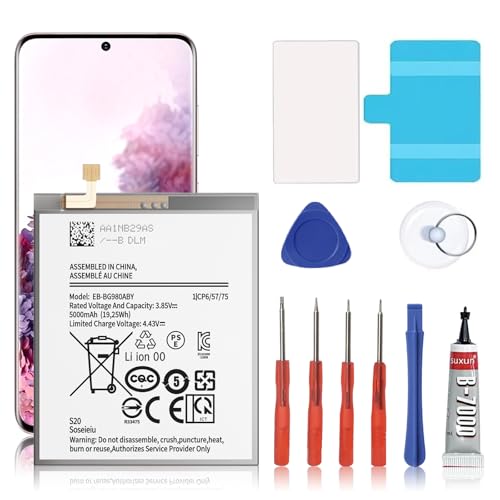
🎋【Compatible Model】EB-BG980ABY Replacement Battery for Samsung Galaxy S20 SM-G980 SM-G980F[Note: Not for Galaxy S20 FE or S20 Ultra other Phone Models]

{COMPATIBLE MODELS}:This Replacement battery Compatible with Samsung Galaxy S20 Plus (Model: SM-G985 SM-G985F S20+ 5G).

Compatible Phone Model: This battery kit is specifically designed for Samsung Galaxy S20 Ultra (with model SM-G988 series), NOT work for Galaxy S20 Plus/S20 FE, please double confirm your phone model before purchasing
Essential Tools
- Plastic Pry Tool: Use this to safely open the device without scratching or damaging the surface.
- Screwdriver: A small Phillips screwdriver is essential for removing screws that secure the back cover.
- Tweezers: Tweezers help you grasp and maneuver small components during the battery removal.
- Suction Cup: A suction cup assists in lifting the back cover without leaving fingerprints or residue.
Optional Tools
- Heat Gun or Hair Dryer: Applying gentle heat can soften adhesive, making it easier to remove the back cover.
- Antistatic Wrist Strap: Wearing this prevents static electricity from damaging internal components.
- Magnetic Mat: A magnetic mat can help keep screws organized and prevent loss during disassembly.
Step-by-Step Guide to Remove Battery
Removing the battery from a Samsung S20 involves precise steps. Follow this guide to ensure an efficient process.
Recommended Products

Compatible Phone Model: This battery kit is specifically designed for Samsung Galaxy S20 Plus (with model SM-G985 series), NOT work for Galaxy S20 / S20 Ultra, please double confirm your phone model before purchasing
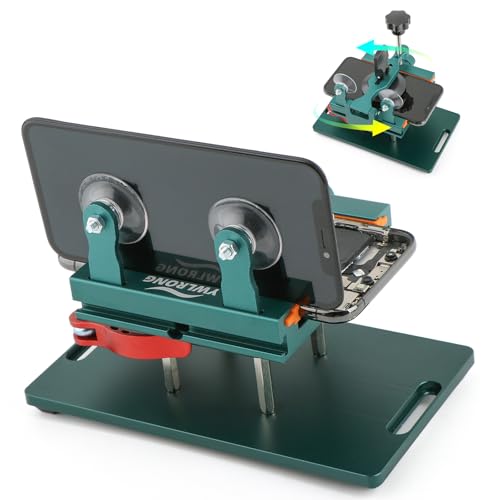
Compatible Model: Please check the product video to confirm how to use. The fixing clamp of phone screen removal tools, which compatible with iPhone 12, for iPhone 12 Pro, for iPhone 12 Pro Max, for iPhone 11, for iPhone 11 Pro, for iPhone 11 Pro Max, for iPhone 13/13 Pro/13 Pro Max, for iPhone 14,for iPhone 8, 8 Plus, SE, X, XS, XS MAX for Samsung S21/S21 Ultra/S21 Plus/S21,/S20 Plus/Samsung S20 Ultra. etc.

Compatible Models: This S20 Battery For Samsung Galaxy S20, SM-G980, SM-G980F, SM-G980F/DS Galaxy S20 5G, SM-G981, SM-G981F, SM-G981F/DS, SM-G981B/DS, SM-G981U, SM-G981U1, SM-G981N, SM-G981B, SM-G9810, SM-G981W, SC-51A, SCG01,EB-BG980ABY
Preparing the Device
- Power Off Your Phone: Turn off the Samsung S20 completely to avoid any damage or electrical issues.
- Gather Tools: Collect the necessary tools, including a plastic pry tool, small Phillips screwdriver, tweezers, and suction cup. Optional tools like a heat gun can help soften adhesive.
Opening the Device
- Heat the Edges: Use a heat gun or hair dryer to warm the edges of the screen. This softens the adhesive, making it easier to open.
- Apply the Suction Cup: Attach the suction cup to the screen, ideally near the edge without covering important areas.
- Pry Open the Device: Gently lift the screen with the suction cup. Insert the plastic pry tool between the screen and the back panel. Slide the tool around the edges to release the adhesive, ensuring you do not damage the internal components.
Disconnecting the Battery
- Locate the Battery Connector: After opening the device, find the battery connector on the motherboard. It is typically covered by a small shield.
- Unscrew the Shield: Use a Phillips screwdriver to remove any screws securing the shield over the battery connector.
- Disconnect the Cable: With tweezers, carefully disconnect the battery cable by lifting it away from the connector.
Removing the Battery
- Release Adhesive: If the battery is stuck, apply gentle heat to the edges to help loosen the adhesive.
- Lift Out the Battery: Use the plastic pry tool to carefully lift the battery. Be cautious not to bend or puncture the battery.
- Dispose Properly: Follow local regulations for disposing of lithium-ion batteries to ensure safety and environmental responsibility.
Tips for Replacing the Battery
Replacing the battery in your Samsung S20 can enhance your device’s performance. Follow these tips for a smooth experience.
Recommended Products

{COMPATIBLE MODELS}:This Replacement battery Compatible with Samsung Galaxy S20 FE (Model: SM-G781B G781U G781W SM-A526 A526B/DS A5260 A526W).

[PLS CONFIRM DEVICE MODEL]-- The repair kit contains the instruction to guide you step by step installation, and we have professional engineers to answer all your questions about the repair process. Please verify your old battery part number and model before purchasing this replacement battery. Compatible with Samsung Galaxy S20 Ultra SM-G988, G988V, G988A, G988T, G988P, G988R4, G988U, G988U1, EB-BG988ABY. ★NOT FOR Samsung Galaxy S20, S20+, Note 20 Ultra, S20 FE, Note 20★

HIGH CAPACITY --- This replacement battery for Samsung Galaxy S20 FE is 5150mAh high capacity, with more power than original battery.You can use your phone for a longer time!
Choosing a Compatible Battery
- Select Manufacturer-Approved Batteries: Opt for batteries directly from Samsung or reputable third-party manufacturers. These ensure compatibility and safety.
- Verify Battery Specifications: Check the specifications match your S20’s original battery, including voltage and capacity. Mismatched specs can cause performance issues.
- Look for Reviews: Read customer reviews to gauge the reliability of third-party batteries. Reliable feedback helps avoid faulty products.
Handling the New Battery
- Keep the Battery in a Safe Place: Store your new battery in a cool, dry location before installation. Extreme temperatures can affect its lifespan.
- Use Clean Hands or Gloves: Minimize the risk of static damage by handling the battery with clean, dry hands or gloves.
- Avoid Bending or Puncturing: Batteries are sensitive components. Treat your new battery gently to prevent damaging it.
- Follow Installation Instructions Carefully: Adhere to the provided instructions when installing the new battery. This ensures proper connection and function.
These steps help you navigate the battery replacement process with ease and efficiency.
Conclusion
Taking the battery out of your Samsung S20 might seem daunting at first but with the right tools and steps, you can handle it like a pro. Whether you’re troubleshooting an issue or planning to replace an old battery, knowing how to do it safely is key.
Remember to keep your workspace organized and take your time during the process. Always prioritize safety by using the proper equipment and handling the battery with care. By following the tips shared, you’ll not only maintain your device but also ensure it runs smoothly for years to come. Happy tinkering!
Frequently Asked Questions
How do I remove the battery from my Samsung S20?
To remove the battery from a Samsung S20, you first need to power off the device and gather tools like a plastic pry tool, Phillips screwdriver, tweezers, and a suction cup. Heat the edges of the phone slightly to soften the adhesive, use a suction cup to lift the screen, and carefully pry it open. Disconnect the battery connector and remove the battery once it’s freed from adhesive.
Is the Samsung S20 battery removable?
The Samsung S20 features a non-removable 4000 mAh lithium-ion battery. This design enhances the phone’s sleekness and minimizes weight, but makes user-initiated battery removal and replacement more complicated.
What tools do I need to remove the Samsung S20 battery?
You will need a plastic pry tool, a small Phillips screwdriver, tweezers, and a suction cup to safely remove the Samsung S20 battery. Optional tools include a heat gun or hair dryer for the adhesive and an antistatic wrist strap to prevent static damage.
Why would I need to remove the battery from my Samsung S20?
Common reasons for removing the Samsung S20 battery include troubleshooting an unresponsive device, replacing a degraded battery, and cleaning dust or debris around charging ports. Proper battery maintenance promotes optimal phone performance.
How can I ensure safe installation of a new battery for my Samsung S20?
To safely install a new battery, choose a manufacturer-approved battery that matches your device’s specifications. Handle it with clean hands or gloves to avoid static damage, and follow the installation instructions meticulously to prevent issues.
