

Key Takeaways
- Battery Removal Importance: Knowing how to remove the battery from a Samsung Galaxy S6 Edge can aid in troubleshooting issues like rapid battery drain or charging problems.
- Essential Tools: Gather necessary tools including a suction cup, plastic pry tool, tweezers, Phillips head screwdriver, and spudger for a safe and effective battery removal process.
- Safety Precautions: Always power off your device, ground yourself to avoid static discharge, and handle components carefully to prevent damage during battery removal.
- Step-by-Step Process: Follow a clear procedure to safely open the back cover, disconnect the battery, and remove it without damaging internal components.
- Choosing Replacement Batteries: Opt for OEM batteries that match original specifications and verify quality through user reviews to ensure safety and performance.
- Reassembly Tips: Carefully reconnect components and securely seal the back cover to maintain your device’s integrity after battery replacement.
Have you ever found yourself in a situation where your Samsung Galaxy S6 Edge is acting up and a simple restart just won’t cut it? Maybe your phone’s battery is draining too quickly, or it’s just not charging properly. In these moments, knowing how to safely remove the battery can be a game changer.
Overview of Samsung Galaxy S6 Edge
Samsung Galaxy S6 Edge features a sleek design and a vibrant display. This smartphone sports a 5.1-inch Super AMOLED screen with a resolution of 1440 x 2560 pixels, providing sharp visuals and rich colors. The curved edges not only enhance aesthetics but also enable useful features like edge notifications.
Performance-wise, the S6 Edge runs on an Exynos 7420 octa-core processor, supporting smooth multitasking and app usage. Coupled with 3GB of RAM, this device handles demanding applications efficiently. Available storage options include 32GB, 64GB, or 128GB, but it lacks microSD support for expansion.
The camera system boasts a 16MP rear camera with optical image stabilization, which captures detailed photos in various lighting conditions. The 5MP front camera supports wide-angle shots, making it ideal for selfies.
Battery life, while decent, often raises questions among users. With a non-removable 2600mAh battery, it provides average performance that can lead to faster drainage. Knowing how to safely remove the battery can help resolve issues, particularly when troubleshooting doesn’t yield results.
Overall, the Galaxy S6 Edge combines style, performance, and functionality, making it a popular choice among smartphone users.
Tools Needed for Battery Removal
Gathering the right tools makes the battery removal process easier and safer. Using proper equipment minimizes the risk of damaging your device.
Recommended Products
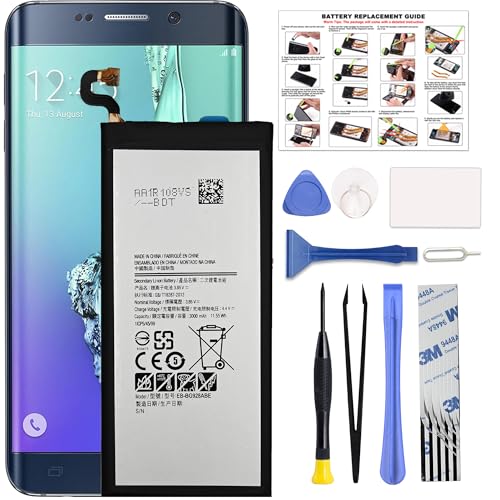
COMPATIBILITY: This battery only fits for Samsung Galaxy S6 Edge+ Plus, SM-G928A, SM-G928F, SM-G928A, SM-G928T, G928I, SM-G928G, SM-G928C, SM-G928I, SCV31, SM-G9280, SM-G928L, SM-G928S, SM-G928K, SM-G928W8. Please carefully confirm your phone model before purchase.
![SHENMZ Galaxy S6 Battery,[Upgraded] 5800mAh High Capacity Li-Polymer EB-BG920ABE Replacement Battery for Samsung Galaxy S6 SM-G920 G920V G920T G920A G920P G920I G920F S906L with Repair Tools](https://m.media-amazon.com/images/I/41pc-APX7ML._SL500_.jpg)
✾【HIGH QUALITY, TRUSTWORTHY PREMIUM BATTERY】:This Upgraded S6 battery uses Grade A+ rated battery cells with CE and ROHS certification,ensure last over 1200 charge cycles. Multiple-protection for safer operation for both user and devices,build-in microchip to prevent over-charging,over-discharging and over-heating.

1. Applicable Models:Compatible with Samsung Galaxy S6 Edge SM-G9250, SM-G925A,Please carefully check your mobile phone model before purchasing to avoid purchasing the wrong model and damaging your product
Recommended Tools
- Suction Cup: Use this to gently pull off the screen without causing cracks.
- Plastic Pry Tool: This helps you separate the screen from the body, preventing damage.
- Tweezers: These assist in grabbing small components and the battery connector.
- Phillips Head Screwdriver: Required for removing screws that secure the phone’s inner components.
- Spudger: Ideal for prying open and maneuvering delicate areas without scratching.
Safety Precautions
- Power Off: Shut down your Samsung Galaxy S6 Edge completely before starting.
- Static Electricity: Ground yourself by touching a metal surface to avoid damage to the internal components.
- Handle with Care: Avoid using excessive force while prying open the phone to prevent bending or cracking.
- Work in a Clean Area: Keep your workspace organized to avoid losing small screws and parts.
- Avoid Water and Moisture: Ensure that tools and your work area remain dry to prevent electrical shorts.
Step-by-Step Guide to Removing the Battery
Removing the battery from your Samsung Galaxy S6 Edge involves several straightforward steps. Follow this guide to ensure a smooth process.
Recommended Products

[PLS CONFIRM DEVICE MODEL] --- The repair kit contains the instruction to guide you step by step installation, and we have professional engineers to answer all your questions about the repair process. Please verify your old battery part number and model before purchasing this replacement battery. Compatible with Samsung Galaxy S7 Edge SM-G935, G935A, G935T, G935P, G935V, EB-BG935ABE. ★NOT FOR Samsung Galaxy S7★

The battery is manufactured and tested under strict quality control standards before sent out

【Compatible Model】:S6 Replacement Battery compatible with models :for Samsung Galaxy S6 SM-G920 G920V G920T G920A G920P G920I G920F S906L.
Powering Off the Device
Power off your Galaxy S6 Edge. Press and hold the power button until the power options appear. Select “Power off,” then tap “OK” to confirm. Always ensure the device is fully powered down before starting the battery removal process.
Opening the Back Cover
Use a suction cup to create a gap between the back cover and the phone’s body. If there’s no suction cup, a plastic pry tool works well. Insert the pry tool into the gap and carefully slide it around the edges. Gradually lift the back cover until it separates from the phone. Be cautious not to apply excessive force, as this can damage the cover.
Disconnecting the Battery
Locate the battery connector on the motherboard after removing the back cover. Use a Phillips head screwdriver to remove the screws securing the battery connector. Once the screws are removed, gently lift the connector with a plastic spudger. Ensure the connector is completely detached from the motherboard before proceeding.
Removing the Battery
To remove the battery, use a spudger or your finger to lift it away from the casing. Be gentle to avoid damaging any surrounding components. Once the battery is loose, carefully pull it out of the compartment. Dispose of or recycle the battery according to local regulations, if applicable.
Following these steps will help you remove the battery from your Samsung Galaxy S6 Edge safely and effectively.
Tips for Battery Replacement
Replacing the battery in your Samsung Galaxy S6 Edge can extend its lifespan and improve performance. Following these tips ensures a smooth process.
Recommended Products

Compatible with: Fit for Samsung Galaxy Tab S6 10.5” SM-T860 T865, Samsung Galaxy Tab S5e 10.5” SM-T720 T725, please check the model of your tablet before purchase. Compatible Part Numbers: EB-BT725ABU. Installation Notice: Replacing battery for Samsung Galaxy Tab S6 / S5E requires careful disassembly. Please watch professional teardown video before installation. Improper installation may result in charging recognition error.


【COMPATIBLE MODELS】Compatible with Samsung Galaxy S6. Battery Model: EB-BG920ABE. Fits for SM-G920, G920F, G920A, G920P series. NOT compatible with Galaxy S6 Enge,Galaxy S6 Enge+ or other Galaxy models. Please double check your phone model before purchasing the battery.
Choosing the Right Replacement Battery
- Use OEM Batteries: Always opt for original equipment manufacturer (OEM) batteries. They’re designed specifically for your device, ensuring compatibility and safety.
- Check Specifications: Look for batteries that match the original specs, like a 2600mAh capacity. A mismatched capacity can negatively affect performance.
- Read Reviews: Research reviews and ratings from verified users. Quality batteries often receive positive feedback regarding longevity and reliability.
- Avoid Off-Brands: Be wary of generic or off-brand batteries. These may not meet safety standards and could cause issues like overheating or swelling.
Reassembling the Device
- Reconnect Components Carefully: After replacing the battery, ensure all connectors are firmly and properly reattached. Don’t rush this step; loose connections can lead to performance issues.
- Align the Back Cover: Place the back cover back onto the phone gently. Ensure it fits snugly to avoid dust or moisture getting inside.
- Apply Pressure for Seal: Press down around the edges of the back cover. This helps create a secure seal, essential for maintaining your device’s integrity.
- Power Up: Once reassembled, turn on your device. Check if everything functions correctly, including battery charging and phone performance.
Implementing these tips streamlines the battery replacement process while enhancing the overall functionality of your Samsung Galaxy S6 Edge.
Conclusion
Knowing how to remove the battery from your Samsung Galaxy S6 Edge can really help you tackle those pesky battery issues. With the right tools and a bit of patience you can safely replace or troubleshoot your battery.
Always remember to follow safety precautions and handle your device with care. When you’re ready to reassemble your phone make sure everything’s connected properly to avoid any future problems.
By taking these steps you can keep your Galaxy S6 Edge running smoothly and enjoy its features without the frustration of battery troubles. Happy troubleshooting!
Frequently Asked Questions
What are common issues with the Samsung Galaxy S6 Edge?
Many users experience battery drainage, charging problems, and overheating. These issues can often be mitigated by knowing how to safely remove the battery for troubleshooting.
How can I safely remove the battery from my Galaxy S6 Edge?
To remove the battery, ensure your phone is powered off. Use tools like a suction cup, plastic pry tool, tweezers, and a Phillips head screwdriver. Follow proper safety precautions to avoid damage.
What tools do I need to remove the Galaxy S6 Edge battery?
You will need a suction cup, plastic pry tool, tweezers, Phillips head screwdriver, and a spudger to safely perform the battery removal.
Why is it important to use OEM batteries for replacements?
OEM batteries ensure compatibility and safety for your device. They are tested for performance and significantly reduce the risk of overheating or battery failure compared to off-brand options.
What precautions should I take when handling the battery?
Always power off your device, ground yourself to prevent static damage, avoid moisture, and work in a clean area. Handle the components gently to avoid damage.
How do I reassemble my Galaxy S6 Edge after battery replacement?
Carefully reconnect all components, align the back cover, apply pressure for a secure seal, and test the phone to ensure it functions properly after reassembly.
