

Key Takeaways
- Key Factors Influencing Battery Drain: High screen brightness, background app activity, and power-intensive features such as 5G connectivity are primary contributors to fast battery depletion on the Samsung Note 20.
- Monitoring Battery Usage: Users can review battery consumption by accessing Settings > Battery and Device Care > Battery for insights on which apps consume the most power.
- Optimization Tips: Improve battery life by lowering screen brightness, turning off 5G when unnecessary, and limiting background app activity through the device settings.
- Update Software Regularly: Keeping your device’s software up to date can enhance battery efficiency and includes important bug fixes that mitigate battery drain issues.
- Manage Resource-Intensive Applications: Be mindful of using resource-heavy apps, as they can consume significant battery life; consider using lighter alternatives when possible.
- Consider Aging Batteries: If your Samsung Note 20 is older, the battery may need replacement as aging batteries lose capacity and efficiency. Check battery health in Settings > Battery and Device Care > Battery > More Battery Settings.
Ever found yourself in the middle of an important call or scrolling through your favorite app only to see that dreaded low battery warning? If you own a Samsung Note 20, you’re not alone in facing this frustrating issue. Many users have noticed their battery draining faster than expected, leaving them scrambling for a charger.
Overview Of Samsung Note 20 Battery Performance
Samsung Note 20 features a 4,300 mAh battery, designed to support daily tasks like browsing, streaming, and gaming. While it provides decent performance, some users notice it drains faster than expected.
Several factors affect battery life. High screen brightness, background app activity, and power-intensive features like 5G connectivity significantly impact how long the battery lasts. For instance, using navigation or gaming apps can lead to rapid power depletion.
You can also examine battery usage in your settings. Go to Settings > Battery and Device Care > Battery to review which apps consume the most power. Adjusting or limiting these apps can extend battery life.
To optimize your Samsung Note 20’s performance, consider these tips:
- Reduce Brightness: Lower screen brightness or enable adaptive brightness.
- Turn Off 5G: Switch to 4G LTE if 5G isn’t necessary.
- Limit Background Activity: Restrict apps from running in the background through your settings.
- Use Battery Saver Mode: Activate power-saving modes during critical times.
- Update Software: Keep your device updated for the latest battery management features.
Being aware of your usage patterns and making simple adjustments can help maintain your battery’s longevity.
Common Reasons For Fast Battery Drain
Several factors contribute to the rapid battery drain experienced by Samsung Note 20 users. Understanding these reasons helps you optimize your device’s performance.
Recommended Products

【Compatible Model】: Specifically developed for the Samsung Galaxy Note 20 Ultra. It is compatible with a wide range of 5G models including SM - N985F, SM - N985F/DS, SM - N986B, SM - N986B/DS, SM - N986U, SM - N986U1, SM - N986W, SM - N9860, SM - N986N, and SC - 53A.
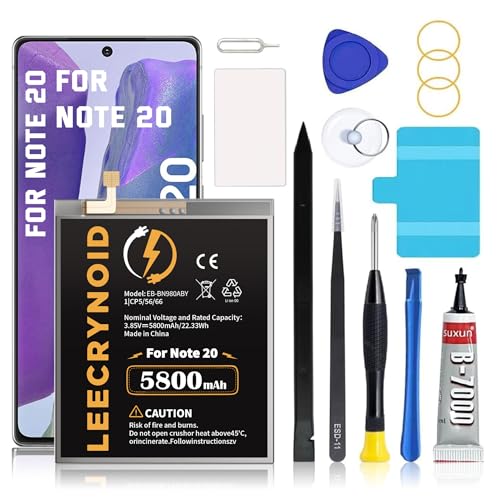
【Battery Compatible Model】: This Upgraded high capacity battery compatible with Samsung Galaxy Note 20 SM-N980, N980V, N980A, N980T, N980P, N980R4, N980U, N980U1
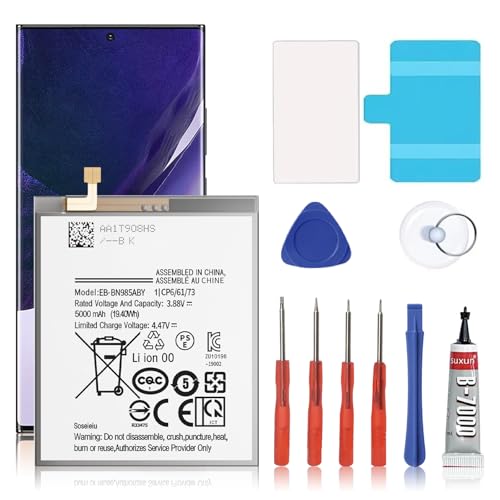
🎋【Compatible Model】EB-BN985ABY Replacement Battery for Samsung Galaxy Note 20 Ultra SM-N985 N986 N986U[Note: Not for GalaxyGalaxy Note 20 Ultra Battery Note 20 other Phone Models]
High Screen Brightness
High screen brightness significantly impacts battery life. If you keep your display at maximum brightness, expect faster battery drain. Try lowering brightness or enabling adaptive brightness to adjust levels automatically based on your surroundings. You can access this option in your display settings.
Background Applications
Background applications consume power even when you’re not actively using them. Apps running in the background can drain your battery quickly. Check which apps are using the most battery by going to Settings > Battery > Battery Usage. Force stop or uninstall unnecessary apps to improve battery efficiency.
Location Services
Location services, such as GPS, consume a lot of battery power. Apps that frequently track your location can lead to quicker battery depletion. To save battery life, turn off location services for apps that don’t require it. You can adjust these settings in Settings > Location. Choose either “Device only” mode or restrict access for specific apps.
Software Issues Impacting Battery Life
Software issues can significantly impact the battery life of your Samsung Note 20. Keeping your device updated and managing its settings can help improve performance and longevity.
Recommended Products

High-Quality Battery with Long-Lasting Performance: Built with premium 0-cycle battery cells, For Galaxy Note 20 Replacement Battery ensures optimal performance and extended battery life, offering a dependable power solution that meets high-quality standards.

🎋【Compatible Model】EB-BN980ABY Replacement Battery for Samsung Galaxy Note 20 SM-N980 SM-N981U[Note: Not for Galaxy Note 20 Ultra other Phone Models]

【0 Cycle and OEM Battery Cells】 OEM quality Galaxy Note 20 Ultra battery replacement perfect fit your phone. It is safer than so-called upgraded high-capacity batteries. No potential risks during use. Multiple protection features to prevent overcharging and prevent overheating. Built-in microchip to ensure safe battery charging and improve battery life. NOTE: Please fully charge and discharge your new battery 3 to 5 cycles to release all capacity of the new battery.
Outdated Software
Running outdated software can cause battery drain. Updates often include bug fixes and enhancements that boost efficiency. Check for updates regularly by going to Settings > Software update > Download and install. Keeping your system current ensures you benefit from the latest battery optimization features.
Battery Optimization Settings
Utilizing battery optimization settings can prolong your device’s battery life. Navigate to Settings > Battery and device care > Battery > Background usage limits. Here, you can restrict apps that run in the background, which conserves power. Activate the Power saving mode under Settings > Battery and device care > Battery to reduce usage of battery-consuming features like high screen brightness or 5G. Setting specific apps to Optimize battery usage further controls how much power they consume when not in active use. Adjusting these settings can lead to noticeable improvements in battery performance.
Hardware Factors Contributing To Battery Drain
Several hardware factors can accelerate battery drain in your Samsung Note 20. Recognizing these elements allows you to make informed adjustments and extend battery life.
Aging Battery
Aging batteries lose their ability to hold a charge effectively. If you’ve used your Samsung Note 20 for over a year, the battery’s capacity might decline. This results in faster battery depletion during your daily activities. To check your battery condition, navigate to Settings > Battery and device care > Battery > More battery settings > Battery diagnostics. If it’s nearing the end of its lifespan, consider replacing the battery.
Resource-Intensive Apps
Certain apps demand extensive resources. Games, video streaming, and augmented reality applications consume more energy than standard tools. To identify resource hogs, go to Settings > Battery and device care > Battery > Usage since last fully charged. You can close or uninstall high-energy apps to mitigate their impact. Also, consider switching to lighter alternatives whenever possible. Limiting the use of these demanding applications can noticeably improve your overall battery performance.
Recommendations To Improve Battery Life
Improving battery life on your Samsung Note 20 involves a few simple adjustments. Here are some practical tips to help you maximize battery performance.
Recommended Products

Device Compatibility: This battery case ONLY fits Samsung Galaxy Note20 Ultra (6.9 inch). Not compatible with other models. Does not support wireless charging

✅【Compatible Model】SHENMZ Galaxy Note 20 Ultra Battery Replacement ONLY Work For Model Samsung Galaxy Note 20 Ultra 5G Model SM-N985F/N9860/N986B/N986U EB-BN985ABY. Note: Galaxy Note 20 Ultra 5G Battery ,NOT for Other Samsung Model. Please Confirm Your Phone Model From Phone Back Cover to Avoid Wrong Order.

Charging and protecting, 2 in 1 function. Built-in short-circuit and overcharge protection. Plugged-in: Charge the phone and battery case simultaneously while plugged in. The charging will be stopped after fully charged. Note: the battery case will charge the phone automatically at slow charging speed when you unplug the charging cable. You can double click the power button to stop charging. Then click the power button once to start charging at normal charging speed. This battery case is only designed for Galaxy Note 20. It's NOT compatible with Galaxy Note 20 Ultra.
Adjusting Settings
Adjust settings on your phone to conserve energy. Lower screen brightness to around 50% or enable adaptive brightness to automatically adjust based on surroundings. Turn off features like 5G if you don’t need them. Navigate to Settings > Connections > Network mode to switch back to 4G when 5G isn’t essential. Manage background activity by checking Settings > Battery and Device Care > Battery > Usage since last full charge. Limit apps that run in the background by disabling their background usage in Settings > Apps.
Battery Saver Mode
Activate battery saver mode to extend usage time. This mode reduces performance and limits background data. To enable it, go to Settings > Battery and Device Care > Battery and select Power Saving Mode. You can customize settings within this mode, adjusting features like reducing screen brightness and limiting background app activity. Regularly using battery saver mode can significantly prolong battery life throughout the day.
Conclusion
Managing your Samsung Note 20’s battery life doesn’t have to be a hassle. By being mindful of your settings and usage habits you can make a noticeable difference. Lowering your screen brightness turning off 5G when it’s not in use and managing background apps are simple steps that can extend your battery’s longevity.
Don’t forget to keep your software updated and check your battery condition regularly. If you’ve been using your device for a while consider whether a battery replacement might be necessary. With a few adjustments you can enjoy your Note 20 without the constant worry of running out of power.
Frequently Asked Questions
Why is my Samsung Note 20 battery draining so fast?
The rapid battery drain in Samsung Note 20 can be attributed to several factors including high screen brightness, background app activity, and power-hungry features like 5G connectivity. Properly managing these aspects can help extend battery life.
How can I improve battery life on my Samsung Note 20?
To enhance battery life, lower your screen brightness, turn off 5G when not needed, limit background activity, and activate battery saver mode. Regularly check and optimize settings for better performance.
What settings should I check for battery optimization?
Check your screen brightness settings, background app activity, and location services. Make sure to restrict apps that consume unnecessary power and ensure your device’s software is up-to-date for optimal battery performance.
Does using 5G affect battery drain?
Yes, using 5G can lead to faster battery drain due to increased power consumption. If not required, consider turning off 5G to help conserve battery life on your Samsung Note 20.
How can I identify battery-draining apps?
You can identify battery-draining apps by going to your device settings, then checking the battery usage report. This will show you which apps consume the most power so you can manage or uninstall them accordingly.
Should I replace my battery if it drains quickly?
If your Samsung Note 20’s battery drains quickly despite optimization, and especially if the device is over a year old, it may be time to check the battery’s condition and consider a replacement for better performance.
How often should I update my Samsung Note 20?
It’s advisable to update your Samsung Note 20 regularly to ensure access to the latest features and battery optimization settings. Check for updates consistently to keep your device running efficiently.
Can screen brightness really affect battery life?
Yes, high screen brightness significantly impacts battery life. Reducing brightness or using adaptive brightness can help conserve energy, enhancing your Samsung Note 20’s battery performance.
