

Key Takeaways
- Understand Common Causes: Key factors contributing to battery drain include high screen brightness, background apps, location services, poor network connectivity, and frequent notifications.
- Adjust Screen Brightness: Lower brightness settings and utilize adaptive brightness to conserve battery life effectively.
- Manage Background Applications: Regularly check and close unused apps, and limit background data usage to prevent unnecessary battery drain.
- Utilize Power Saving Features: Activate power-saving mode and keep your software updated for enhanced battery management and efficiency.
- Disable Unused Features: Turn off connectivity options like Bluetooth, Wi-Fi, and mobile data when not needed, and adjust location services settings to save power.
- Monitor Battery Usage: Regularly review battery settings to identify and limit apps that consume the most power, ensuring prolonged battery life.
Is your Samsung A14 battery draining faster than you’d like? You’re not alone. Many users find themselves frustrated when their phone can’t keep up with their daily demands. Whether you’re scrolling through social media or catching up on emails, a quickly depleting battery can really put a damper on your day.
In this article, you’ll discover the common reasons behind that pesky battery drain and practical tips to help you manage it. From adjusting settings to understanding app usage, you’ll learn how to extend your phone’s battery life. Say goodbye to battery anxiety and get back to enjoying your device without constant recharging.
Overview Of Samsung A14 Battery Performance
The Samsung A14 features a 5000 mAh battery, designed to offer extended usage for daily activities. However, users often report rapid battery drain, which can stem from various factors.
Common Causes of Battery Drain
- Screen Brightness: High brightness levels significantly impact battery life. Reducing brightness or using adaptive brightness settings helps conserve power.
- Background Apps: Apps running in the background consume power. Regularly check app settings and close unused applications to optimize battery use.
- Location Services: Constantly using GPS or location services can drain battery quickly. Turning off location services when not in use can help extend battery life.
- Network Connectivity: Poor network signals cause the phone to work harder, draining battery faster. Switching to Airplane mode in low signal areas conserves battery.
- Notifications: Frequent notifications from apps keep the screen active. Limiting notifications can prevent unnecessary battery drain.
Battery Saving Tips
- Enable Power Saving Mode: Use the built-in power-saving mode to limit background activities and reduce performance slightly for better battery longevity.
- Update Software: Keep your device updated to benefit from the latest power management features and bug fixes.
- Monitor Battery Usage: Check battery settings to identify which apps consume the most power. Limit or uninstall power-hungry apps.
- Disable Unnecessary Features: Turning off features like Bluetooth, Wi-Fi, or mobile data when not in use conserves battery.
With these insights, you’ll better understand the Samsung A14 battery performance and how to manage its efficiency effectively.
Common Causes Of Battery Drain
Several factors contribute to battery drain issues in the Samsung A14. Understanding these causes helps you take corrective action and improve battery performance.
Background Applications
Background applications often run without your knowledge. These apps consume resources and contribute to battery drain. Look out for multiple apps updating or syncing in the background simultaneously, which can be particularly draining. To manage this:
- Check your battery usage: Access Settings and select Battery and Device Care to see which apps are consuming the most power.
- Limit background activity: Restrict background data usage of non-essential apps through Settings > Apps > [App Name] > Mobile data.
- Close unused apps: Regularly close apps running in the background to reduce strain on your battery.
Screen Brightness Settings
Screen brightness significantly impacts battery life. High settings lead to rapid drain, especially with OLED displays. To optimize brightness:
- Adjust brightness manually: Lower brightness through Settings > Display > Brightness.
- Use adaptive brightness: Enable adaptive brightness to adjust automatically based on the surrounding light. This option enhances visibility without overusing battery.
- Disable always-on display: Turn off the always-on display feature to save power when the phone is idle. Find this option in Settings > Lock Screen > Always On Display.
By adjusting these settings and managing background applications, you can effectively reduce battery drain and enhance your Samsung A14 experience.
Battery-Saving Tips For Samsung A14
You can implement several strategies to extend the battery life of your Samsung A14 effectively. Adjusting settings and managing app usage significantly contributes to improved battery performance.
Recommended Products

✅【Safe And Efficient】: All Galaxy A14 Replacement battery of our batteries have the highest level of security protections. Including, over charging protection, overheating protection, overload protection, short circuit protection, highly effective temperature control, battery cell PTC protection. Our Dual IC design ensures that your battery won't fail under any circumstances.

COMPATIBILITY: This battery only fits for Samsung Galaxy A14 5G , SM-A146B, SM-A146B/DS, SM-A146P, SM-A146P/DS, SM-A146U, SM-A146U1, SM-A146U1/DS, SM-A146W, SM-A146P/N, SM-A146P/DSN, SM-S146VL, SM-A146M, Please carefully confirm your phone model before purchase.
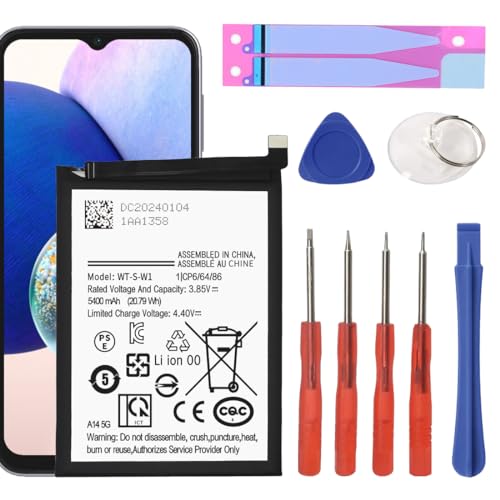
►【 Upgrade Capacity to 5400mAh】- Galaxy A14 5G battery replacement use advanced technology makes the battery capacity for A14 5G up to 5400mAh with the same size. Best Replacement for the original A14 5G battery, With extra enhanced talk time, standby time and longevity . It will provide you with up to 1000+ charge cycles with the high-speed and efficient charge.
Adjusting Settings
Adjusting specific settings on your Samsung A14 can help conserve battery power.
- Lower Screen Brightness: Reduce brightness manually or enable adaptive brightness for automatic adjustments based on enviroment.
- Enable Power Saving Mode: Activating this mode limits background activity and reduces screen performance to save energy.
- Turn Off Always-On Display: This feature consumes battery, especially if you don’t need constant notifications at a glance.
- Limit Location Services: Use location services only when necessary. Switch from high accuracy to battery-saving mode in the location settings.
- Disable Unused Connectivity Features: Turn off Bluetooth, Wi-Fi, and mobile data when not in use. You can easily toggle these features in the quick settings menu.
- Adjust Refresh Rate: Set the refresh rate to standard settings instead of high for smoother graphics, thereby saving battery life.
Managing App Usage
Managing how you use apps on your Samsung A14 is crucial for reducing battery drain.
- Monitor Battery Usage: Regularly check which apps consume the most battery by going to Settings > Battery and Device Care > Battery > Usage.
- Close Background Apps: Make a habit of closing apps you don’t actively use. This action can prevent unnecessary resource consumption.
- Limit App Notifications: Disable notifications from apps that aren’t essential. Excess notifications can wake your screen frequently, leading to battery drain.
- Uninstall or Disable Unused Apps: If an app isn’t necessary, remove or disable it to prevent it from draining resources in the background.
- Update Apps Regularly: Keeping apps updated can improve efficiency and help with battery life, as developers often release performance enhancements.
Implementing these battery-saving tips helps you maximize the use of your Samsung A14 while minimizing the need for constant charging.
Comparing With Other Models
When comparing the Samsung A14 battery life to other models, you’ll notice distinct performance differences based on specifications and user experiences.
Recommended Products

【Compatible Model】:This Battery Model is EB-BA505ABU,Compatible with Samsung Galaxy A505F /A30 SM-A305 /A20 A205FN A202F /A30s SM-A307.Please confirm your phone model and your old battery part number before placing an order.

🎋【Compatible Model】 Replacement Battery for Samsung Galaxy A14 SM-A146U SM-A146U1 SM-A146W SM-S146VL SM-A146M WT-S-W SCUD-WT-S-W1[Note: Not for Galaxy A12,Galaxy A13 or other Phone Models]
![SHENMZ for Samsung Galaxy S22 5G Battery Replacement, 5200mAh Upgraded EB-BS901ABY Battery Compatible with SM-S901U/U1/B/W with Adhesive Tool Repair Kit [Not Compatible with Galaxy S22 Plus]](https://m.media-amazon.com/images/I/41ElvnnDw5L._SL500_.jpg)
✅【Compatible Model】Developed especially for Samsung Galaxy S22 5G. Compatible with Samsung Galaxy S22 5G Models SM-S908B, SM-S908B/DS, SM-S908U, SM-S908W, SM-S908N, SM-S9080, SM-S908E, SM-S908E/DS.NOT for Other Samsung Model. Please Confirm Your Phone Model From Phone Back Cover to Avoid Wrong Order.
Battery Life Comparison
The Samsung A14 features a 5000 mAh battery, but how does this measure against competitors?
| Model | Battery Capacity | Average Usage Time |
|---|---|---|
| Samsung A14 | 5000 mAh | 12-14 hours |
| Samsung Galaxy S21 | 4000 mAh | 10-12 hours |
| Xiaomi Redmi Note 11 | 5000 mAh | 14-16 hours |
| OnePlus Nord N200 | 5000 mAh | 11-13 hours |
Samsung A14 offers competitive battery capacity, yet features lead to variations in runtime. The phone’s screen brightness settings and frequent background processes will impact performance more significantly than in other models. While the A14 can deliver decent battery life, optimizing settings makes a marked difference compared to similar devices.
User Experiences
User feedback on battery performance often highlights both satisfaction and frustration. Many users report noticeable differences in usage patterns.
- Users utilizing location services extensively experience faster battery drain.
- Users limiting background app activity report better performance.
- Users adjusting display brightness experience longer usage times.
Some users find that activating power-saving mode substantially improves overall battery longevity while multitasking. Monitoring which apps consume the most power also enhances control over battery life.
By taking these factors into account, adjusting your usage patterns can lead to a more satisfying experience with your Samsung A14 compared to other models.
Conclusion
Dealing with battery drain on your Samsung A14 can be frustrating but you’re not alone in this. By understanding the factors that contribute to rapid battery depletion you can take steps to enhance your device’s performance. Simple adjustments like lowering screen brightness and managing background apps can make a noticeable difference.
Remember to keep an eye on your settings and regularly update your apps to ensure optimal efficiency. With a few tweaks you can enjoy a more reliable battery life and make the most out of your Samsung A14. Happy optimizing!
Frequently Asked Questions
What causes battery drain in the Samsung A14?
The Samsung A14’s battery drain can be attributed to several factors, including high screen brightness, background applications running, constant location services use, poor network connectivity, and frequent notifications. Addressing these issues can help improve battery performance.
How can I extend the battery life of my Samsung A14?
To extend battery life, consider enabling power-saving mode, manually adjusting screen brightness, turning off the always-on display, and disabling unused connectivity features. Additionally, limit location services and manage app usage by closing background apps and monitoring battery consumption.
Is the Samsung A14’s battery capacity good compared to other devices?
With a 5000 mAh battery, the Samsung A14 offers competitive capacity. However, its performance may vary based on factors like screen brightness and background processes. Users who manage their settings and app usage typically report better battery life compared to other models.
What settings should I adjust for better battery management?
To better manage battery life, adjust settings by lowering screen brightness, turning off the always-on display, enabling power-saving mode, limiting location services, and disabling unused connectivity features like Bluetooth and Wi-Fi.
How do background apps affect battery life?
Background apps can significantly drain battery life by consuming system resources. It’s essential to monitor battery usage, close unused apps, and limit background activity to prolong battery performance on your Samsung A14.
