

Key Takeaways
- Battery Capacity Matters: Higher mAh ratings generally result in longer battery life, with models like the Galaxy M51 (7,000 mAh) catering to heavy users.
- Adaptive Power Saving: This feature automatically optimizes settings based on usage patterns, enhancing overall battery efficiency.
- Fast Charging Technology: Features like 25W fast charging found in models such as the Galaxy Note 20 Ultra allow for quick power boosts, ideal for busy lifestyles.
- Real-World Performance: Models like the Galaxy M51 and Galaxy S23 Ultra excel in practical tests, offering impressive durations for video playback and web browsing.
- Budget-Friendly Options Exist: Samsung’s budget models, like the Galaxy A12, provide significant battery capacities while remaining affordable and efficient for casual users.
- Optimize Settings for Longevity: Adjusting display settings and utilizing built-in battery management tools can significantly extend your phone’s battery life.
Ever found yourself scrambling for a charger halfway through the day? You’re not alone. With so many Samsung phones on the market, it can be tough to figure out which model packs the longest-lasting battery.
In this article, you’ll discover which Samsung phones keep you powered up for longer. Whether you’re a heavy user or just need a reliable device for daily tasks, knowing the right choice can make a big difference. Get ready to find the perfect Samsung phone that fits your lifestyle and keeps you connected without the constant worry of running out of juice.
Overview of Samsung Phone Batteries
Samsung phone batteries vary in capacity and efficiency across different models. Understanding battery specifications helps you make informed choices.
Battery Capacity
Battery capacity, measured in milliampere-hours (mAh), indicates how long a device can last on a single charge. Higher mAh numbers generally signify longer battery life. For example, the Galaxy S21 Ultra comes with a 5,000 mAh battery, allowing for extended usage compared to models with smaller capacities such as the Galaxy A32 with a 5,000 mAh battery.
Adaptive Power Saving
Samsung’s Adaptive Power Saving feature prolongs battery life. It automatically adjusts settings like brightness and background app usage. You’ll find this feature on most modern Samsung devices. Activating this option helps optimize power consumption during your daily tasks.
Fast Charging Technology
Many Samsung phones support fast charging technology. This means you can recharge your device quickly. For instance, models like the Galaxy Note 20 Ultra support 25W fast charging, giving you hours of power in just a short time. This can be especially useful for busy days or when you’re on the go.
Battery Management Tools
Samsung’s One UI offers built-in battery management tools. These tools let you monitor your battery usage and identify apps that drain power excessively. Go to Settings > Battery and Device care. There, you can see detailed information and manage your battery settings effectively.
Real-World Usage
In real-world scenarios, heavy users benefit from high-capacity batteries. Daily tasks such as video streaming or gaming can quickly deplete lower-capacity batteries. For example, the Galaxy S22 can last around 12 hours on intensive tasks, while the Galaxy A52 may serve up to 15 hours on moderate usage.
Long-Lasting Models
Some Samsung models are known for their enduring battery life. The Galaxy M series, especially the M51 with its 7,000 mAh battery, targets users who prioritize longevity. If long-lasting performance is a crucial requirement, consider models within this series.
Understanding these aspects of Samsung phone batteries empowers you to choose a phone that meets your needs, ensuring you stay connected throughout your day.
Factors Affecting Battery Life
Battery life is influenced by multiple factors, including hardware specifications and software settings. Understanding these elements helps you make informed decisions about which Samsung phone offers the best battery longevity.
Recommended Products

POWER ANYWHERE YOU WANT IT: Charge up any of your devices with the Galaxy Magnetic Wireless Battery Pack. Whether you want to plug in to the USB-C port or use the built-in magnetic wireless charger, the 5,000mAh battery is waiting to power you up throughout the whole day.

☑️【Compatible Model】Developed especially for Samsung Galaxy S22 Plus. Compatible with Samsung Galaxy S22 Plus Model SM-S906U S906B S906W S906N [NOTE: You can find your phone model on phone back over for reference.]
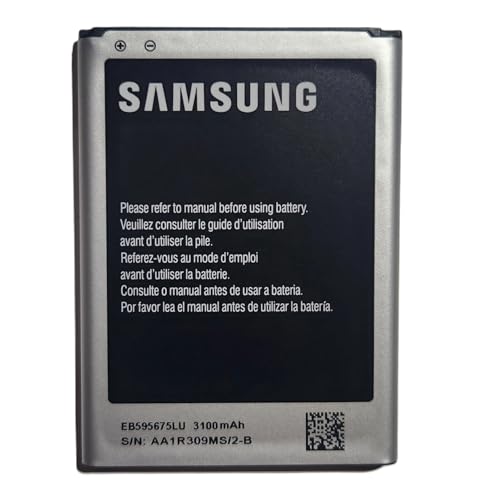
· 【Perfect Compatibility】This is a premium replacement battery specifically designed for Samsung Galaxy Note 2. Ensures a perfect fit and flawless performance for models: SGH-i317 (AT&T), SGH-T889 (T-Mobile), SCH-i605 (Verizon), SPH-R950 (Sprint), SPH-L900 (Sprint). Check your old battery's model number EB595675LA to confirm.
Battery Capacity
Battery capacity, measured in milliampere-hours (mAh), plays a crucial role in determining how long your device lasts on a single charge. Higher mAh values typically mean longer battery life. For example, the Samsung Galaxy M51 features a 7,000 mAh battery, ideal for heavy users who rely on their phone throughout the day. By contrast, a model with a 4,000 mAh battery may be sufficient for casual users who engage in light tasks.
Software Optimization
Samsung optimizes battery performance through its Adaptive Power Saving feature. This software automatically adjusts settings based on your usage patterns. Features, such as background app management and battery usage alerts, prioritize power efficiency. Regularly checking which apps consume the most power helps you identify and limit usage, leading to enhanced battery performance over time.
Display Technology
Display technology significantly affects battery life. Samsung’s AMOLED screens use less power when displaying dark colors, improving longevity compared to traditional LCDs. For instance, the Galaxy Note 20 Ultra’s 120 Hz refresh rate offers smoother visuals but can drain the battery faster if used continuously. Adjusting display settings, such as reducing brightness or switching to standard refresh rates, can help conserve battery life during extended use.
Comparison of Samsung Phone Models
Understanding which Samsung phone models offer the longest battery life can guide your purchasing decision. Here’s a comparison across different categories.
Flagship Models
Flagship models like the Samsung Galaxy S23 Ultra boast impressive battery capacities. The Galaxy S23 Ultra features a 5,000 mAh battery, offering robust performance even with heavy usage. This model optimizes power consumption through Adaptive Power Saving, extending battery life during intense tasks. Other flagship editions, such as the Galaxy Note 20 Ultra, also house a 4,500 mAh battery, providing excellent longevity for users who engage in multitasking or gaming.
Mid-Range Models
Mid-range models like the Samsung Galaxy A54 present a balance between price and performance. The Galaxy A54 comes with a 5,000 mAh battery, allowing you to enjoy all-day usage without frequent recharges. Mid-range models typically include power-saving features that enhance efficiency, making them suitable for everyday tasks. The Galaxy A34, with a 5,000 mAh battery, is another option offering dependable performance while remaining budget-friendly.
Budget Models
Budget models such as the Samsung Galaxy M32 and Galaxy A12 hold significant battery capacities. The Galaxy M32 has a 6,000 mAh battery that supports prolonged use, making it ideal for casual users. The Galaxy A12, featuring a 5,000 mAh battery, ensures that you stay connected below the budget ceiling. Both models prioritize battery efficiency, helping you manage battery life effectively through One UI’s built-in tools.
Real-World Battery Performance Tests
Samsung phone battery performance varies in real-life situations. Testing methods often include tasks like video playback, web browsing, and gaming. Understanding the results helps you identify which models deliver longer battery life during everyday use.
Comparison of Key Models
| Model | Battery Capacity (mAh) | Video Playback (Hours) | Web Browsing (Hours) | Gaming (Hours) |
|---|---|---|---|---|
| Galaxy S23 Ultra | 5,000 | 16 | 12 | 10 |
| Galaxy Note 20 Ultra | 4,500 | 15 | 11 | 9 |
| Galaxy A54 | 5,000 | 15 | 10 | 8 |
| Galaxy M51 | 7,000 | 21 | 16 | 14 |
| Galaxy A12 | 5,000 | 14 | 9 | 7 |
Testing Scenarios
- Video Playback: Phones like the Galaxy M51 excel in video playback, lasting up to 21 hours. This model’s high capacity fits cinematic enjoyment without frequent recharges.
- Web Browsing: Models like the Galaxy S23 Ultra and Galaxy Note 20 Ultra perform well, offering 12 and 11 hours respectively. You can comfortably scroll through feeds or articles without worrying about the battery dying.
- Gaming: While gaming drains battery faster, the Galaxy M51 provides 14 hours, making it suitable for extended gaming sessions. Other models, such as the Galaxy A54, offer solid performance without overheating or excessive drain.
User Experience
User experiences also highlight the significance of battery performance in daily routines. Heavy users favor models with higher capacity, like the Galaxy M51, which supports intensive tasks. Casual users, however, might find 4,000 mAh sufficient for regular activities.
Optimizing Battery Life
- Adjust Settings: Use adaptive brightness and disable unnecessary background apps to extend battery life.
- Enable Power-Saving Mode: Activate this feature during critical moments to maximize remaining battery support.
- Monitor App Usage: Identify power-hungry applications through settings to reduce their impact.
Understanding real-world battery performance equips you to choose the right Samsung phone for your lifestyle. Balancing capacity, optimization, and daily usage ensures you stay powered throughout your day.
Conclusion
Choosing the right Samsung phone with a long-lasting battery can make all the difference in your daily routine. Whether you’re a heavy user or someone who just needs a reliable device for everyday tasks there’s a perfect model out there for you.
By considering battery capacity software optimizations and real-world performance you can ensure your phone keeps up with your lifestyle. With options ranging from budget-friendly models to flagship devices you can find a Samsung phone that not only fits your needs but also keeps you connected throughout the day. Happy phone hunting!
Frequently Asked Questions
What factors affect battery life in Samsung phones?
Battery life in Samsung phones is influenced by factors such as battery capacity (mAh), software optimization, hardware specifications, and display technology. Higher mAh ratings generally indicate longer battery life, while features like Adaptive Power Saving and efficient AMOLED screens also contribute to better performance.
Which Samsung phone has the longest battery life?
The Samsung Galaxy M51 boasts one of the longest battery lives, featuring a massive 7,000 mAh battery. It excels in video playback and can last up to 21 hours, making it ideal for heavy users needing extended use between charges.
How does Samsung’s Adaptive Power Saving work?
Samsung’s Adaptive Power Saving feature intelligently optimizes power consumption by adjusting the phone’s settings based on usage patterns. It helps extend battery life by reducing activity for apps that aren’t frequently used, ensuring that your battery lasts longer.
Are there budget Samsung phones with good battery life?
Yes, budget models like the Samsung Galaxy M32 and A12 are equipped with 6,000 mAh and 5,000 mAh batteries, respectively. They offer efficient battery performance, making them suitable for casual users who don’t need high-performance features.
How can I improve battery life on my Samsung phone?
To improve battery life, you can adjust your settings by enabling power-saving mode, reducing screen brightness, and managing background app activity. Regularly monitoring app usage can also help identify power-hungry applications that may need adjustments.
