

Key Takeaways
- Battery Life Performance: iPhones typically provide 11 to 14 hours of usage on a full charge, while Android devices can vary from 8 to 12 hours based on model and manufacturer.
- Charging Technologies: iPhones achieve about 50% charge in 30 minutes, whereas some Androids can fully charge in under an hour due to advanced charging methods.
- Battery Management Features: Both iPhones and Androids offer battery-saving modes; iPhones feature Low Power Mode, and Androids provide various settings to optimize battery usage.
- Temperature Sensitivity: Battery performance on both platforms is affected by temperature, with extreme conditions leading to quicker battery drain and performance throttling.
- User Experiences: Feedback highlights that while iPhones are admired for consistent battery life, Androids are favored for higher capacity batteries and faster charging in specific models.
- Choosing the Right Device: The decision between iPhone and Android largely depends on personal needs for battery life, charging speeds, and management features, tailored to individual usage patterns.
Ever found yourself frantically searching for a charger when your phone’s battery hits the red zone? You’re not alone. With so many options available, it’s tough to know if the iPhone or an Android device will keep you powered throughout the day.
Overview of Smartphone Batteries
Smartphone batteries are crucial for performance and daily usage. Two dominant types of batteries are found in smartphones: lithium-ion (Li-ion) and lithium polymer (LiPo). Both types offer efficient power solutions but vary in design and features.
Battery Life Comparison
Battery life is a key factor when comparing iPhones and Androids. iPhones typically feature optimized software and hardware integration, which can provide longer effective usage times. Based on numerous user reports, iPhones often last 11 to 14 hours on a full charge under typical conditions.
Android devices vary widely. Battery life on Androids depends on the model and manufacturer, with some lasting between 8 to 12 hours. For example, high-end Android devices like the Samsung Galaxy S series frequently equip larger batteries, supporting longer daily usage.
Charging Technologies
Charging technologies impact how quickly you can power up your device. iPhones support fast charging and wireless charging capabilities. They generally achieve about 50% charge in 30 minutes with a compatible charger.
Android phones also support fast and wireless charging, often exceeding iPhone’s capabilities in specific models. Some Android devices can achieve full charges in less than an hour, thanks to advanced charger technologies like SuperVOOC or Quick Charge.
Battery Management Features
Battery management features in iPhones include Low Power Mode, which extends battery life by limiting background activity and visual effects. This feature can increase usage time by up to 3 hours.
Android devices also offer various battery-saving modes, helping you extend usage. You can optimize battery life through settings that reduce brightness, turn off background apps, and limit notifications.
Conclusion on Battery Options
Battery performance varies based on user needs and device settings. You might prefer iPhones for their longevity and system efficiency, while some Androids excel with larger batteries and faster charging. Each ecosystem presents unique advantages to accommodate different lifestyles and preferences.
Comparing iPhone and Android Batteries
Understanding the differences between iPhone and Android batteries can help you make an informed choice tailored to your daily needs.
Battery Life: Real-World Usage
iPhone batteries typically provide consistent performance in real-world conditions. Most users experience around 11 to 14 hours of usage on a full charge. Apple optimizes its software and hardware, ensuring efficient power management.
Android devices, however, show more variability. High-end models often last 8 to 12 hours, while budget options may last significantly less due to less efficient components. Consider your daily activities: if you stream videos or play games, select a device with a longer battery life to match your usage patterns.
Battery Capacity: Specifications
When diving into battery specifications, both iPhone and Android provide compelling options.
| Device Type | Average Battery Capacity (mAh) | Typical Usage Time |
|---|---|---|
| iPhone | 2815 – 3687 | 11 – 14 hours |
| Android | 3000 – 5000+ | 8 – 12 hours |
Battery capacity in milliamp hours (mAh) indicates how much energy a battery can store. iPhones usually have lower capacity numbers but efficiently manage power due to effective software integration.
Android devices offer a broader range of capacities. Phones with over 4000 mAh often excel, providing longer usage times, especially for heavy users. Choose a model that fits your lifestyle, factoring in both battery capacity and real-world usage reports.
Performance Under Different Conditions
Battery performance varies significantly under different conditions, impacting user experience with both iPhones and Android devices.
Recommended Products

🔌 𝐖𝐚𝐥𝐥 𝐏𝐥𝐮𝐠 𝐈𝐧𝐭𝐞𝐠𝐫𝐚𝐭𝐞𝐝 & 𝐍𝐨 𝐄𝐱𝐭𝐫𝐚 𝐀𝐝𝐚𝐩𝐭𝐞𝐫 𝐍𝐞𝐞𝐝𝐞𝐝 - Say goodbye to messy adapters and wall-hogging bricks! Just plug this portable charger directly into any wall outlet. Plug in power bank recharges itself from 0% to 100% in only 2 hours – much faster than most power banks. Also supports pass-through charging: power your phone and the battery simultaneously.

【Dual-Pack Power Bank】This high-capacity battery pack is portable and easy to store,easily fitting into a pocket or backpack.It's super practical for couples and families on daily outings.10000mAh ample capacity,double the peace of mind.

10000mAh True Capacity (Lab-Verified) – Real Power, Compact Size--Unlike lightweight power banks that inflate numbers, our lab-verified 10000mAh portable charger delivers honest charging: 2 full charges for iPhone 17 or 1.79 charges for Samsung S24. The durable metal construction ensures reliable power in a 0.6-inch ultra-slim body—outlasting 'same-size' plastic competitors by 2X.
Extreme Usage Scenarios
Extreme usage scenarios reveal differences in battery endurance. Heavy activities like gaming or video streaming drain battery life rapidly. iPhones might provide up to 11 hours with intensive tasks, while some Androids can last around 8 hours. Phones running demanding apps may overheat, reducing battery efficiency. For instance, during a gaming session, an iPhone maintains stable performance. In contrast, certain Android models may experience a decrease in speed and battery life, especially budget options. You can optimize performance by closing background apps and reducing screen brightness.
Temperature Effects on Battery Life
Temperature significantly affects battery life. Both iPhones and Androids operate best between 32°F and 95°F (0°C to 35°C). High temperatures can lead to battery draining quickly and even damage battery health. Apples’ devices may throttle performance when temperatures exceed this range, maintaining stability but at a reduced battery life. Androids also exhibit similar behaviors but generally vary more across models. For optimal battery health, avoid exposure to extreme temperatures. You can help mitigate temperature effects by keeping your phone in cool, dry places and removing cases during charging to allow better heat dissipation.
Charging Technologies
Charging technologies significantly impact your experience with smartphone batteries. Both iPhones and Androids prioritize fast charging and convenience, but their approaches differ.
Recommended Products
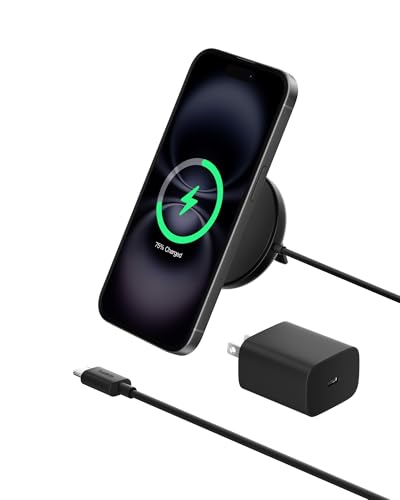
FAST CHARGE W/ THE LATEST Qi2 TECHNOLOGY: Conveniently place your phone on the magnetic charger to fast charge your iPhone, Samsung*, or Qi2 compatible device up to 15W. Qi2 gives you up to 2x faster wireless charging** so you can spend less time waiting.

Rapid 15W Wireless Charging: Unlock 15W high-speed charging with Qi2 certification and power your iPhone 16 Pro Max to 20% in just 19 minutes. For the best fast charging experience, we recommend using a 20W or higher output charger (not included).
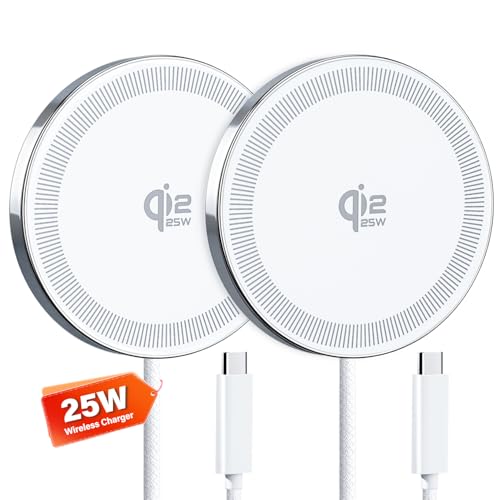
【25W High - Speed Charging】: Equipped with the latest Qi2.2 technology, this 25w wireless charger pad offers up to 25W of fast charging power. Charge your compatible iPhone and other Qi - enabled devices in significantly less time compared to standard wireless chargers.
Fast Charging Comparisons
Fast charging methods vary between iPhones and Android devices. iPhones, starting with the iPhone 8, support fast charging that achieves about 50% in roughly 30 minutes with an 18W adapter or higher. Some Android devices, like the Samsung Galaxy series, can fully recharge in under an hour using up to 45W charging.
| Device Type | Fast Charging Speed | Notable Examples |
|---|---|---|
| iPhone | 50% in 30 minutes | iPhone 8, iPhone 13 Pro |
| Android | Fully charged in under an hour | Samsung Galaxy S21, OnePlus 9 |
Wireless Charging Capabilities
Wireless charging is another feature worth considering. iPhones support Qi wireless charging, delivering up to 15W with the proper MagSafe charger. This technology allows for convenient charging without dealing with cables. Many Android devices also utilize Qi charging, with some supporting even faster wireless charging speeds of up to 30W, enhancing user convenience.
| Device Type | Wireless Charging Speed | Notable Examples |
|---|---|---|
| iPhone | Up to 15W (MagSafe) | iPhone 12, iPhone 14 |
| Android | Up to 30W | Xiaomi Mi 11, Samsung Galaxy S21 |
When selecting a smartphone, consider these charging technologies that can align with your daily habits and ensure a seamless charging experience.
User Experiences and Feedback
Many users express opinions about iPhone and Android battery life based on personal experiences.
iPhone Battery Experiences
- Longevity: Users report an average of 11 hours on a single charge, especially with regular tasks like browsing or social media.
- Performance Consistency: iPhones show steady performance across different conditions. They don’t fluctuate much even when multitasking.
- Charging Speed: Many appreciate the ability to reach about 50% charge in 30 minutes using an 18W adapter. This is beneficial for those with busy schedules.
Android Battery Experiences
- Varied Performance: Battery performance on Androids can differ widely. Some users enjoy long-lasting high-end models, while budget devices may struggle.
- Higher Capacity: With many Android phones featuring batteries over 4000 mAh, users often report longer usage times, particularly with gaming or streaming.
- Fast Charging Capabilities: Several models achieve full charge in under an hour. Users of Samsung Galaxy devices often highlight this fast-charging feature as a game-changer.
User Feedback
- Preference for Battery Management: Some users prefer iPhones for their Low Power Mode, which can extend use by about 3 hours. Others enjoy the variety of battery-saving modes available on Androids.
- Temperature Sensitivity: Users across both platforms note that high temperatures can quickly drain battery life, stressing the importance of keeping devices cool.
- Background Management: Many find that managing background apps and screen brightness significantly impacts battery life for both device types.
By gathering and analyzing these experiences, you gain insights into how battery management differs between iPhones and Androids, guiding you to make a more informed decision based on your lifestyle and needs.
Conclusion
Choosing between an iPhone and an Android really comes down to your personal needs and preferences. If you value consistent battery performance and efficient charging, an iPhone might be your best bet. On the other hand, if you prefer a device with a larger battery capacity and faster charging options, some Androids could be more suitable for you.
Ultimately, it’s all about how you use your phone. Take a moment to consider your daily habits and what matters most to you in a smartphone. With the right choice, you can enjoy a seamless experience that keeps you powered up throughout your day.
Frequently Asked Questions
What are the main differences between iPhone and Android battery life?
iPhones generally offer optimized software and hardware integration, lasting about 11 to 14 hours on a full charge. Android devices exhibit more variability, with high-end models averaging between 8 to 12 hours, depending on the specific device and usage conditions.
What types of batteries do iPhones and Androids use?
Both iPhones and Androids primarily use lithium-ion (Li-ion) and lithium polymer (LiPo) batteries. While Li-ion batteries are more common in iPhones, Androids can feature both types, with varying designs and performance characteristics.
How does charging speed compare for iPhones and Androids?
iPhones support fast and wireless charging, reaching about 50% in 30 minutes. Some advanced Android models can fully charge in under an hour, but charging speeds vary widely across different devices and brands.
What battery management features do iPhones and Androids offer?
iPhones include a Low Power Mode that can extend usage time by up to 3 hours. Android devices offer various battery-saving modes, helping users optimize battery life based on their needs and usage patterns.
How do extreme conditions affect battery performance?
Extreme conditions, such as high temperatures or intense usage like gaming, can drain battery life quickly for both iPhones and Androids. Both device types perform best within a specific temperature range for optimal battery health.
What factors influence day-to-day battery usage?
Battery performance is influenced by several factors, such as running background apps, screen brightness, and temperature. Managing these settings effectively can help optimize battery life for a smoother user experience.
What do users prefer about iPhone and Android battery experiences?
iPhone users often favor the consistent performance and fast charging capabilities, while Android users appreciate higher-capacity batteries and various charging technologies, especially for gaming and heavy usage. User preferences vary based on individual needs and device settings.
