

Check the Battery Health
When checking your laptop’s battery health, it is crucial to gather key information before proceeding with a reset. Here are the steps to ensure your battery is in good condition:
- Access Battery Settings: Go to your laptop’s settings and navigate to the power options to locate the battery health section.
- Check Cycle Count: This metric indicates how many charge cycles the battery has gone through and can give insight into its overall health.
- Look for Wear Level: The wear level percentage will show you how much capacity your battery has lost over time.
- Review Battery Capacity: Ensure that your laptop’s battery capacity aligns with its original specifications.
Taking stock of these battery health indicators will help you make an informed decision on whether a reset is necessary.
Calibrate the Battery
To calibrate your HP laptop battery, follow these steps:
- Step 1: Plug in your laptop and let it charge to 100%.
- Step 2: After reaching full charge, keep your laptop connected for at least two hours to ensure it’s completely charged.
- Step 3: Disconnect the power source and use your laptop until the battery level drops to around 20%.
- Step 4: Once it reaches 20%, plug in the charger again and allow it to charge back up to 100% without interruptions.
Calibrating your battery helps reset the power gauge, ensuring accurate readings of the battery level.
Update the BIOS
When it comes to resetting your HP laptop’s battery, updating the BIOS can play a crucial role in ensuring optimal performance. The BIOS, or Basic Input/Output System, is responsible for managing the communication between your laptop’s hardware and software. If you’re experiencing battery issues, updating the BIOS can sometimes resolve them.
Here’s how you can update the BIOS on your HP laptop:
- Visit the HP support website and navigate to the drivers and downloads section.
- Locate the latest BIOS update for your specific laptop model.
- Carefully read the instructions provided by HP before proceeding with the update.
- Ensure that your laptop is connected to a reliable power source throughout the update process.
- Follow the on-screen prompts to complete the BIOS update.
Remember that updating the BIOS should be done with caution, as any errors during the process could potentially damage your laptop. If you’re unsure about updating the BIOS yourself, consider seeking assistance from a professional or contacting HP support for guidance.
By keeping your laptop’s BIOS up to date, you can help maximize its performance and address any underlying issues that may be affecting your battery life.
Recommended Products

Battery type: Li-ion; Capacity: 4400mAh/49Wh; Cells: 6-cell; Voltage: 11.1V Color: Black
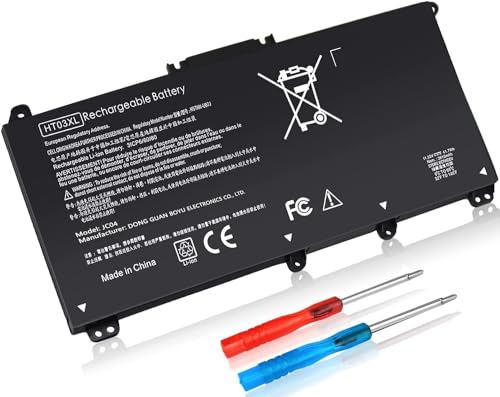
1.Specifications: Model Name: HT03XL; Voltage: 11.55V; Capacity: 41.9Wh; Color: Sleek Black. Package Includes: 1 x HT03XL Laptop Battery Replacement, 2 x Complimentary Screwdrivers, and 1 x Easy-to-Follow Instruction Manual for seamless battery installation.
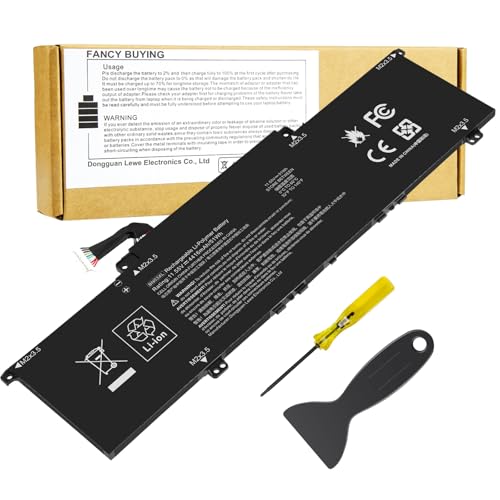
Battery Type: Polymer. Voltage: 11.55V Capacity: 51Wh ; Cells: 3-cell; Color: Black, Packages includes: 1x BN03XL battery , with auxiliary installation tool and user manual. !!! Please open your laptop case, check and confirm your original battery model and appearance, compared with our battery image, make sure that's what you need. Especially the location of the connector and the cable length (long or short).
Reset the Laptop’s Power Management
To reset your HP laptop’s battery, resetting the laptop’s power management can help resolve any issues. Here’s how to do it:
- Start by shutting down your laptop completely.
- Unplug the power cable and detach the battery if possible.
- Press and hold the power button for about 30 seconds to drain any residual power.
- Reconnect the battery and power cable.
- Turn on your laptop and check if the battery is charging properly.
Performing a power management reset can recalibrate the battery and improve its overall performance.
Remember, this step is just one of the measures you can take to optimize your HP laptop’s battery health.
Conclusion
That’s it! By resetting your HP laptop’s power management, you can give your battery a fresh start and potentially improve its performance. Remember, taking care of your laptop’s battery is essential for maximizing its lifespan and ensuring smooth functionality. Incorporating this simple reset into your routine maintenance can go a long way in optimizing your overall laptop experience. So, next time you notice your battery acting up, don’t fret – just follow these steps and watch your laptop regain its power. Happy computing!
Frequently Asked Questions
How can I optimize my HP laptop battery health?
To optimize your HP laptop battery health, consider resetting the power management. This involves shutting down the laptop, unplugging the power cable, detaching the battery (if possible), holding the power button for 30 seconds, reconnecting the battery and power cable, and checking if the battery charges properly upon restarting. This reset can recalibrate the battery and enhance its performance, contributing to improved battery health and overall laptop functionality.
