
Close Menu
Battery Spotlight
    Battery Spotlight
    • Home
    • Phone Batteries
    • Laptop Batteries
    • Car Batteries
      • Golf Cart Batteries
    • Battery Info
      • Battery Chargers
      • Battery Life
      • Battery Maintenance
      • Marine Batteries
      • Rechargeable Batteries
      • Solar Batteries
    • About Us
      • Contact
    Battery Spotlight
    Navigation: Home » Phone Batteries » Android Batteries » How to Replace Battery Sony WH-1000XM3: A Step-by-Step Guide for Long-Lasting Headphones
    Android Batteries

    How to Replace Battery Sony WH-1000XM3: A Step-by-Step Guide for Long-Lasting Headphones

    Leo HudsonBy Leo HudsonJune 3, 20256 Mins Read
    Share Facebook Twitter Pinterest LinkedIn Tumblr Email WhatsApp Copy Link
    Share
    Facebook Twitter LinkedIn Pinterest Email Copy Link

    Key Takeaways

    • Identify Battery Issues: Many users face battery drain problems with the Sony WH-1000XM3 headphones over time, necessitating a replacement.
    • Essential Tools: Gather the necessary tools, including a small Phillips screwdriver, plastic opening tool, tweezers, a compatible replacement battery, and an anti-static wrist strap, for a successful battery replacement.
    • Step-by-Step Process: Follow a structured process: prepare the headphones, open the ear cups, remove the old battery, install the new one, and reassemble the headphones securely.
    • Safety Precautions: Use an anti-static wrist strap, work in a clean area, and handle tools with care to avoid damaging the headphones.
    • Troubleshooting Tips: If issues arise post-replacement, check battery connections, inspect for loose components, verify replacement battery compatibility, and ensure all screws are tightened to avoid misalignment.
    • Enjoy Enhanced Performance: A successful battery replacement can significantly improve the performance and longevity of your Sony WH-1000XM3 headphones, restoring your audio experience.

    Are your Sony WH-1000XM3 headphones losing their charge way too quickly? You’re not alone. Many users experience battery issues over time, and it can be frustrating when your favorite headphones let you down.

    Table of Contents

    Toggle
    • Key Takeaways
    • Tools Required for Battery Replacement
    • Step-by-Step Guide to Replace Battery
    • Preparing Your Headphones
    • Opening the Headphones
    • Removing the Old Battery
    • Installing the New Battery
    • Reassembling the Headphones
    • Tips for Successful Battery Replacement
    • Safety Precautions
    • Troubleshooting Common Issues
    • Conclusion
    • Frequently Asked Questions
    • What causes the battery life issues in Sony WH-1000XM3 headphones?
    • What tools do I need to replace the battery?
    • How do I open the headphones for battery replacement?
    • What steps are involved in battery replacement?
    • What safety precautions should I take?
    • What should I do if my headphones won't turn on after replacing the battery?
    • How can I ensure a successful battery replacement?

    Tools Required for Battery Replacement

    To replace the battery in your Sony WH-1000XM3 headphones, gather the following tools:

    • Small Phillips screwdriver: Use this for removing screws securely.
    • Plastic opening tool: This helps you pry open the headphones without damaging them.
    • Tweezers: Use these for handling small components, especially the new battery.
    • Replacement battery: Ensure you’re using a compatible model for best performance. Look for a battery specifically designed for the WH-1000XM3.
    • Anti-static wrist strap: This protects sensitive electronic components from static electricity.

    Having these tools on hand makes the battery replacement process smoother and safer. Make sure all tools are ready before you start to avoid interruptions.

    Recommended Products
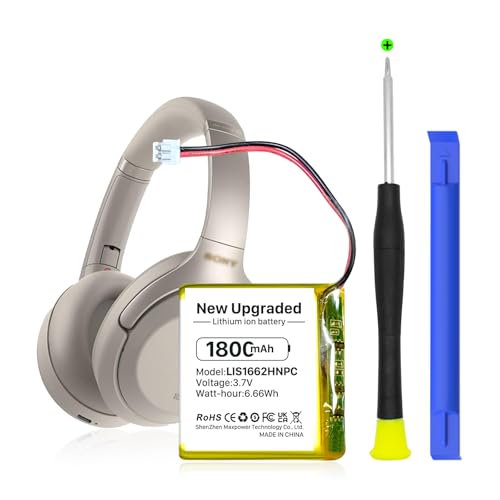
    KOOAQQ 624038 Battery, 1800mAh High Capacity Li-Polymer Battery Replacement for Sony WH-1000xM3, WH-1000MX4 PN SM-03, 1588-0911, LIS1662HNPC, SP 624038
    KOOAQQ 624038 Battery, 1800mAh High Capacity Li-Polymer Battery Replacement for Sony WH-1000xM3, WH-1000MX4 PN SM-03, 1588-0911, LIS1662HNPC, SP 624038

    【Compatible Model】: This 624038 Replacement Battery Suitable for Sony WH-1000XM3 WH-1000XM4 WH-XB900N WH-H910N WH-CH710N Bluetooth Wireless Headset SM-03 SP 624038 LIS1662HNPC,

    SEE ALSO  How to Remove Battery from LG G2 Phone: Step-by-Step Guide for Easy Battery Replacement
    VIEW LATEST PRICE

    As an affiliate, we earn on qualifying purchases.

    HXJNLDC 3.7V 1200mah Li-Polymer Battery Replacement for Sony WH-1000XM3、WH-1000XM4、WH-XB900N、WH-H910N、WH-CH710N Bluetooth Wireless Noise canceling Stereo Headset SM-03 SP 624038
    HXJNLDC 3.7V 1200mah Li-Polymer Battery Replacement for Sony WH-1000XM3、WH-1000XM4、WH-XB900N、WH-H910N、WH-CH710N Bluetooth Wireless Noise canceling Stereo Headset SM-03 SP 624038

    ★【Please note that the original battery connector of earphones in individual batches will be different, and you need to replace the connector yourself.】for Sony WH-1000XM3、WH-1000XM4、WH-XB900N、WH-H910N、WH-CH710N Bluetooth Wireless Noise canceling Stereo Headset and Part NO SP624038 Battery Replacement。It can also be used in other 3.7-5V electronic products with power less than 4.44Wh (1200mAh).

    VIEW LATEST PRICE

    As an affiliate, we earn on qualifying purchases.

    HXJNLDC DC 3.8V 1600mah Lithium Battery Replacement for Sony WH-1000XM5 Bluetooth Wireless Noise canceling Stereo Headset 723741
    HXJNLDC DC 3.8V 1600mah Lithium Battery Replacement for Sony WH-1000XM5 Bluetooth Wireless Noise canceling Stereo Headset 723741

    Compatible with Sony WH-1000XM5 Bluetooth Wireless Noise canceling Stereo Headset Battery Replacement。It can also be used in other 3.8-5V electronic products with power less than 6.08Wh (1600mAh).(★ Not applicable to high-power electric tools and model aircraft)

    VIEW LATEST PRICE

    As an affiliate, we earn on qualifying purchases.

    Step-by-Step Guide to Replace Battery

    Replacing the battery in your Sony WH-1000XM3 headphones is a straightforward process. Follow these steps to complete the replacement efficiently.

    Recommended Products

    AOLIKES SM-03 SP 624038 1200mAh Battery Replacement for [Sony] WH-1000xm4, WH-1000xm3,WH-XB900N, WH-H910N, WH-CH710N Wireless Headset,
    AOLIKES SM-03 SP 624038 1200mAh Battery Replacement for [Sony] WH-1000xm4, WH-1000xm3,WH-XB900N, WH-H910N, WH-CH710N Wireless Headset,

    The 3.7v 1200mAh lithium polymer battery it's the SM-03 SP 624038 battery's replacement, Compatible with Sony WH-1000XM3,WH-1000XM4,WH-XB900N,WH-H910N,WH-CH710N Bluetooth wireless noise canceling stereo headphones.

    VIEW LATEST PRICE

    As an affiliate, we earn on qualifying purchases.

    SONXIAVIVO 𝟮𝟬𝟮𝟲 𝗡𝗲𝘄 𝗨𝗽𝗴𝗿𝗮𝗱𝗲𝘀 Z55 Battery, Compatible with Sony Headset Battery for WF-1000XM3 SP600 700 900 Jabra Rox Bando H5 E6 Galaxy• Truly Wireless Earbud+ Tools [2PCS]
    SONXIAVIVO 𝟮𝟬𝟮𝟲 𝗡𝗲𝘄 𝗨𝗽𝗴𝗿𝗮𝗱𝗲𝘀 Z55 Battery, Compatible with Sony Headset Battery for WF-1000XM3 SP600 700 900 Jabra Rox Bando H5 E6 Galaxy• Truly Wireless Earbud+ Tools [2PCS]

    ♫ 【Battery part】part number:Z55 for original battery.

    VIEW LATEST PRICE

    As an affiliate, we earn on qualifying purchases.

    Nzzz 624038 Battery Compatible with Sony WH-1000xM3 WH-1000XM4, 1588-0911, LIS1662HNPC, SM-03, SP 624038 Battery NiMH
    Nzzz 624038 Battery Compatible with Sony WH-1000xM3 WH-1000XM4, 1588-0911, LIS1662HNPC, SM-03, SP 624038 Battery NiMH

    Compatible with: WH-1000XM3、WH-1000XM4、WH-XB900N、WH-H910N、WH-CH710N、WH-CH710N/B

    VIEW LATEST PRICE

    As an affiliate, we earn on qualifying purchases.

    Preparing Your Headphones

    Gather the necessary tools before starting. You need a small Phillips screwdriver, a plastic opening tool, tweezers, a compatible replacement battery, and an anti-static wrist strap. Power off your headphones and remove any external connections, ensuring a clean workspace.

    Opening the Headphones

    Locate the screws on the ear cups. Use the Phillips screwdriver to carefully remove them, placing the screws in a small container to avoid losing them. Insert the plastic opening tool into the seam around the ear cups, gently prying them apart. Be cautious to avoid damaging the clips inside.

    SEE ALSO  Where Can I Get a Samsung Battery: Best Sources for Authentic Replacements and Tips

    Removing the Old Battery

    After opening the ear cups, identify the battery. Carefully disconnect it from the circuit board using tweezers. Note the orientation of the battery for correct installation later. Remove the old battery from its compartment and ensure no debris remains in the space.

    Installing the New Battery

    Insert the new battery into the compartment, adhering to the previous orientation. Reconnect the battery to the circuit board firmly, ensuring a secure connection. If your replacement battery has adhesive, press it down gently to hold it in place.

    Reassembling the Headphones

    Align the ear cups back together, ensuring the clips fit snugly. Replace the screws you previously removed. Verify that all parts are secure and make any necessary adjustments. Power on your headphones to test the new battery and enjoy your refreshed audio experience.

    Tips for Successful Battery Replacement

    Replacing the battery in your Sony WH-1000XM3 headphones requires attention to detail and a few helpful strategies. These tips ensure a smooth replacement process.

    Recommended Products

    SONXIAVIVO 624038 1300mAh Battery Replacement for Sony WH-1000XM3 WH-1000XM4 WH-XB900N WH-H910N WH-CH710N Bluetooth Wireless Noise canceling Stereo Headset SM-03 SPLIS1662HNPC 3.7V
    SONXIAVIVO 624038 1300mAh Battery Replacement for Sony WH-1000XM3 WH-1000XM4 WH-XB900N WH-H910N WH-CH710N Bluetooth Wireless Noise canceling Stereo Headset SM-03 SPLIS1662HNPC 3.7V

    100% Compatible with original battery

    VIEW LATEST PRICE

    As an affiliate, we earn on qualifying purchases.

    Timsenkoo 3.7V 1300mAh WH-1000XM4 Battery Replacement for Sony WH-1000XM3 WH-XB900N WH-H910N WH-CH710N SM-03 SP 624038 1588-0911 Bluetooth Headset Battery
    Timsenkoo 3.7V 1300mAh WH-1000XM4 Battery Replacement for Sony WH-1000XM3 WH-XB900N WH-H910N WH-CH710N SM-03 SP 624038 1588-0911 Bluetooth Headset Battery

    Compatibility: Compatible with WH-1000XM3 WH-1000XM4 Headset Battery. Please make sure the battery model matched with your device

    VIEW LATEST PRICE

    As an affiliate, we earn on qualifying purchases.

    Genuine Sony Rechargeable Battery BP-HP800-11 for SONY MDR-RF995RK, MDR-RF995R, WH-RF400, MDR-RF895RK Wireless Headphones
    Genuine Sony Rechargeable Battery BP-HP800-11 for SONY MDR-RF995RK, MDR-RF995R, WH-RF400, MDR-RF895RK Wireless Headphones

    Note! Select correct battery (headphone model is printed under charging tower). The backside of the HP800 battery has a cross bar in the center of the opening slot (see pics)

    VIEW LATEST PRICE

    As an affiliate, we earn on qualifying purchases.

    Safety Precautions

    • Use an anti-static wrist strap. This strap prevents damage to internal components from static electricity.
    • Work in a clean area. A clutter-free workspace reduces the risk of losing small parts.
    • Handle tools carefully. Sharp tools can damage the headphones or cause injury, so keep them away from sensitive areas.
    SEE ALSO  How to Check Battery Health Samsung S23: Essential Tips for Optimal Performance

    Troubleshooting Common Issues

    • If the headphones won’t turn on after battery replacement, check the battery connections. Ensure they’re secure and properly oriented.
    • If you hear unusual sounds, inspect for loose components. A loose screw or connection might cause this issue.
    • If the battery drains quickly, confirm you installed a compatible replacement. Verify the specifications match the original battery.
    • If the ear cups don’t fit correctly after reassembly, double-check all screws. Missing screws can lead to misalignment.

    Follow these tips and address potential issues to enhance your experience with the Sony WH-1000XM3 headphones.

    Conclusion

    Replacing the battery in your Sony WH-1000XM3 headphones can breathe new life into your audio experience. With the right tools and a bit of patience you can tackle this task with confidence. Remember to take your time during each step to ensure everything goes smoothly.

    Once you’ve successfully replaced the battery you’ll notice a significant improvement in performance. Don’t forget to follow the safety tips to protect both yourself and your headphones. Enjoy your favorite tunes without the worry of a dying battery and get back to what you love most—great sound!

    Frequently Asked Questions

    What causes the battery life issues in Sony WH-1000XM3 headphones?

    The battery life issues in Sony WH-1000XM3 headphones are often attributed to natural battery wear over time, usage patterns, and settings like noise cancellation. Many users report a reduction in charge as the headphones age, which can lead to frustration.

    What tools do I need to replace the battery?

    To replace the battery in your Sony WH-1000XM3 headphones, you will need a small Phillips screwdriver, a plastic opening tool, tweezers, a compatible replacement battery, and an anti-static wrist strap to ensure safety during the process.

    How do I open the headphones for battery replacement?

    Start by removing the screws on the ear cups using the Phillips screwdriver. Then, use the plastic opening tool to carefully pry apart the ear cups. Be gentle to avoid damaging internal components while accessing the battery.

    What steps are involved in battery replacement?

    First, gather all necessary tools. After opening the headphones, remove the old battery and install the new one, ensuring the orientation and connections are secure. Finally, reassemble the headphone parts and replace the screws, then test the new battery.

    What safety precautions should I take?

    Always use an anti-static wrist strap to prevent damage to electronic components. Work in a clean, well-lit area, and handle all tools carefully to avoid any accidents during the battery replacement process.

    What should I do if my headphones won’t turn on after replacing the battery?

    If your headphones won’t turn on after a battery replacement, check the battery connections to ensure they are secure. Inspect for any loose components, and confirm that the replacement battery is compatible with your headphones.

    How can I ensure a successful battery replacement?

    Ensure you have the right tools and a clean workspace. Carefully follow each step in the replacement guide, handle components gently, and always double-check connections and screws during reassembly to avoid any issues.

    Share. Facebook Twitter Pinterest LinkedIn Tumblr Email WhatsApp Copy Link
    Leo-Hudson
    Leo Hudson

      Technical writer with 3+ years of experience. Bachelor of Arts in Environmental Studies from UC Santa Cruz. Passionate about sustainability and providing clear, concise how-to guides for common battery problems.

      Related Posts

      Android Batteries

      How to Replace Battery in Samsung Phone: A Step-by-Step Guide for Easy Replacement

      October 25, 2025
      Android Batteries

      How to Remove Battery from Samsung Smart TV Remote: A Step-by-Step Guide for Easy Replacement

      October 25, 2025
      Android Batteries

      How to Check Your Battery Health on Samsung: Simple Methods to Extend Your Phone’s Lifespan

      October 25, 2025
      Android Batteries

      How Much Is a Battery for a Samsung Galaxy S6: Pricing and Replacement Options Explained

      October 25, 2025
      Android Batteries

      How to Remove Battery from Samsung Galaxy S7: A Step-by-Step Guide for Easy DIY Fixes

      October 25, 2025
      Android Batteries

      Why is My Battery Going Down While Charging Android – Effective Solutions to Fix the Issue

      October 25, 2025
      Add A Comment
      Leave A Reply Cancel Reply

      Search
      Affiliate Disclaimer

      As an Amazon Associate I earn from qualifying purchases.

      Latest Articles

      How to Replace Battery in Samsung Phone: A Step-by-Step Guide for Easy Replacement

      Android Batteries

      How to Remove Battery from Samsung Smart TV Remote: A Step-by-Step Guide for Easy Replacement

      Android Batteries

      How to Check Your Battery Health on Samsung: Simple Methods to Extend Your Phone’s Lifespan

      Android Batteries

      How Much Is a Battery for a Samsung Galaxy S6: Pricing and Replacement Options Explained

      Android Batteries

      How to Remove Battery from Samsung Galaxy S7: A Step-by-Step Guide for Easy DIY Fixes

      Android Batteries

      Why is My Battery Going Down While Charging Android – Effective Solutions to Fix the Issue

      Android Batteries
      Battery Spotlight

      Battery Spotlight is a website dedicated to helping you solve common battery problems.

      Read more about us here

      Affiliate Disclaimer
      As an Amazon Associate I earn from qualifying purchases.

      Site Navigation
      • Above Mirror Bathroom Lighting
      • Android Batteries
      • Bathroom Pendant Lighting
      • Battery Chargers
      • Battery Life
      • Battery Maintenance
      • Car Batteries
      • Ceiling Lighting Ideas
      • Golf Cart Batteries
      • Japandi Lighting
      • Laptop Batteries
      • Marine Batteries
      • Mood Lighting Living Room
      • Phone Batteries
      • Rechargeable Batteries
      • Reviews
      • Solar Batteries
      • Uncategorized
      • Vaulted Ceiling Lighting
      Latest Articles

      How to Replace Battery in Samsung Phone: A Step-by-Step Guide for Easy Replacement

      How to Remove Battery from Samsung Smart TV Remote: A Step-by-Step Guide for Easy Replacement

      How to Check Your Battery Health on Samsung: Simple Methods to Extend Your Phone’s Lifespan

      How Much Is a Battery for a Samsung Galaxy S6: Pricing and Replacement Options Explained

      How to Remove Battery from Samsung Galaxy S7: A Step-by-Step Guide for Easy DIY Fixes

      • Home
      • About
      • Contact
      • Privacy Policy
      • Editorial Policy
      • Disclaimer
      • Terms and Conditions
      • Affiliate Disclosure
      © 2026 Battery Spotlight

      Type above and press Enter to search. Press Esc to cancel.