

Key Takeaways
- Battery Removal Process: To safely remove the Samsung S9 battery, follow a detailed step-by-step guide that includes powering off the device, detaching the back cover, and disconnecting the battery connector.
- Essential Tools: Use specific tools like a Phillips-head screwdriver, plastic pry tool, suction cup, and tweezers to facilitate battery removal while avoiding damage.
- Safety Precautions: Always power off your device before starting, handle components carefully, and avoid exposing the battery to heat or moisture during the removal process.
- Proper Disposal: Follow recycling guidelines for disposing of lithium-ion batteries, ensuring you do not throw them in regular trash to prevent environmental harm.
- Use Genuine Parts: To ensure compatibility and safety, replace the Samsung S9 battery with approved and genuine Samsung parts.
- Handle with Care: Gentle handling of the battery and internal components is crucial to prevent damage and extend the lifespan of your device.
Have you ever found yourself struggling with a phone that just won’t charge or holds a charge for only a short time? If you own a Samsung S9, you might be wondering how to tackle battery issues without breaking a sweat.
Overview of Samsung S9 Battery Removal
Removing the battery from a Samsung S9 requires careful handling due to the device’s design. Unlike older models, the Samsung S9 features a non-removable battery, which means accessing it involves specific steps.
Necessary Tools
- Screwdriver: Use a small Phillips-head screwdriver for the internal screws.
- Plastic Pry Tool: Use this tool to separate the phone’s front and back panels without causing damage.
- Suction Cup: This aids in lifting the screen.
- Tweezers: Helpful for maneuvering small components.
Step-by-Step Removal
- Power Off the Device: Turn off your Samsung S9 completely to avoid any electrical issues.
- Prepare the Work Area: Find a clean, flat surface. Organize your tools for easy access.
- Remove the Back Cover: Use the suction cup to create a gap. Insert the plastic pry tool gently into the gap, working your way around to detach the back cover.
- Unscrew the Battery Connector: Remove screws holding the battery connector in place. This step requires the Phillips-head screwdriver.
- Disconnect the Battery: Use tweezers to gently lift the battery connector from the logic board. Avoid applying excess force.
- Replace or Remove the Battery: If replacing, insert the new battery. For removal, simply lift it out carefully.
Safety Precautions
- Avoid Heat and Moisture: Ensure the device is cool and dry during the procedure.
- Handle with Care: Be cautious with internal components. Incorrect handling can lead to damage.
- Use Approved Parts: Always use genuine Samsung batteries for replacements to avoid compatibility issues.
Completing these steps carefully ensures a successful battery removal process, prolonging the life of your Samsung S9.
Tools Required for Battery Removal
Removing the battery from your Samsung S9 requires specific tools to ensure a smooth process. The following tools are essential for this task.
Recommended Products
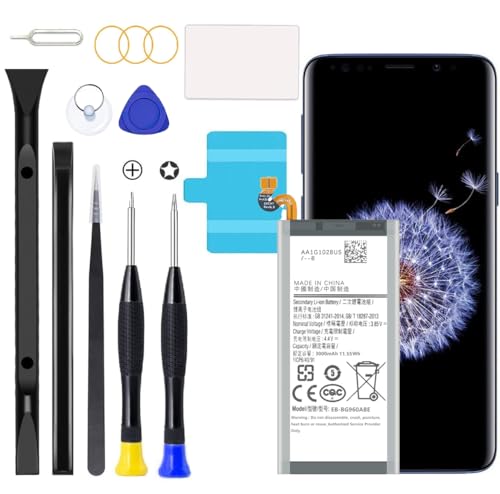
Compatible with Samsung Galaxy S9 SM-G960, SM-G960A, SM-G960T, SM-G960P, SM-G960V, SM-G960R4, SM-G960F, SM-G960U, EB-BG960ABA, EB-BG960ABE.

Model-Specific Compatibility: This battery is only compatible with Galaxy S9, NOT for S9 Plus, please verify your phone model before ordering.

✔ Compatible With: Samsung Galaxy S7 S8 S8 Plus S9 S9 Plus S10,S10 Plus,S20,S20+,S20 Ultra ,S21,S21 Plus,S21 Ultra,Galaxy S22,S22 Plus,S22 Ultra,S23,S23 Ultra,Galaxy S24 Ultra,Galaxy S25 S25 Ultra,S25 Edge,Note8, Note 9,Note 10,Note 10 Plus,Note 20,Note 20 Ultra,Galaxy Z Flip 2 3 4 5 ,Galaxy Z Fold 2 3 4 5 6 7 Galaxy Tab S7 S8 S9 S10 S11Series and other Samsung Galaxy Models
Essential Tools
- Screwdriver: A small, Phillips-head screwdriver is necessary to remove screws securing the back cover and battery connector.
- Plastic Pry Tool: Use this thin, flat tool to gently separate the back cover from the phone without damaging it.
- Suction Cup: A suction cup helps lift the back cover safely. It creates a seal, allowing for easier removal of the cover.
- Tweezers: Tweezers assist in handling small components and connectors, making it simpler to disconnect the battery.
Optional Tools
- Heat Gun or Hair Dryer: Applying gentle heat can soften the adhesive on the back cover, aiding in easier removal.
- Magnet Organizer: This keeps screws and small parts organized during the process, preventing loss or mix-ups.
- Anti-Static Wrist Strap: Wearing this strap protects your device from static electricity that could damage sensitive components.
Step-by-Step Guide to Remove Battery From Samsung S9
Follow these steps carefully to remove the battery from your Samsung S9. Each step is essential for a successful process.
Recommended Products

[PLS CONFIRM DEVICE MODEL] -- Contains the instruction to guide you step by step installation. Please verify your old battery part number and model before purchasing this replacement battery. Compatible with Samsung Galaxy S9 SM-G960, SM-G960A, SM-G960T, SM-G960P, SM-G960V, SM-G960R4, SM-G960F, SM-G960U, EB-BG960ABA, EB-BG960ABE. NOT FOR Samsung Galaxy S9 Plus.

Compatible Models: This replacement battery is compatible with Galaxy S9 EB-BG960ABE

Compatible Phone Model: This battery kit is specifically designed for Samsung Galaxy S9 (with model SM-G960 series), NOT work for Galaxy S9 Plus/Note 9, please double confirm your phone model before purchasing
Power Off Your Device
First, power off your Samsung S9. Press and hold the side button, then tap “Power Off.” This step prevents any electrical issues during battery removal. Make sure the device is completely off before continuing.
Remove Back Cover
Next, you’ll need to remove the back cover. Use a plastic pry tool to gently lift one corner of the cover. Insert a suction cup near the lifted corner, then pull carefully while sliding the pry tool around the edges. This action detaches the adhesive securely holding the cover. Take your time to avoid cracking the glass.
Disconnect the Battery Connector
After removing the back cover, locate the battery connector. Use a Phillips-head screwdriver to unscrew the screws securing the connector. Once the screws are out, gently lift the connector using tweezers, taking care not to damage nearby components. This disconnection allows safe battery removal.
Take Out the Battery
Finally, lift the battery from the compartment. If the adhesive makes it difficult to remove, apply gentle heat with a heat gun or hair dryer to soften it. Avoid using excessive heat, as it can damage your phone. Once loosened, you can take out the battery completely.
By following these steps, you can safely remove the battery from your Samsung S9.
Tips for Handling Your Samsung S9 Battery
Proper handling of your Samsung S9 battery ensures safety and longevity. Following a few key practices can help you maintain your device and its performance.
Safety Precautions
- Power Off: Always power off your Samsung S9 before starting any battery-related procedures. This avoids electrical surges and potential damage.
- Avoid Heat: Keep the battery away from excessive heat sources. High temperatures can lead to swelling and leaks.
- Use Approved Tools: Utilize only the recommended tools for battery removal. Mismatched tools can cause damage to the device or injury.
- Be Gentle: Handle the battery and components carefully. Dropping or forcing tools can result in harm to you or the device.
- Wear Protective Gear: Use gloves and safety glasses when working on the battery. This minimizes the risk of injury from accidental punctures or spills.
Battery Disposal Guidelines
- Recycling: Always recycle your old battery at a designated recycling center. Many electronic stores offer battery recycling programs.
- Avoid Landfills: Never dispose of lithium-ion batteries in regular trash. They can leak harmful chemicals into the environment.
- Store Carefully: If you temporarily store a removed battery, place it in a cool, dry area, away from metal objects that could cause a short circuit.
- Documentation: Keep the battery in its original packaging if possible, or label it clearly. This prevents confusion with other items and ensures proper handling.
By following these tips, your Samsung S9 battery can remain in good condition while minimizing environmental impact during disposal.
Conclusion
Taking care of your Samsung S9’s battery doesn’t have to be a daunting task. By following the steps outlined in this guide you can safely remove and replace the battery when needed. Remember to always prioritize safety and use the right tools to avoid any mishaps.
Proper handling and disposal of your old battery not only helps your device but also contributes to a healthier environment. So whether you’re looking to replace a worn-out battery or just want to learn more about your device’s maintenance you’re now equipped with the knowledge to tackle it confidently. Happy tinkering!
Frequently Asked Questions
How do I fix charging issues with my Samsung S9?
To fix charging issues with your Samsung S9, start by checking the charging cable and port for debris. Try using a different charger to rule out a faulty cable. If problems persist, consider soft resetting your device or checking for software updates. If none work, it may be time to replace the battery.
Is the Samsung S9 battery removable?
No, the Samsung S9 features a non-removable battery. This means that you need specific tools and a careful process to safely remove the battery for replacement. It’s advisable to follow a detailed guide or seek professional help if you’re unfamiliar with this process.
What tools do I need to remove the Samsung S9 battery?
To remove the Samsung S9 battery, you will need a Phillips-head screwdriver, a plastic pry tool, a suction cup, and tweezers. Optional tools like a heat gun or hair dryer can help soften adhesive, while an anti-static wrist strap can protect against static damage.
What precautions should I take when handling the battery?
When handling the Samsung S9 battery, always power off the device first, avoid heat and moisture, and use only approved tools. Handle components gently and wear protective gear like gloves and safety glasses to ensure safety throughout the process.
How should I dispose of an old Samsung S9 battery?
Dispose of an old Samsung S9 battery responsibly by recycling it at designated centers. Avoid throwing it in the landfill or regular trash. Store removed batteries carefully to prevent short circuits and check local guidelines for battery disposal options.
