

Key Takeaways
- Understand Key Factors: Screen brightness, background apps, location services, and poor network connectivity significantly impact Android battery life. Optimize these settings to improve performance.
- Debunk Common Myths: Regular partial charging between 20%-80%, not closing apps, and using Battery Saver mode judiciously are crucial for effective battery management.
- Implement Practical Tips: Adjust screen brightness, manage app usage, and enable Battery Saver mode to conserve power throughout the day.
- Maintain Battery Health: Regular software updates, avoiding high temperatures, and preventing complete discharges contribute to longer battery lifespan and efficiency.
- Monitor with Tools: Utilize built-in battery usage tools and third-party apps like AccuBattery and GSam Battery Monitor to track battery health and optimize usage effectively.
Ever find yourself frantically searching for a charger when your Android phone’s battery is running low? You’re not alone. Many people struggle with keeping their devices powered up throughout the day. With all the apps and features we use, it’s easy to drain your battery faster than expected.
Understanding Android Battery Life
Understanding how Android battery life works helps you maximize your device’s performance. Several key factors influence battery performance, and debunking common myths can guide you in managing and preserving battery life effectively.
Key Factors Affecting Battery Performance
- Screen Brightness: High screen brightness consumes significant battery power. Lowering brightness or using adaptive brightness extends battery life.
- Background Apps: Apps running in the background can drain your battery. Close apps you aren’t using to conserve energy.
- Location Services: GPS and location services can quickly deplete battery power. Turn off location services when not needed.
- Network Connectivity: Poor signal strength causes your device to use more power in searching for connections. Switching to airplane mode in low signal areas saves battery.
- App Usage: Some apps are more demanding than others. Monitor which apps consume the most battery in your settings and limit their use.
Common Myths About Battery Life
- Myth: Always Fully Charge Your Battery: Modern batteries benefit from partial charging. Regularly charging your device between 20% to 80% helps maintain battery lifespan.
- Myth: Leaving the Phone Plugged In Over Night Damages the Battery: Most devices are designed to stop charging when full, but it’s best to unplug once charged.
- Myth: Closing Apps Saves Battery: While closing unused apps offers some savings, most Android systems efficiently manage background processes without significant battery loss.
- Myth: Battery-saving Mode Always Improves Battery Life: Battery-saving mode reduces performance and disables features. Use it when necessary but not as a default.
Tips for Extending Battery Life
Improving your Android’s battery life involves simple adjustments and smart habits. Follow these tips to help your device stay charged throughout the day.
Adjusting Screen Brightness and Timeout
Adjust screen brightness to optimize battery usage. Navigate to Settings > Display and select Brightness Level. Lowering brightness or enabling Adaptive Brightness automatically adjusts based on your surroundings. Set a shorter screen timeout to save battery when the device isn’t in use. Navigate to Settings > Display > Screen Timeout, and choose 15 or 30 seconds.
Managing App Usage and Background Activity
Monitor your app usage to identify battery-hogging applications. Access Settings > Battery > Battery Usage to view which apps consume the most power. Limit background activity by turning off Background Data for apps that don’t need it. Go to Settings > Apps, select the app, tap Mobile Data, and disable Background Data. Uninstall unused applications to free up resources and prolong battery life.
Utilizing Battery Saver Mode
Enable Battery Saver mode to help extend battery life when the charge is low. Go to Settings > Battery and toggle Battery Saver on. This mode reduces background activity, limits performance, and adjusts settings to conserve power. Schedule Battery Saver to activate automatically when the battery reaches a certain percentage for seamless management.
Battery Maintenance Practices
Maintaining your Android battery involves proactive measures that enhance its lifespan and efficiency. Implement the following practices to keep your device running longer between charges.
Recommended Products

𝐖𝐡𝐲 𝐂𝐡𝐨𝐨𝐬𝐞 𝐓𝐡𝐢𝐬 𝐌𝐚𝐠𝐧𝐞𝐭𝐢𝐜 𝐏𝐨𝐰𝐞𝐫 𝐁𝐚𝐧𝐤? It packs an upgraded 10000mAh capacity, 20W fast charging, and a tiny body all in one. Unlike bulky chargers, it won't block your iPhone's rear camera. The strong magnetic grip holds your phone firmly – no slipping, no wobble. The smart LED display shows exact remaining battery percentage in real-time – so you're never caught off guard. Works with iPhone 17/16/15/14/13/12 series, giving you 1.8~2.5 full charges. When used with a magnetic phone case, it also supports fast wireless charging for Samsung Galaxy S26/S25/S25 Ultra, Huawei Mate 70/Pura 80 Pro and most Android phones, no need to remove the case.

45W Fast Charge, More Than Phones Why settle for phone-only charging? 45W gives quick power to phones, tablets, handheld consoles, and compatible USB-C cameras—iPhone 17 Pro to 65% and Galaxy S26 Ultra to 75% in 30 min.

【Smart Watches For Women & Personalized Watch Faces】: The SHANG WING LYNN2 has a slim and stylish design, making it a perfect gift for women/ladies. LYNN2 smart watch with 1.47” TFT full-touch color screen can provide you with smooth using and visual experience. Express your style with many watch faces in the GloryFit App, or customize with your own photos. Make your own unique dials to meet your mood and outfit style.
Regular Software Updates
Regular software updates provide new features and improvements that enhance battery management. Check for updates consistently by navigating to Settings > System > System updates. Keeping your operating system and apps updated ensures optimal performance and reduces bugs that may drain your battery.
Keeping the Device Cool
High temperatures can negatively impact battery health. Protect your device from excessive heat caused by direct sunlight or operating while charging. If your device feels hot, stop using it temporarily to cool down. Consider removing the case during charging to allow better airflow.
Avoiding Complete Discharges
Avoid letting your battery drop to 0% frequently. Frequent complete discharges can wear down the battery over time. Instead, aim to recharge when your battery level reaches around 20%. This simple habit helps maintain battery health and prolongs longevity.
By integrating these battery maintenance practices, your Android phone will benefit from improved performance and extended battery life.
Monitoring Battery Health
Monitoring your Android battery health is crucial for maximizing its lifespan and performance. Regular checks help you identify issues early and ensure your device remains efficient.
Recommended Products
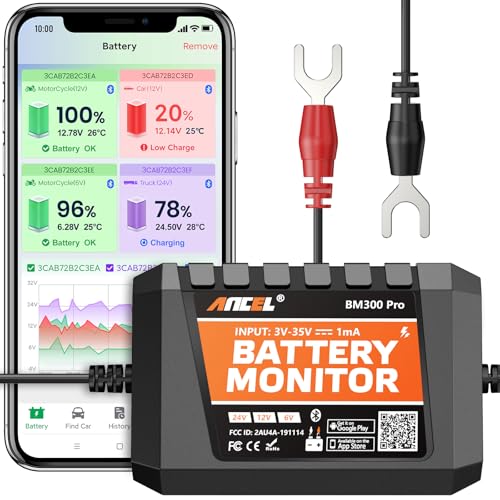
ONE DEVICE FITS ALL: Why juggle multiple single-voltage monitors? Engineered for true versatility, it auto-detects and adapts to any standard system: from 6V classic cars and 12V daily drivers to 24V diesel rigs, large RVs, and marine setups. Compatible with all common battery types including Lead-Acid (Flooded, AGM, Gel, EFB) and Lithium-Ion. This is the single, future-proof solution for enthusiasts with diverse vehicles or evolving needs. Note: 6V only for SOC, voltage & temp monitoring; no charging & cranking tests.

Monitor your app's performance and usage to improve your battery life, speed up your phone, etc.

【Medically Accurate】- FDA-cleared digital blood pressure monitor with high-end measurement accuracy. Our bluetooth blood pressure monitor not only provide blood pressure readings but also tracks pulse rate and detect irregular heartbeats, allowing you to understand your physical condition anytime and anywhere.
Using Built-In Battery Usage Tools
Most Android devices come with built-in battery usage tools. Access these tools through Settings > Battery. Here, you can view battery usage by apps, which highlights which apps consume the most power.
- Check Usage Stats: Analyze the list of apps to identify any that use excessive battery power, which might indicate a problem.
- Adjust Settings: For apps with high consumption, consider reducing their background activity or uninstalling if unnecessary.
- Battery Optimization: Enable battery optimization for frequently used apps under Settings > Battery > Battery Optimization. This feature limits background processing to save battery life.
Third-Party Battery Health Apps
Several third-party battery health apps offer more detailed insights into your battery’s condition. These apps provide advanced features for monitoring and managing battery usage.
- AccuBattery: This app measures battery wear and offers alerts when battery care is needed. It provides detailed statistics about battery charge cycles.
- GSam Battery Monitor: This app presents information on battery performance and app usage in an easy-to-understand format. It also includes historical data tracking.
- Battery Guru: Battery Guru helps optimize your device through recommendations based on your usage habits. It monitors charging cycles and suggests best practices for keeping your battery healthy.
Using these tools and apps empowers you to maintain better battery health, ultimately extending the life of your Android device.
Conclusion
Taking control of your Android battery life doesn’t have to be a daunting task. By making a few simple adjustments to your settings and habits you can significantly extend your device’s performance.
Remember to keep an eye on your app usage and make use of the built-in tools to monitor battery health. Embracing battery optimization and regularly updating your software can go a long way in preserving your battery’s lifespan.
With these tips in mind you’ll find yourself worrying less about your battery and enjoying your device more. Happy charging!
Frequently Asked Questions
What are common reasons for Android battery drain?
The common reasons for Android battery drain include high screen brightness, numerous background apps, location services being active, poor network connectivity, and heavy app usage. Adjusting these settings can help improve battery performance.
How can I extend my Android’s battery life?
To extend your Android’s battery life, you can reduce screen brightness, limit background data for less crucial apps, utilize Battery Saver mode, and maintain good charging habits by avoiding frequent complete discharges.
Is it true that I should fully charge my Android battery?
No, fully charging your Android battery is not necessary. It’s better to recharge your phone when it reaches around 20% to avoid stressing the battery and to improve its lifespan.
What practices can improve battery maintenance?
Improving battery maintenance involves keeping your device cool, regularly updating software, and being mindful of your charging habits. Avoid letting the battery run down completely.
How can I monitor my Android battery health?
You can monitor your Android battery health using built-in battery usage tools found in settings. These tools show which apps consume the most power and allow you to optimize settings accordingly.
What are some recommended battery health apps for Android?
Some recommended third-party battery health apps for Android include AccuBattery, GSam Battery Monitor, and Battery Guru. These apps provide insights into battery usage and tips for better management.
