

Ever wondered why your laptop battery seems to die out so quickly? Picture this: you’re in the middle of an important task when suddenly, your laptop shuts down. Frustrating, right? What if you could predict when this might happen and avoid the hassle?
Importance of Knowing Your Laptop Battery Life
Knowing your laptop battery life is crucial to prevent unexpected interruptions and maximize productivity. By understanding how long your battery can last, you can plan your work effectively and avoid situations where your device suddenly shuts down in the middle of an important task.
Here are a few reasons why it’s essential to be aware of your laptop battery life:
- Preventive Measures: Knowing when your battery is running low allows you to save your work, plug in your laptop, or prioritize tasks before the battery drains completely.
- Productivity Boost: By being aware of your battery status, you can efficiently manage your workload and ensure uninterrupted workflow.
- Longevity: Over time, consistently monitoring your battery life can help you maintain the health of your laptop battery and extend its lifespan.
Understanding your laptop battery life empowers you to make informed decisions and optimize your productivity. By implementing simple monitoring techniques, you can stay ahead of potential issues and enjoy seamless performance from your device.
Checking the Battery Health
When checking your laptop battery health, it’s essential to have a clear understanding to ensure optimal performance and longevity. Here are some key steps to help you assess and monitor your battery health effectively:
- Use Built-in Tools: Your laptop likely has built-in tools to check battery health. Look for the battery settings in your system preferences to access information like battery capacity, cycle count, and health status.
- Third-party Apps: Consider using third-party applications designed to provide detailed insights into your battery health. These tools can offer additional metrics and notifications to keep you informed.
- Monitor Charging Habits: Be mindful of your charging habits as overcharging or regularly draining your battery to 0% can impact its health. Aim to keep your battery between 20%-80% for optimal performance.
- Temperature Awareness: High temperatures can degrade battery health. Avoid exposing your laptop to extreme heat and ensure proper ventilation during use.
- Regular Calibration: Periodically calibrate your battery by fully charging, then discharging it. This process helps the system recalibrate battery capacity for accurate readings.
| Battery Health Tips |
|---|
- Avoid Extreme Temperatures: High heat can impact battery life.
- Calibrate Regularly: Fully charge and discharge your battery for accurate readings.
By following these tips and maintaining a watchful eye on your laptop battery health, you can prolong its lifespan and optimize your device’s performance for a seamless user experience.
Recommended Products

[ FHD 1080P PORTABLE MONITOR ]: KYY using a 15.6''(8.8"x14.2") advanced IPS screen with 178° wide viewing angle, Delivers 1920*1080 breathtaking viewing quality and HDR technology, KYY portable gaming monitor has excellent color rendering ability, provide you the clearer, smooth, excellent performance in gaming/multimedia. It can effectively reduce blue light radiation damage, no flickering, eye-care, and make it easier to watch for a long time
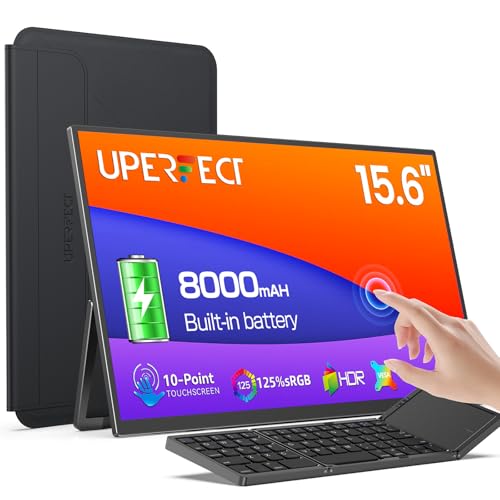
【3-in-1 Portable Combo】: UPERFECT touchscreen portable monitor 15.6'' is built-in 8000mAh battery. Not only that, but monitor also comes with a Bluetooth portable wireless keyboard and a protective case. Achieve true portability, allowing you to work efficiently or enjoy immersive entertainment experiences anytime and anywhere. Don't worry about needing power supply when you go out.

True Wireless & Upgraded Low-Latency: The latest low-latency wireless technology, near real-time screen for presentations, multitasking, and everyday productivity. (Low power or device heat may cause lag)
Understanding Battery Usage Statistics
When it comes to understanding your laptop’s battery life, keeping an eye on battery usage statistics is key. These statistics provide valuable insights into how your battery is performing and can help you optimize its usage. Here are some important points to consider:
- Battery Health: Monitoring the health of your battery is essential in understanding its overall performance. Look for indicators such as charge capacity and cycle count, which can give you an idea of your battery’s current condition.
- Power Usage: Check the power consumption of different apps and processes on your laptop. Identifying power-hungry applications can help you adjust your usage habits to conserve battery life.
- Charging Patterns: Understanding how often and how long you charge your laptop can impact its battery life. Avoid frequent short charging sessions and aim for full charge cycles when possible.
- Battery Life Estimations: Pay attention to battery life estimations provided by your operating system. These estimates can give you an idea of how long your battery is expected to last based on current usage.
- Tracking Trends: Keep track of any deterioration in your battery life over time. If you notice a significant drop in performance, it may be time to consider replacing your battery.
- Utilizing Tools: Take advantage of built-in battery monitoring tools or third-party apps that can provide detailed insights into your battery usage and health.
By staying informed about your laptop’s battery usage statistics, you can make informed decisions to optimize performance and extend the lifespan of your battery.
Recommended Products

True Wireless Portable Monitor - Equipped with the latest wireless screen mirroring and 10000mAh built-in battery. Connect effortlessly to Windows, macOS, Android, iOS, and more without wires, or use wired connections via HDMI or full-function Type-C for plug-and-play flexibility.

15.6-inch Full HD portable anti-glare IPS display with an ultraslim and thin design, perfect solution for travel, on-the-go meetings, or business trips.Specific uses for product - Business

【100% Cordless & Built-in Large Capacity Battery】– No any wires needed for display and use, the built-in rechargeable battery supports long-time wireless screen mirroring, realize truly anytime anywhere display, no more tangled cables and power socket restrictions for office, travel, outdoor and gaming.
Maximizing Battery Life
To get the most out of your laptop battery, here are some practical tips and best practices to help extend its lifespan:
- Adjust screen brightness to a comfortable level.
- Enable power-saving mode when not performing demanding tasks.
- Keep your laptop clean and dust-free to prevent overheating.
- Unplug unnecessary peripherals when not in use.
- Avoid leaving your laptop plugged in and fully charged for extended periods.
- Periodically discharge your battery to around 20% and then recharge it.
- Use hibernation mode instead of sleep mode for longer idle periods.
- Close unnecessary background applications consuming battery power.
- Invest in a cooling pad to help dissipate excess heat.
Remember, by incorporating these habits into your routine, you can prolong your laptop battery’s life and maintain optimal performance levels.
Recommended Products

Ultra-Portable: Slim, portable, and light weight allowing you to protect your investment wherever you go

Targeted Cooling Design:Feel like the airflow directly above the fans isn’t as strong as expected? Don’t worry — simply move your hand between the two fans and you’ll notice a surprisingly cool. The TECKNET cooling pad for laptop features two large fans paired with an internal channel design. This cleverly draws air from the sides and bottom, directing a concentrated, cool flow right to the center of your laptop — CPU gets hottest — for efficient, targeted cooling.It's a great gift as a work or gaming computer cooling pad

Whisper-Quiet Operation: Enjoy a noise-free and interference-free environment with super quiet fans, allowing you to focus on your work or entertainment without distractions.
Conclusion
You now have the tools to keep your laptop battery in top shape. By monitoring key indicators and following best practices, you can prolong its lifespan and optimize performance. Remember to adjust settings, keep your laptop clean, and be mindful of charging habits. With these simple steps, you’ll ensure your laptop battery serves you well for years to come.
Frequently Asked Questions
Why is monitoring laptop battery health important?
Monitoring laptop battery health is crucial to retain optimal performance levels and extend the battery’s lifespan. By tracking indicators like charge capacity, cycle count, power usage of apps, and charging patterns, users can determine battery health status and identify when it may need replacement. Regular monitoring enables users to adopt best practices and habits that maximize battery life, ensuring their laptop’s mobility and productivity.
What are some practical tips to maximize laptop battery life?
To maximize laptop battery life, users can adjust screen brightness, enable power-saving mode, keep the laptop clean, unplug unnecessary peripherals, avoid prolonged full charges, periodically discharge and recharge, use hibernation mode, close background applications, and invest in a cooling pad. By incorporating these habits into their usage routine, users can preserve their battery’s health, optimize performance, and prolong the overall lifespan of their laptop battery.
