

Key Takeaways
- Understanding Battery Life: AirPods offer about 5 hours of listening on a single charge and up to 24 hours total with the charging case, depending on usage and features like noise cancellation.
- Checking Battery Levels: You can easily check your AirPods’ battery on Android devices via Bluetooth settings or by using third-party apps for more detailed insights.
- Troubleshooting Issues: Common battery problems include connectivity issues and uneven battery drain—solutions involve checking software updates, ensuring proper charging, and cleaning charging ports.
- Extending Battery Life: Maintain battery longevity by keeping volume levels moderate, limiting noise cancellation use, taking breaks during use, and protecting AirPods from extreme temperatures.
- Regular Charging Practices: Regularly charge your AirPods in their case, use the original charging cable, monitor battery levels, and avoid overnight charging to optimize battery health.
Ever found yourself jamming to your favorite tunes only to have your AirPods die unexpectedly? It’s frustrating, especially when you’re out and about. Knowing how to check your AirPods’ battery life on an Android device can save you from those awkward moments.
Understanding AirPods Battery Life
Knowing the battery life of your AirPods enhances your listening experience. It helps you avoid unexpected interruptions.
Importance of Knowing Battery Levels
Knowing your AirPods’ battery levels ensures uninterrupted music and calls. Being aware of battery status helps plan charging times. It keeps you connected, especially during long listening sessions or important phone calls. Regularly checking the battery levels lets you enjoy your AirPods without interruptions.
Common Battery Life Expectations
AirPods typically last around 5 hours on a single charge for continuous listening. When using the charging case, you can expect up to 24 hours of total listening time. Battery life varies based on usage and environmental factors. For example, using features like noise cancellation can drain the battery faster. Maintaining your AirPods by keeping them clean and storing them properly can help ensure optimal battery performance.
Checking AirPods Battery on Android Devices
Knowing how to check the battery of your AirPods on an Android device enhances your listening experience. You can prevent unexpected interruptions by keeping track of the battery life. Here’s how to do it.
Method 1: Using Bluetooth Settings
- Open your Android device’s Settings app.
- Select Connections or Bluetooth, depending on your device model.
- Locate your connected AirPods in the list of paired devices.
- Tap your AirPods’ name. You’ll see the battery percentage displayed next to the device name.
This method gives you a quick snapshot of how much battery your AirPods have left, allowing you to plan charging accordingly.
Method 2: Third-Party Apps
- Download a third-party app like AirBattery, Pod Battery, or MaterialPods from the Google Play Store.
- Open the app after installation.
- The app connects to your AirPods and displays the current battery levels for both the left and right earbuds along with the charging case.
Using third-party apps often provides more detailed insights into your AirPods’ battery health and connectivity status.
Troubleshooting Battery Issues
If you encounter battery problems with your AirPods, you can identify and resolve common issues quickly.
Common Problems and Solutions
- AirPods Won’t Connect
Ensure Bluetooth is enabled on your Android device. Try turning Bluetooth off and then back on. If the issue persists, forget the AirPods in your device’s Bluetooth settings, then reconnect them.
- Short Battery Life
Check for software updates on your Android device. Sometimes, outdated software can affect battery performance. If problems continue, reset your AirPods by pressing the setup button on the case until the status light flashes amber, then white.
- Uneven Battery Drain
Make sure both AirPods are charging properly. Clean the charging ports to ensure clear connections. Use the Bluetooth settings to check the battery levels of each earbud separately.
- Charging Case Issues
If your charging case isn’t charging the AirPods, inspect the case for debris in the charging ports. Clean it gently with a soft, dry cloth. If it still doesn’t charge, verify that the charging cable works with other devices.
When to Consider Replacement
Consider replacing your AirPods if you notice significant battery degradation. If the charge lasts less than 2 hours, it might be time for new ones. Evaluate the charging case too; if it fails to provide power, that may indicate a problem.
Frequent charging or prolonged use in noisy environments can wear down the battery more quickly, so replace the AirPods if you experience persistent issues after troubleshooting.
Tips for Extending AirPods Battery Life
You can extend your AirPods’ battery life with a few simple practices. Understanding how to care for your AirPods helps you enjoy longer listening sessions without interruptions.
Recommended Products
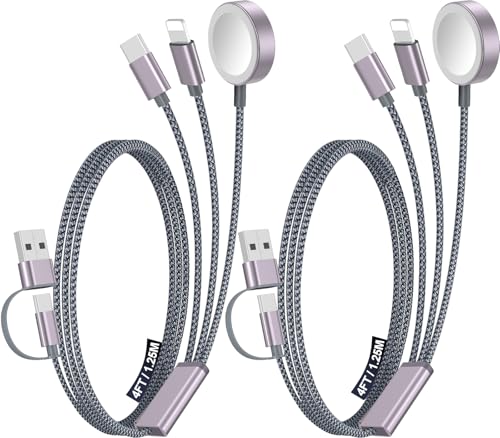
【Advanced Safe & Stable Charging】Experience enhanced safety and fast,delivering efficient power output to your devices.This certified multi charger cable supports USB Type C cable charging and USB lightning cable compatibility, delivering rapid power to iPhone cable, USB C cable pack, and for Apple Watch and Xbox Series X & S .(3A+ adapter recommended for best results). Please Note: *Charging speed depends on your device's capabilities, battery status, and the power adapter used.If your device does not charge or charges intermittently, it may be due to poor contact caused by a thick phone case. Try removing the case for a more reliable charging experience.

【Ideal AirPods Pro Charging Case Replacement】If you are looking for a charging case that is compatible with Airpods Pro 1st&2nd generation has wireless charging. This charger case is a perfect fit for you. NOTE: Air Pods Pro 1st/2nd generation charging case only, no Airpods Pro 1st/2nd generation headphones. Not compatible with AirPods 1 & AirPods 2
Best Practices for Usage
- Keep volume low: Lower volumes reduce the strain on the battery. Aim for around 50-75% for longer playtime.
- Limit noise cancellation: If you don’t need it, switch off noise cancellation. This feature consumes more power.
- Take breaks: Give your AirPods a rest during long listening sessions. Continuous use drains the battery faster.
- Avoid extreme temperatures: Store and use your AirPods in a temperature range of 32°F to 95°F (0°C to 35°C). Extreme heat or cold affects battery health and performance.
Charging Tips
- Charge regularly: Keep your AirPods in their case when not in use. This practice helps maintain their charge.
- Use the right cable: Always use the original charging cable that comes with your AirPods. A compatible cable ensures efficient charging.
- Monitor charging levels: Check the battery status regularly using your Android’s Bluetooth settings or a third-party app. This helps you keep track of when it’s time to charge.
- Avoid overnight charging: While it’s safe, it’s better to charge your AirPods only when needed instead of letting them sit in the case for extended periods.
By incorporating these tips into your routine, you can enhance the longevity of your AirPods’ battery life and ensure a better listening experience.
Conclusion
Knowing how to check your AirPods’ battery life on Android can truly enhance your listening experience. By staying aware of battery levels you can avoid those frustrating moments when your earbuds suddenly die.
Using Bluetooth settings or downloading helpful apps gives you the insights you need to keep your AirPods charged and ready for action. Plus with a few simple maintenance tips you can extend their battery life and enjoy uninterrupted music and calls.
So go ahead and implement these methods and tips to keep your AirPods performing at their best. Happy listening!
Frequently Asked Questions
How can I check the battery life of my AirPods on an Android device?
You can check the battery life of your AirPods by going to the Bluetooth settings on your Android device. Once connected, you should see a battery percentage displayed. Alternatively, you can download third-party apps like AirBattery or MaterialPods for more detailed insights on both earbuds and the charging case.
What is the typical battery life of AirPods?
AirPods generally offer around 5 hours of listening time on a single charge. With the charging case, they can provide up to 24 hours of total listening time. However, battery duration may vary depending on usage and environmental factors like noise cancellation settings.
What should I do if my AirPods won’t connect?
If your AirPods won’t connect, ensure that Bluetooth is enabled on your device. Try resetting the AirPods by placing them in the charging case, closing the lid, and holding the setup button until the LED light flashes. Then, attempt to reconnect them to your device.
How can I extend my AirPods’ battery life?
To extend your AirPods’ battery life, keep the volume low, limit noise cancellation when possible, and take breaks during long listening sessions. Additionally, avoid exposing them to extreme temperatures and regularly charge them without leaving them overnight.
What are common battery issues with AirPods?
Common battery issues include short battery life, uneven drain between earbuds, and charging case problems. Troubleshooting steps include checking for software updates, cleaning the charging ports, and ensuring the charging cable is functioning properly. If issues persist, consider contacting support for potential replacements.
