

Key Takeaways
- Understand Your Device: The Samsung Galaxy S6 features a non-removable battery, requiring specific procedures for safe removal.
- Identify Common Battery Issues: Symptoms like overheating, rapid battery drain, or inability to charge can indicate battery problems.
- Use Proper Tools: Essential tools for battery removal include a plastic pry tool, Phillips screwdriver, and tweezers, ensuring a safe disassembly.
- Follow Step-by-Step Instructions: Power off your device, carefully remove the back cover, disconnect the battery, and lift it out using the right techniques.
- Replace with Care: When replacing the battery, clean the area, reconnect securely, and test the device afterward to ensure proper functionality.
- Proper Disposal: Always recycle old batteries at designated centers to promote environmental responsibility.
Have you ever found yourself in a situation where your Samsung Galaxy S6 won’t turn on or is acting up? You might be wondering if removing the battery could solve the problem. While it’s not as straightforward as some other phones, knowing how to safely take out the battery can be a game-changer.
Understanding Your Samsung Galaxy S6
The Samsung Galaxy S6 features a sleek design with a glass back and an aluminum frame, which enhances its aesthetic appeal. This smartphone includes a non-removable battery, making access not as straightforward as in some other models. Knowing the components of your device helps understand how to handle it properly.
Key Components of the Galaxy S6
- Display: The phone has a 5.1-inch Super AMOLED display, providing vibrant colors and deep contrasts.
- Camera: The rear camera boasts 16 MP, ideal for capturing high-quality images, while the front camera offers 5 MP for selfies.
- Processor: The Galaxy S6 runs on an Exynos 7420 processor, delivering smooth performance for various applications and tasks.
- Storage Options: Available in 32 GB, 64 GB, and 128 GB variants, there’s no microSD card slot for expandable storage.
Importance of Battery Management
Understanding your battery helps maintain device performance. The Galaxy S6 battery capacity is 2,550 mAh, which provides adequate power for daily usage. Poor battery health might lead to quicker drains or failure to charge.
Common Battery Issues
You may notice issues like:
- Overheating: If your phone feels hot, it may indicate battery problems.
- Rapid Drain: Quickly losing charge can signal battery wear.
- Inability to Charge: If your phone doesn’t charge, the battery might be the cause.
Steps for Safe Battery Handling
- Power Off Your Device: Always turn off the Galaxy S6 before starting any battery-related procedures.
- Use Proper Tools: Utilize a plastic spudger and a suction cup for safe opening.
- Follow Disassembly Guides: Resources like iFixit provide detailed guides for accessing the battery.
- Handle with Care: Avoid applying excessive force when prying open the device to prevent damage.
Understanding these aspects equips you to deal with any battery-related issues effectively, ensuring your Samsung Galaxy S6 functions optimally.
Tools Required for Battery Removal
Removing the battery from your Samsung Galaxy S6 requires specific tools to ensure safety and effectiveness. Gather the following tools before starting the process.
Essential Tools
- Plastic Pry Tool: Use a plastic pry tool to gently detach the back cover without damaging the device.
- Phillips Screwdriver: A small Phillips screwdriver is necessary for removing screws that may secure the battery or other components.
- Tweezers: Tweezers help in handling small screws and battery connectors with precision.
- Suction Cup Tool: This tool assists in pulling off the screen or back cover if it’s tightly sealed.
Optional Tools
- Heat Gun or Hair Dryer: Applying gentle heat loosens adhesive that may hold the back cover, making it easier to remove.
- Magnetic Mat: A magnetic mat keeps screws organized during disassembly, ensuring you don’t lose any small parts.
- Gloves: Wearing gloves can help protect your hands and prevent damage to the device’s interior components.
Gathering these tools enhances the battery removal process and helps maintain the condition of your Samsung Galaxy S6.
Step-by-Step Guide on How to Get Battery Out of Samsung Galaxy S6
Follow these steps to safely remove the battery from your Samsung Galaxy S6.
Recommended Products
![SHENMZ Galaxy S6 Battery,[Upgraded] 5800mAh High Capacity Li-Polymer EB-BG920ABE Replacement Battery for Samsung Galaxy S6 SM-G920 G920V G920T G920A G920P G920I G920F S906L with Repair Tools](https://m.media-amazon.com/images/I/41pc-APX7ML._SL500_.jpg)
✾【HIGH QUALITY, TRUSTWORTHY PREMIUM BATTERY】:This Upgraded S6 battery uses Grade A+ rated battery cells with CE and ROHS certification,ensure last over 1200 charge cycles. Multiple-protection for safer operation for both user and devices,build-in microchip to prevent over-charging,over-discharging and over-heating.
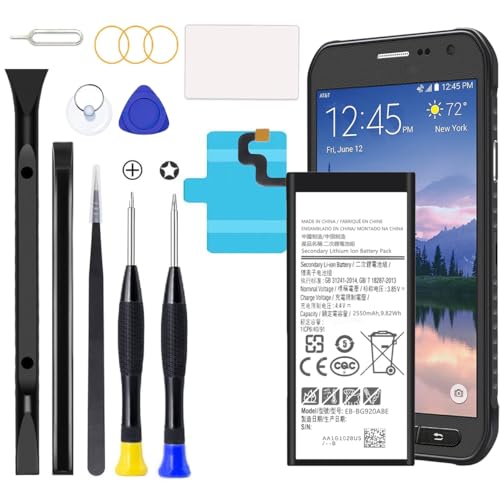
Compatible with Galaxy S6 Only, Model: S6 SM-G9200 SM-G9208 SM-G9208/SS SM-G9209 SM-G920A SM-G920F SM-G920FD SM-G920I SM-G920S SM-G920T SM-G920K SM-G920L SM-G920

{COMPATIBLE MODELS}:This Replacement battery Compatible with Samsung Galaxy S6 (Model: SM-G920 G920V G920T G920A G920P G920I G920F S906L).
Power Down Your Device
Power down your Galaxy S6 by pressing and holding the power button until the power menu appears. Tap “Power off” and confirm the selection. Ensuring the device is off prevents any electrical issues during the battery removal process.
Remove the Back Cover
Use the plastic pry tool to gently lift the back cover. Start at one corner and work your way around the edges. Be careful not to apply too much force, as excessive pressure can crack the cover. Once the cover is loose, remove it with your fingers.
Disconnect the Battery
Locate the battery connector on the motherboard. Use a Phillips screwdriver to remove any screws securing the battery connector. Once removed, carefully lift the connector using tweezers or your fingers. Avoid touching other components to prevent damage.
Remove the Battery
It’s time to lift the battery out of the device. If the battery is stuck, gently apply heat using a heat gun or hair dryer for a few seconds to loosen the adhesive. Use the plastic pry tool to carefully pry the battery loose. Once free, lift it out and set it aside for further use or replacement.
By following these steps, you can safely remove the battery from your Samsung Galaxy S6.
Tips for Replacing the Battery
- Gather Tools: Ensure you have all necessary tools before starting. You’ll need a plastic pry tool, a Phillips screwdriver, tweezers, and a suction cup tool for safe disassembly.
- Power Off the Device: Always power down your Galaxy S6 completely. This prevents any electrical issues during the replacement.
- Warm the Back Cover: Use a heat gun or hairdryer briefly on the back cover to soften the adhesive. This makes it easier to pry off the cover without damage.
- Use the Pry Tool Carefully: Insert the plastic pry tool between the back cover and the frame. Gently work your way around the edges to avoid cracking the glass.
- Disconnect the Battery: Once you remove the back cover, locate the battery connector on the motherboard. Use tweezers to pull the connector up carefully, avoiding any damage to surrounding components.
- Remove the Battery: After disconnecting, use the suction cup tool to lift the battery out. If it’s attached firmly, apply more heat to loosen the adhesive.
- Clean the Area: Before inserting a new battery, clean any remaining adhesive residue from inside the phone. This ensures a better fit and seal.
- Install the New Battery: Place the new battery in position, reconnect it to the motherboard, and press down firmly to secure it.
- Reattach the Back Cover: Align the back cover and press down gently so it seals completely. Ensure all edges are secure to maintain the phone’s integrity.
- Test the Device: Power on your Galaxy S6 to confirm that the new battery works properly. Check for any unusual behavior during startup.
- Recycle the Old Battery: Dispose of the old battery properly at a recycling center. Many locations accept used lithium-ion batteries.
These tips enhance the battery-replacing process, ensuring efficiency and safety while maintaining your Galaxy S6.
Conclusion
You’ve now got the know-how to safely remove and replace the battery in your Samsung Galaxy S6. By following the steps outlined in this guide you can tackle battery issues with confidence. Remember to handle everything with care to avoid any damage and always recycle your old battery responsibly.
With a little patience and the right tools you can keep your device running smoothly. Don’t hesitate to reach out for help if you run into any challenges along the way. Happy troubleshooting and enjoy your revitalized Galaxy S6!
Frequently Asked Questions
What should I do if my Samsung Galaxy S6 won’t turn on?
If your Galaxy S6 won’t turn on, try removing the battery and reinserting it. This can resolve minor glitches. Ensure the device is charged and perform a soft reset by holding the power button for about 10 seconds. If it still doesn’t respond, further troubleshooting may be required.
How can I safely remove the battery from my Galaxy S6?
To safely remove the battery from your Galaxy S6, power off the device first. Use a plastic pry tool to carefully open the back cover, then disconnect the battery from the motherboard. Make sure to use the right tools like a Phillips screwdriver and tweezers, and handle everything gently.
What tools do I need to remove the Galaxy S6 battery?
Essential tools for removing the Galaxy S6 battery include a plastic pry tool, Phillips screwdriver, tweezers, and a suction cup. Optional tools, like a heat gun and magnetic mat, can make the process easier and help keep screws organized.
How do I prevent battery issues like rapid drain?
To prevent battery issues, manage your device’s settings by reducing screen brightness, disabling unused applications, and avoiding extreme temperatures. Regularly updating your software and clearing cached data can also help maintain battery health.
Can I replace the Galaxy S6 battery myself?
Yes, you can replace the Galaxy S6 battery yourself by following proper procedures. Make sure to use the right tools, follow disassembly guides, and exercise caution to prevent damage to the device during the process.
What should I do after replacing the battery?
After replacing the battery, clean the area around it before inserting the new one. Reattach the back cover securely and test the device to ensure it turns on and charges properly. Remember to recycle your old battery responsibly.
