

Key Takeaways
- Understand Battery Health: Battery health indicates the capacity of your Motorola phone’s battery to hold a charge, which diminishes over time due to usage and charging habits.
- Check Battery Status: Access battery health through the Settings app by navigating to the “Battery” section and reviewing app battery usage and health status.
- Recognize Symptoms of Decline: Be vigilant for signs like rapid battery drain, unexpected shutdowns, and overheating, which signify potential battery issues.
- Utilize Tools for Assessment: Use built-in settings or third-party apps like AccuBattery to gather detailed insights on battery performance and health metrics.
- Adopt Good Charging Practices: Maintain battery longevity by charging moderately (20% to 80%), using original chargers, and avoiding overnight charging.
- Stay Updated and Optimize: Regularly install software updates, manage background apps, and monitor battery usage to ensure optimal performance and prolong battery health.
Is your Motorola phone running out of juice faster than it used to? You’re not alone. Many people face this frustrating issue as their devices age. Knowing how to check your battery health can help you understand if it’s time for a replacement or if there are simple fixes to extend its life.
Understanding Battery Health
Battery health refers to the ability of your Motorola phone’s battery to hold a charge compared to its original capacity. Over time, factors like age, usage patterns, and charging habits affect battery performance. Knowing your battery health helps you decide whether to replace the battery or adjust usage for better longevity.
Recommended Products

High capacity batteries provide ultra strong power for your devices to performance well and operate longer.


NNTN4497CR 7.4V 2250mAh Li-ion Replacement Two-Way Radio Battery for NNTN4497DR,NNTN4497,NNTN4496,NNTN4407,NNTN4970,NNTN4970A,NNTN4970AR,NNTN4851,NNTN4852 Talkabout Radios
Key Indicators of Battery Health
- Charge Capacity: This shows how much charge the battery can hold. New batteries operate at 100% capacity. As batteries age, this percentage decreases.
- Cycle Count: A cycle represents the complete depletion and recharge of the battery. Frequent complete discharges can shorten battery life.
- Charging Speed: Slow charging or overheating during charging might indicate battery issues.
Checking Battery Health on Your Motorola Phone
You can check your battery health in a few steps:
- Go to Settings: Open the settings app on your device.
- Select Battery: Tap on the “Battery” option to access battery information.
- View Battery Usage: Review the battery usage screen for details on app consumption and important stats.
- Check Health Status: If available, look for an option that mentions battery health or capacity.
Common Signs of Poor Battery Health
Recognizing symptoms of declining battery health can help you act promptly.
- Rapid Drain: If your phone loses charge significantly faster than before, battery health may be declining.
- Frequent Overheating: Overheating during normal usage or charging can signal underlying issues.
- Unexpected Shutdowns: If your phone shuts down even with some battery life remaining, it indicates potential battery failure.
By understanding these factors, you can maintain your Motorola phone more effectively, ensuring it continues to serve your needs without interruptions.
Importance Of Battery Health
Maintaining good battery health ensures your Motorola phone operates efficiently. Battery health affects not just the lifespan of your device but also its overall performance.
Impact On Phone Performance
A healthy battery directly contributes to your phone’s performance. It allows your device to run applications smoothly, support multitasking, and maintain stable operating times. If the battery’s health declines, the phone may struggle to hold a charge, leading to slow performance, lagging apps, or frequent crashes. For example, if you notice that your Motorola phone freezes or takes longer to start apps, poor battery health could be the culprit.
Signs Of Deteriorating Battery Health
Recognizing signs of deteriorating battery health helps you address issues promptly. Common indicators include:
- Rapid Drain: If your battery percentage drops significantly in a short time, it often signals a problem.
- Frequent Overheating: Excessive heat during charging or usage often means the battery is struggling.
- Unexpected Shutdowns: Devices shutting down without warning, even when the battery indicates a charge, point to potential battery failure.
- Slow Charging: Taking longer than usual to charge fully suggests that the battery is losing its capacity.
Staying alert to these signs helps you determine when to check your battery health and consider taking action to maintain your device’s performance.
Methods To Check Battery Health On Motorola Phone
You can assess the battery health of your Motorola phone through various methods. These methods provide insight into your battery’s performance, helping you determine if it’s time for a replacement or if you can enhance its lifespan.
Recommended Products

Long Battery Life - Unleash your potential with up to 10 days on a single charge, ensuring you stay connected and active without frequent recharging, more accurate tracking with extra battery life.

Long Battery Life - Unleash your potential with up to 10 days on a single charge, ensuring you stay connected and active without frequent recharging, more accurate tracking with extra battery life.

Long Battery Life - Unleash your potential with up to 10 days on a single charge, ensuring you stay connected and active without frequent recharging, more accurate tracking with extra battery life.
Using Built-In Settings
- Open Settings: Launch the Settings app on your Motorola phone.
- Select Battery: Scroll down and tap on “Battery”.
- Check Battery Usage: You can view battery usage per app, which shows how much power each application consumes.
- Battery Health Status: Depending on your phone model, look for an option labeled “Battery health” or “Battery care”. This section provides information about your battery’s current condition, such as its capacity relative to when it was new.
Using Third-Party Apps
- Choose an App: Download a reputable battery health app from the Google Play Store, such as AccuBattery or GSam Battery Monitor.
- Open the App: Launch the app after installation.
- Review Battery Data: These apps offer detailed statistics on battery health, charge cycles, and discharge rates. You’ll find metrics like estimated battery capacity, charge cycles, and charging time.
- Monitor Trends: Regularly check the app to track any changes in battery health over time. Most apps provide insights into how usage patterns affect battery lifespan.
By using these methods, you gain a clearer understanding of your Motorola phone’s battery health, allowing you to take action to maintain its performance.
Tips For Maintaining Battery Health
Maintaining battery health on your Motorola phone enhances performance and longevity. Here are effective strategies to help you care for your device’s battery.
Recommended Products

TurboPower Type-C Charging- power up fast with the TurboPower 30 USB-C charger

NOTE: For some radios, the battery need to be removed and charged separately.Please choose the correct charging method according to the model of the walkie-talkie.
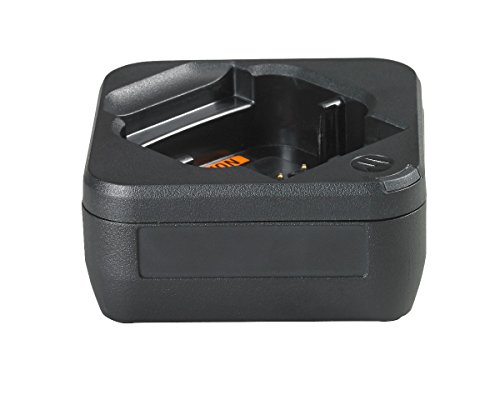
Type: Dlr Series Accessory
Charging Habits
- Opt for moderate charging: Avoid charging your phone to 100% or letting it drop below 20%. Keeping the battery between 20% and 80% maximizes lifespan.
- Use the original charger: Stick to the charger your phone came with or certified alternatives to ensure safe charging.
- Avoid overnight charging: Unplugging your phone when it reaches around 80% prevents excessive heat and strain on the battery.
- Enable battery saver mode: Activating this mode reduces background activity when the charge is low, extending overall battery life.
Software Updates
- Install updates timely: Keeping your software updated fixes bugs and optimizes battery performance.
- Manage background apps: Review which apps run in the background regularly. Limit those that drain your battery without active use.
- Clear app cache: Regularly clearing cache from apps can reduce battery strain, improving efficiency.
- Monitor battery usage: Check which apps consume the most battery through the Settings app. Consider replacing or limiting high-usage apps.
Following these tips can significantly enhance your Motorola phone’s battery health and performance.
Conclusion
Taking charge of your Motorola phone’s battery health is essential for keeping your device running smoothly. By regularly checking the battery status and recognizing signs of decline you can make informed decisions about maintenance or replacement.
Implementing simple practices like moderate charging habits and managing apps can go a long way in prolonging battery life. Remember that a healthy battery not only enhances performance but also makes your daily tasks more enjoyable.
Stay proactive and keep your Motorola phone performing at its best for as long as possible. Your device will thank you for it!
Frequently Asked Questions
What causes battery drain in Motorola phones as they age?
As Motorola phones age, battery drain can be caused by a combination of factors including decreased battery capacity, increased charge cycles, and changes in usage patterns. Over time, the battery’s ability to hold a charge diminishes, leading to quicker depletion.
How can I check the battery health of my Motorola phone?
To check battery health on your Motorola phone, go to the Settings app, select “Battery,” and view the battery usage per app and health status. Alternatively, you can download third-party apps like AccuBattery or GSam Battery Monitor for more detailed statistics.
What are the signs of poor battery health?
Common signs of poor battery health include rapid battery drain, frequent overheating, unexpected shutdowns, and lagging performance. If you notice any of these issues, it’s essential to assess your battery and consider maintenance steps or replacements.
How can I improve battery health on my Motorola phone?
To improve battery health, charge your phone moderately (between 20% and 80%), use the original charger, avoid overnight charging, and enable battery saver mode. Also, manage background apps and install software updates promptly for optimal performance.
When should I consider replacing my Motorola phone’s battery?
Consider replacing your phone’s battery if it consistently drains quickly, overheats, or causes frequent shutdowns. If your battery health indicator shows significant decline or reduced capacity, a replacement may be necessary for better performance.
