

Ever wondered how to keep your Toyota hybrid running smoothly? Picture this: you’re on the road, enjoying the fuel efficiency of your hybrid, when suddenly, the battery runs low. What do you do next? That’s where knowing how to charge your Toyota hybrid battery comes in handy.
In this article, you’ll discover practical tips and easy steps to ensure your Toyota hybrid battery stays charged and ready for the road ahead. By learning how to effectively charge your hybrid battery, you’ll not only save on fuel costs but also extend the lifespan of your vehicle’s battery. Let’s dive in and explore the simple yet essential techniques to keep your Toyota hybrid performing at its best.
Understanding Toyota Hybrid Batteries
To make the most of your Toyota hybrid vehicle, it’s essential to understand how the hybrid battery works. Here are key points to consider:
- Hybrid batteries in Toyota vehicles are designed to recharge while driving, converting energy from braking and the gasoline engine into electricity.
- These batteries are different from traditional car batteries, using nickel-metal hydride or lithium-ion technology for longevity and efficiency.
- Toyota hybrids automatically manage battery levels, so while driving, you don’t need to worry about manually charging the battery.
- Regular driving habits, including braking and acceleration, help maintain a healthy charge in the hybrid battery.
Remember, understanding the basics of Toyota hybrid batteries can go a long way in optimizing their performance and lifespan.
Different Methods of Charging
Charging your Toyota hybrid battery is essential to keep it running efficiently. Here are some different methods you can use to charge it effectively:
- Regenerative braking: When you apply the brakes while driving, the system converts kinetic energy into electricity, which is used to charge the battery.
- Plug-in charging: You can also charge your Toyota hybrid by plugging it into an external power source, such as a standard electrical outlet or a dedicated charging station.
- Engine power: The gasoline engine in your Toyota hybrid can also help charge the battery by generating electricity as you drive.
- Hybrid system: The hybrid system in your Toyota vehicle intelligently manages the battery charge level by switching between the electric motor and gasoline engine as needed.
- Monitoring tools: Some Toyota hybrids come equipped with monitoring tools that allow you to track the battery’s charge level and optimize charging based on your driving habits.
- Scheduled charging: You can set a specific time for your Toyota hybrid to start charging, allowing you to take advantage of off-peak electricity rates and ensure your battery is ready when you need it.
| Regenerative Braking Efficiency | 72% |
|---|---|
| Plug-in Charging Time | 2-5 hours |
| Engine Power Contribution | Varies based on driving conditions |
By understanding these different methods of charging, you can effectively maintain and maximize the performance of your Toyota hybrid battery.
Recommended Products
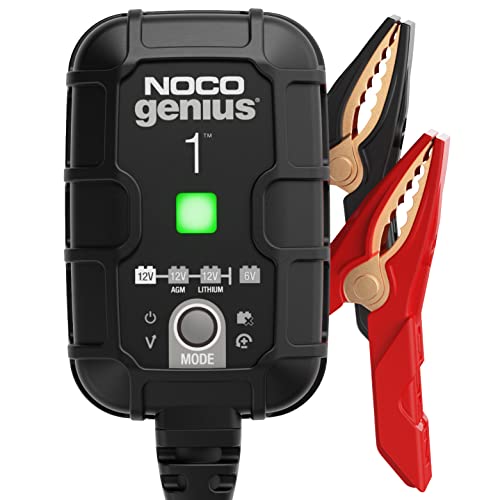
MEET THE GENIUS1 — Similar to our G750, just better. It's 35% smaller and delivers over 35% more power. It's the all-in-one charging solution - battery charger, battery maintainer, trickle charger, plus desulfator.

MEET THE GENIUS5 — Similar to our G3500, just better. It's 34% smaller and delivers over 65% more power. It's the all-in-one charging solution - battery charger, battery maintainer, trickle charger, plus desulfator.
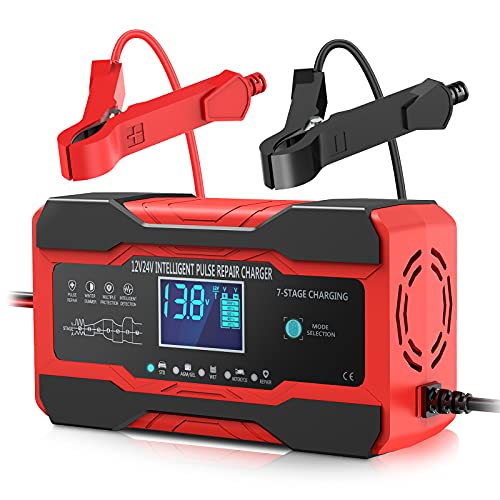
[All in One, Keep your battery charged and your car ready to go] This compact yet powerful 10-Amp 12V/24V smart battery charger is a versatile all-in-one solution, functioning as a charger, maintainer, trickle charger, and desulfator. It works with all 12V and 24V lead-acid batteries, including AGM, GEL, SLA, and Flooded types, for vehicles like cars, trucks, SUVs, motorcycles, lawnmowers, and boats. Note: For 12V/24V automotive or motorcycle batteries only. Not suitable for RC LiPo batteries or laboratory use.
Steps to Charge Toyota Hybrid Battery
To charge your Toyota hybrid battery effectively, here are some key steps to keep in mind:
- Plug-in Charging: Park your vehicle in a designated charging spot or your garage and plug it into a power source to initiate the charging process.
- Regenerative Braking: Allow your vehicle to harness energy while driving by braking, converting some of it into electricity to recharge the battery.
- Scheduled Charging: Utilize your vehicle’s charging timer to schedule charging during off-peak hours when electricity rates are lower.
- Monitoring Tools: Use the display screen in your vehicle to keep track of the battery’s charge level and optimize charging times.
Remember, following these steps helps maintain and optimize your Toyota hybrid battery’s performance.
Tips for Maintaining a Charged Battery
- Avoid letting your Toyota hybrid battery reach low charge levels frequently.
- Try to keep the battery charge between 20% and 80%.
- Regularly charge your battery to prevent deep discharges.
Remember, proper care and maintenance are essential for the longevity and performance of your Toyota hybrid battery.
Conclusion
Remember, keeping your Toyota hybrid battery charged within the optimal range of 20% to 80%, avoiding deep discharges, and maintaining a regular charging routine are key to maximizing its lifespan and performance. By following these simple tips, you can ensure that your Toyota hybrid vehicle continues to run efficiently and smoothly for years to come. Proper care and attention to your battery’s charge level will go a long way in enhancing your driving experience and reducing the need for costly replacements. So, make it a habit to prioritize the health of your Toyota hybrid battery for a worry-free driving experience.
Frequently Asked Questions
How can I maintain a charged Toyota hybrid battery?
To maintain a charged Toyota hybrid battery, avoid letting it reach low charge levels frequently. Keep the battery charge between 20% and 80%. Regularly charge the battery to prevent deep discharges.
Why is proper care of the Toyota hybrid battery important?
Proper care, like avoiding deep discharges and maintaining charge levels between 20% and 80%, is crucial for ensuring the longevity and performance of the Toyota hybrid battery. Regular charging is also essential for battery health.
