

Key Takeaways
- Battery Characteristics: The Samsung S9 Plus features a non-removable 3500mAh lithium-ion battery, known for its high energy density and fast charging capabilities.
- Signs of Battery Degradation: Look for symptoms like rapid discharge, overheating, and swelling as indicators that your battery may need replacement.
- Tools for Replacement: Essential tools include a precision screwdriver set, plastic opening tools, tweezers, a suction cup tool, and a heat source. Optional tools can enhance safety and efficiency.
- Step-by-Step Process: Power down the device, carefully remove the back cover, disconnect the old battery, install the new battery, and reassemble the phone to complete the replacement.
- Post-Replacement Monitoring: After installing a new battery, monitor its performance to ensure proper functioning and check connections if issues arise.
- Safe Disposal Practices: Dispose of the old battery responsibly at a recycling center or authorized facility to protect the environment.
Is your Samsung S9 Plus battery draining faster than you’d like? You’re not alone. Many users face this frustrating issue, and it can feel like a hassle to get it sorted. But don’t worry, changing the battery isn’t as daunting as it seems.
Understanding The Samsung S9 Plus Battery
The Samsung S9 Plus features a non-removable 3500mAh lithium-ion battery. This battery type offers high energy density, ensuring a longer battery life compared to older models. Fast charging capabilities allow you to recharge quickly, while wireless charging adds convenience.
Battery Lifespan
Batteries degrade over time. You might notice a decline in performance after 2 to 3 years. Symptoms of battery degradation include:
- Rapid Discharge: Battery drains faster than before.
- Overheating: Phone feels unusually hot during use or charging.
- Swelling: Battery swelling may cause physical damage to your device.
Factors Affecting Battery Performance
Several factors influence battery life in your Samsung S9 Plus:
- Screen Brightness: Higher brightness consumes more power.
- App Usage: Resource-heavy apps drain battery quickly.
- Network Connectivity: Constantly searching for networks reduces battery life.
Monitoring Battery Health
You can check battery health to stay informed. Use built-in features or third-party apps to monitor battery status. Look for information on charge cycles and current capacity. This data helps you determine when to consider a replacement.
Replacement Timing
Recognizing when to change your battery is crucial. If you frequently experience:
- Unexpected Shutdowns: Device turns off even with charge remaining.
- Charging Issues: Slow charging or failure to charge could indicate battery problems.
Address these signs promptly to maintain optimal device performance. Assessing these factors keeps your Samsung S9 Plus functional and prepared for daily use.
Tools Required For The Battery Replacement
Replacing the Samsung S9 Plus battery requires specific tools. Having them ready ensures a smooth replacement process.
Recommended Products

【Why Don't Sell Increased Capacity Battery 】- Because most of the so-called upgraded batteries on the market are exaggerated, the actual use time does not increase much, but the price is expensive. Our battery capacity and voltage is 100% same as your original s9 plus battery, it is a real 3500mAh can be perfectly compatible with the motherboard of your phone, and will not damage the hardware and reduce the service life of phone, true to providing long-lasting battery life.
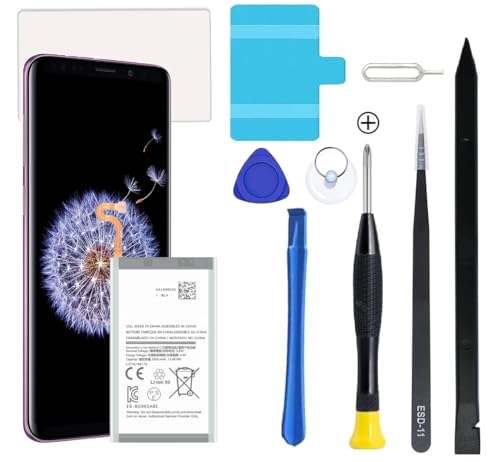
Compatible Models: This S9 Plus Battery For Samsung Galaxy S9 Plus SM-G965, G965V, G965A, G965T, G965P, G965R4, EB-BG965ABE, EB-BG965ABA

[PLS CONFIRM DEVICE MODEL] -- Contains the instruction to guide you step by step installation. Please verify your old battery part number and model before purchasing this replacement battery. Compatible with Samsung Galaxy S9 SM-G960, SM-G960A, SM-G960T, SM-G960P, SM-G960V, SM-G960R4, SM-G960F, SM-G960U, EB-BG960ABA, EB-BG960ABE. NOT FOR Samsung Galaxy S9 Plus.
Essential Tools
- Screwdriver Set: A precision screwdriver set with Phillips and Pentalobe bits. These screws hold the device securely in place.
- Plastic Opening Tools: These help separate the screen from the body without causing damage.
- Tweezers: Useful for handling small components during the replacement.
- Suction Cup Tool: Aids in lifting the screen away from the phone to access the battery safely.
- Heat Gun or Hair Dryer: Provides controlled heat to soften adhesive under the screen, making it easier to open.
Optional Tools
- Antistatic Wrist Strap: Reduces static electricity risks when handling internal components.
- SIM Card Ejector Tool: Helpful if you need to remove the SIM card before starting the replacement.
- Battery Adhesive Strips: Used to secure the new battery in place once installed.
- Magnifying Glass: Assists in seeing small components more clearly during the replacement.
Gathering these tools before starting ensures you address the battery replacement efficiently and effectively.
Step-By-Step Guide On How To Change Samsung S9 Plus Battery
Changing the battery in a Samsung S9 Plus can seem daunting, but following these steps makes the process straightforward.
Recommended Products

COMPATIBILITY: This battery only fits for Samsung Galaxy S9 Plus, SM-G965F, SM-G965U, SM-G965W, SM-G9650, SM-G965U1, SM-G965N, SCV39, SM-G965X, SC-03K. Please carefully confirm your phone model before purchase.
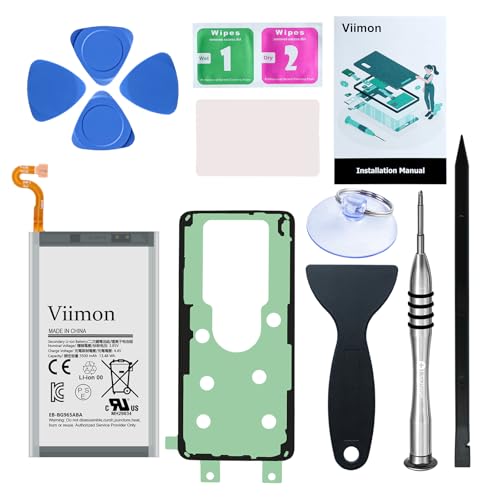
【Compatible Model】 It is compatible with Samsung Galaxy S9+ Plus SM-G965, G965U, G965U1, G965V, G965A, G965T, G965P, G965R4, EB-BG965ABE, EB-BG965ABA. Not for S9. Please double identify check your phone model matches before purchasing the battery.
Compatible Models: This S9 Plus Battery For Samsung Galaxy S9 Plus SM-G965, G965V, G965A, G965T, G965P, G965R4, EB-BG965ABE, EB-BG965ABA
Powering Down The Device
First, power down your device. Hold the Power button down, then select “Power Off.” Wait for the screen to go dark before proceeding.
Removing The Back Cover
Next, remove the back cover. Use a heat gun or hair dryer to warm the edges for about 30 seconds. This softens the adhesive. Then, use a plastic opening tool to gently pry the cover away from the device. Start at the bottom edge, carefully working your way around the phone.
Disconnecting The Old Battery
Disconnect the old battery. Locate the battery connector near the bottom. Use a plastic opening tool to lift it gently. Be cautious not to damage any surrounding components while performing this.
Installing The New Battery
Insert the new battery. Place it in the same position as the old one, lining up the connectors. Firmly press the battery down to secure it in place. Reconnect the battery connector by pressing it until you hear a click.
Reassembling The Device
Finally, reassemble the device. Align the back cover with the phone and press it down firmly. Ensure all edges are sealed properly. If necessary, use battery adhesive strips to maintain a secure fit. Power on your device to check if everything functions correctly.
Following these steps ensures a smooth battery replacement for your Samsung S9 Plus.
Tips For Successful Battery Replacement
- Gather Your Tools: Assemble all necessary tools before starting. Use a precision screwdriver set, plastic opening tools, tweezers, a suction cup tool, and a heat gun or hair dryer. Optional tools like an antistatic wrist strap can prevent static damage.
- Work in a Clean Area: Choose a clean, well-lit workspace. This minimizes the risk of losing small screws or damaging components during the process.
- Use Heat Wisely: Apply heat evenly to soften the adhesive under the back cover. This makes it easier to lift the cover without causing cracks or damage.
- Handle Components Carefully: Disconnect wires gently to avoid tearing. Pushing too hard can cause damage.
- Double-Check Battery Alignment: Ensure the new battery is properly aligned and securely connected. Loose connections can lead to charging problems.
- Seal the Device Properly: After reassembling, press down on the edges to seal the back cover. Improper sealing can cause moisture ingress or dust accumulation.
- Test Before Finalizing: Power on the device briefly to check if everything functions correctly. If you experience issues, double-check connections before sealing completely.
- Dispose of the Old Battery Safely: Take the old battery to a recycling center or an authorized disposal facility. Proper disposal helps protect the environment.
- Monitor Battery Health Post-Replacement: After changing the battery, observe its performance over the next few days. If new issues arise, investigate potential installation errors.
- Consider Professional Help if Uncertain: If you’re uncomfortable with the process, seeking professional assistance can ensure a safe and effective battery replacement.
Conclusion
Replacing the battery in your Samsung S9 Plus can breathe new life into your device and improve its performance. With the right tools and a bit of patience you can tackle this task with confidence. Remember to handle everything carefully and follow the steps closely for the best results.
Once you’ve got your new battery in place don’t forget to monitor its performance. If you ever feel unsure about the process don’t hesitate to reach out for professional help. Keeping your device in top shape means staying connected and enjoying all it has to offer. Happy replacing!
Frequently Asked Questions
How can I tell if my Samsung S9 Plus battery is degrading?
If your Samsung S9 Plus battery is degrading, you might notice rapid discharge, overheating, or physical swelling. Unexpected shutdowns and charging issues are also key indicators. Regular monitoring using built-in features or third-party apps can help track the battery’s health and charge cycles.
What tools do I need to replace my Samsung S9 Plus battery?
To replace the Samsung S9 Plus battery, you’ll need a precision screwdriver set, plastic opening tools, tweezers, a suction cup tool, and a heat gun or hair dryer. Optional tools like an antistatic wrist strap, SIM card ejector tool, battery adhesive strips, and a magnifying glass can make the process easier.
Can I replace my Samsung S9 Plus battery myself?
Yes, you can replace your Samsung S9 Plus battery yourself by following a step-by-step guide. Make sure to power down the device, gather the necessary tools, and carefully follow the instructions to disconnect the old battery and connect the new one. Proper handling and sealing are essential for success.
What are the steps to replace the Samsung S9 Plus battery?
Start by powering down your Samsung S9 Plus. Use heat to soften the adhesive, then remove the back cover. Disconnect the old battery and insert the new one. Reconnect it securely and reassemble the device, ensuring all edges are sealed before powering it on.
What should I do with the old Samsung S9 Plus battery?
Dispose of the old Samsung S9 Plus battery safely. Many electronic stores offer battery recycling programs. Avoid throwing it in the trash, as lithium-ion batteries can be hazardous. Proper disposal helps protect the environment and complies with local regulations.
What if I don’t feel comfortable replacing the battery myself?
If you’re unsure about replacing the battery yourself, it’s best to seek professional help. Many repair shops specialize in device repairs and can safely replace your Samsung S9 Plus battery, ensuring proper handling and disposal of the old battery.
