

Key Takeaways
- Battery Replacement Steps: Changing the battery in your Samsung S7 Edge involves several key steps: powering off the device, removing the back cover, disconnecting the old battery, and installing the new one securely.
- Essential Tools Required: Gather necessary tools such as a small Phillips screwdriver, plastic opening tool, and tweezers to facilitate a smooth battery replacement process.
- Choosing the Right Battery: Opt for either an OEM battery for best compatibility or a reputable third-party battery, ensuring it matches the original specifications for voltage and capacity (around 3000mAh).
- Tips for Battery Maintenance: Regularly charge your battery between 20-80%, use quality chargers, avoid extreme temperatures, and manage app usage to extend the lifespan of your Samsung S7 Edge battery.
- Backup Important Data: Before starting the replacement process, back up your important data to prevent potential loss during the battery change.
- Consult Online Resources: For additional guidance, consider watching online tutorials that visually demonstrate the battery replacement process for your Samsung S7 Edge.
Is your Samsung S7 Edge struggling to hold a charge? You’re not alone. Many users face battery issues over time, and it can be frustrating when your phone can’t keep up with your daily demands.
How To Change Battery In Samsung S7 Edge
Changing the battery in your Samsung S7 Edge is straightforward with the right tools and steps. Follow this guide for a successful battery replacement.
Tools You’ll Need
- Small Phillips screwdriver: Essential for removing tiny screws.
- Plastic opening tool: Helps pry the phone open without damage.
- Tweezers: Useful for handling small components.
- New battery: Ensure compatibility with the Samsung S7 Edge.
Step-by-Step Instructions
- Power Off Your Device: Turn off your Samsung S7 Edge completely to protect your components during the replacement.
- Remove the Back Cover:
- Insert the plastic opening tool into the slot next to the charging port.
- Gently pry the back cover open. Start from one corner and work your way around.
- Unscrew the Battery Connector:
- Locate the battery connector, which is usually secured with a couple of small screws.
- Use the Phillips screwdriver to remove the screws carefully.
- Disconnect the Battery:
- Use tweezers or the plastic opening tool to gently lift the battery connector from the motherboard.
- Avoid applying excessive force to prevent damage.
- Remove the Old Battery:
- Carefully pull out the old battery; it may be stuck due to adhesive.
- Use the plastic opening tool if necessary to help detach it.
- Insert the New Battery:
- Place the new battery into the slot, ensuring it fits snugly.
- Reconnect the battery connector to the motherboard.
- Secure the Battery Connector:
- Replace the screws you removed earlier to secure the battery connector.
- Reattach the Back Cover:
- Press the back cover back into place, ensuring it snaps securely.
- Power On Your Device:
- Turn on your Samsung S7 Edge and check for functionality. Ensure the new battery holds a charge.
Additional Tips
- Purchase a Quality Replacement Battery: Choose batteries from reputable suppliers to avoid issues.
- Back Up Your Data: Back up important data beforehand to prevent loss during the process.
- Watch Online Tutorials: Consider watching videos demonstrating the replacement for further guidance.
By following these steps, you can change the battery in your Samsung S7 Edge effectively.
Tools And Materials Needed
Changing the battery in your Samsung S7 Edge requires a few essential tools and materials to ensure a smooth process. Gather the following items before you start.
Recommended Products

{COMPATIBLE MODELS}:This Replacement battery Compatible with Samsung Galaxy S7 (Model: G930 G930V G930A G930T G930P G920V).

[PLS CONFIRM DEVICE MODEL] --- The repair kit contains the instruction to guide you step by step installation, and we have professional engineers to answer all your questions about the repair process. Please verify your old battery part number and model before purchasing this replacement battery. Compatible with Samsung Galaxy S7 SM-G930, G930A, G930T, G930P, G930V, EB-BG930ABE. ★NOT FOR Samsung Galaxy S7 Edge or S7 Edge Plus★
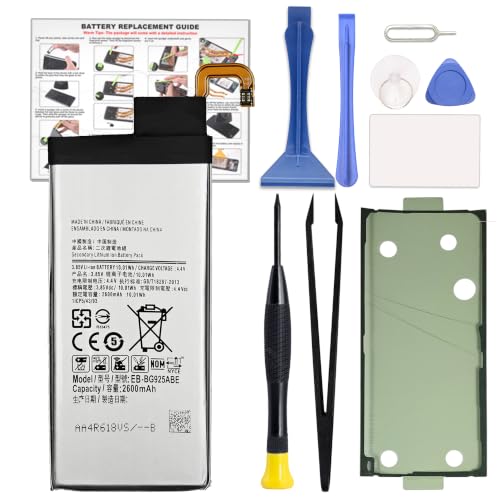
COMPATIBILITY: This battery only fits for Samsung Galaxy S6 Edge, SM-G9250, SM-G925A, SM-G925F, SM-G925FQ, SM-G925I, SM-G925K, SM-G925L, SM-G925S, SM-G925T, SC-04G, 404SC, SM-G925D, SM-G925J. Please carefully confirm your phone model before purchase.
Recommended Tools
- Small Phillips Screwdriver: You’ll need this to remove screws holding the back cover and battery in place. Use one with a magnetic tip for better handling.
- Plastic Opening Tool: This tool helps pry open the back cover without damaging the device. It’s crucial to avoid scratches on your phone’s surface.
- Tweezers: Use tweezers for careful handling of small components. They help grasp and position delicate parts, ensuring you don’t apply unnecessary pressure.
Replacement Battery Options
- OEM (Original Equipment Manufacturer) Batteries: Consider using a genuine Samsung battery for compatibility and reliability. These batteries usually come with a warranty.
- Third-Party Batteries: If you opt for third-party brands, verify compatibility with the S7 Edge. Look for batteries with positive reviews and a good track record for performance and safety.
- Check Battery Specifications: Ensure the replacement battery matches the voltage and capacity of the original to maintain optimal performance. Look for around 3000mAh capacity.
By ensuring you have all the necessary tools and materials, you set yourself up for a successful battery replacement.
Step-By-Step Process
Changing the battery in your Samsung S7 Edge is straightforward when you follow these steps. Ensure you have your tools ready, including a new battery, before starting.
Recommended Products

[CONFIRM YOUR MODEL AGAIN] --- The repair kit contains the instruction to guide you step by step installation, and we have professional engineers to answer all your questions about the repair process. Please verify your old battery part number and model before purchasing this replacement battery. Compatible with Samsung Galaxy Note 9 SM-N960, EB-BN965ABU, N960A, N960V, N960T, N960P, N960U, N960F.

Battery Condition: Brand New; Voltage: 3.86V. Capacity: 30.88Wh/8000mAh

❁Compatible Models: This Battery Suitable for all Galaxy J7 Prime variants.Compatible with Samsung Galaxy J7 Prime (2017 Ver) J727 J7 Perx J7 Sky Pro J727P J727A J727V J727T J727R J727U J7 2016 J710 J710F J710T J710P EB-BJ710CBC EB-BJ710CBE EB-BJ710CBU EB-BJ710CBZ EB-BJ710CBK. ★NOT FOR Galaxy J7 (2015/2018 Ver).
Powering Off The Device
First, power off your Samsung S7 Edge. To do this, press and hold the power button until the power menu appears, then select “Power off.” This step protects your device from any potential damage during the battery replacement.
Removing The Back Cover
Next, carefully remove the back cover. Use a plastic opening tool to pry the cover open, starting at a corner. Gently slide the tool around the edges to disengage the clips. Avoid using excessive force to prevent damaging the cover.
Disconnecting The Old Battery
It’s time to disconnect the old battery. Locate the battery connector, which is usually near the bottom of the battery. Use a small Phillips screwdriver to remove any screws holding the connector in place. Once the screws are out, gently lift the connector away from the motherboard.
Installing The New Battery
After disconnecting the old battery, insert the new one. Align the new battery within the compartment, ensuring it fits snugly. Connect the new battery’s terminal to the motherboard. Press down gently until you hear a click, indicating a secure connection.
Tips For Maintaining Battery Health
Maintaining your Samsung S7 Edge battery health helps prolong its lifespan. Simple habits can enhance battery performance.
Recommended Products

【Precise Compatibility, Perfect Fit】This battery is compatible with Samsung Galaxy S7 Edge SM-G935, to ensure that the battery you purchase is a perfect match for your device, be sure to check the model number of your device before ordering (you can check the model number of your device in the ‘Settings’ of your device).

Compatible with Samsung Galaxy S7 Edge . Model NO.:EB-BG935ABE . Make sure your phone is suitable for this replacement battery before ordering.

Charge Smart
Charge your phone regularly, ideally between 20% and 80%. Avoid letting it drop below 20% frequently. Charging overnight is fine but can lead to overcharging if not monitored.
Use the Right Charger
Use the original charger or a high-quality third-party option. Low-quality chargers can cause overheating and damage the battery.
Avoid Extreme Temperatures
Keep your phone away from extreme heat or cold. Ideal operating temperatures range from 32°F to 95°F. Exposure to extreme conditions can deteriorate battery health.
Manage App Usage
Close unused apps running in the background. Apps that consume high power can lead to faster battery depletion. Check your battery usage settings to identify power-hungry apps.
Update Software Regularly
Install software updates promptly. Updates often include optimizations for battery performance, enhancing efficiency.
Enable Battery Saver Mode
Activate battery saver mode in settings during low battery situations. This feature limits background activity and can extend usage time.
Practice Good Charging Habits
Avoid charging your phone to 100% constantly. Lithium-ion batteries, like those in the S7 Edge, prefer partial charges rather than full cycles.
Remove Cases While Charging
If your phone feels hot while charging, consider removing the case. Heat can affect battery health and charging efficiency.
By incorporating these practices into your routine, you can significantly improve your Samsung S7 Edge battery’s longevity and performance.
Conclusion
Changing the battery in your Samsung S7 Edge can breathe new life into your device. It’s a straightforward process that can save you time and money in the long run. With the right tools and a little patience, you can tackle this task with confidence.
Remember to choose a quality replacement battery to ensure optimal performance. By following the steps outlined and practicing good charging habits, you’ll not only enjoy a fully functioning phone but also extend the overall lifespan of your battery. So go ahead and give your S7 Edge the upgrade it deserves. Happy replacing!
Frequently Asked Questions
What common battery problems do Samsung S7 Edge users face?
Many Samsung S7 Edge users struggle with their phone’s battery not holding a charge over time. This leads to frustration as the device may not meet daily usage demands.
What tools do I need to replace the battery in a Samsung S7 Edge?
To replace the battery, gather a small Phillips screwdriver, a plastic opening tool, tweezers, and a compatible new battery. Using a magnetic screwdriver can help prevent losing screws.
Is it better to use an OEM battery or a third-party battery?
Using an OEM (Original Equipment Manufacturer) battery is recommended for compatibility and reliability. Third-party batteries may vary in quality, so ensure they match the original’s voltage and capacity.
How do I change the battery in my Samsung S7 Edge?
Start by powering off your device, then carefully remove the back cover with a plastic opening tool. Disconnect the old battery, insert the new one, and reconnect it to the motherboard.
How can I maintain my Samsung S7 Edge battery health?
To prolong battery life, charge between 20% and 80%, use original or high-quality chargers, manage app usage, and regularly update your software. Avoid extreme temperatures and try to limit full charges.
