Close Menu
Battery Spotlight
    Battery Spotlight
    • Home
    • Phone Batteries
    • Laptop Batteries
    • Car Batteries
      • Golf Cart Batteries
    • Battery Info
      • Battery Chargers
      • Battery Life
      • Battery Maintenance
      • Marine Batteries
      • Rechargeable Batteries
      • Solar Batteries
    • About Us
      • Contact
    Battery Spotlight
    Navigation: Home » Car Batteries » How to Replace Battery in 2022 Hyundai Elantra Key Fob: Complete Guide
    Car Batteries

    How to Replace Battery in 2022 Hyundai Elantra Key Fob: Complete Guide

    Jackson DoyleBy Jackson DoyleMay 4, 20244 Mins Read
    Share Facebook Twitter Pinterest LinkedIn Tumblr Email WhatsApp Copy Link
    Share
    Facebook Twitter LinkedIn Pinterest Email Copy Link

    Ever found yourself locked out of your car because of a dead key fob battery? The frustration is real. But fret not, as we’ve got your back! In this article, we’ll walk you through the simple steps to change the battery in your 2022 Hyundai Elantra key fob.

    Table of Contents

    Toggle
    • Step 1: Gather the Necessary Tools
    • Step 2: Locate the Battery Compartment
    • Step 3: Remove the Old Battery
    • Step 4: Insert the New Battery
    • Step 5: Test the Key Fob
    • Conclusion
    • Frequently Asked Questions
    • How often should I replace the battery in my Hyundai Elantra key fob?
    • What should I keep in mind when replacing the battery in my Hyundai Elantra key fob?
    • How can I test if the new battery in my Hyundai Elantra key fob is working properly?
    • What should I do if my Hyundai Elantra key fob still doesn't work after replacing the battery?

    Picture this: you’re rushing to an important meeting, only to realize your key fob isn’t working. Sounds familiar? Don’t worry, we’ve all been there. With our easy-to-follow guide, you’ll be swapping out that battery like a pro in no time.

    Step 1: Gather the Necessary Tools

    When changing the battery in your 2022 Hyundai Elantra key fob, you’ll want to have the following tools ready:

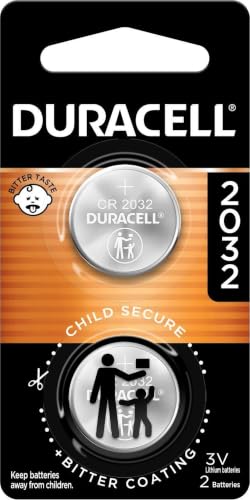
    • New CR2032 replacement battery
    • Small flathead screwdriver or a coin
    • Soft cloth or towel
    • Tweezers or pliers (optional)

    Having these tools on hand will make the battery replacement process smoother and quicker.

    Recommended Products

    Key Fob Replacement Batteries for Hyundai, Pack of 2
    Key Fob Replacement Batteries for Hyundai, Pack of 2

    **Please confirm compatibility using the compatibilty guide located in the product images**

    SEE ALSO  Where to Buy DieHard Car Batteries in California: Expert Tips for Optimal Vehicle Performance
    VIEW LATEST PRICE

    As an affiliate, we earn on qualifying purchases.

    Key Fob Battery Replacement for Hyundai CR2032 Batteries Two Pack
    Key Fob Battery Replacement for Hyundai CR2032 Batteries Two Pack

    Elite by SHI USA Batteries Replacement compatible with 2001-2022 Hyundai smart key fobs, including: ✔ Elantra ✔ Sonata ✔ Tucson ✔ Santa Fe ✔ Accent ✔ Kona ✔ Palisade ✔ Elite Batteries compatible with Veloster ✔ Venue ✔ Ioniq ✔ Azera ✔ Nexo. May be compatible with some 2023-2026 models — check your owner's manual.

    VIEW LATEST PRICE

    As an affiliate, we earn on qualifying purchases.

    Auliguy Key Fob Batteries Replacement for Hyundai (2001-2022)
    Auliguy Key Fob Batteries Replacement for Hyundai (2001-2022)

    [ Original OEM Battery as Provided by Manufacturer ] Please refer to the fitment guide in the product images to check for compatibility.

    VIEW LATEST PRICE

    As an affiliate, we earn on qualifying purchases.

    Step 2: Locate the Battery Compartment

    When you’re ready to replace the battery in your 2022 Hyundai Elantra key fob, the next step is to locate the battery compartment.

    Here’s what you need to do:

    • Look for a small slot on the back of your key fob.
    • Use a flathead screwdriver or coin to gently pry open the slot.
    • Slide out the battery cover to reveal the battery inside.

    Remember, each key fob model may have a slightly different design, so take your time to locate the battery compartment properly.

    Step 3: Remove the Old Battery

    • Carefully lift out the old battery, making sure not to damage the key fob.
    • Dispose of the old battery properly, following local regulations or recycling guidelines.
    • Avoid touching the new battery with your bare hands to prevent oil transfer that could affect its performance.
    • Insert the new battery into the key fob with the positive(+) side facing up.
    • Slide the battery cover back into place until it clicks securely.
    SEE ALSO  Who to Call When Your Car Battery Dies: Roadside Assistance Guide
    Key Points
    Dispose of the old battery responsibly.
    Handle the new battery with care.
    Ensure the battery cover is securely in place.

    Recommended Products

    Key Fob Batteries for Genesis & Hyundai (2-Pack) CR2032 – Accent, Azera, Elantra/GT, Entourage, Equus, Genesis/Coupe/Sedan, Ioniq, Kona, Palisade, Santa Cruz, Santa Fe, Sonata, Tucson
    Key Fob Batteries for Genesis & Hyundai (2-Pack) CR2032 – Accent, Azera, Elantra/GT, Entourage, Equus, Genesis/Coupe/Sedan, Ioniq, Kona, Palisade, Santa Cruz, Santa Fe, Sonata, Tucson

    Comprehensive Replacement Kit – Two CR2032 coin batteries + video guide for a quick, seamless key fob swap.

    VIEW LATEST PRICE

    As an affiliate, we earn on qualifying purchases.

    Car Key Battery Replacement for Hyundai (Tucson Sonata Elantra Santa Fe Palisade Santa-Cruz Kona Accent IONIQ 5 EV Hybrid Nexo Veloster CR2032 3V Remote Batteries Pack of 2)
    Car Key Battery Replacement for Hyundai (Tucson Sonata Elantra Santa Fe Palisade Santa-Cruz Kona Accent IONIQ 5 EV Hybrid Nexo Veloster CR2032 3V Remote Batteries Pack of 2)

    Replacement batteries compatible with Hyundai Remote Key Fob with a low or dead battery.

    VIEW LATEST PRICE

    As an affiliate, we earn on qualifying purchases.

    SUPALAND Key Fob Shell Case Replacement Fits for Hyundai Sonata Elantra Tucson Ioniq IX35 I45 2013-2020 Keyless Smart Key Housing Remote Pad Cover 4 Button with Battery Holder
    SUPALAND Key Fob Shell Case Replacement Fits for Hyundai Sonata Elantra Tucson Ioniq IX35 I45 2013-2020 Keyless Smart Key Housing Remote Pad Cover 4 Button with Battery Holder

    Only Key Fob Shell: This is just a smart key shell case replacement with Uncut Blank Key. There is no electronics, transponder chip, or battery inside

    VIEW LATEST PRICE

    As an affiliate, we earn on qualifying purchases.

    Step 4: Insert the New Battery

    It’s time to insert the new battery into your Hyundai Elantra key fob. Here’s how to do it:

    • Handle the new battery with care.
    • Insert the new battery correctly, with the positive side up.
    • Slide the battery cover back securely.

    Remember to follow these steps carefully to ensure a successful battery replacement in your key fob.

    SEE ALSO  Optimizing Your Tesla Battery: Tips for Longevity and Performance

    Step 5: Test the Key Fob

    After replacing the battery in your 2022 Hyundai Elantra key fob, it’s crucial to test if it’s functioning correctly. Here’s how:

    • Ensure the key fob is reassembled securely.
    • Stand near your car and press the buttons to check if it locks and unlocks.
    • If the key fob doesn’t work, review the steps to ensure the battery is correctly placed.

    For a successful battery replacement, testing the key fob is the final step to guarantee everything works as expected.

    Key Points
    Ensure key fob is reassembled securely
    Test by pressing lock/unlock buttons
    Review steps if key fob isn’t working

    Conclusion

    That’s it! You’ve successfully replaced the battery in your Hyundai Elantra key fob. Remember to handle the battery with care and make sure it’s inserted correctly. Test your key fob to ensure it’s working properly by reassembling it securely and checking if it locks and unlocks your car. If you encounter any issues, double-check the battery placement. Enjoy the convenience of a fully functional key fob!

    Frequently Asked Questions

    How often should I replace the battery in my Hyundai Elantra key fob?

    It is recommended to replace the battery in your Hyundai Elantra key fob every 1-2 years to ensure optimal performance.

    What should I keep in mind when replacing the battery in my Hyundai Elantra key fob?

    Handle the battery carefully to avoid damage and make sure to insert it with the correct polarity to prevent any issues with the key fob.

    How can I test if the new battery in my Hyundai Elantra key fob is working properly?

    After replacing the battery, reassemble the key fob securely and test it by checking if it locks and unlocks your car effectively.

    What should I do if my Hyundai Elantra key fob still doesn’t work after replacing the battery?

    If the key fob is not working after replacing the battery, double-check the battery placement to ensure it is correctly inserted for proper functionality.

    Share. Facebook Twitter Pinterest LinkedIn Tumblr Email WhatsApp Copy Link
    Jackson-Doyle
    Jackson Doyle

      Battery industry professional with 5+ years of experience. Bachelor of Science in Electrical Engineering from Georgia Tech. Specializes in power systems and renewable energy.

      Related Posts

      Car Batteries

      Top Online Platforms to Buy Authentic Optima Car Batteries

      January 5, 2025
      Car Batteries

      Maximize Tesla Battery Life: Practical Tips & Longevity Insights

      January 5, 2025
      Car Batteries

      Discover Who Makes Bosch Car Batteries in A Sustainable Drive for Eco-friendly Power Solutions

      January 5, 2025
      Car Batteries

      Top Companies That Deliver Car Batteries to Your Doorstep

      January 4, 2025
      Car Batteries

      Understanding Tesla Powerwall Battery: A Green Energy Solution for Your Home

      January 3, 2025
      Car Batteries

      Extending the Life of Used Car Batteries: Top Tips and Savings Guide

      January 3, 2025
      Add A Comment
      Leave A Reply Cancel Reply

      Search
      Affiliate Disclaimer

      As an Amazon Associate I earn from qualifying purchases.

      Latest Articles

      How to Replace Battery in Samsung Phone: A Step-by-Step Guide for Easy Replacement

      Android Batteries

      How to Remove Battery from Samsung Smart TV Remote: A Step-by-Step Guide for Easy Replacement

      Android Batteries

      How to Check Your Battery Health on Samsung: Simple Methods to Extend Your Phone’s Lifespan

      Android Batteries

      How Much Is a Battery for a Samsung Galaxy S6: Pricing and Replacement Options Explained

      Android Batteries

      How to Remove Battery from Samsung Galaxy S7: A Step-by-Step Guide for Easy DIY Fixes

      Android Batteries

      Why is My Battery Going Down While Charging Android – Effective Solutions to Fix the Issue

      Android Batteries
      Battery Spotlight

      Battery Spotlight is a website dedicated to helping you solve common battery problems.

      Read more about us here

      Affiliate Disclaimer
      As an Amazon Associate I earn from qualifying purchases.

      Site Navigation
      • Above Mirror Bathroom Lighting
      • Android Batteries
      • Bathroom Pendant Lighting
      • Battery Chargers
      • Battery Life
      • Battery Maintenance
      • Car Batteries
      • Ceiling Lighting Ideas
      • Golf Cart Batteries
      • Japandi Lighting
      • Laptop Batteries
      • Marine Batteries
      • Mood Lighting Living Room
      • Phone Batteries
      • Rechargeable Batteries
      • Reviews
      • Solar Batteries
      • Uncategorized
      • Vaulted Ceiling Lighting
      Latest Articles

      How to Replace Battery in Samsung Phone: A Step-by-Step Guide for Easy Replacement

      How to Remove Battery from Samsung Smart TV Remote: A Step-by-Step Guide for Easy Replacement

      How to Check Your Battery Health on Samsung: Simple Methods to Extend Your Phone’s Lifespan

      How Much Is a Battery for a Samsung Galaxy S6: Pricing and Replacement Options Explained

      How to Remove Battery from Samsung Galaxy S7: A Step-by-Step Guide for Easy DIY Fixes

      • Home
      • About
      • Contact
      • Privacy Policy
      • Editorial Policy
      • Disclaimer
      • Terms and Conditions
      • Affiliate Disclosure
      © 2026 Battery Spotlight

      Type above and press Enter to search. Press Esc to cancel.