

Ever been stuck with a dead car battery at the worst possible moment? Imagine the relief of knowing how to change it yourself. In this guide, you’ll learn how to replace the battery in your 2020 Toyota Corolla quickly and confidently.
Picture this: you’re running late for an important meeting, and your car won’t start. Instead of panicking or waiting for help, what if you could tackle the issue yourself? By the end of this article, you’ll have the knowledge and skills to swap out your Corolla’s battery like a pro.
No more costly trips to the mechanic or relying on others for a simple battery change. With our step-by-step instructions and tips, you’ll be back on the road in no time. Let’s dive in and empower you to take control of your car’s battery replacement needs.
Gather necessary tools and materials
To successfully change your 2020 Toyota Corolla’s battery, there are a few essential tools and materials you’ll need to gather beforehand. Ensuring you have everything ready will make the process smoother and more efficient. Here’s what you’ll need:
Basic Tools:
- Screwdriver: To loosen and tighten the battery terminal clamps.
- Pliers: For removing any nuts or bolts that may be securing the battery.
- Safety Gloves: Protect your hands from dirt and corrosion.
- Safety Goggles: Shield your eyes from any potential debris.
- New Battery: Ensure it’s compatible with your 2020 Toyota Corolla.
- Battery Cleaning Solution: To clean any corrosion from the terminals.
- Anti-corrosion Battery Washers: Help prevent future corrosion build-up.
- Rag or Paper Towels: For cleaning and wiping down surfaces.
Having these tools and materials at hand will set you up for a successful battery replacement process. It’s always better to be prepared before you begin the task, so gather everything you need before getting started.
Locate and access the battery
When changing the battery in your 2020 Toyota Corolla, the first step is finding the location of the old battery. In most cases, the battery is located under the hood of your car. To access it:
- Pop the hood of your car by pulling the hood release lever usually found below the steering wheel.
- Once the hood is open, secure it with the prop rod to ensure it stays up while you work.
- Locate the battery. It is usually a rectangular box with two cables attached to it, often concealed under a plastic covering.
Before you start removing the old battery, it’s essential to identify the positive and negative terminals. The positive terminal is typically marked with a “+” sign, while the negative terminal has a “-” sign. Familiarize yourself with these to ensure you disconnect and reconnect the cables correctly during the battery replacement process.
Disconnect the old battery
- Start by disconnecting the negative cable first to prevent any electrical mishaps.
- Use a wrench or socket to loosen the nut on the negative terminal.
- Once the negative cable is removed, proceed to disconnect the positive cable using the same method.
- After removing both cables, carefully lift out the old battery from its housing.
- Be mindful of any clips or straps holding the battery in place.
Prepare the new battery for installation
Now it’s time to prepare the new battery before installing it in your 2020 Toyota Corolla. Here’s what you need to do:
- Inspect the new battery: Before installation, make sure the new battery is free of any damage or leaks.
- Clean the terminals: If there’s any corrosion on the terminals, clean it using a mixture of baking soda and water.
- Attach the battery cable ends: Connect the positive cable to the positive terminal, and the negative cable to the negative terminal – ensuring they are securely in place.
- Perform a final check: Double-check that all connections are tight and secure to prevent any issues down the road.
Important Data:
| Information | Details |
|---|---|
| Model year | 2020 |
| Maintenance | Battery replacement |
| Key steps | Prepare new battery |
| Vehicle | Toyota Corolla |
Remember, a proper installation ensures the efficiency and longevity of your new battery.
Install the new battery
Now that you’ve got the new battery prepped, it’s time to install it in your 2020 Toyota Corolla. Follow these simple steps to ensure a smooth installation process:
- Step 1: Position the new battery in the battery tray.
- Step 2: Securely attach the positive (+) cable to the positive terminal on the battery.
- Step 3: Similarly, attach the negative (-) cable to the negative terminal.
- Step 4: Double-check all connections to ensure they are tight and secure.
It’s essential to install the new battery correctly to optimize performance and extend its lifespan. Keep these steps in mind to complete the battery replacement process effectively.
Recommended Products
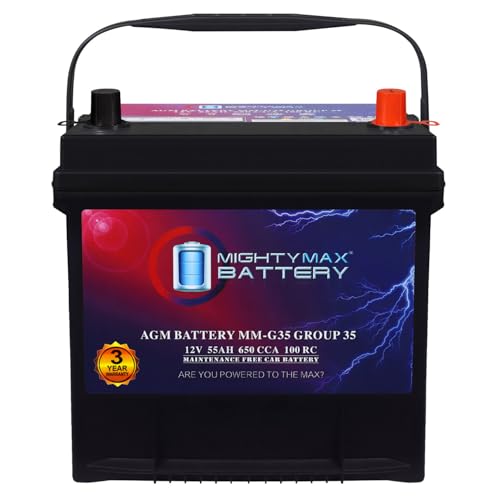
Fast Starting Power: This 12V 55Ah 650 CCA delivers strong, steady starts is ready for any weather in any season.

Battery dimensions --- BCI Group size 140R(H4 LN1), 8.15 x 6.89 x 7.48 inches, Terminal Layout: Left: - Right: +. Battery dimensions, cold cranking amps, terminal location and battery type are key factors in getting the right unit. Please measure your old battery and compare the size with this battery, if the measurements are the same, the positive and negative positions are the same, there is not much difference in CCA and it will fit your vehicle.

Replacement Batteries for a 2014-2022 Toyota Corolla Smart Key with a low or dead battery.
Conclusion
That’s it! You’ve now learned how to change the battery in your 2020 Toyota Corolla. Remember, proper installation ensures optimal performance and longevity for your new battery. By following the steps outlined in this guide, you can confidently replace the battery yourself and keep your Corolla running smoothly. Don’t forget to double-check all connections and securely attach the cables to their terminals. With these simple but essential steps, you’ll be back on the road in no time. Happy driving!
Frequently Asked Questions
1. Why is proper battery installation important for a 2020 Toyota Corolla?
It is crucial to ensure optimal performance and extend the battery’s lifespan by securely attaching cables and positioning the battery correctly.
2. What are the key steps involved in installing a new battery?
Positioning the battery in the tray, securely attaching the positive and negative cables, and double-checking all connections for tightness are the key steps.
3. How does proper installation impact battery replacement effectiveness?
Proper installation ensures the battery functions efficiently and lasts longer, enhancing the overall effectiveness of the replacement process.
