

Ever changed your car battery only to find it refusing to start afterward? Frustrating, right? We’ve all been there – the confusion, the worry, the wondering of what went wrong. But fret not, as we’re here to shed light on this common automotive conundrum. In this article, we’ll unravel the mysteries behind why your car might not start after a seemingly simple battery swap.
Imagine this: you’ve just replaced your car battery, expecting a smooth ride ahead, only to be met with silence when you turn the key. It’s a scenario that can leave you feeling stuck and unsure of what steps to take next. But fear not, as we’re here to guide you through the troubleshooting process and get you back on the road in no time.
In this article, we’ll walk you through the possible reasons why your car is refusing to start post-battery replacement. From common issues to expert tips, we’ve got your back. So, sit tight, buckle up, and let’s dive into the world of car mechanics together.
Signs of a Faulty Battery Installation
Wondering if your car’s new battery is causing the starting issue? Here are some signs to look out for:
- Dim Lights or Electrical Issues: If lights are weak or you experience electrical malfunctions, it could indicate a problem with the battery installation.
- Clicking Sound While Turning Key: A consistent clicking noise when trying to start your car could be a sign of improper installation.
- Inconsistent Starting: Difficulty starting the car, especially right after the battery replacement, might point to an installation error.
- Battery Corrosion: Visible corrosion on the battery terminals suggests an improper connection.
Having trouble with any of these warning signs? Let’s dive deeper to troubleshoot the issue and get you back on the road fast.
Testing the Battery Connections
To troubleshoot why your car isn’t starting after changing the battery, Testing the Battery Connections is crucial. Here are the steps to follow:
- Visually inspect: Ensure the battery terminals are tightly connected.
- Check for corrosion: Greenish residue on the terminals can disrupt the flow of electricity.
- Tighten connections: Use a wrench to securely fasten loose terminals.
- Test with a multimeter: Measure the voltage across the terminals. A healthy battery should read around 12.6 volts.
- Inspect the cables: Look for any signs of fraying or damage that may affect conductivity.
- Clean the terminals: Use a mixture of baking soda and water to remove any corrosion gently.
Recommended Products

【WHAT YOU GET】: Included in the package are 2 battery terminal cleaning brushes and 10 battery terminal corrosion-resistant fiber washers (5 green and 5 red). We have thoughtfully designed different colors to help you distinguish between positive and negative, red for + and green for -.


All-In-One - The ultimate battery terminal cleaning kit provides all the tools to clean and protect your battery from battery corrosion.
Checking for Corrosion
When dealing with a car that’s not starting after a battery change, Checking for Corrosion is crucial. Corrosion on battery terminals can impede the flow of electricity, impacting the car’s ability to start. Here’s a simple guide to help you tackle this issue effectively:
- Visual Inspection: Start by looking at the battery terminals. If you notice any white or green powdery substance, that’s corrosion.
- Tools You Need: For this task, you’ll require protective gloves, a wire brush, and a mixture of water and baking soda.
- Cleaning Process: Dip the wire brush in the baking soda solution and scrub the corrosion off the terminals. Ensure you disconnect the battery before cleaning.
- Rinsing and Drying: After scrubbing, rinse the terminals with clean water and let them air dry completely.
- Reconnection: Once dry, reconnect the battery cables, making sure they are securely tightened.
By addressing any corrosion on the battery terminals, you’re ensuring a clean connection for the electricity to flow smoothly, possibly resolving the starting issue with your car.
Recommended Products

Specially designed to protect battery terminals from corrosion, a leading cause of hard starting and battery failure.

Quantity: comes with 10 pieces battery anti-corrosion washers(5 red & 5 green) and 2pcs Battery Terminal Cleaning Brush.

【Effortlessly removes corrosion】The dual-ended battery post cleaning brush, made of stainless steel casing and with steel wire bristles, powerfully removes stubborn corrosion and oxides from battery terminals and clamps, ensuring optimal conductivity. In winter, clean terminals will help your car start more easily while reducing battery drain.
Assessing the Battery Voltage
To troubleshoot a car not starting after a battery change, one crucial step is to assess the battery voltage. Here are some tips to guide you:
Use a multimeter:
- Set the multimeter to DC voltage.
- Connect the red lead to the positive terminal and the black lead to the negative terminal.
A healthy car battery should register about 12.6 to 12.8 volts when the engine is off.
Interpret the readings:
- Below 12.4 volts indicates a low charge, potentially causing starting issues.
A reading below 11.9 volts suggests the battery is discharged and may need recharging or replacement.
Check for a drop in voltage while starting the car:
Assessing the battery voltage provides valuable insights into the health of your car’s electrical system. It helps you determine if the battery is the culprit behind the starting issue or if there are other underlying issues to address.
Recommended Products
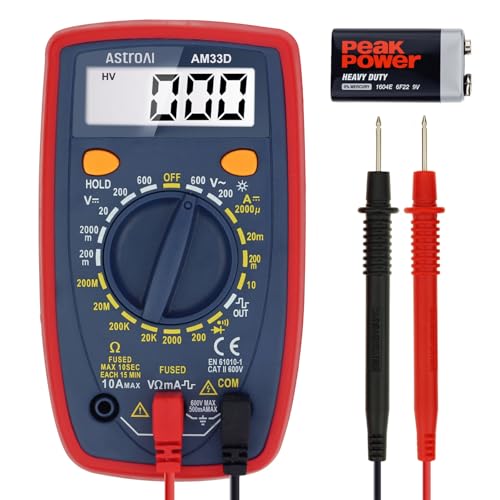
Additional Tips - The following incorrect operations may cause the multimeter not to show results: Firstly, the plugs of test leads are not fully inserted or not inserted into the correct sockets. Secondly, the manual rotary switch is not placed in the correct position. In addition, this meter can not test all AC Current and below 100mV AC Voltage. Please check the user manual carefully before measurement.

Accurately Test Full Features: Accurately measures AC/DC voltage, DC current, resistance, continuity test, diode and batteries.

Customer Service: KAIWEETS provides a lifetime after sale service and technical support. This digital multimeter is included with 2 AAA batteries (pre-installed), comes with a carrying case and 2 decent cable leads.
Ensuring Proper Battery Programming
After replacing your car battery, it’s essential to ensure that the new battery is properly programmed to match your vehicle’s specifications. Without proper coding, your vehicle’s electrical system may not function correctly.
Here are some key points to consider to ensure proper battery programming:
- Modern Vehicles: Many modern cars require battery registration or coding to sync the new battery with the vehicle’s system. This process informs the car’s computer about the new battery’s installation.
- Battery Registration Tools: Some vehicles necessitate specialized tools, like a diagnostic scan tool, to register a new battery properly. These tools help communicate the battery change to the car’s system.
- Professional Assistance: If you’re unsure about the battery registration process for your vehicle, it’s recommended to seek assistance from a certified mechanic or dealership. They have the expertise and tools to ensure the battery is correctly programmed.
- Avoiding Electrical Issues: Properly programming your battery helps prevent electrical issues, ensures optimal performance, and extends the lifespan of your new battery.
Always remember, proper battery programming is crucial to the overall functionality of your vehicle post-battery change. Be proactive in following the necessary steps to avoid potential electrical mishaps.
Conclusion
Ensuring a clean connection by addressing corrosion on battery terminals and checking battery voltage are key steps in troubleshooting a car that won’t start after a battery change. Proper maintenance and attention to detail can help resolve starting issues effectively. Remember to follow the guide’s recommendations for cleaning terminals and assessing battery voltage accurately. Additionally, don’t forget the importance of proper battery programming to match your vehicle’s specifications. By taking these steps, you can optimize performance, prevent electrical issues, and extend the lifespan of your new battery. If you encounter any challenges, seeking professional assistance or using specialized tools for battery registration is advised. Keep these tips in mind for a smooth and hassle-free experience with your car’s new battery.
Frequently Asked Questions
Why is it important to check for corrosion on battery terminals when troubleshooting a car that won’t start after a battery change?
Corrosion on battery terminals can hinder electricity flow, impacting the car’s ability to start. Visually inspect for powdery substances, use protective gloves, a wire brush, and a baking soda solution to clean the terminals, rinse with water, and ensure secure reconnection of battery cables for a clean connection.
How can I assess the battery voltage to troubleshoot starting problems post-battery change?
Use a multimeter to measure voltage levels. Low charge or discharge may be indicated, helping to identify the root cause of the starting issue after a battery change.
Why is proper battery programming crucial after replacing the battery?
Modern cars may need battery registration or coding to sync the new battery with the vehicle’s system. This ensures optimal performance, prevents electrical issues, and extends the new battery’s lifespan.
