

Key Takeaways
- Battery Overview: The Samsung S10 Plus is equipped with a Lithium-ion battery (4,100 mAh) that may experience performance decline over time due to factors like usage and temperature.
- Signs for Replacement: Key indicators that your battery may need replacement include decreased battery life and frequent overheating during regular use.
- Replacement Options: Users can choose between official Samsung service centers for quality assurance or consider DIY kits for a hands-on approach.
- DIY Considerations: If opting for a DIY replacement, ensure you have the required tools, including a heat source, suction cup, and replacement battery, while following safety protocols to avoid damage.
- Risks of DIY Replacement: Potential risks include screen damage, safety hazards from improper battery handling, and voiding warranties. Weigh these factors before deciding to replace the battery yourself.
- Professional Help: If unsure about the DIY process or facing persistent issues, seeking assistance from professionals can save time and mitigate the risk of further damage.
Is your Samsung S10 Plus battery draining faster than you’d like? You’re not alone. Many users face this frustrating issue as their devices age. A dead battery can feel like a major setback, especially when you rely on your phone for everything from staying connected to capturing memories.
But what if you could breathe new life into your device? This article will guide you through the ins and outs of replacing the battery in your S10 Plus. You’ll learn whether it’s a DIY project you can tackle or if it’s better to seek professional help. By the end, you’ll have the knowledge to make an informed decision and keep your phone running smoothly.
Overview of Samsung S10 Plus Battery
The Samsung S10 Plus features a Lithium-ion battery with a capacity of 4,100 mAh. This battery provides decent longevity, supporting various tasks like gaming, streaming, and browsing without frequent charging. As the device ages, users often notice a decline in battery performance. Factors like app usage, software updates, and ambient temperature can affect battery life significantly.
Battery Specifications
| Specification | Details |
|---|---|
| Battery Type | Lithium-ion |
| Capacity | 4,100 mAh |
| Voltage | 3.85 V |
| Dimensions | 70 x 50 x 5 mm |
Common Issues
You might face several issues as the battery deteriorates:
- Rapid Drain: If your phone discharges quickly, it may signal battery wear.
- Charging Problems: Difficulty charging could indicate a failing battery or issues with the charging port.
- Overheating: Frequent overheating during charging or heavy use raises concerns about battery condition.
Replacement Considerations
Before deciding on replacement, consider these factors:
- DIY Feasibility: Assess your comfort level with technical tasks. Replacing the battery requires tools and patience.
- Professional Help: If you’re unsure about the process or face persistent issues, seeking professional assistance may save time and avoid potential damage.
Replacement Options
You can opt for several options for battery replacement:
- Official Service Centers: Relying on Samsung’s authorized centers ensures quality parts and warranty coverage.
- Third-Party Services: Various repair shops offer battery replacement services. Research their reputation and reviews.
- DIY Kits: Numerous online retailers sell battery replacement kits with tools and instructions.
Keep these factors in mind to make an informed decision about your Samsung S10 Plus’s battery replacement.
Signs That You Need a Battery Replacement
Recognizing when your Samsung S10 Plus battery needs replacement is essential for maintaining optimal performance. Look for these key signs that indicate it’s time for a change.
Recommended Products
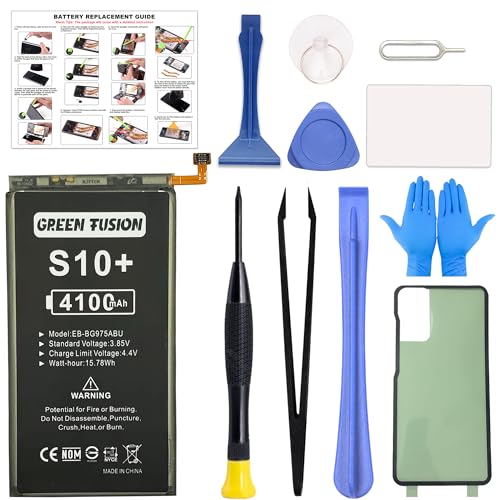
Compatible Model: This battery replacement kit is only compatible with Samsung Galaxy S10 Plus SM-G975 series, it does NOT work for S10 or S10e, please carefully check your device model before purchasing

【Latest IC Chip Smart Power Housekeeper 】- Use the latest cost-effective smart IC chip on the market now which same as the original Galaxy S10+ battery, combined with the latest science and technology at the same time, so that the battery has an exclusive smart power housekeeper which can intelligently control and distribute the power, maximize power conversion rate. Longer power life without bothering about running out of power and shut down some apps all the time.

Compatible Models: This S10 plus Battery For Samsung Galaxy S10 Plus G975V(Verizon ),G975A(AT&T),G975T(T-Mobile),G975P(Sprint),G975R4(US Cellular),EB-BG975ABU
Decreased Battery Life
You notice a significant decline in the time your phone lasts on a single charge. If your S10 Plus struggles to get through the day without needing a recharge, it’s a clear signal that the battery may not hold its charge effectively anymore. For instance, if you regularly check social media or stream videos and find the battery percentage drops rapidly, consider a replacement. Typically, a healthy battery supports several hours of use, but if you see a battery life of less than five hours, take it as a warning sign.
Frequent Overheating
You experience your phone becoming noticeably hot during regular use. Overheating often occurs when the battery ages or malfunctions. If you find your S10 Plus getting warm even when performing basic tasks like texting or calling, it could indicate battery issues. For a quick check, consider if your phone overheats while charging. A warm phone while charging is normal, but extreme heat can signify a failing battery. If temperatures rise enough to cause discomfort or if the device becomes unusable, it’s time to think about replacing the battery.
Can You Replace the Battery in a Samsung S10 Plus?
Yes, you can replace the battery in a Samsung S10 Plus. Users often consider this option due to declining battery life or charging issues. Understanding your choices helps ensure the process goes smoothly.
Recommended Products

【Compatible Model】It is compatible with Samsung Galaxy S10+ Plus SM-G975, EB-BG975ABU, EB-BG975ABE, G975A, G975T, G975V, G975P, G975R4. Not for S10. Please double identify check your phone model matches before purchasing the battery.

{COMPATIBLE MODELS}:This Replacement battery Compatible with Samsung Galaxy S10 PLUS (Model: SM-G975F G975U G975W G975U1 G9750 G975N ).

HIGH CAPACITY --- This replacement battery for Samsung Galaxy S10 Plus is 4500mAh high capacity, with more power than original battery.You can use your phone for a longer time!
Official Replacement Options
Choosing an official Samsung service center guarantees quality and reliability. You can book an appointment online or visit a local Samsung store. Trained technicians perform the replacement using genuine parts. This option typically costs more but provides peace of mind with warranty protection.
To find a nearby service center, visit the Samsung support website and enter your location. You’ll receive a list of authorized centers. Be prepared for possible wait times based on demand.
DIY Replacement Guide
If you prefer a DIY approach, follow these steps for a safe battery replacement:
- Gather Necessary Tools: You’ll need a heat gun or hair dryer, a suction cup, plastic opening tools, and a compatible replacement battery.
- Heat the Edges: Apply heat to the edges of the screen to soften the adhesive.
- Create an Opening: Use the suction cup to lift the screen slightly. Insert a plastic tool to carefully pry it open, avoiding damage to internal components.
- Disconnect the Battery: Locate the battery connector on the motherboard. Disconnect it by gently lifting the connector with a plastic tool.
- Replace the Battery: Remove the old battery and insert the new one. Reconnect the battery connector securely.
- Seal the Phone: Reattach the screen and apply pressure around the edges to secure it in place.
Resources online, like instructional videos and guides, are available for additional assistance. Prioritize safety by working in a well-lit space and wearing gloves. If you encounter difficulties, consider switching to professional help.
Tools Required for Battery Replacement
To replace the battery in your Samsung S10 Plus, gather the following tools:
- Small Phillips Head Screwdriver
A tool for removing screws from the back cover and battery.
- Plastic Pry Tool
Use this to safely detach the back cover without damaging it.
- Tweezers
These help manage small components during the replacement process.
- Suction Cup Tool
Use it to create a gap when lifting the back cover.
- Spudger
Ideal for disconnecting battery connectors and lifting components.
- Replacement Battery
Acquire a compatible battery for your model, preferably from a reputable source.
- Isopropyl Alcohol (optional)
Use to clean any adhesive residue if necessary.
- Microfiber Cloth
Keep your device clean and free from dust during replacement.
Gathering these tools will ensure a smoother battery replacement experience. You may find kits online that include most of these essential tools for convenience.
Recommended Products
![TQTHL for Galaxy S10 Battery Replacement,[4800mAh] (New Upgraded) EB-BG973ABU Replacement Battery Compatible with Samsung Galaxy S10, with Repair Tools (NOT Work for Galaxy S10 Plus/S10 5G)](https://m.media-amazon.com/images/I/41gIhNqB0SL._SL500_.jpg)
【Upgrade Battery】This battery kit is specifically designed for Samsung Galaxy S10 (with model SM-G973 series), NOT work for Galaxy S10 Plus/S10 5G, please double confirm your phone model before purchasing
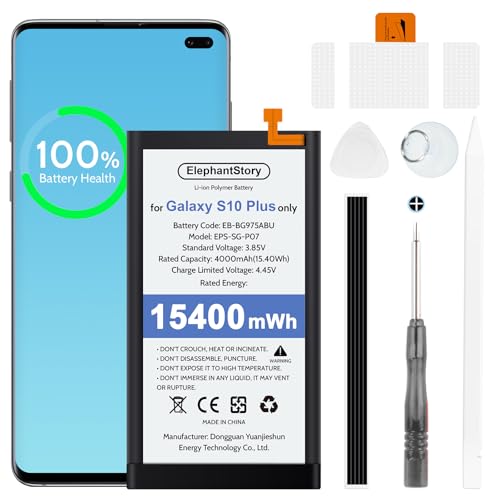
【COMPATIBLE MODELS】Compatible with Samsung Galaxy S10 Plus only. Battery Model: EB-BG975ABU. Fits for SM-G975U, SM-G975U1, SM-G975F, SM-G975W, SM-G9750, SM-G975N, SM-G975X, G975A, G975T, G975V, G975P, G975R4 series. NOT compatible with Galaxy S10 or Galaxy S10e. Please double check your phone model before purchasing the battery.

Compatible Phone Model: This battery kit is specifically designed for Samsung Galaxy S10 Plus (with model SM-G975 series), NOT work for Galaxy S10 / S10e, please double confirm your phone model before purchasing
Potential Risks of Battery Replacement
Replacing the battery in a Samsung S10 Plus carries several potential risks that you should consider.
Damage to Components
- Screen Damage: Mishandling the device during battery replacement can lead to screen cracks or damage.
- Internal Components: Static electricity or excessive force might harm internal parts, potentially rendering the phone inoperable.
Safety Hazards
- Battery Safety: Improper handling of the Lithium-ion battery can cause swelling, leakage, or even fires. Always inspect the replacement battery for any damage before installation.
- Tools and Techniques: Using inappropriate tools can lead to accidents. Always use the tools specified for the replacement task.
Warranty Concerns
- Warranty Void: DIY replacements may void any existing warranty. Check your warranty status before proceeding with a self-service battery replacement.
- Service Center Options: Utilizing authorized service centers maintains warranty coverage and ensures trained technicians handle the repair.
Performance Issues
- Compatibility Problems: Using third-party batteries can lead to compatibility issues, affecting charging speed and overall battery life.
- Installation Errors: Misalignment or improper connections during installation may result in poor performance or malfunction.
By addressing these risks beforehand, you can make informed choices on whether to proceed with battery replacement on your Samsung S10 Plus.
Conclusion
Replacing the battery in your Samsung S10 Plus can breathe new life into your device. Whether you choose to tackle it yourself or seek professional help, it’s important to weigh your options carefully. Pay attention to the signs that indicate a battery replacement is necessary and gather the right tools to make the process smoother.
Remember that while DIY can be rewarding, it comes with its own set of risks. If you’re not comfortable with the technical aspects, don’t hesitate to consult an expert. Keeping your phone running smoothly is worth the effort, and with the right approach, you can enjoy your Samsung S10 Plus for years to come.
Frequently Asked Questions
What causes battery drain in the Samsung S10 Plus?
Battery drain in the Samsung S10 Plus can be caused by several factors, including app usage, software updates, and ambient temperature. As the device ages, its Lithium-ion battery’s capacity diminishes, leading to faster draining during tasks like gaming, streaming, and browsing.
When should I consider replacing my Samsung S10 Plus battery?
Consider replacing your Samsung S10 Plus battery if you notice significant declines in battery life, frequent overheating, or charging issues. If the device gets excessively hot during use, especially while performing basic tasks, it’s a strong indicator of a potential battery failure.
Can I replace the Samsung S10 Plus battery myself?
Yes, you can replace the Samsung S10 Plus battery yourself, but it’s essential to be comfortable with technical tasks. If unsure, seeking professional help is recommended for quality assurance and to avoid potential damage to the device.
What tools do I need for a battery replacement?
To replace the battery in your Samsung S10 Plus, you will need a small Phillips head screwdriver, a plastic pry tool, tweezers, a suction cup tool, a spudger, a compatible replacement battery, and optionally, isopropyl alcohol and a microfiber cloth for cleaning.
What are the risks of a DIY battery replacement?
DIY battery replacement risks include potential damage to internal components or the screen, safety hazards from battery swelling, voiding the warranty, and performance issues from using incompatible third-party batteries. Assess these risks before proceeding with the replacement.
