

Key Takeaways
- Battery Performance: Samsung S22 batteries often degrade over time, exhibiting signs such as rapid depletion and reduced charge duration, prompting consideration for replacement.
- Replacement Options: Users can choose between a DIY battery replacement or professional service, each option having its distinct advantages and disadvantages.
- DIY Pros and Cons: DIY replacements can save costs and provide control, but come with risks of damage and the need for specific tools.
- Professional Services: Opting for professional help ensures quality and may come with a warranty, although it is typically more expensive.
- Signs of Battery Failure: Key indicators for battery replacement include visibly swollen batteries, frequent recharging, and significantly decreased battery life.
- Essential Tools for DIY: Success in DIY battery replacement requires tools like a precision screwdriver set, plastic opening tools, tweezers, and a compatible new battery.
Have you noticed your Samsung S22 struggling to hold a charge lately? You’re not alone. Many users face battery issues as their devices age, leading to frustration and the question: can you replace the battery yourself?
In this article, you’ll find out whether tackling a battery replacement is a viable option for you. We’ll explore the steps involved, what tools you might need, and the pros and cons of doing it yourself. By the end, you’ll have a clear understanding of your options and whether it’s time to roll up your sleeves or seek professional help.
Overview of Samsung S22 Battery
The Samsung S22 features a lithium-ion battery with a capacity of 3,700 mAh. This capacity typically allows for a full day of use under normal conditions. Battery performance may decline over time, causing you to seek solutions for improved battery life.
Battery Life Concerns
Common signs of battery issues include rapid depletion during calls or while using apps. If your battery drains faster than before, it may be time to assess its condition or consider replacement options.
Replacement Options
You can choose between a DIY battery replacement or visiting a professional service center. If you prefer the DIY approach, be aware of the necessary tools, including a heat gun, suction cup, and appropriate screwdrivers.
Advantages of DIY Replacement
- Cost Savings: Performing the replacement yourself can save money compared to professional services.
- Control: You manage the entire process, allowing for customization.
- Learning Experience: Gaining hands-on knowledge of your device can enhance your technical skills.
Disadvantages of DIY Replacement
- Risk of Damage: Incorrect handling may damage internal components or void your warranty.
- Time-Consuming: The process requires time, especially if you’re unfamiliar with smartphone repairs.
- Tool Requirements: You’ll need specific tools that might not be readily available.
Professional Assistance
If you opt for professional help, local repair shops or Samsung’s authorized service centers provide experienced technicians. This option ensures the work is done correctly, maintaining your device’s warranty.
Assess your skills and confidence before deciding on the approach. Each option has pros and cons, so choose based on your comfort level with technical tasks.
Signs You Need to Replace Your Battery
Recognizing when to replace your Samsung S22 battery can improve your phone’s performance significantly. Look out for these warning signs:
Recommended Products

🌿【High Quality Grade A Premium Battery】: This Galaxy S22 Battery uses Grade A+ rated battery cells with CE and ROHS UL certification,ensure last over 1200 charge cycles. This is Perfect Galaxy S22 5G phone EB-BS901ABY replacement battery.
![ITMBET [4600mAh] Galaxy S22 Battery, EB-BS901ABY Battery with Repair Kit](https://m.media-amazon.com/images/I/41ZZVE+SvIL._SL500_.jpg)
⚡ Premium Quality: Experience a new level of performance with our upgraded 4600mAh 3.85V battery replacement. This high-quality battery will restore your phone’s battery life to like-new condition, ensuring you stay connected longer.

【Compatible Model】It is compatible with Samsung Galaxy S22 Only, Model: S22 5G SM-S901U. Not for S22 Ultra and S22+ Plus. Please double identify and check your phone model matches before purchasing the battery.
Decreased Battery Life
If your Samsung S22 drains quickly, it’s a clear sign that the battery’s health may have deteriorated. You might experience a full charge lasting only a few hours, especially during calls or while using apps. Frequent charging throughout the day indicates the battery doesn’t hold a charge like it once did. Consider keeping track of how long your phone lasts on a single charge to gauge performance over time.
Swelling or Damage
Notice any swelling in the battery or physical damage to the device? Swollen batteries can create pressure on your phone’s components, leading to additional issues. If you observe a bulging back cover or the screen lifting, act immediately. It’s crucial to replace a damaged battery promptly to prevent further harm to your device.
Can You Replace a Battery in a Samsung S22?
Replacing a battery in a Samsung S22 is possible, but it’s essential to weigh your options carefully. Understanding the advantages of both professional replacements and DIY efforts helps you make an informed decision.
Recommended Products

Compatibility: This replacement battery is compatible with Galaxy S22 Ultra, ensuring a precise fit and reliable performance tailored to your device.

【Precise EB-BS908ABY Compatibility】 Direct replacement for OEM battery model EB-BS908ABY. Fits Samsung Galaxy S22 Ultra SM-S908U, SM-S908U1, SM-S908B, SM-S908W, SM-S908N, and all S908 series variants. Please verify your phone model in Settings > About Phone before ordering.

✅【5200mAh High-Capacity Upgrade】 Upgraded 5200mAh Li-Polymer S22 battery than the original 3700mAh cell. Extend your Galaxy S22 usage significantly – perfect for heavy users and long days out. Brand new 0-cycle cell with built-in over-charge, over-discharge, short-circuit, and over-heat protection.
Professional vs. DIY Replacement
Professional replacements guarantee quality. Technicians have the right tools and skills to safely replace the battery, often with a warranty on their work. You avoid the risk of damaging your device during the process. However, this option usually comes with a higher cost, which can vary based on service centers.
DIY replacements offer benefits like cost savings and full control over the process. You can choose a reputable battery and complete the replacement at your own convenience. Nonetheless, this approach carries risks, such as voiding warranties and potential damage to your phone if not executed properly. Evaluate your comfort level with technology before deciding.
Tools Required for DIY Replacement
If you choose to replace the battery yourself, you’ll need specific tools to get started. Here’s a list of what you should prepare:
- Screwdriver set: A precision screwdriver set featuring Pentalobe and Phillips screwdrivers is necessary for opening the device.
- Plastic opening tools: These tools help gently pry open the phone without damaging the casing.
- Tweezers: Tweezers assist in handling small components, ensuring precision during the replacement.
- Suction cup: A suction cup helps lift the screen from the back cover without causing cracks.
- New battery: Ensure you purchase a compatible, high-quality lithium-ion battery designed for the Samsung S22.
Gathering these tools before starting simplifies the process. Follow each step carefully, and don’t rush to ensure a successful battery replacement.
Steps for Replacing the Battery
Replacing the battery in your Samsung S22 can enhance its performance. Follow these steps for a smooth process.
Recommended Products

HIGH CAPACITY --- This replacement battery for Samsung Galaxy S22 is 4000mAh high capacity, with more power than original battery.You can use your phone for a longer time!
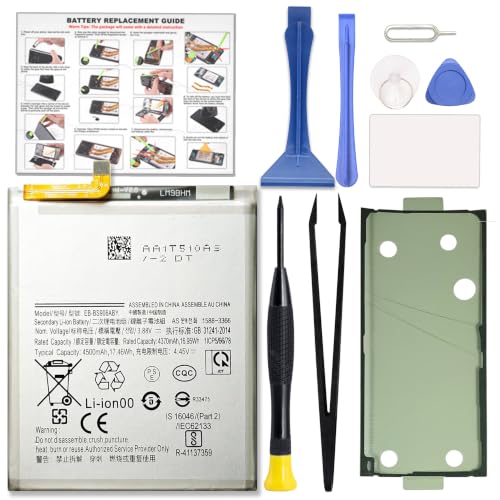
COMPATIBILITY: This battery only fits for Samsung Galaxy S22+ Plus, SM-S906B, SM-S906B/DS, SM-S906U, SM-S906U1, SM-S906W, SM-S906N, SM-S9060, SM-S906E, SM-S906E/DS. Please carefully confirm your phone model before purchase.

🎋【Compatible Model】EB-BS908ABY Replacement Battery for Samsung Galaxy S22 Ultra SM-S908 S908B S908U[Note: Not for Galaxy S21 Ultra,Galaxy S20 Ultra or other Phone Models]
Preparing Your Device
- Power Off your Samsung S22. Ensure no active applications are causing issues.
- Gather Tools you need: a precision screwdriver set, plastic opening tools, tweezers, a suction cup, and a compatible new battery.
- Create a Clean Workspace. Use a flat surface to avoid losing small parts and keep your tools organized.
Removing the Old Battery
- Heat the Edges of the device with a heat gun or hairdryer. This softens the adhesive, making it easier.
- Insert the Plastic Opening Tool between the back cover and the frame. Gently pry it open, moving the tool along the edges.
- Remove the Back Cover. Set it aside carefully.
- Disconnect the Battery. Locate the battery connector and gently lift it using tweezers.
- Remove the Old Battery. Use the suction cup if needed for better grip, then lift it out carefully.
Installing the New Battery
- Place the New Battery in the compartment. Ensure it sits securely in position.
- Reconnect the Battery. Align the connector and press it gently to connect.
- Reattach the Back Cover. Align it with the body and press down until it snaps into place.
- Power On your device. Confirm the battery is functioning correctly.
These steps help ensure a successful battery replacement for your Samsung S22.
Conclusion
Deciding whether to replace the battery in your Samsung S22 is a personal choice. If you’re feeling confident and ready to tackle a DIY project you might enjoy the process and save some cash. Just remember to take your time and follow the steps carefully.
On the other hand if you’re unsure or want to avoid any risks getting professional help can be a smart move. You’ll ensure your device stays in good hands while maintaining its warranty.
Whichever route you choose keep an eye out for those signs of battery trouble. A little proactive care can go a long way in keeping your phone running smoothly.
Frequently Asked Questions
What are the signs that my Samsung S22 battery needs replacement?
If your Samsung S22’s battery depletes quickly, lasting only a few hours on a full charge, or if you notice visible swelling or damage, it’s time to consider a replacement.
Can I replace the battery in my Samsung S22 myself?
Yes, you can replace the Samsung S22 battery yourself. However, it requires specific tools and knowledge of the process. Weigh the risks and benefits before proceeding.
What are the advantages of a DIY battery replacement?
The DIY approach can save money, give you more control over the process, and provide a valuable learning experience. However, it comes with risks, including possible damage to your device.
Why should I consider professional battery replacement for my Samsung S22?
Professional battery replacement ensures quality work, protects your device’s warranty, and guarantees safety. Although it’s usually more expensive, it can save time and stress.
What tools do I need for a DIY battery replacement?
Essential tools include a precision screwdriver set, plastic opening tools, tweezers, a suction cup, and a compatible new battery. Gathering these will help ensure a smooth replacement process.
