

Ever wondered if you could replace the battery in your Samsung S6 all by yourself? Picture this: your trusty S6 suddenly loses its battery life, leaving you in a bind. But what if you could easily swap out the old battery for a new one without any hassle? In this article, you’ll discover the simple steps to take matters into your own hands and revive your S6’s power.
Imagine the convenience of being able to extend the lifespan of your Samsung S6 with a quick battery replacement. No more worrying about finding a repair shop or waiting for days to get your phone back. With the right guidance, you’ll learn how to tackle this task confidently and save both time and money. Get ready to unlock the secrets to mastering the art of replacing your Samsung S6 battery like a pro.
Benefits of Replacing the Battery in Your Samsung S6
Assuming you’re wondering about the advantages of replacing the battery in your Samsung S6, let’s dive into the perks:
- Improved Battery Life: Swapping out the old battery for a new one can enhance your phone’s daily performance, ensuring it lasts longer during the day.
- Cost-Efficient: By opting to replace the battery on your own, you save money that might have been spent on professional repair services.
- Time-Saving: Instead of waiting around at a repair shop, you can quickly replace the battery at your convenience.
- Sustainability: Extending the life of your Samsung S6 through a battery replacement supports a more environmentally friendly approach by reducing electronic waste.
Remember, by taking the initiative to replace your Samsung S6 battery, you’re not only improving your device’s functionality but also saving both time and money in the process.
Tools Required for Battery Replacement
When replacing the battery in your Samsung S6, you’ll need a few essential tools to get the job done efficiently. Here are the tools you’ll need:
- Replacement Battery: Make sure to purchase a compatible replacement battery for your Samsung S6 model.
- Phillips Screwdriver: You’ll need this tool to remove the screws holding the phone together.
- Plastic Pry Tools: These tools help in separating the back cover from the phone without causing damage.
- Tweezers: Useful for handling small components during the replacement process.
- Adhesive Strips or Glue: To secure the new battery in place once installed.
- Spudger or Opening Tool: Assist in disconnecting connectors and maneuvering inside the device.
- Heat Gun or Hair Dryer: Helps soften adhesive for easier opening of the phone.
With these tools at your disposal, you’re ready to embark on replacing the battery in your Samsung S6.
Recommended Products

Compatible with: Fit for Samsung Galaxy Tab S6 10.5” SM-T860 T865, Samsung Galaxy Tab S5e 10.5” SM-T720 T725, please check the model of your laptop before purchase.

{COMPATIBLE MODELS}:This Replacement battery Compatible with Samsung Galaxy S6 (Model: SM-G920 G920V G920T G920A G920P G920I G920F S906L).

The battery is manufactured and tested under strict quality control standards before sent out
Steps to Replace the Battery in a Samsung S6
When it comes to swapping the battery in your Samsung S6, following a few simple steps can make the process a breeze. Here’s how you can do it:
Step 1: Gather Your Tools
- Make sure you have all the necessary tools handy:
- Replacement battery
- Phillips screwdriver
- Plastic pry tools
- Tweezers
- Adhesive strips or glue
- Spudger or opening tool
- Heat gun or hair dryer
Step 2: Power Down Your Device
- Before starting, switch off your Samsung S6 to avoid any electrical mishaps during the battery replacement.
Step 3: Remove the Back Cover
- Gently remove the back cover of your phone using a pry tool. Be careful not to damage it as you may need it later.
Step 4: Unscrew the Battery
- Locate the screws holding the battery in place, and using the Phillips screwdriver, unscrew them to detach the battery.
Step 5: Replace the Battery
- Swap out the old battery with the new one, ensuring it fits securely in the designated spot.
- Put the screws back in place, reattach the back cover, and power up your Samsung S6 to ensure the new battery works correctly.
Remember, if you feel uncertain at any point during the process, don’t hesitate to seek professional help or a guide tailored to your specific device model.
Common Mistakes to Avoid During Battery Replacement
When replacing the battery in your Samsung S6, there are some common mistakes to steer clear of to ensure a successful replacement process.
- Not Using the Correct Tools: Using improper tools can lead to damaging the phone and the new battery. Make sure to use the right tools for the job.
- Skipping Powering Down: Failing to power down your device before replacing the battery can result in malfunctions and even damage.
- Rushing Through Disassembly: Taking apart your device too quickly can cause you to miss important steps and damage delicate components.
- Neglecting Proper Screw Organization: Keep track of the screws you remove and where they belong to avoid confusion during reassembly.
- Forgetting to Test Before Reassembly: Testing the new battery before putting everything back together ensures that it’s functioning correctly.
Testing Your New Battery
When replacing the battery in your Samsung S6, testing the new battery before reassembling your device is crucial to ensure everything works smoothly. Here’s how to do it:
- Power Up: Insert the new battery into your phone.
- Power On: Turn on your device to check if it boots up properly.
- Usage Test: Use your phone for a while to confirm it holds charge and functions normally.
Remember, testing the new battery helps avoid reassembly issues and ensures your Samsung S6 is up and running without any hitches.
Recommended Products
![SHENMZ Galaxy S6 Battery,[Upgraded] 5800mAh High Capacity Li-Polymer EB-BG920ABE Replacement Battery for Samsung Galaxy S6 SM-G920 G920V G920T G920A G920P G920I G920F S906L with Repair Tools](https://m.media-amazon.com/images/I/41pc-APX7ML._SL500_.jpg)
✾【HIGH QUALITY, TRUSTWORTHY PREMIUM BATTERY】:This Upgraded S6 battery uses Grade A+ rated battery cells with CE and ROHS certification,ensure last over 1200 charge cycles. Multiple-protection for safer operation for both user and devices,build-in microchip to prevent over-charging,over-discharging and over-heating.

[Applicability] : For Samsung Galaxy S6 edge SM-G9250, SM-G925A. With the same shape as the original battery, it fits your phone perfectly and extends the usage time of your phone.Each battery is tested to strict quality control standards before it leaves the factory
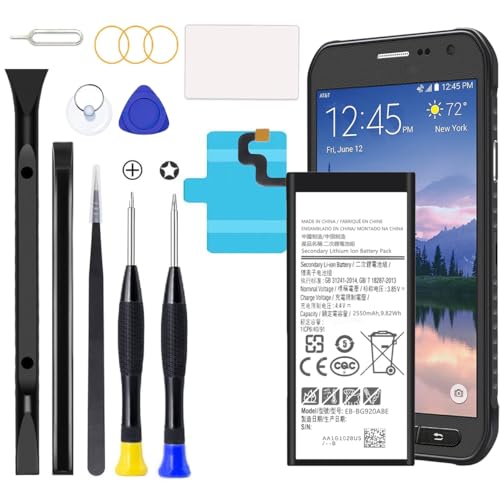
Compatible with Galaxy S6 Only, Model: S6 SM-G9200 SM-G9208 SM-G9208/SS SM-G9209 SM-G920A SM-G920F SM-G920FD SM-G920I SM-G920S SM-G920T SM-G920K SM-G920L SM-G920
Data & Statistics
| Key Point | Data |
|---|---|
| Mistakes to avoid | 5 common ones |
Conclusion
Testing the new battery in your Samsung S6 is crucial to guarantee its proper functionality. By following the step-by-step guide provided in this article, you can easily test the new battery by inserting it into the phone, powering on the device, and confirming that it holds a charge and operates normally. This simple process can help you avoid any reassembly issues and ensure that your Samsung S6 continues to function smoothly. Remember, taking the time to test the new battery can save you from potential headaches down the line.
Frequently Asked Questions
Why is testing the new battery in a Samsung S6 important?
Testing the new battery in a Samsung S6 is crucial to ensure proper functionality before reassembling the device.
How do I test the new battery in a Samsung S6?
- Insert the new battery into the phone.
- Power on the device.
- Confirm the battery holds a charge and functions normally.
What are the benefits of testing the new battery?
Testing the new battery helps prevent reassembly issues and ensures the Samsung S6 operates smoothly.
